Pre-condition cabin while unplugged

933233311602

Well-Known Member
Joined
Sep 29, 2023
Threads
30
Messages
247
Reaction score
229
Location
Canada
Vehicles
2021 Mach-E 4 Select 86,000+ Km
Country flag
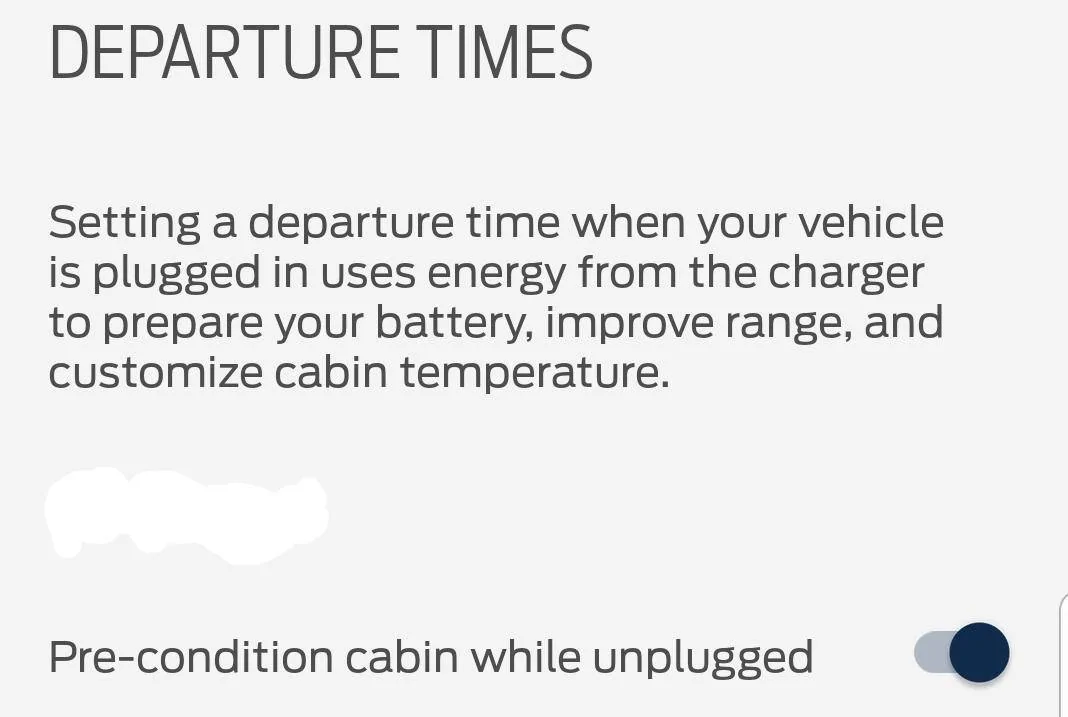
Does this option (in Ford Pass app) work for anyone?

It's strangely only in the phone app and not in the car controls proper.

The car will pre-condition to the departure times while plugged to a charger, as expected. It does not when un-plugged, even though this toggle in the app suggests that it should.

Ford Mustang Mach-E Pre-condition cabin while unplugged departuretimes
Sponsored


bshaw

Well-Known Member
Joined
May 18, 2020
Threads
14
Messages
1,562
Reaction score
2,181
Location
Boston, MA
Vehicles
2021 Mustang Mach E 4X (Job 1)
Country flag
Whether or not that's true, the car still does not condition the cabin when the car is un-plugged.
Re-using the words “pre-condition” was a confusing choice for them to put in FordPass when referencing the cabin.

For getting the cabin ready, just use FordPass remote start with about 5-min before walking out the door. Apple Watch app is great too. Even with only 30 secs advance notice, the car is more comfortable than entering while off.

Remote start works regardless of being plugged in or location. As long as car has a cell signal, it will start.
 
OP
OP
933233311602

933233311602

Well-Known Member
Joined
Sep 29, 2023
Threads
30
Messages
247
Reaction score
229
Location
Canada
Vehicles
2021 Mach-E 4 Select 86,000+ Km
Country flag
For getting the cabin ready, just use FordPass remote start
I'd prefer that the car actually did what the control settings say it's supposed to do.

The car has a cabin conditioning schedule feature. I expect it to work.

The app has a "Pre-condition cabin while unplugged" option. I expect that to work too.


hybrid2bev

Well-Known Member
Joined
Dec 4, 2019
Threads
78
Messages
4,641
Reaction score
12,765
Location
USA
Vehicles
2026 Rally
Country flag
Does this option (in Ford Pass app) work for anyone?

It's strangely only in the phone app and not in the car controls proper.

The car will pre-condition to the departure times while plugged to a charger, as expected. It does not when un-plugged, even though this toggle in the app suggests that it should.
departuretimes.webp
It works for me. I have a morning departure time each weekday when the car is unplugged. I also have an evening time set for twice a week, while plugged in.
 
OP
OP
933233311602

933233311602

Well-Known Member
Joined
Sep 29, 2023
Threads
30
Messages
247
Reaction score
229
Location
Canada
Vehicles
2021 Mach-E 4 Select 86,000+ Km
Country flag
It works for me. I have a morning departure time each weekday when the car is unplugged. I also have an evening time set for twice a week, while plugged in.
Did you ever have it not work and figure out why?

What Power Up version do you have?
 

AKgrampy

Well-Known Member
First Name
Mike
Joined
Jan 29, 2022
Threads
7
Messages
3,520
Reaction score
3,591
Location
Fairbanks, Alaska
Vehicles
Ford Expedition, Ford F-150, Mach E GT
Occupation
Retired
Country flag
I'd prefer that the car actually did what the control settings say it's supposed to do.

The car has a cabin conditioning schedule feature. I expect it to work.

The app has a "Pre-condition cabin while unplugged" option. I expect that to work too.
What settings do you have in the car?
 

hybrid2bev

Well-Known Member
Joined
Dec 4, 2019
Threads
78
Messages
4,641
Reaction score
12,765
Location
USA
Vehicles
2026 Rally
Country flag
Did you ever have it not work and figure out why?

What Power Up version do you have?
If I update the schedule in FordPass that could cause it to fail. Setting up the schedule from the car itself is reliable. Though I have found FordPass to be more reliable lately.

I’m on 6.2.1 as of today. I’ve had 6.2 for over a month.
 
OP
OP
933233311602

933233311602

Well-Known Member
Joined
Sep 29, 2023
Threads
30
Messages
247
Reaction score
229
Location
Canada
Vehicles
2021 Mach-E 4 Select 86,000+ Km
Country flag
What settings do you have in the car?
Only the day and time departure scheduling screen. I don't see any "Pre-condition cabin while unplugged" toggle in the car controls. That button is only in the phone app.
 

AKgrampy

Well-Known Member
First Name
Mike
Joined
Jan 29, 2022
Threads
7
Messages
3,520
Reaction score
3,591
Location
Fairbanks, Alaska
Vehicles
Ford Expedition, Ford F-150, Mach E GT
Occupation
Retired
Country flag

Only the day and time departure scheduling screen. I don't see any "Pre-condition cabin while unplugged" toggle in the car controls. That button is only in the phone app.
Sorry - what temperature settings? And do they work when plugged in?
 
OP
OP
933233311602

933233311602

Well-Known Member
Joined
Sep 29, 2023
Threads
30
Messages
247
Reaction score
229
Location
Canada
Vehicles
2021 Mach-E 4 Select 86,000+ Km
Country flag
Sorry - what temperature settings? And do they work when plugged in?
"Warm" for all times.

The 7:30 am scheduled departure when plugged-in works.

The 5:00 pm time when un-plugged does not.
 

AKgrampy

Well-Known Member
First Name
Mike
Joined
Jan 29, 2022
Threads
7
Messages
3,520
Reaction score
3,591
Location
Fairbanks, Alaska
Vehicles
Ford Expedition, Ford F-150, Mach E GT
Occupation
Retired
Country flag
"Warm" for all times.

The 7:30 am scheduled departure when plugged-in works.

The 5:00 pm time when un-plugged does not.
I would just double check that the 5:00 time is set to warm and not off.
 

AliRafiee

Well-Known Member
First Name
Ali
Joined
Jan 20, 2023
Threads
103
Messages
3,267
Reaction score
4,191
Location
Seattle WA
Vehicles
2022 Mach E GT - Grabber Blue
Occupation
Software Eng.
Country flag
Does this option (in Ford Pass app) work for anyone?

It's strangely only in the phone app and not in the car controls proper.

The car will pre-condition to the departure times while plugged to a charger, as expected. It does not when un-plugged, even though this toggle in the app suggests that it should.

departuretimes.jpg
Thank you. I had no idea that existed. I keep remote starting manually everyday.
Sponsored


Top