SteveMach-ee

Well-Known Member
First Name
Steve
Joined
Nov 6, 2024
Threads
1
Messages
126
Reaction score
169
Location
Mass
Vehicles
2021 MME Select AWD, 2023 Ariya Venture+
Remotely Accessing LV Battery Voltage from Ford.com with Chrome

Given that Ford removed access to LVB voltage I thought it might be useful to write this up for Chrome. Thanks to Lars/Holy Driver for giving this procedure in Firefox. I don't have Firefox but the procedure is probably pretty similar: https://www.macheforum.com/site/thr...de-the-car-dead-12v-battery.41505/post-893115 .

See Mach-Lee's 12V FAQ https://www.macheforum.com/site/threads/12v-battery-faq.32744/ for all the caveats around randomly reading the voltage of the LVB. Unless Ford changes the software for the LVB charging regime I highly recommend preemptively putting in a new LVB around 3 years.

This gives you the voltage when last connected to the Ford server. If the car is on or is charging it will show the 15V or so charge voltage. I found that an unlock/lock in the FordPass app will refresh the voltage state. Note that some systems in the car will be active when reading the state so the voltage level will be under a slight load and won’t be the same as an open circuit reading. My new battery reads 12.1V to 13.4V depending on the load and charge state. I don’t know if the LV battery health is available. Perhaps that’s what the entry Oil Health means ? ?

In Chrome:
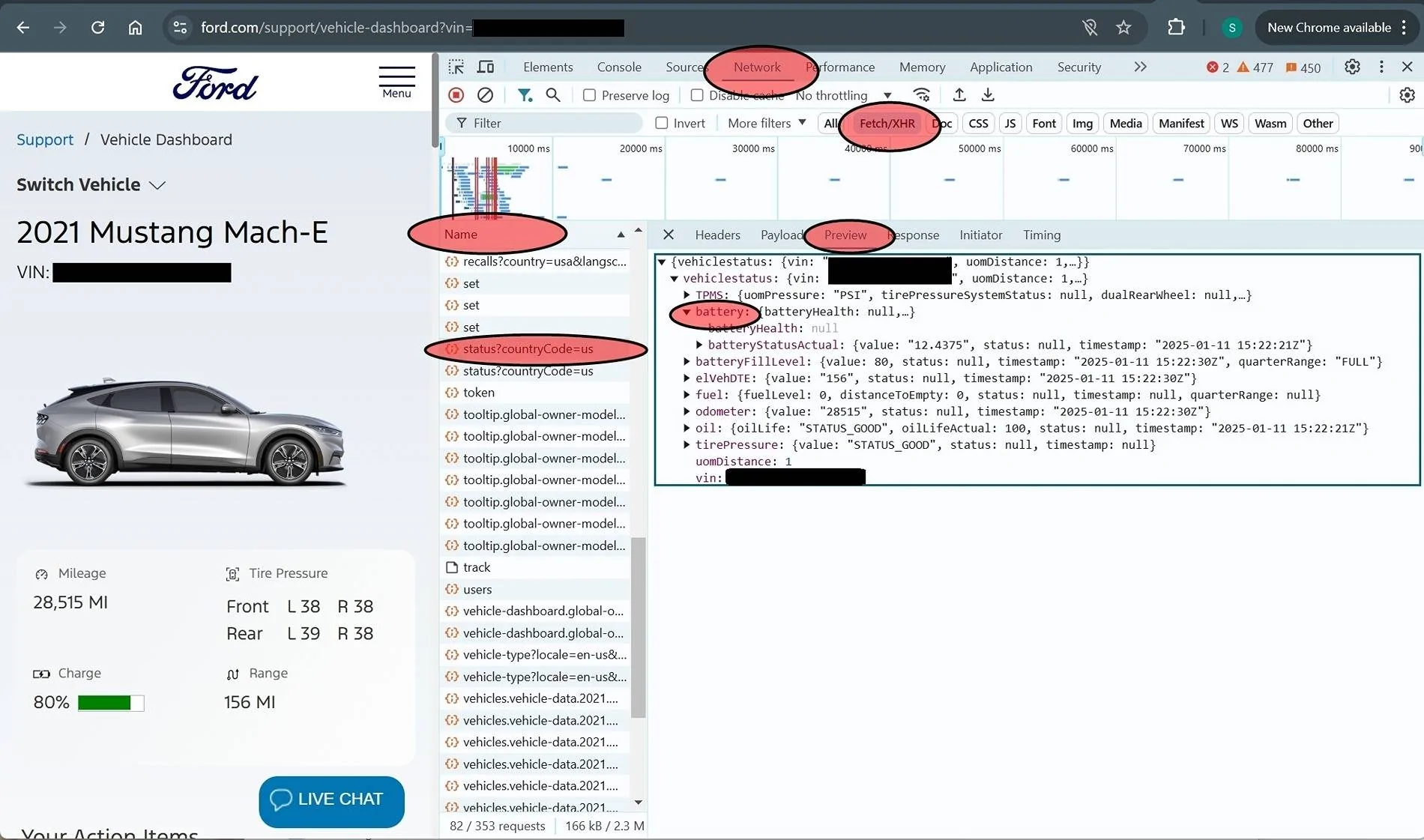
  1. Go to https://www.ford.com/
  2. Type the F12 Key to open developer toolbox
  3. Select Network and Fetch/XHR (might have to poke around for these but they will stay selected next time toolbox is opened)
  4. On ford.com login at the upper right corner person icon
  5. Again in the upper right person icon select your_user_name account
  6. On ford.com under your VIN select Go To Vehicle
  7. In the developer toolbox select the Name heading so the list will sort alphabetically.
  8. Scroll down to S’ and select status?countryCode=us
  9. You might have to select Preview
  10. Open up vehiclestatus
  11. Open up battery
  12. Magically you get: batteryStatusActual: {value: "12.4375", status: null, timestamp: "2025-01-11 15:22:21Z"}
Timestamp is in Zulu or GMT. Let me know if I made any errors in the procedure.

Edit: The FordPass unlock/lock status refresh can be done anytime before selecting Go To Vehicle but you might have to wait for the server to update. To get another refresh you may need to go back to the login step because of cache effects.

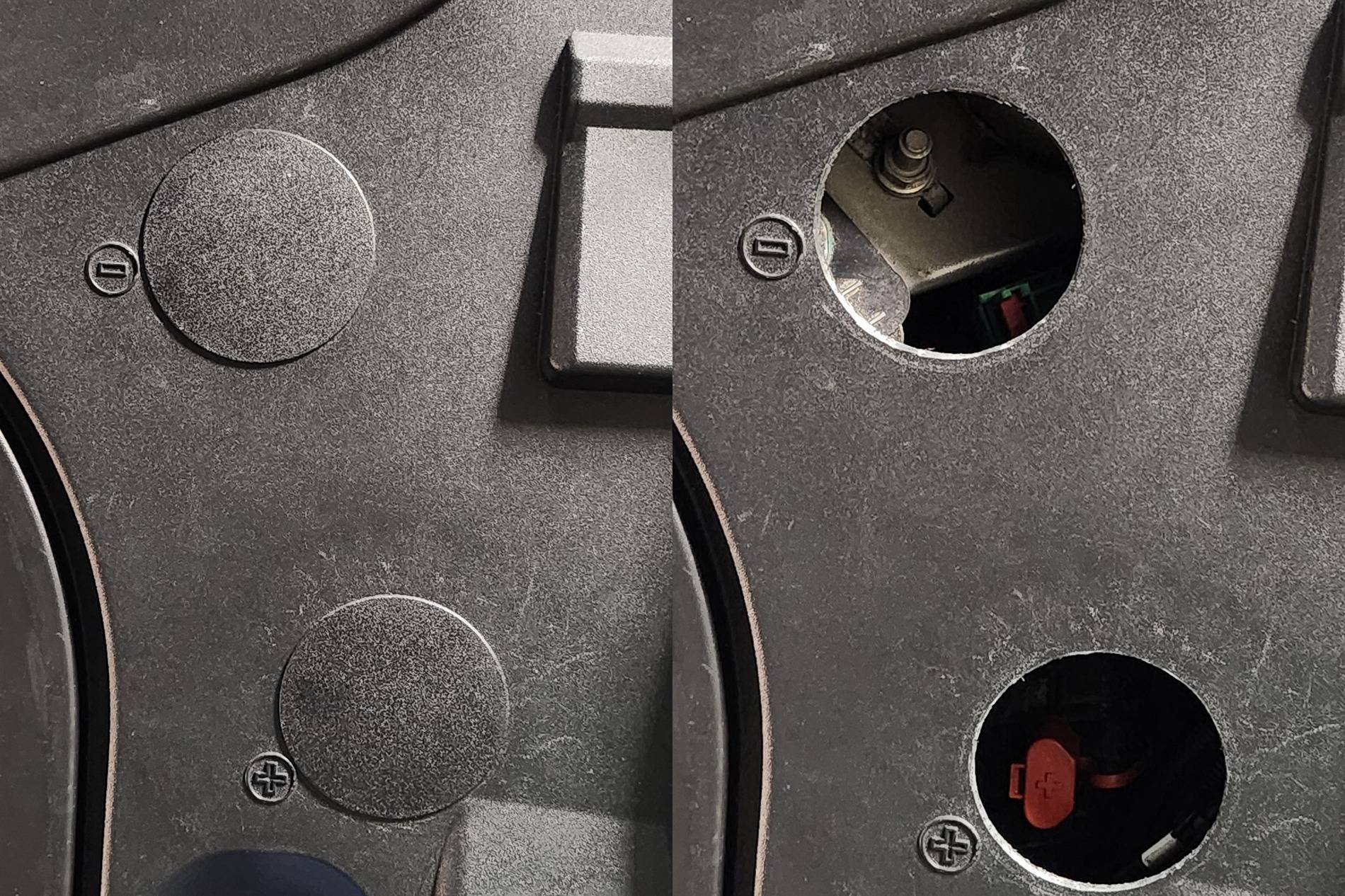
I’m new to the Mach-e world (used 2021 Sel SR AWD job 2, iconic silver) and want to thank everyone on the forum for all the helpful posts. I installed the Torklift EchoHitch and wiring harness. Also added 2.5” hole plugs over the LVB jump points. The 2.5” (-) hole also has room to access the HVB cutoff. I preemptively replaced the LVB at 3 years because the car sat on the dealer lot for 4 or 5 months and the LVB was also likely chronically under-charged by the previous owner’s low usage.

Ford Mustang Mach-E Remotely Accessing LV Battery Voltage from Ford.com with Chrome Browser LVB Access


Ford Mustang Mach-E Remotely Accessing LV Battery Voltage from Ford.com with Chrome Browser LVB Status 2
Sponsored

 
Last edited:
OP
OP
SteveMach-ee

SteveMach-ee

Well-Known Member
First Name
Steve
Joined
Nov 6, 2024
Threads
1
Messages
126
Reaction score
169
Location
Mass
Vehicles
2021 MME Select AWD, 2023 Ariya Venture+
Oops, guess I should have posted in Charging, Battery, 12v, Electrical category. Anyone know how to move a thread?
 

chillyWilly

Well-Known Member
First Name
William
Joined
Dec 29, 2024
Threads
3
Messages
102
Reaction score
71
Location
70734
Vehicles
2024 Mustang Mach E
Occupation
retired
As a previous long ago mod, (far far away) mods do have that ability if you request.
 

ipca204

Well-Known Member
Joined
Mar 18, 2024
Threads
19
Messages
815
Reaction score
1,197
Location
60543
Vehicles
2024 GT PE, 2023 VW ID.4, 2025 Equinox EV
Occupation
retired
Country flag
nice write up
 
  • Like
Reactions: TWD

astrorob

Well-Known Member
First Name
rob
Joined
Aug 26, 2022
Threads
22
Messages
873
Reaction score
388
Location
bay area
Vehicles
24GT, plug-in prius, 99 MBZ C43
Country flag
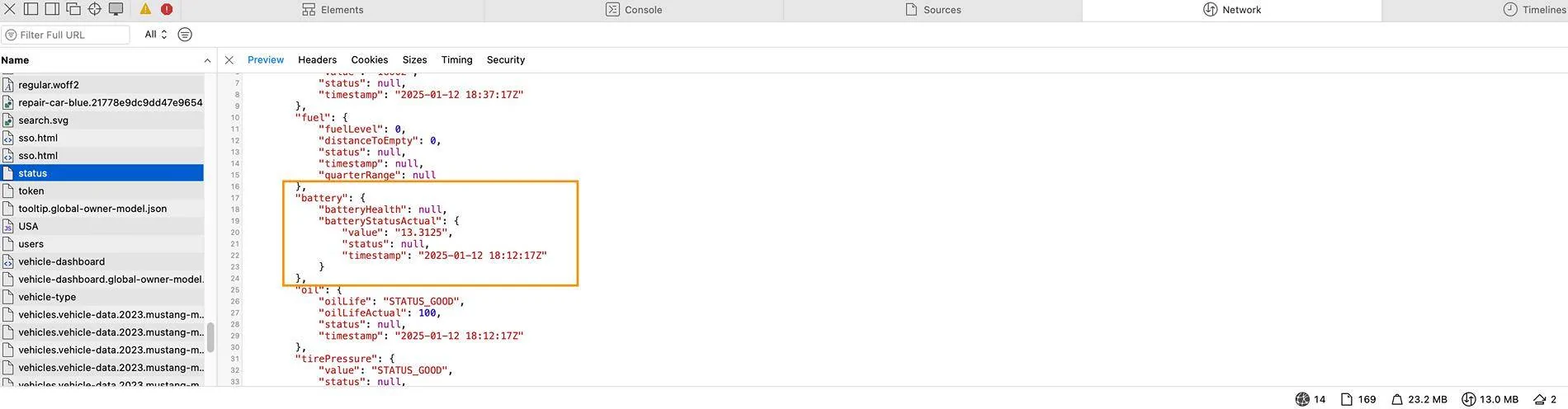
On safari, you can access this in Develop > Show Web Inspector (you might need to turn on the developer menu in the safari preferences though). after following the steps to get to the car's page on ford, com, you can se the battery status in a similar place; select the network tab, sort by the Name field, find and click "status" and then scroll or search (command-F) for batteryStatusActual.


Ford Mustang Mach-E Remotely Accessing LV Battery Voltage from Ford.com with Chrome Browser Screenshot 2025-01-12 at 10.58.06 AM


JohnFoxeSheets

Well-Known Member
First Name
John
Joined
Jan 29, 2022
Threads
28
Messages
3,406
Reaction score
5,504
Location
San Francisco
Website
johnfoxesheets.com
Vehicles
2022 Iced Blue Silver Mach E GT
Occupation
Retired Engineer
Country flag
I tried it and it works. One tip that helps is to refresh the vehicle status in FP before doing the stuff in Chrome. I found that if I did it afterwards and then refreshed the Chrome page to get the latest, only a tiny subset of records show up in the developer panel. (This could 100% be operator error - I am very far from an expert.)

It would be great if someone could find a way to extract this info without need to get into the developer panel!
 
OP
OP
SteveMach-ee

SteveMach-ee

Well-Known Member
First Name
Steve
Joined
Nov 6, 2024
Threads
1
Messages
126
Reaction score
169
Location
Mass
Vehicles
2021 MME Select AWD, 2023 Ariya Venture+
I tried it and it works. One tip that helps is to refresh the vehicle status in FP before doing the stuff in Chrome. I found that if I did it afterwards and then refreshed the Chrome page to get the latest, only a tiny subset of records show up in the developer panel. (This could 100% be operator error - I am very far from an expert.)

It would be great if someone could find a way to extract this info without need to get into the developer panel!
Yes, thanks, do the FordPass refresh before selecting Go To Vehicle. Because of cache effects you might have to start over at login if you want an update. I'm sure there is someone out there that can write a script to grab the status.
 

MoonRiver

Well-Known Member
Joined
Jan 27, 2022
Threads
41
Messages
519
Reaction score
231
Location
Tampa Bay, FL
Vehicles
22 Mach e select, 07 Infiniti G35
Country flag
Remotely Accessing LV Battery Voltage from Ford.com with Chrome

Thanks to Lars/Holy Driver for this procedure: https://www.macheforum.com/site/thr...de-the-car-dead-12v-battery.41505/post-893115 . Given that Ford removed access to LVB status I thought it might be useful to write this up for Chrome.

Note this is the voltage when last connected to the Ford server. If the car is on or is charging it will show the 15V or so charge voltage. I found that an unlock/lock in the FordPass app will refresh the voltage state. Note that some systems in the car will be active when reading the state so the voltage level will be under a slight load and won’t be the same as an open circuit reading. My new battery reads 12.1V to 13.4V depending on the load and charge state. I don’t know if the LV battery health is available. Perhaps that’s what the entry Oil Health means ? ?

In Chrome:
  1. Go to https://www.ford.com/
  2. Type the F12 Key to open developer toolbox
  3. Select Network and Fetch/XHR (might have to poke around for these but they will stay selected next time toolbox is opened)
  4. On ford.com login at the upper right corner person icon
  5. Again in the upper right person icon select your_user_name account
  6. On ford.com under your VIN select Go To Vehicle
  7. In the developer toolbox select the Name heading so the list will sort alphabetically.
  8. Scroll down to S’ and select status?countryCode=us
  9. You might have to select Preview
  10. Open up vehiclestatus
  11. Open up battery
  12. Magically you get: batteryStatusActual: {value: "12.4375", status: null, timestamp: "2025-01-11 15:22:21Z"}
Timestamp is in Zulu or GMT. Let me know if I made any errors in the procedure.

Edit: The FordPass unlock/lock status refresh can be done anytime before selecting Go To Vehicle but you might have to wait for the server to update. To get another refresh you may need to go back to the login step because of cache effects.

I’m new to the Mach-e world (used 2021 Sel SR AWD job 2, iconic silver) and want to thank everyone on the forum for all the helpful posts. I installed the Torklift EchoHitch and wiring harness. Also added 2.5” hole plugs over the LVB jump points. The 2.5” (-) hole also has room to access the HVB cutoff. I preemptively replaced the LVB at 3 years because the car sat on the dealer lot for 4 or 5 months and the LVB was also likely chronically under-charged by the previous owner’s low usage.
LVB Access.jpg


LVB Status 2.jpg
Great resource. Does it work with Firefox?
 

astrorob

Well-Known Member
First Name
rob
Joined
Aug 26, 2022
Threads
22
Messages
873
Reaction score
388
Location
bay area
Vehicles
24GT, plug-in prius, 99 MBZ C43
Country flag
Great resource. Does it work with Firefox?
i'm sure it does, the instructions are probably pretty similar to chrome. as mentioned i was able to find it using safari, so it's not a chrome-specific thing.
 

MoonRiver

Well-Known Member
Joined
Jan 27, 2022
Threads
41
Messages
519
Reaction score
231
Location
Tampa Bay, FL
Vehicles
22 Mach e select, 07 Infiniti G35
Country flag
I don’t understand all this stuff and probably couldn’t do it if I did. Why can’t Ford just provide a simple way to monitor the battery?
I wonder the same thing too. They just want to keep us all in the dark as much as they can.
 

astrorob

Well-Known Member
First Name
rob
Joined
Aug 26, 2022
Threads
22
Messages
873
Reaction score
388
Location
bay area
Vehicles
24GT, plug-in prius, 99 MBZ C43
Country flag
I wonder the same thing too. They just want to keep us all in the dark as much as they can.
my guess is that they think it will cause more confusion and concern than it's worth. also the battery voltage alone isn't really enough to go on, you probably also want the SOC and that doesn't seem to be available on the backend (but that doesn't mean the car doesn't send it to the server). not sure if the 12V has a SOH in OBD2 but i'd think that's what you'd really want to see.
 

bpbailey

Well-Known Member
First Name
BYRON
Joined
Sep 29, 2021
Threads
3
Messages
74
Reaction score
131
Location
Kauai, HI
Vehicles
'22 MME Select
Country flag
On safari, you can access this in Develop > Show Web Inspector (you might need to turn on the developer menu in the safari preferences though). after following the steps to get to the car's page on ford, com, you can se the battery status in a similar place; select the network tab, sort by the Name field, find and click "status" and then scroll or search (command-F) for batteryStatusActual.


Screenshot 2025-01-12 at 10.58.06 AM.jpg
I went to my car's page on the Ford website and pulled up my vehicle dashboard. Even after doing so, I could not find the "status" field under "Name". Am I missing something?
 

benk016

Well-Known Member
First Name
Ben
Joined
Nov 12, 2020
Threads
38
Messages
3,265
Reaction score
5,093
Location
Tulsa, Oklahoma
Vehicles
2021 Mustang Mach-E GT
Country flag
There has been other threads where some users just never had that show up in their developer tab and never found any reason for that.

Also Ford occasionally hides this data or makes a change where it won't show up occasionally but it has always come back eventually.
 
OP
OP
SteveMach-ee

SteveMach-ee

Well-Known Member
First Name
Steve
Joined
Nov 6, 2024
Threads
1
Messages
126
Reaction score
169
Location
Mass
Vehicles
2021 MME Select AWD, 2023 Ariya Venture+
I went to my car's page on the Ford website and pulled up my vehicle dashboard. Even after doing so, I could not find the "status" field under "Name". Am I missing something?
Hmm, if after selecting Go To Vehicle the page was somehow refreshed again the status will disappear? It's only loaded once after Go To Vehicle. Close the page and try starting from the beginning following the steps in order. Not sure otherwise. I did try it on two computers.
Sponsored


Top