TruWrecks

Well-Known Member
Joined
Jun 3, 2021
Threads
25
Messages
948
Reaction score
1,030
Location
Oregon
Vehicles
Mach-E Star White Premium AWD Ext (Ghost Stallion)
Occupation
Retired
Country flag
Mine was built 6/21/21 or 6/24 depending on where you look. No traction control button on the dash, no blue cruise yet although that was a promised feature, no frunk support. So I guess I'm Job 1 (it used to be "Quality is Job 1", but I guess no more).
Obviously in the new world Quality is Job 2!
Sponsored


bfleischer

Well-Known Member
First Name
Bill
Joined
Jun 21, 2021
Threads
3
Messages
75
Reaction score
52
Location
New Jersey
Vehicles
2018 Chevrolet Bolt EV, 2015 Honda CRV
Occupation
Director - Information Systems
Country flag
Probably a stupid question, but can someone post how to identify the current software version installed on the car? Checked the Software Updates section on Sync 4 and every menu item in the Fordpass app, yet no indication of what version is currently running. It’s as though they intentionally don’t want you to know. Thanks in advance!
 

Gullwingdmc

Well-Known Member
First Name
Chip
Joined
May 15, 2021
Threads
85
Messages
2,945
Reaction score
4,113
Location
Boston, MA
Vehicles
2022 Mustang Mach E GT AWD ER - Grabber Blue
Country flag
Probably a stupid question, but can someone post how to identify the current software version installed on the car? Checked the Software Updates section on Sync 4 and every menu item in the Fordpass app, yet no indication of what version is currently running. It’s as though they intentionally don’t want you to know. Thanks in advance!
Short answer, the car doesn’t have one software version, it has dozens. One for each module.

Long answer: https://www.macheforum.com/site/threads/a-guide-to-understanding-ota-updates.13111/
 

flapjake314

Well-Known Member
Joined
Jan 8, 2022
Threads
38
Messages
683
Reaction score
749
Location
NYC
Vehicles
Mach-E Select AWD
Country flag
i thought i was headed down the right track with updates bc last week i got an update that said "small bugs" like a lot of other ppl, but then i noticed i still didn't have sketch pad/notes.

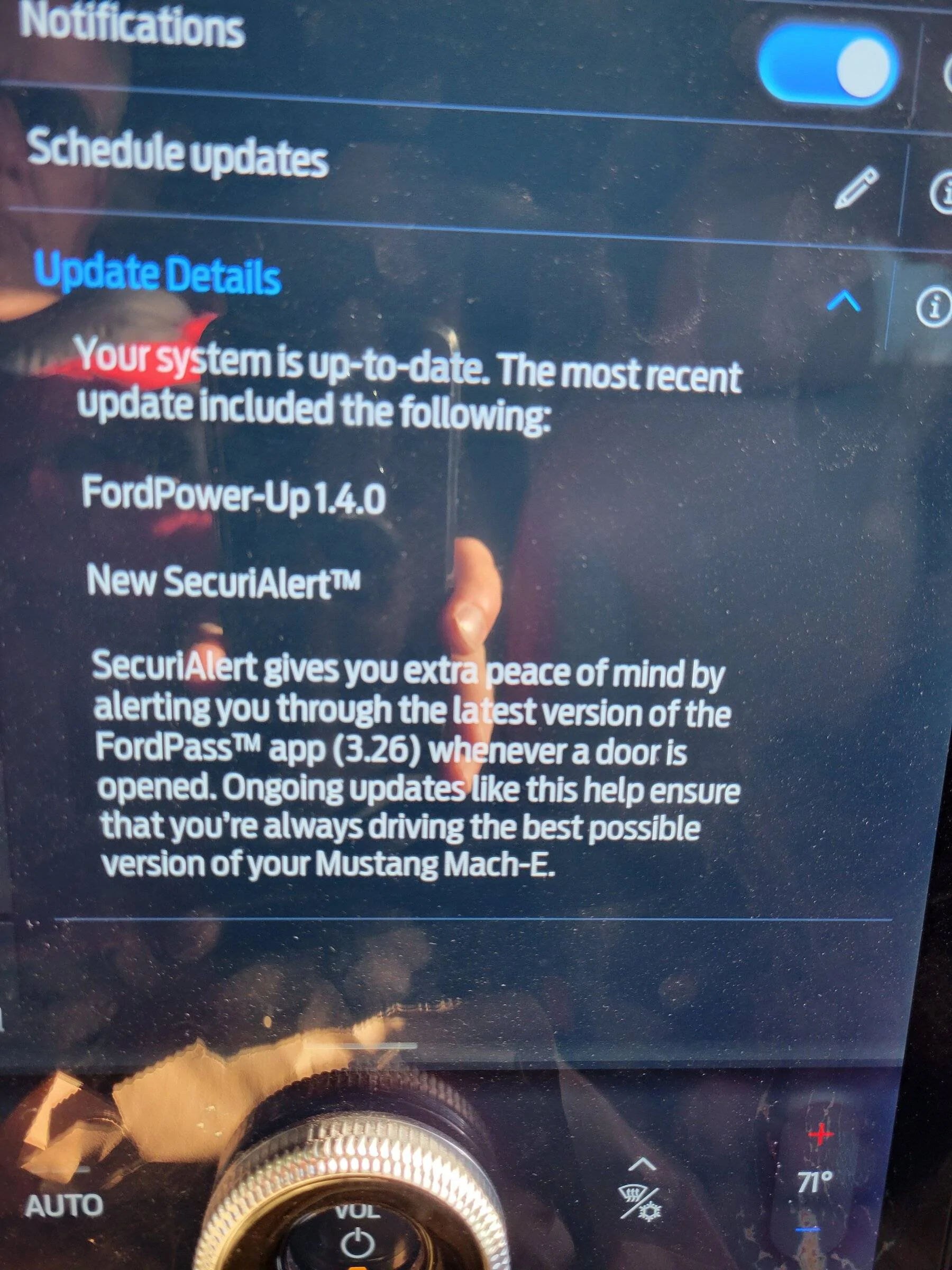
today it ran another update and it told me it was 1.4.0 lol wtf am i going backwards?! i've had securialerts this whole time, i don't get why it updated 1.4.0???


Jimrpa

Well-Known Member
First Name
Jim
Joined
Sep 10, 2020
Threads
297
Messages
9,583
Reaction score
12,927
Location
Wayne, PA
Vehicles
2021 Infinite Blue Premium Mustang Mach E ER AWD
Occupation
Retied (formerly tried to herd highly technical, independent cats)
Country flag
So, I have a data point to contribute: my car normally “lives” in my garage, connected to my home Wi-Fi. The original 2.1 push failed. However, while it was at the body shop, recovering from the violent assault it suffered at the hands of the brutal parking bollard, it updated to 2.1. At the time, I just attributed at to the body shop playing around with their FDRS (they did admit it was their first Mustang Mach E and they had to clear codes, etc.)
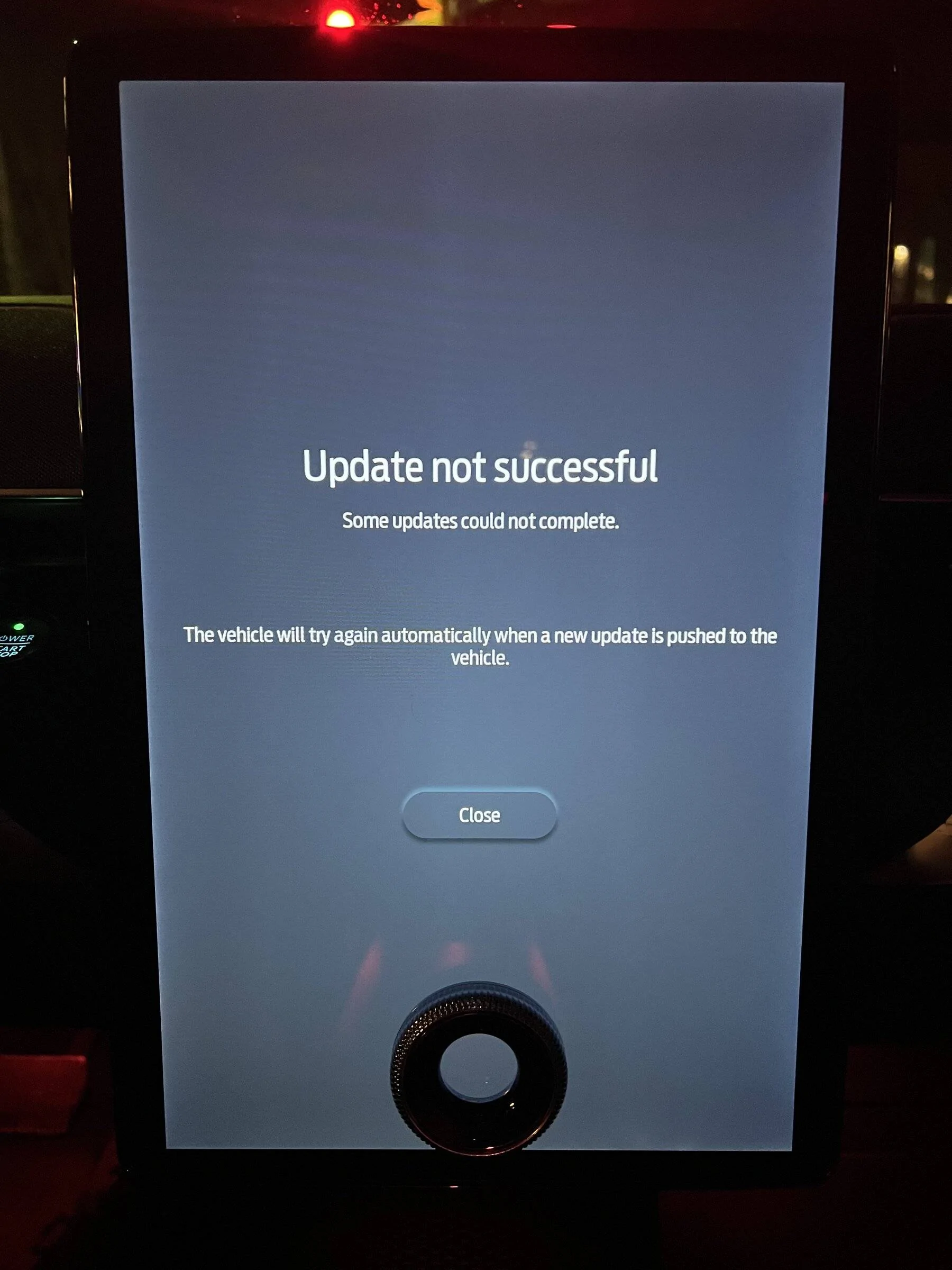
Fast forward: 2.3 failed for me and I’m pretty sure when the push occurred, my car was again in the garage and connected to Wi-Fi. According to the OTA details from Widget Tool, the deployment was going to try again. Today happens to be 7 days after the failed deployment. At about 6:30 PM eastern, I had to go out for a while. When I got back to my car, which was parked outside, in an open lot with excellent AT&T “5G” reception, I started the car and the center screen displayed that the System had shut down to save power and that I had to turn the car on or off to turn the system back on. There was a progress bar that was filling beneath that, and an OK button (I think the button was OK). Anyway, that message seemed odd to me since I HAD turned on the car and was about to drive. I pressed the OK button and got the screen below. I’ve checked Widget Tool OTA details and it looks like the push may try again. I’m wondering if the pushes only happen weekly? The problem is that, if I park my car outside so it sees the sky, I can’t plug it in and apparently something decides to turn off (I’ve never seen that before). If I leave it in the garage, the OTA fails. I’m thinking about dropping it off my home Wi-Fi. Thoughts?
Ford Mustang Mach-E OTA Power Up 2.3.0 Is out 116E299E-70E2-4249-B20E-460C648F1308
 

benk016

Well-Known Member
First Name
Ben
Joined
Nov 12, 2020
Threads
39
Messages
3,274
Reaction score
5,118
Location
Tulsa, Oklahoma
Vehicles
2021 Mustang Mach-E GT
Country flag
So, I have a data point to contribute: my car normally “lives” in my garage, connected to my home Wi-Fi. The original 2.1 push failed. However, while it was at the body shop, recovering from the violent assault it suffered at the hands of the brutal parking bollard, it updated to 2.1. At the time, I just attributed at to the body shop playing around with their FDRS (they did admit it was their first Mustang Mach E and they had to clear codes, etc.)
Fast forward: 2.3 failed for me and I’m pretty sure when the push occurred, my car was again in the garage and connected to Wi-Fi. According to the OTA details from Widget Tool, the deployment was going to try again. Today happens to be 7 days after the failed deployment. At about 6:30 PM eastern, I had to go out for a while. When I got back to my car, which was parked outside, in an open lot with excellent AT&T “5G” reception, I started the car and the center screen displayed that the System had shut down to save power and that I had to turn the car on or off to turn the system back on. There was a progress bar that was filling beneath that, and an OK button (I think the button was OK). Anyway, that message seemed odd to me since I HAD turned on the car and was about to drive. I pressed the OK button and got the screen below. I’ve checked Widget Tool OTA details and it looks like the push may try again. I’m wondering if the pushes only happen weekly? The problem is that, if I park my car outside so it sees the sky, I can’t plug it in and apparently something decides to turn off (I’ve never seen that before). If I leave it in the garage, the OTA fails. I’m thinking about dropping it off my home Wi-Fi. Thoughts?
116E299E-70E2-4249-B20E-460C648F1308.jpeg
Wouldn't hurt anything to disconnect from your wifi and see if it works next time it tries.
 

Trick.Mach-E

Well-Known Member
First Name
Trick
Joined
Mar 8, 2021
Threads
6
Messages
441
Reaction score
1,016
Location
Earth
Vehicles
Old Raptor, Mach-E4x, New Raptor, F-250, Taycan.
Occupation
Computer Nerd
Country flag
Nice to see this update helping bring the software on early Mach-E up to what the GT has! I am really looking forward to the full screen CarPlay, unfortunately, I'm still waiting for my APIM to arrive from Ford. :(
Unless 2.3.0 is being rolled out via FDRS when your APIM arrives it will not have the latest software. When Ford replaced my APIM in late December the only version available was 1.7.1 which installed correctly.

So don't get your hopes up just yet :(
 

methorian

Well-Known Member
Joined
Nov 18, 2019
Threads
18
Messages
1,558
Reaction score
2,437
Location
Roanoke, VA
Vehicles
2021 Mach-E First Edition, 2025 Kia EV6 GT-Line
Occupation
IT Admin
Country flag
So, I have a data point to contribute: my car normally “lives” in my garage, connected to my home Wi-Fi. The original 2.1 push failed. However, while it was at the body shop, recovering from the violent assault it suffered at the hands of the brutal parking bollard, it updated to 2.1. At the time, I just attributed at to the body shop playing around with their FDRS (they did admit it was their first Mustang Mach E and they had to clear codes, etc.)
Fast forward: 2.3 failed for me and I’m pretty sure when the push occurred, my car was again in the garage and connected to Wi-Fi. According to the OTA details from Widget Tool, the deployment was going to try again. Today happens to be 7 days after the failed deployment. At about 6:30 PM eastern, I had to go out for a while. When I got back to my car, which was parked outside, in an open lot with excellent AT&T “5G” reception, I started the car and the center screen displayed that the System had shut down to save power and that I had to turn the car on or off to turn the system back on. There was a progress bar that was filling beneath that, and an OK button (I think the button was OK). Anyway, that message seemed odd to me since I HAD turned on the car and was about to drive. I pressed the OK button and got the screen below. I’ve checked Widget Tool OTA details and it looks like the push may try again. I’m wondering if the pushes only happen weekly? The problem is that, if I park my car outside so it sees the sky, I can’t plug it in and apparently something decides to turn off (I’ve never seen that before). If I leave it in the garage, the OTA fails. I’m thinking about dropping it off my home Wi-Fi. Thoughts?
116E299E-70E2-4249-B20E-460C648F1308.jpeg
All of my past updates have also been successful after being away from home, not connected to Wifi.

I also had a failed update when I know the car was downloading over a gig of data via wifi on Saturday.

I may disconnect it from my home's wifi as well to see what happens....
 

vincektan

Member
First Name
Vince
Joined
Nov 27, 2021
Threads
2
Messages
10
Reaction score
2
Location
NH
Vehicles
2021 Mach E Select AWD, 2006 4Runner Sports
Country flag
20220111_094204.jpg


Yikes!!! I'm so jealous!

I'm stuck. What do I do?
I got the same thing yesterday. It started with getting an update with no number last week. That was my very first update. I wonder if the no number update last week is a fix because before that one, I never got a single update. And the vehicle is definitely a Job 1 car.
 

Stang68

Well-Known Member
Joined
Dec 21, 2020
Threads
13
Messages
1,292
Reaction score
2,607
Location
USA
Vehicles
Eruption Green Mustang Mach-E GT
Country flag
All of my past updates have also been successful after being away from home, not connected to Wifi.

I also had a failed update when I know the car was downloading over a gig of data via wifi on Saturday.

I may disconnect it from my home's wifi as well to see what happens....
Same here. My car downloaded something big Saturday but still no install of the update. I’ve driven around and everything to see if it will but I’ll just turn off WiFi and see if that does anything.
 

Gullwingdmc

Well-Known Member
First Name
Chip
Joined
May 15, 2021
Threads
85
Messages
2,945
Reaction score
4,113
Location
Boston, MA
Vehicles
2022 Mustang Mach E GT AWD ER - Grabber Blue
Country flag
To add another data point, I have received 4 updates. 2 were while at work while not on Wi-Fi. 2 were at home while on Wi-Fi. One of the at home ones was 1.7.1 which “failed” in the sense that I never got the notification, but everything was there. The other was 2.1.0 that installed fine. I don’t think either actually downloaded over Wi-Fi though. 2.1.0 was last week and the most activity I see for the car was a 30mb download.
 

Jimrpa

Well-Known Member
First Name
Jim
Joined
Sep 10, 2020
Threads
297
Messages
9,583
Reaction score
12,927
Location
Wayne, PA
Vehicles
2021 Infinite Blue Premium Mustang Mach E ER AWD
Occupation
Retied (formerly tried to herd highly technical, independent cats)
Country flag
Well, I’ve turned off Wi-Fi in the car, so we will see.
Sponsored


Top