ProximusAl
Well-Known Member
- Joined
- May 27, 2021
- Threads
- 7
- Messages
- 674
- Reaction score
- 707
- Location
- UK
- Vehicles
- Mach-E - SR-AWD - Star White

Just ripped my car apart for that lol
Sponsored


Are you able to help @SashaLondon with his issue? Is he work actually done or does dealer not know what they are doing? I feel like some people need more clarity on what a complete fix should look like.Oh yeah that's 100% what it is. This will ONLY work for stuck 1.7.1

 Waiting on a PSU replacement before I try it. (Clore PL6100).
I definitely received OTA 2.1.0 after I did the 1.7.1 update with FDRS. 2.3.0 failed and never retried and my FDRS software list is empty.@ProximusAl sounds like I might soon find your issue as I managed to sideload 1.7.1 also but am still stuck on the same issue. Maybe this fix is gonna fail for me too.

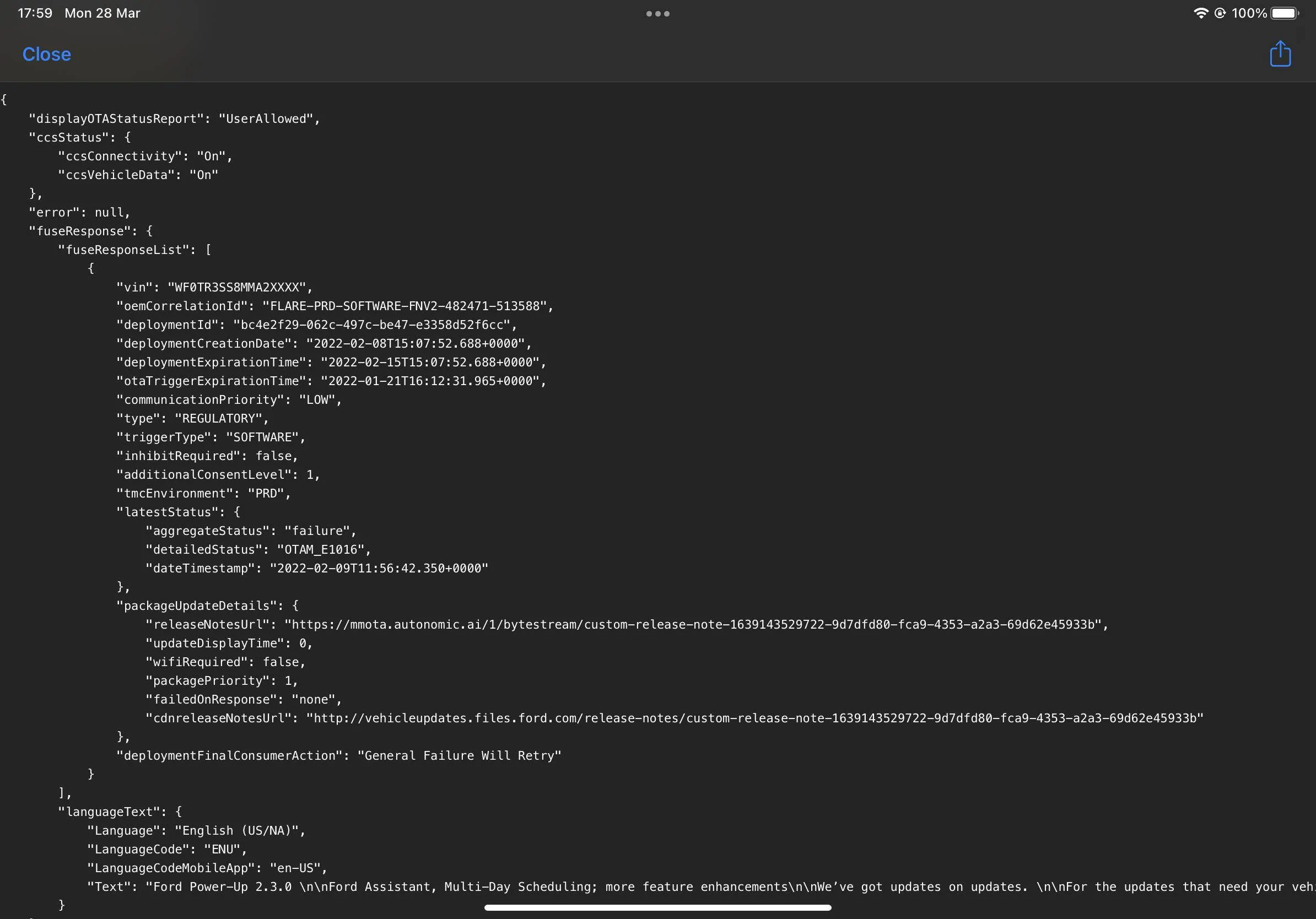
If I try the module update repair, I get the same error. It establishes comms with the APIM and the TCU and afterwards tells me to shut off the car. And then the error is shown.
You are describing what I have identically.If I try the module update repair, I get the same error. It establishes comms with the APIM and the TCU and afterwards tells me to shut off the car. And then the error is shown.
But I'm still on 1.7.1 (I just have the notes app. In settings menu it shows SYNC 4 Softwareversion 21174_PRODUCT and revision 168). And in onboard diagnostics I can't see a serial number for the APIM.
I installed version 1.7.1 via FDRS and had to install it twice because the first time something didn't go right and I wasn't able to switch to the dark theme any more. With the second attempt it finished correctly. And I haven't received any OTA updates afterwards.
And in the OTA information section of the iOS widget I get a status of null for the updatePendingState. And the schedule also shows null for the dayOfWeekAndTime, but I have set it to 03:00. And I can toggle the auto update button on and off, but it's always just saying that my system is up to date.
"displayOTAStatusReport": "UserAllowed",
"ccsStatus": {
"ccsConnectivity": "On",
"ccsVehicleData": "On"
},
"error": null,
"fuseResponse": null,
"tappsResponse": {
"vin": "WF0TK1E79MMA3XXXX",
"status": 200,
"vehicleInhibitStatus": null,
"lifeCycleModeStatus": {
"lifeCycleMode": "NORMAL",
"oemCorrelationId": "",
"vehicleDateTime": "2022-02-02T07:00:25.000Z",
"tappsDateTime": "2022-02-02T07:25:47.811439Z"
},
"asuActivationSchedule": {
"scheduleType": "RECURRING",
"dayOfWeekAndTime": null,
"activationScheduleDaysOfWeek": [
"MONDAY"
],
"activationScheduleTimeOfDay": "03:00",
"oemCorrelationId": "7",
"vehicleDateTime": "2022-03-20T19:30:41.000Z",
"tappsDateTime": "2022-03-20T18:30:42.044627Z"
},
"asuSettingsStatus": {
"asuSettingsState": "ON",
"notificationSettingsState": "ON",
"oemCorrelationId": "2857",
"vehicleDateTime": "2022-03-20T12:34:44.000Z",
"tappsDateTime": "2022-03-20T11:34:45.694458Z"
},
"version": "2.0.0"
},
"updatePendingState": null,
"otaAlertStatus": null
So I guess there is something wrong here and I hoped this TSB would fix it, but it doesn't even start applying the fix.
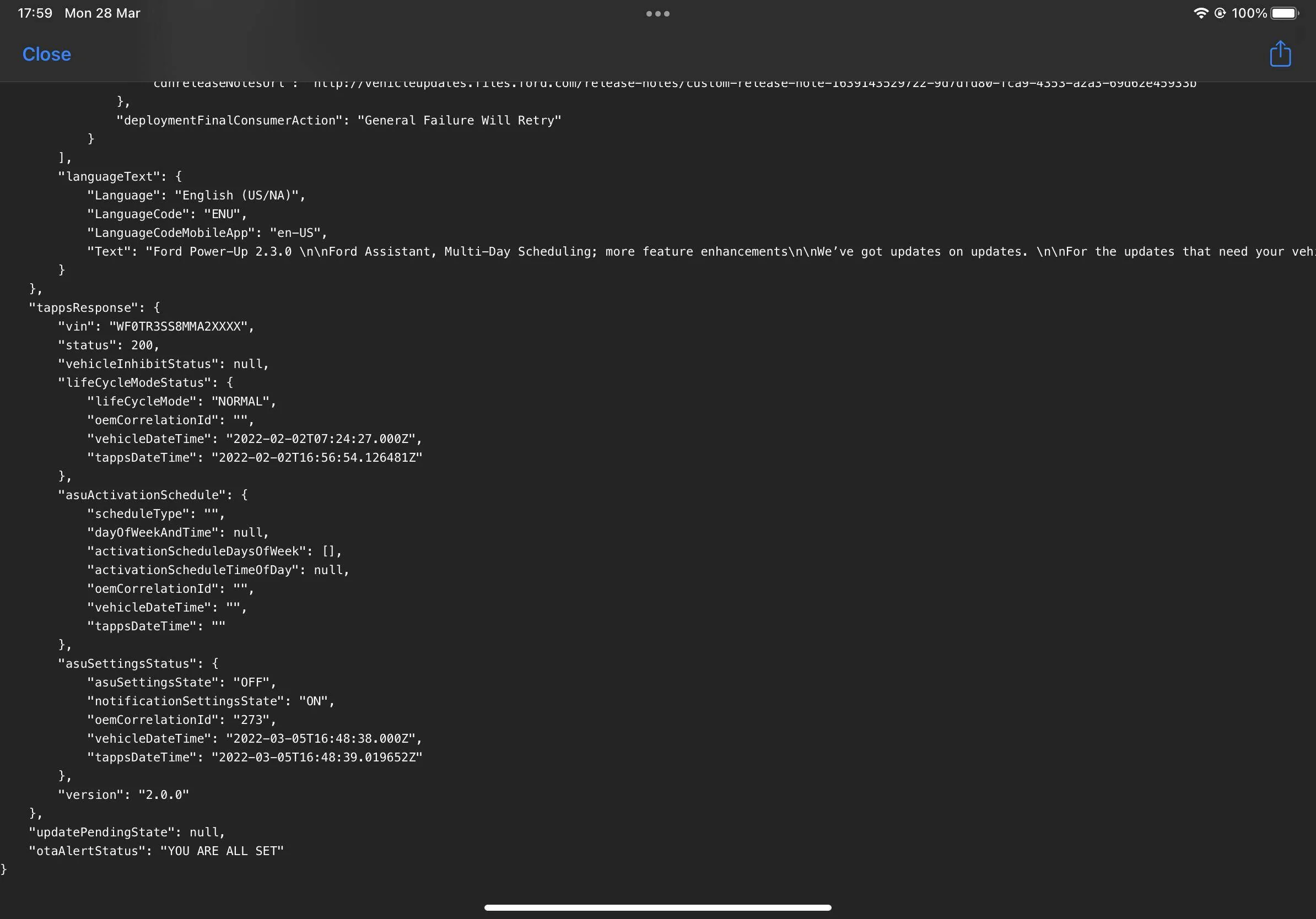
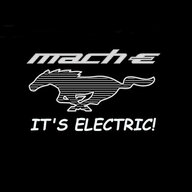
You are looking at the wrong item. I see it is setup for Monday at 3 AM. The dayOfWeekAndTime is the older data item from when only one day could be set.If I try the module update repair, I get the same error. It establishes comms with the APIM and the TCU and afterwards tells me to shut off the car. And then the error is shown.
But I'm still on 1.7.1 (I just have the notes app. In settings menu it shows SYNC 4 Softwareversion 21174_PRODUCT and revision 168). And in onboard diagnostics I can't see a serial number for the APIM.
I installed version 1.7.1 via FDRS and had to install it twice because the first time something didn't go right and I wasn't able to switch to the dark theme any more. With the second attempt it finished correctly. And I haven't received any OTA updates afterwards.
And in the OTA information section of the iOS widget I get a status of null for the updatePendingState. And the schedule also shows null for the dayOfWeekAndTime, but I have set it to 03:00. And I can toggle the auto update button on and off, but it's always just saying that my system is up to date.
"displayOTAStatusReport": "UserAllowed",
"ccsStatus": {
"ccsConnectivity": "On",
"ccsVehicleData": "On"
},
"error": null,
"fuseResponse": null,
"tappsResponse": {
"vin": "WF0TK1E79MMA3XXXX",
"status": 200,
"vehicleInhibitStatus": null,
"lifeCycleModeStatus": {
"lifeCycleMode": "NORMAL",
"oemCorrelationId": "",
"vehicleDateTime": "2022-02-02T07:00:25.000Z",
"tappsDateTime": "2022-02-02T07:25:47.811439Z"
},
"asuActivationSchedule": {
"scheduleType": "RECURRING",
"dayOfWeekAndTime": null,
"activationScheduleDaysOfWeek": [
"MONDAY"
],
"activationScheduleTimeOfDay": "03:00",
"oemCorrelationId": "7",
"vehicleDateTime": "2022-03-20T19:30:41.000Z",
"tappsDateTime": "2022-03-20T18:30:42.044627Z"
},
"asuSettingsStatus": {
"asuSettingsState": "ON",
"notificationSettingsState": "ON",
"oemCorrelationId": "2857",
"vehicleDateTime": "2022-03-20T12:34:44.000Z",
"tappsDateTime": "2022-03-20T11:34:45.694458Z"
},
"version": "2.0.0"
},
"updatePendingState": null,
"otaAlertStatus": null
So I guess there is something wrong here and I hoped this TSB would fix it, but it doesn't even start applying the fix.
Ok I think you are wright with that. It doesn't solve the problem though, that the TSB won't apply to my vehicle.You are looking at the wrong item. I see it is setup for Monday at 3 AM. The dayOfWeekAndTime is the older data item from when only one day could be set.
That was probably an update to fix your stuck 2.3.0 issueMine said the same thing until last week. I received a successful message at lunchtime last Thursday in the Fordpass app. Rushed out to the car only to find a successful update occurred without telling me anything about it. And still have no version listed in the car or the widget. The widget says it was a low priority update. First update since January when the 2.3.0 update failed.


I ran it successfully on a car Yesterday. Did they say what the issue they are having is?So my car has been at Ford since last Tuesday. It was in the shop when the news landed that there was a fix. Wednesday and Thursday they didn't have all the parts needed so I order things from Amazon and dropped them off.
Monday is here, they have the info, the parts, AND THEY STILL HAVE ISSUES!
Still unsuccessful at updating my car. Does the APIM need replacing or anything? Anyone have success with this yet?