MadMach

Member
First Name
stephen
Joined
Feb 25, 2022
Threads
3
Messages
10
Reaction score
0
Location
27527
Vehicles
2021 MME GT
Country flag
Have you also purchased a suitable 12V power supply? Do not start any FDRS updates without a proper power supply on the 12V.

Otherwise FDRS manages which updates are appropriate for your vehicle based on VIN and current versions. If they have to be applied in a particular order, then FDRS will manage that too.

The "picking and choosing" seems to be done by the dealership when they are only getting paid by Ford to apply certain fixes per vehicle.
Yes I bought a 30 Amp Powersupply
Sponsored


Arjan

Well-Known Member
First Name
Arjan
Joined
Feb 14, 2020
Threads
6
Messages
360
Reaction score
241
Location
NL
Vehicles
Ford Mustang Mach-E GT Performance
Country flag
From what I am read some of them can mess your car up
Never did on mine, i also have a 2021 GT and applied all updates.
 

Arjan

Well-Known Member
First Name
Arjan
Joined
Feb 14, 2020
Threads
6
Messages
360
Reaction score
241
Location
NL
Vehicles
Ford Mustang Mach-E GT Performance
Country flag
Yes I bought a 30 Amp Powersupply
Please keep your eye on the charger, because sometimes the car needs more then 30 Amps. Especially when applying updates that take an hour or more, the voltage will still slowly drop.
 

bshaw

Well-Known Member
Joined
May 18, 2020
Threads
14
Messages
1,562
Reaction score
2,181
Location
Boston, MA
Vehicles
2021 Mustang Mach E 4X (Job 1)
Country flag
From what I am read some of them can mess your car up
FDRS can be buggy at times, and this can mean a couple of different things go wrong. (Failed updates, modules not disappearing from list after successful update, etc)

But, in general, you should be good to apply all that it shows for your vehicle.


ToRue

Member
First Name
Tobias
Joined
Apr 4, 2022
Threads
2
Messages
17
Reaction score
4
Location
Germany
Vehicles
Mustang Mach-E4X
Country flag
I wonder how the car is managing this 12V power matter during OTA-Updates? It receives the same software and installs it not having a power supply on the 12V Battery..... Any idea?
 

bshaw

Well-Known Member
Joined
May 18, 2020
Threads
14
Messages
1,562
Reaction score
2,181
Location
Boston, MA
Vehicles
2021 Mustang Mach E 4X (Job 1)
Country flag
I wonder how the car is managing this 12V power matter during OTA-Updates? It receives the same software and installs it not having a power supply on the 12V Battery..... Any idea?
Short answer is that it’s a completely different process. End result should be more or less the same, but when FDRS writes to a module directly, that’s not how OTA is doing it.
I suspect maybe the FDRS module updates that require a USB may be more similar to an OTA package, but someone else can confirm that or not.
The usb updates still say to keep 12V connected, but don’t take as long and don’t have the massive power draw.
 

ToRue

Member
First Name
Tobias
Joined
Apr 4, 2022
Threads
2
Messages
17
Reaction score
4
Location
Germany
Vehicles
Mustang Mach-E4X
Country flag
OK, thanks
 

Mike G

Well-Known Member
First Name
Mike
Joined
Mar 27, 2022
Threads
25
Messages
6,449
Reaction score
5,289
Location
N. AL, USA
Vehicles
'23(J1) Mach-E GT-PE, '22 F-150 Lightning, '24 Bronco HLE 2Dr
Country flag
OK, thanks
For OTA updates (that normally download while you are driving the car) they will update in a memory space that the module is not using (So-called A/B). So while the module is using memory space A as an example, the OTA is updating memory space B while you're driving. When the car goes to "sleep" and is then restarted, it will switch memory spaces and the updated memory space now becomes the default program (until the next update happens for that module) "Rinse and repeat".

The car's 12V battery (the "LVB") is charged by the vehicles HVB while driving (like an alternator charges the battery on a normal car while driving). So this will keep the battery up to a charge level (over 80% SOC) that will enable the OTA update to happen when the car is shut off (for updates that require this).

Does that answer your question?

Mike
 
Last edited:

ToRue

Member
First Name
Tobias
Joined
Apr 4, 2022
Threads
2
Messages
17
Reaction score
4
Location
Germany
Vehicles
Mustang Mach-E4X
Country flag
For OTA updates (that normally download while you are driving the car) they will update in a memory space that the module is not using (So-called A/B). So while the module is using memory space A as an example, the OTA is updatting memory space B while you're driving. When the car goes to "sleep" and is then restarted, it will switch memory spaces and the updated memory space now becomes the default program (until the next update happens for that module) "Rinse and repeat".

The car's 12V battery (the "LVB") is charged by the vehicles HVB while driving (like an alternator charges the battery on a normal car while driving). So this will keep the battery up to a charge level (over 80% SOC) that will enable the OTA update to happen when the car is shut off (for updates that require this).

Does that answer your question?

Mike

Yes, definitely. Thanks a lot.
 

tobin1920

Well-Known Member
First Name
Anthony
Joined
May 15, 2022
Threads
1
Messages
91
Reaction score
108
Location
PA
Vehicles
2022 Mach-E Premium AWD ER
Country flag
This ended up sounding pretty negative which I did not intend! Just trying to arrive at a realistic impression of the overall situation.

I haven’t received a single OTA update since I got my car in April. I’m in the weird spot with the 22S41 recall software update where my dealer applied the wrong patch and marked my recall status as cleared. A couple of generous forum members with FDRS access helped me out by running my VIN and providing a full list of updates that are available for my car, but the dealer didn’t install or mention when I had it in for the recall “fix”. The only thing they mentioned is that updates can take forever. My impression is that getting a dealership to apply the full list of updates could be a multi-day affair and they may or may not have the knowledge or capacity to ever do it.

How does anyone fully catch up? Is plunking down the hefty license fee and buying a mongoose / power supply required if you truly want your car to stay up to date? I am feeling like that is the only real way to control my own fate with this, and even then there will always be the potential for random issues and getting into a bad state that requires Ford’s help anyway - if they even CAN help.

The up front / recurring investment will probably deter me, but a close friend is seriously considering placing an order for a 2023 when the order banks open. This whole 22S41 experience and learning more about how updates are applied has put a serious dent in my confidence in Ford’s early ability to execute, which truly pains me to say. I swear that didn’t mean for this to take such a negative tone… just hoping to either validate or course-correct some thoughts that I’ve been having.
 

Mike G

Well-Known Member
First Name
Mike
Joined
Mar 27, 2022
Threads
25
Messages
6,449
Reaction score
5,289
Location
N. AL, USA
Vehicles
'23(J1) Mach-E GT-PE, '22 F-150 Lightning, '24 Bronco HLE 2Dr
Country flag
I have never heard of anybody on this forum who performed updates using FDRS and the the defacto standard Mongoose adapter and a properly rated powersupply dorking their car up in a way that was unrecoverable. Some have had their computer crash because they forgot about power saving, or because their computer got too hot. Or other reasons associated with not having the correct equipment or having it setup correctly, or having decently fast internet.

But they were always able to recover, re-program the failed update, and drive on.

I have never, ever, had FDRS crash or ever had it do anything that would cause any issues. FDRS usually receives updates to correct features that may not be working. But for the core functions of programming, it has never failed me and I've never heard of it doing so to anybody else.

This has been my experience.

I don't want anybody to feel that doing their own updates with FDRS carries unreasonably high risk.

It most certainly does not.

Failure to follow instructions or the proper procedures is the primary reason for programming failures.

Mike
 

mkhuffman

Well-Known Member
First Name
Mike
Joined
Nov 19, 2020
Threads
29
Messages
6,875
Reaction score
9,507
Location
Virginia
Vehicles
2025 Rivian R1T Tri-Max, Jeep GC-L, VW Jetta
Country flag
The only thing they mentioned is that updates can take forever. My impression is that getting a dealership to apply the full list of updates could be a multi-day affair and they may or may not have the knowledge or capacity to ever do it.

How does anyone fully catch up? Is plunking down the hefty license fee and buying a mongoose / power supply required if you truly want your car to stay up to date?
It depends. What do you mean by "stay up to date"? Ford is releasing new versions of software on a weekly, sometimes daily, basis. Do you mean up to date with what came out yesterday? If that is what you want, then you need to invest in the equipment or find a friend who will do it daily/weekly for you. If you really mean you want to be updated every six months, or every year, then maybe you can get the dealer to do it.

I complained about my profile settings changing and defaulting to Guest or my wife's profile, instead of mine, and Ford CS saw my post and contacted me. They assigned a case number and then I scheduled a visit at my dealership for software updates. Because they didn't know which software module would fix my problem, they updated all of them. Or maybe it is just my dealer - they said they update all the software any time a car comes in. Either way, I didn't pay for it.

From what I could tell monitoring my car remotely, they spent about four hours performing all the updates.

The point is you can get the dealer to do it, but if you don't have a way for them to get Ford to pay for it, maybe you can offer to pay them for four hours. Or two hours. Whatever you can negotiate. Or maybe they will just do it because they want your repeat business.

Really, the last option is least likely and if they are smart, they won't do that. I mean how much repeat business are they going to get with my car? After the HVBJB replacement, I mean. ?
 

Mike G

Well-Known Member
First Name
Mike
Joined
Mar 27, 2022
Threads
25
Messages
6,449
Reaction score
5,289
Location
N. AL, USA
Vehicles
'23(J1) Mach-E GT-PE, '22 F-150 Lightning, '24 Bronco HLE 2Dr
Country flag
The point is you can get the dealer to do it, but if you don't have a way for them to get Ford to pay for it, maybe you can offer to pay them for four hours. Or two hours. Whatever you can negotiate.
I occasionally opine, (for the benefit of members here whom I suspect of not knowing what updates are designed to do), regarding situations that the members may have found themselves experiencing, and how those situations may have a remedy connected to one or more updates that are shown in the list of available updates for their vehicle. The reason for this is the requirement for a customer complaint to justify a warranty labor charge to update a customer's vehicle.

Some dealerships are more generous than others, and in many cases techs who are very experienced know that what looks like a huge list, can take maybe ten or twenty minutes to actually do if they stay with the vehicle and hit each module without any breaks.

But again, the thing is...they need a complaint from you to justify the warranty labor work.

The alternative is doing the updates yourself, or waiting for an OTA.

Mike
 

markboris

Well-Known Member
First Name
Mark
Joined
Nov 13, 2019
Threads
43
Messages
5,731
Reaction score
16,371
Location
Sonora, CA
Vehicles
Currently: '20 Shelby GT500 FPB '24 Mach-E GTP GGM
Occupation
Retired
Country flag
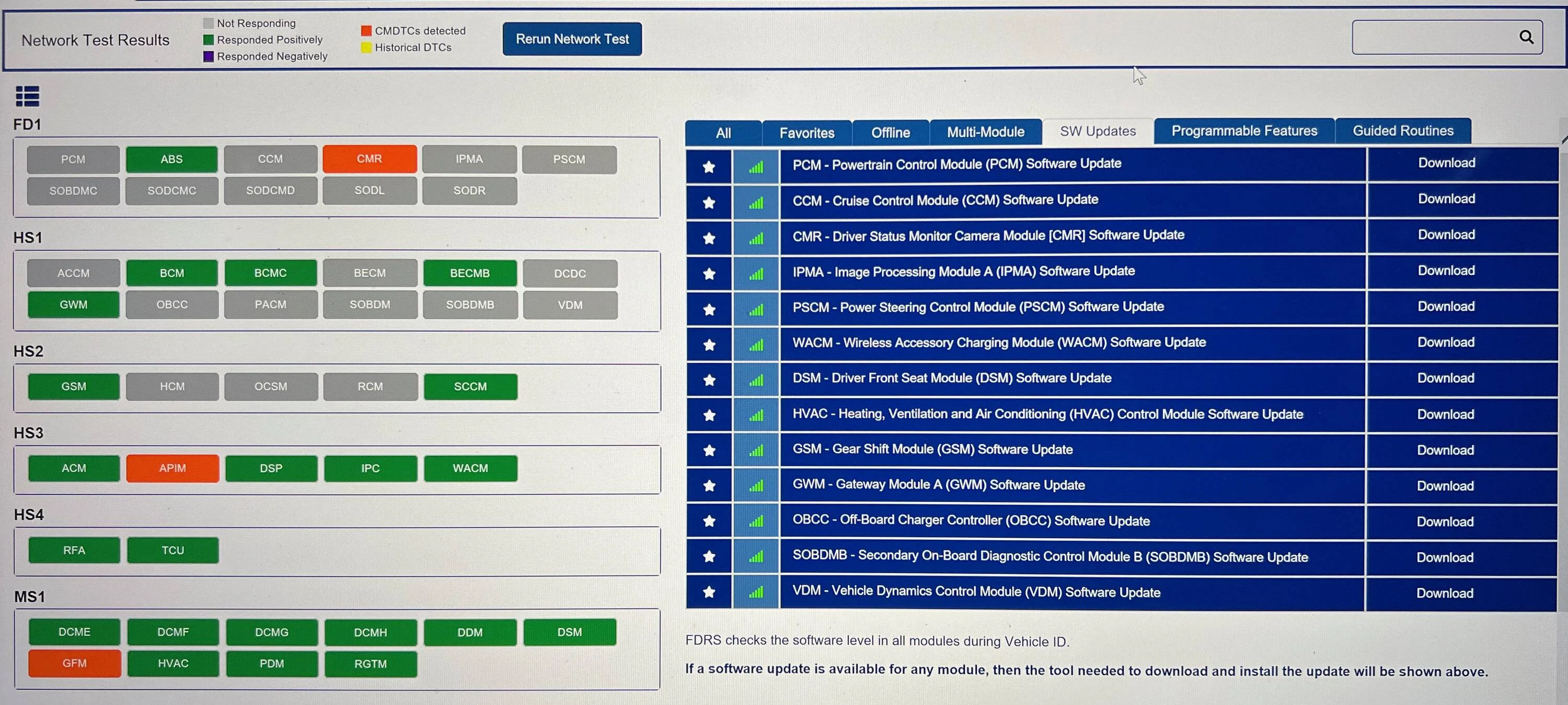
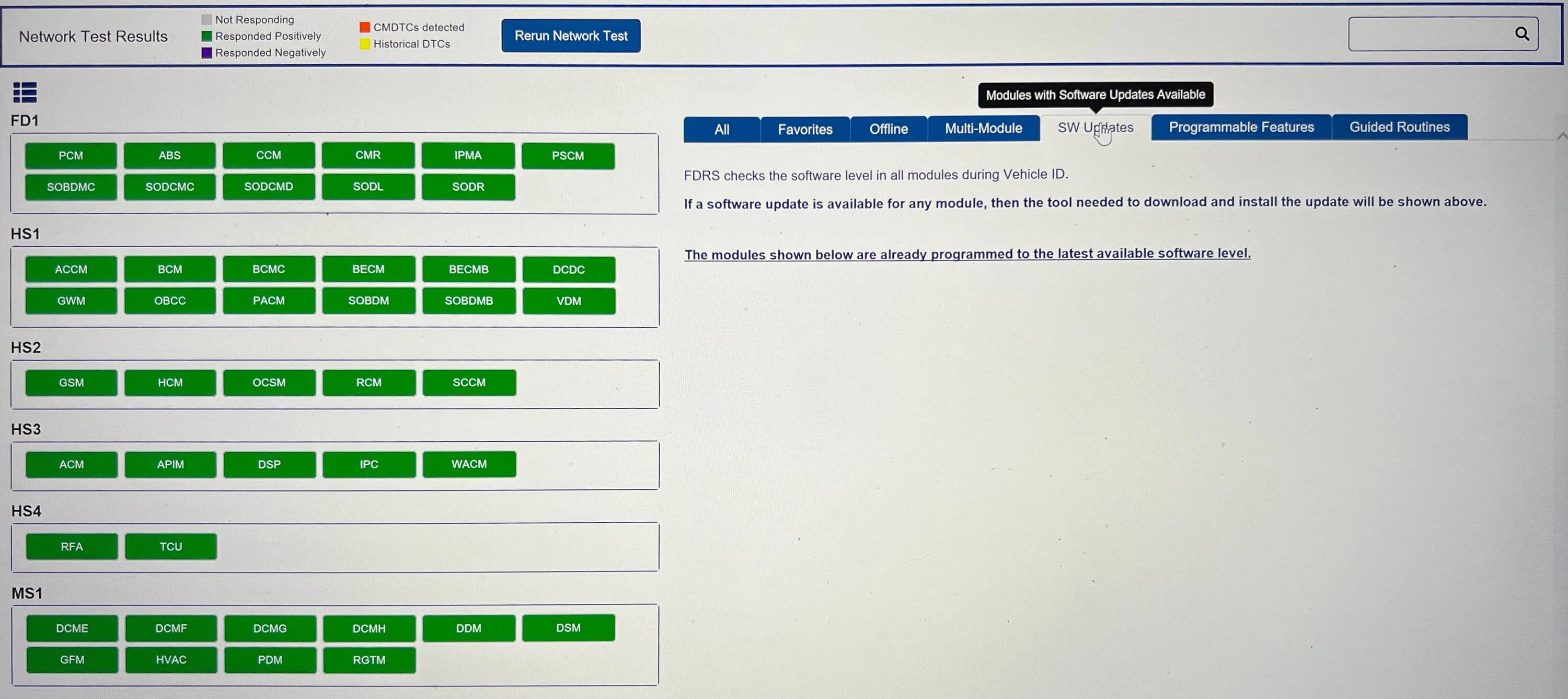
Just wanted to post that I took the plunge and bought what was needed for updating my 2021 Job 2 GTPE that was recommended by Todd and Andy (DevSecOps, scoopman), a Mongoose Plus interface cable and 60 amp power supply. I have a Windows 10 partition on my MacBook Pro and installed FDRS. Bought a 2 day license and updated all 13 modules in the update list. It took about 5 hours but could have been shorter as I was not always at the car. The GWM module required a USB stick for updating and that went well also. All DTC's were cleared and it was much simpler than I thought it would be.

Thanks to Andy's video and a few pointers from Todd it went very smooth. No failed updates, no crashes, everything just worked as it should. In Sync under Software Updates it shows I have PowerUp 2.8.2. I took the car out for a short 5 mile drive this evening and all seems to be well.

Before and after FDRS update screen.

Ford Mustang Mach-E The Complete DIY Guide to Updating Your Mach-E with FDRS IMG_2289


Ford Mustang Mach-E The Complete DIY Guide to Updating Your Mach-E with FDRS IMG_2302
Sponsored


Top