Post here if you have an active FDRS account and are willing to look up info for others

raphael

Active Member
Joined
Jan 16, 2022
Threads
0
Messages
30
Reaction score
23
Location
Austria
Vehicles
2021 Mustang Mach-E RWD LR
Occupation
IT Security specialist
Country flag
I dont want to speak too soon, but it seems trying a third flash drive worked, a 16GB Kingston, 3.0 worked, my SanDisk and PNY failed. As an IT person, I am baffled lol
Maybe I have an answere for you. It's important that your USB flash drive uses MBR (master boot record) partition table instead of the newer GPT (GUID Partition Table). It seems like something in the car isn't compatible with the newer GPT. Maybe the APIM itself, or the component the USB port in the car connects to. However, if thats really the case, it's a shame again for FORDs software development, because GPT was introduced back in the 2000s.

I once tried to update my APIM with an USB stick, which I had used before for successful updates, and suddenly always got an error instantly, after pluging the USB stick into the car.
After some experimenting with redownloading, reformating and deleting partions on the drive, I noticed my drive was using GPT partition table now (must have changed by using the same drive as an USB install stick for some linux servers).
I changed it back to MBR and the next attempt of the update was successful instantly and since then never had this problem again, because I always check my USB sticks for MBR now.

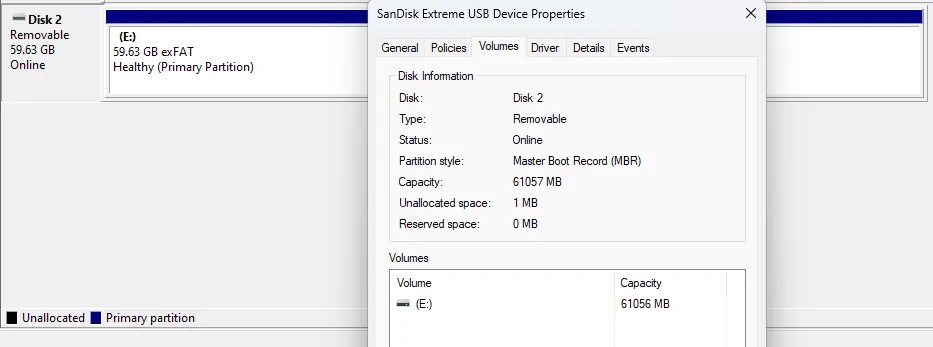
You can check the used partition table in the properties panel of the USB drive
Ford Mustang Mach-E Post here if you have an active FDRS account and are willing to look up info for others 1679260451613


You can change the partition table type with the Windows Disk Management tool or some simple cmd commands:

https://learn.microsoft.com/en-us/w...management/change-a-gpt-disk-into-an-mbr-disk

Would be cool, if some of you guys doing your own FDRS updats could check your USB drives and report back if you are using MBR or GPT.
If all of this is really the reason for the failed updates, this information should definitly be added to the FDRS information page, which tells you to use exFAT, etc.
Sponsored

 

Mike G

Well-Known Member
First Name
Mike
Joined
Mar 27, 2022
Threads
25
Messages
6,450
Reaction score
5,289
Location
N. AL, USA
Vehicles
'23(J1) Mach-E GT-PE, '22 F-150 Lightning, '24 Bronco HLE 2Dr
Country flag
Maybe I have an answere for you. It's important that your USB flash drive uses MBR (master boot record) partition table instead of the newer GPT (GUID Partition Table). It seems like something in the car isn't compatible with the newer GPT. Maybe the APIM itself, or the component the USB port in the car connects to. However, if thats really the case, it's a shame again for FORDs software development, because GPT was introduced back in the 2000s.

I once tried to update my APIM with an USB stick, which I had used before for successful updates, and suddenly always got an error instantly, after pluging the USB stick into the car.
After some experimenting with redownloading, reformating and deleting partions on the drive, I noticed my drive was using GPT partition table now (must have changed by using the same drive as an USB install stick for some linux servers).
I changed it back to MBR and the next attempt of the update was successful instantly and since then never had this problem again, because I always check my USB sticks for MBR now.

You can check the used partition table in the properties panel of the USB drive
1679260451613.png


You can change the partition table type with the Windows Disk Management tool or some simple cmd commands:

https://learn.microsoft.com/en-us/w...management/change-a-gpt-disk-into-an-mbr-disk

Would be cool, if some of you guys doing your own FDRS updats could check your USB drives and report back if you are using MBR or GPT.
If all of this is really the reason for the failed updates, this information should definitly be added to the FDRS information page, which tells you to use exFAT, etc.
I agree with everything you've said, but I'm trying to figure out how a USB drive would have ever been setup with a GPT partition in the first place. Don't they all come as MBR from the OEM?
 

Mark Hassa

Well-Known Member
First Name
Mark
Joined
Jun 15, 2022
Threads
12
Messages
498
Reaction score
300
Location
New Westminster, BC
Vehicles
2024 Grabber Blue GT
Occupation
Government Food Inspector
Country flag
HI Mike,

So 4.2.1 magically showed up this morning. Not sure why the car tried to download the Sync update first and failed when the GWM should have been done first? Going to the dealer this afternoon. So I should now have the APIM, PSCM, and HVAC module now?
3FMTK3SSXMMA50149

Thanks,
Mark
 

ProllyDieWaiting

Well-Known Member
Joined
Apr 14, 2022
Threads
2
Messages
67
Reaction score
37
Location
Okc
Vehicles
Ford F150
Country flag
Hey guys, any help would be appreciated. I posted the following in a new thread and received advice to ask in this thread for help looking up what the dealership saw and did. Issue as follows:
"
I'm in need of suggestions/advice. To preface, my vehicle is a 2022 CA rt 1 built right around the end of May 2022 and purchsed in early August 22. It is at the dealership now so I can't confirm the exact build date, the date on the window sticker is 6/7/22 and I am aware of the HVBJB issues but supposedly the recalls do not apply to my vehicle.

In February I had my car plugged in at home for a couple days and got in to drive it and noticed it had not fully charged and was giving me the wrench with a service vehicle soon message. I had obligations and went ahead and drove it, by the time I finished and got it back home to plug in it gave me a charging error and then gave me the "stop safely now" and wouldn't turn on. It was towed (flat bed) to the dealership who "cleared the codes" and did a software update and couldn't/wouldn't give me any more information than that. I picked it up, it was working correctly for less than a month. Last week I had it plugged in and charging overnight and got in the next morning to find another service vehicle soon/powertrain fault message. This time I drove it directly to the dealership and told them not to "clear" or fix anything until they call me and tell me what they found. They tell me they had to open a ticket with ford hotline and that there were no error codes and the hotline advised them to give it back to me and just have me document how/when it happens and bring it back. I called ford (opened cases for both incidents) and spoke with a representative who told me the hotline instruction was for the dealership to do a drive test and test each module individually, and that the dealership never responded to that instruction. Customer service was then supposed to call the dealership and call me back. I heard nothing for 4 days, finally called customer service and was told I needed to go get my car and document how/when the fault happens bc they can't find anything wrong with it. They are now essentially refusing to respond to me, can't provide an answer as to what ever happened with the drive test and are claiming that was never recommended and the error cleared itself without any diagnosis codes.

I'm not really sure what to believe or what to do next. I don't think the HVBJB is in their consideration and I'm not sure whether it even should be based on my build date or how to convince them to take a look/test it, or how they would go about doing that. Thoughts? Suggestions?"
 

Mike G

Well-Known Member
First Name
Mike
Joined
Mar 27, 2022
Threads
25
Messages
6,450
Reaction score
5,289
Location
N. AL, USA
Vehicles
'23(J1) Mach-E GT-PE, '22 F-150 Lightning, '24 Bronco HLE 2Dr
Country flag
HI Mike,

So 4.2.1 magically showed up this morning. Not sure why the car tried to download the Sync update first and failed when the GWM should have been done first? Going to the dealer this afternoon. So I should now have the APIM, PSCM, and HVAC module now?
3FMTK3SSXMMA50149

Thanks,
Mark
Exactly so.


Redundant

Well-Known Member
First Name
Jim
Joined
Nov 18, 2019
Threads
21
Messages
512
Reaction score
557
Location
New Jersey
Vehicles
Mach-E 4X-Space White, 1 Ford Flex, 2 Ford Escapes
Country flag
I have a job 1 that I have a blue cruise trial, but it has never worked. Had it "installed" at dealer, I think maybe twice and two OTA updates, supposedly, but no luck. Can you tell from my software whether there is something missing that is preventing it from working? I appreciate your help.

VIN - 3FMTK3SU7MMA07079
 

ocr_salty

Well-Known Member
First Name
Steve
Joined
Jun 16, 2021
Threads
3
Messages
238
Reaction score
179
Location
UK
Vehicles
Mach-E SR RWD, Nissan Leaf
Occupation
Aerospace Engineer
Country flag
Hello everyone, it's been a little while and I'm between visits to the dealer right now, though I need to book in to have the projector for the welcome lights replaced. Could someone please have a look at my VIN when there's a spare 5 minutes - WF0TR1RM4MMA30003 - there's no hurry as it really for my own curiosity to see if there has been any updates made to the car since the last check or if the list have just got longer. Thank you!
 

TTT

Well-Known Member
First Name
Tom
Joined
Aug 13, 2021
Threads
4
Messages
260
Reaction score
313
Location
SoCal
Vehicles
DMC-12, 75 Monza, 17 Volt, 22 MMe Prem. ordered
Occupation
Imagineer
Country flag
Good afternoon. I have a 22 Premier built in December 21. I've been stuck on 3.6.1 forever now and have been getting the runaround from the OTA team. The dealer says everything is up to date and they opened a ticket with Ford who wouldn't even run the VIN and just said to make sure the battery was charged and to set it up on wifi - sigh... record of the second service after the dealer had confirmed all modules were up to date follows:


Customer’s description of vehicle concern

CUSTOMER STATES VEHICLE SHOULD BE AT POWER UP VERSION 4.1.2 AND HAS BEEN AT 3.6.1 SINCE OCTOBER

Please list any diagnostics already performed, including results of any TSB, GSBs or Pinpoint Test

NO CODES PRESENT, ALL MODULES ARE UP TO DATE

Parts Replaced, including service part number if available

NONE

What is the level of the scan tool being used? Are any error messages noted?

35.5.3

Your Question:

CUSTOMERS VEHICLE DISPLAY SAYS VEHICLE IS UP TO DATE, HOW CAN I CHECK TO SEE IF THERES AN UPDATE THE VEHICLE NEEDS FOR IT TO BE AT VERSION 4.1.2. CUSTOMER ALSO STATES HE SPOKE TO CUSTOMER SUPPORT AND THAT HIS VEHICLE SHOULD HAVE RECEIVED THE NEWEST UPDATE

Can the concern be duplicated?:

Yes

Check service history. Is this a repeat repair?:

No

Have you compared the customer's vehicle to a like or similar vehicle?:

Yes

Have you performed all applicable published service information?(Service Procedure, TSB, FSA, etc.)?:

Yes

Is the vehicle commercially used?

No

Can the vehicle still be operated by the customer?

Yes

Ruri
Thank you for contacting us,

It is important to note that not all vehicles will be qualified for every power up or OTA update based on the way the vehicle is equipped. With this being the case comparing power up updates on multiple vehicles may not be the most valid method of determining if a vehicle is fully updated.

However with this vehicle having not completed an update in the last couple months we may be looking at a concern with something preventing the updates from completing. With this being the case lets ensure that we are not looking at something preventing an OTA update from completing

For further information about OTA and in turn power up updates we can review the information in the owner’s manual we can see that for the non-running update to complete we will need to ensure that the vehicle is not experiencing any of the following.

Your vehicle is running.
Your vehicle is switched on.
Your vehicle is not parked.
The 12 V battery charge is too low.
The hazard indicators are switched on.
The alarm is sounding.
The doors are open.
The parking lamps are switched on.
You are pressing the brake pedal.
An emergency call is in process.
Your vehicle is in limp home mode.
This information can be found on page 391 of the owner’s manual.
Additionally please ensure that the Vehicle has all of the connected vehicle features in the APIM enabled as well as the connected vehicle features in the Ford Pass app.

With all of the conditions met we will need to wait until the next update is sent out to this vehicle."


Well, nope. Still no updates. Can someone here check my system with FDRS and suggest next steps or help somehow?

3FMTK3R71NMA01568

Tom
 

kennethjk

Well-Known Member
First Name
Ken
Joined
Sep 3, 2021
Threads
30
Messages
3,331
Reaction score
2,124
Location
NY
Vehicles
MME Prem. EB 4WD, X3, IX50
Occupation
Retired
Country flag
Well it’s now happened to me

1: charge Fault
2: high voltage battery warning - may shut down without warning
3: power train malfunction / reduced power

can someone run codes to see if indeed my car is toast

3FMTK3SU2MMA66640

thanks
 

Lord_Sweeney

Member
Joined
Jun 24, 2022
Threads
2
Messages
18
Reaction score
4
Location
California
Vehicles
2022 Mustang Mach-E
Occupation
Real Estate Investor
Country flag
Hello there, I was referred to this thread to ask someone kindly to run my VIN and check to see if any of my modules need updating.

VIN: 3FMTK3R73NMA26827

Thank you for your help!
 

logcat

Active Member
First Name
Brandon
Joined
Jan 26, 2023
Threads
4
Messages
26
Reaction score
5
Location
Austin
Vehicles
2021 Mustang Mach-E Premium
Occupation
Software Engineer
Country flag
Would you be able to run this vin for me?
3FMTK3RM6MMA35834

I have never had access to any of the driving modes since I got the car. Just wondering if I'm missing any updates.
 

Mark Hassa

Well-Known Member
First Name
Mark
Joined
Jun 15, 2022
Threads
12
Messages
498
Reaction score
300
Location
New Westminster, BC
Vehicles
2024 Grabber Blue GT
Occupation
Government Food Inspector
Country flag
Hi Mike,
Didn’t get the usual service advisor, so not exactly sure what updates I got. I assume I got the APIM updated as it now shows Version 713 in ‘About Sync’. The advisor just wrote “Found Couple Modules Failed Update. Update all Necessary Modules.” Whatever that means.
3FMTK3SSXMMA50149
Thanks,
Mark
 

Mach-Lee

Well-Known Member
First Name
Lee
Joined
Jul 16, 2021
Threads
262
Messages
11,356
Reaction score
24,987
Location
Wisconsin
Vehicles
2022 Mach-E Premium AWD
Occupation
Sci/Eng
Country flag
Hi Mike,
Didn’t get the usual service advisor, so not exactly sure what updates I got. I assume I got the APIM updated as it now shows Version 713 in ‘About Sync’. The advisor just wrote “Found Couple Modules Failed Update. Update all Necessary Modules.” Whatever that means.
3FMTK3SSXMMA50149
Thanks,
Mark
Looks like they updated successfully so you should be good now with the latest APIM and GWM.
 

Mach-Lee

Well-Known Member
First Name
Lee
Joined
Jul 16, 2021
Threads
262
Messages
11,356
Reaction score
24,987
Location
Wisconsin
Vehicles
2022 Mach-E Premium AWD
Occupation
Sci/Eng
Country flag
Good afternoon. I have a 22 Premier built in December 21. I've been stuck on 3.6.1 forever now and have been getting the runaround from the OTA team. The dealer says everything is up to date and they opened a ticket with Ford who wouldn't even run the VIN and just said to make sure the battery was charged and to set it up on wifi - sigh... record of the second service after the dealer had confirmed all modules were up to date follows:


Customer’s description of vehicle concern

CUSTOMER STATES VEHICLE SHOULD BE AT POWER UP VERSION 4.1.2 AND HAS BEEN AT 3.6.1 SINCE OCTOBER

Please list any diagnostics already performed, including results of any TSB, GSBs or Pinpoint Test

NO CODES PRESENT, ALL MODULES ARE UP TO DATE

Parts Replaced, including service part number if available

NONE

What is the level of the scan tool being used? Are any error messages noted?

35.5.3

Your Question:

CUSTOMERS VEHICLE DISPLAY SAYS VEHICLE IS UP TO DATE, HOW CAN I CHECK TO SEE IF THERES AN UPDATE THE VEHICLE NEEDS FOR IT TO BE AT VERSION 4.1.2. CUSTOMER ALSO STATES HE SPOKE TO CUSTOMER SUPPORT AND THAT HIS VEHICLE SHOULD HAVE RECEIVED THE NEWEST UPDATE

Can the concern be duplicated?:

Yes

Check service history. Is this a repeat repair?:

No

Have you compared the customer's vehicle to a like or similar vehicle?:

Yes

Have you performed all applicable published service information?(Service Procedure, TSB, FSA, etc.)?:

Yes

Is the vehicle commercially used?

No

Can the vehicle still be operated by the customer?

Yes


Ruri
Thank you for contacting us,

It is important to note that not all vehicles will be qualified for every power up or OTA update based on the way the vehicle is equipped. With this being the case comparing power up updates on multiple vehicles may not be the most valid method of determining if a vehicle is fully updated.

However with this vehicle having not completed an update in the last couple months we may be looking at a concern with something preventing the updates from completing. With this being the case lets ensure that we are not looking at something preventing an OTA update from completing

For further information about OTA and in turn power up updates we can review the information in the owner’s manual we can see that for the non-running update to complete we will need to ensure that the vehicle is not experiencing any of the following.

Your vehicle is running.
Your vehicle is switched on.
Your vehicle is not parked.
The 12 V battery charge is too low.
The hazard indicators are switched on.
The alarm is sounding.
The doors are open.
The parking lamps are switched on.
You are pressing the brake pedal.
An emergency call is in process.
Your vehicle is in limp home mode.
This information can be found on page 391 of the owner’s manual.
Additionally please ensure that the Vehicle has all of the connected vehicle features in the APIM enabled as well as the connected vehicle features in the Ford Pass app.

With all of the conditions met we will need to wait until the next update is sent out to this vehicle."


Well, nope. Still no updates. Can someone here check my system with FDRS and suggest next steps or help somehow?

3FMTK3R71NMA01568

Tom
You have an APIM and HVAC update showing up, ask your dealer to apply the APIM update.

Ford Mustang Mach-E Post here if you have an active FDRS account and are willing to look up info for others 1679373998572
 

TTT

Well-Known Member
First Name
Tom
Joined
Aug 13, 2021
Threads
4
Messages
260
Reaction score
313
Location
SoCal
Vehicles
DMC-12, 75 Monza, 17 Volt, 22 MMe Prem. ordered
Occupation
Imagineer
Country flag
Thank You!
Sponsored


Top