Post here if you have an active FDRS account and are willing to look up info for others

Justconn1

Well-Known Member
Joined
Jul 8, 2021
Threads
2
Messages
63
Reaction score
45
Location
Florida
Vehicles
Mach E
Country flag
Wondering if anyone can help. I have a job 2 2021 and was getting regular updates through OTA. I brought my car back for 30k check up. The dealer told me many modules needed updating. They had to reset my car. Now my last update shows 4.1.2 just after the UI change. However I was many updates and safety recall updates past that already. When I asked them if I would get those later updates again, I got the dealer's equivalent of a shoulder shrug. Does anyone here know if I will somehow sync up and get updates again? People on the forum are on 6.1 already and I seem to have stopped getting updates. My vin is 3FMTK1RM8MMA58780. Thanks in advance for any advice.
Sponsored

 

SONEWBE

Well-Known Member
First Name
Dennis
Joined
Jun 30, 2020
Threads
17
Messages
169
Reaction score
125
Location
Oregon
Vehicles
2021 Job 1 MachE 4X, 2014 BMW X3
Occupation
Retired
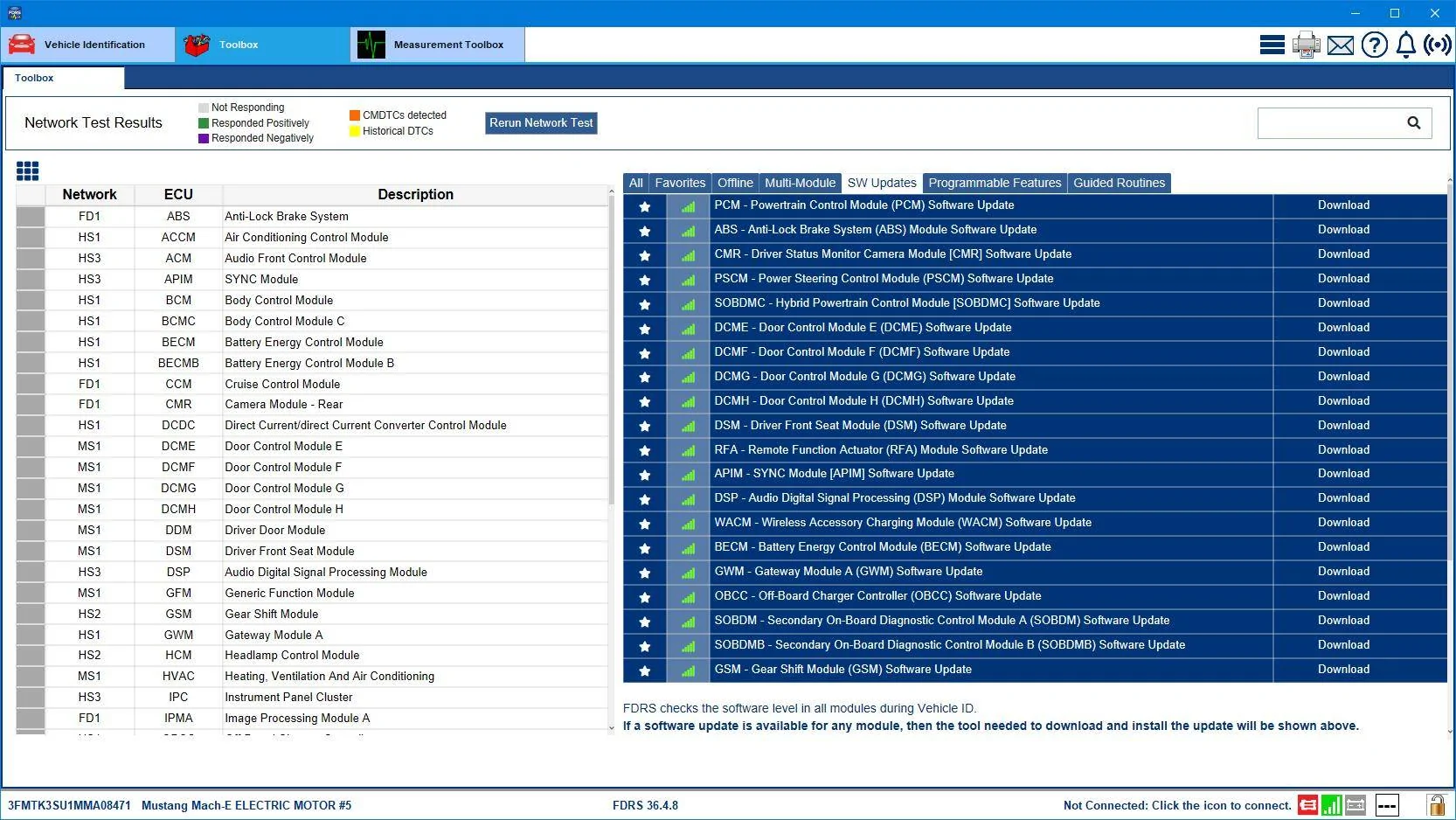
Here's your list today...and it does have a GWM that should be an OTA "in-waiting":
3FMTK3SU1MMA08471-14-Oct-23.png


I believe that gateway update would be PowerUp 5.1.1 if it showed up for you, as it is the "-PAE" revision of the gateway software. And yes, you would need that gateway updated before anything else 6.x.x related would show up.
Thanks Mike! The GWM module didn't show up as "completed" when the tech updated the car. They said to bring it back if there was an issue. I'll drop it by next week and see if they will update that module.
 

HuntingPudel

Well-Known Member
First Name
Steve
Joined
Mar 23, 2021
Threads
88
Messages
12,950
Reaction score
17,402
Location
Bay Area, CA
Vehicles
2024 MME GT with Performance Upgrade, 1979 Fire-Am, 1972 K/5 Blazer
Occupation
Engineering
Country flag
Wondering if anyone can help. I have a job 2 2021 and was getting regular updates through OTA. I brought my car back for 30k check up. The dealer told me many modules needed updating. They had to reset my car. Now my last update shows 4.1.2 just after the UI change. However I was many updates and safety recall updates past that already. When I asked them if I would get those later updates again, I got the dealer's equivalent of a shoulder shrug. Does anyone here know if I will somehow sync up and get updates again? People on the forum are on 6.1 already and I seem to have stopped getting updates. My vin is 3FMTK1RM8MMA58780. Thanks in advance for any advice.
The OTA package version numbers have nothing to do with whatever the dealer's done to your car. OTA updates usually target one or more modules within the car. If the dealer updated everything on your FDRS list, you're probably more up-to-date than if you had received the most recent OTA packages that have been scheduled for your VIN. There were a couple of module updates that seemed to get some cars OTA status "stuck" so that they wouldn't update. If what your dealer did was to update those modules, your car will begin to receive updates when they're queued OTA. ??
 

Pibe38

Well-Known Member
Joined
Jul 8, 2022
Threads
2
Messages
94
Reaction score
45
Location
Orlando, FL
Vehicles
2022 Ford Mustang Mach-E Premium X
Country flag
Hello @Mike G,

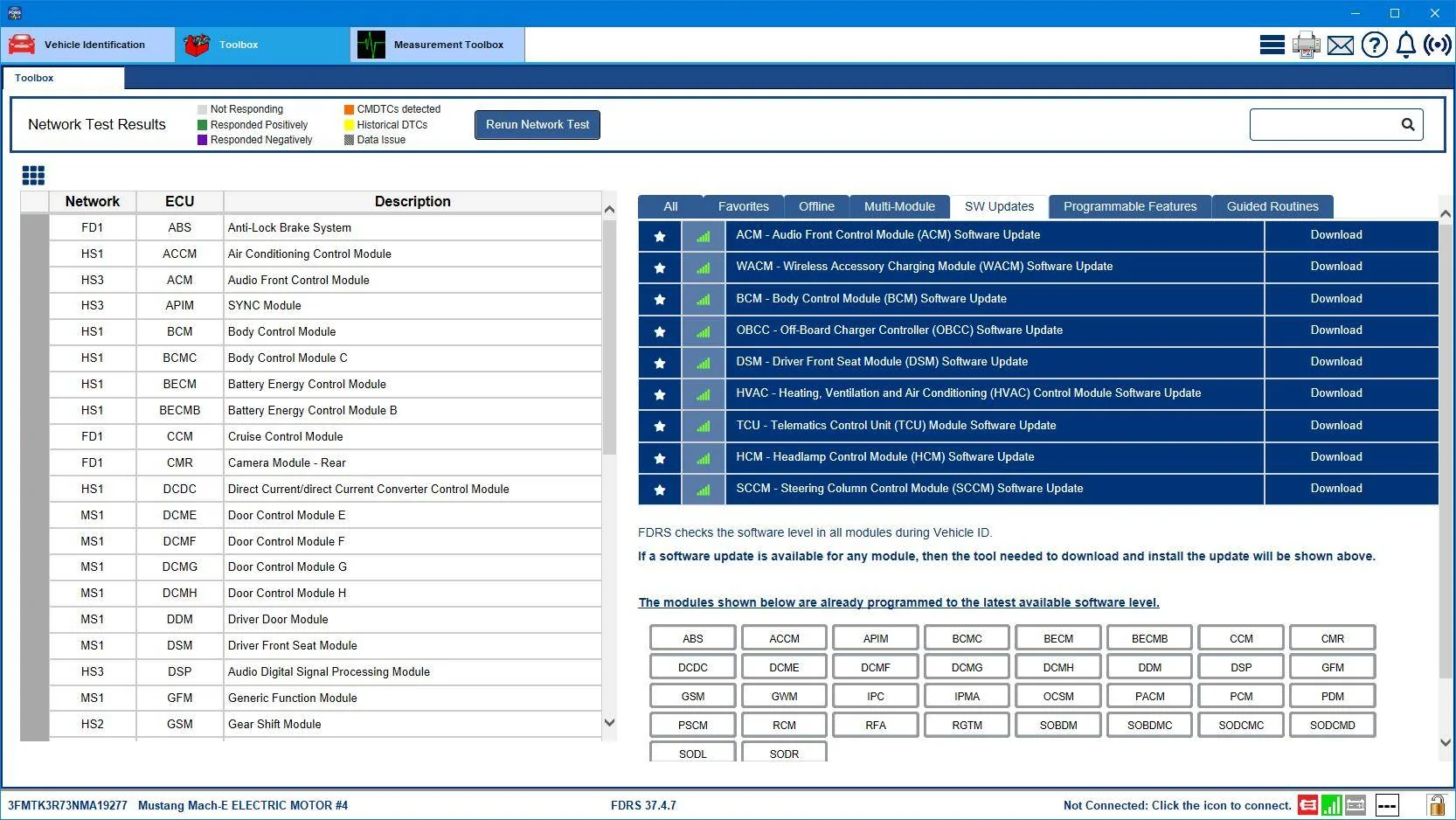
Would you mind pulling my VIN (3FMTK3R73NMA19277)?

Recently went from 5.x to 6.2.0 but car skipped a few 4.x OTAs.

Thank you!


duck2412

Active Member
Joined
Jul 9, 2022
Threads
2
Messages
44
Reaction score
25
Location
Denmark
Vehicles
Mach E
Country flag
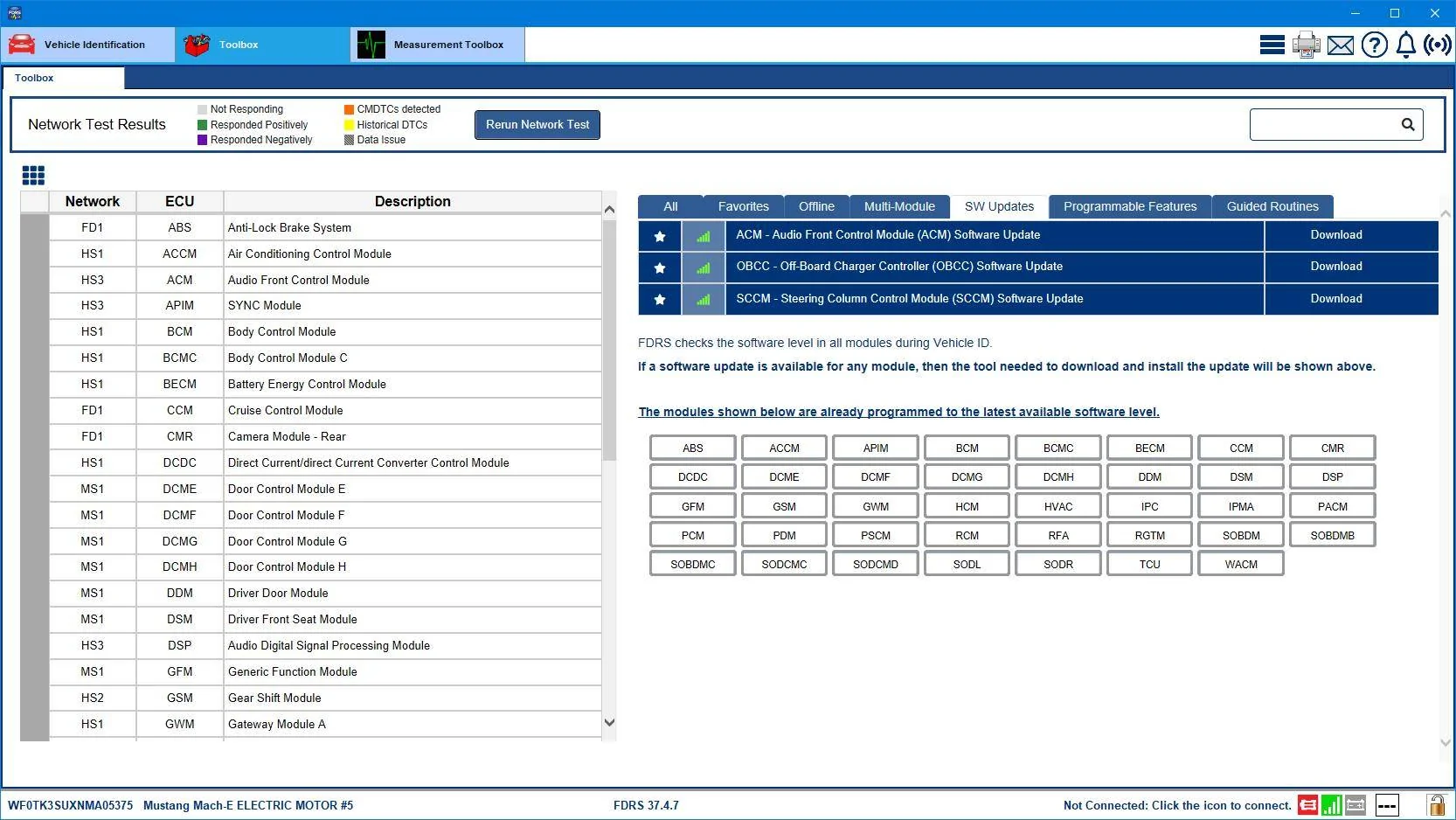
Hi, it has been a while, any significant updates for my car? :)

VIN: WF0TK3SUXNMA05375
 

dbayub

Well-Known Member
First Name
Scott
Joined
Mar 22, 2022
Threads
2
Messages
56
Reaction score
47
Location
America/Ohio
Vehicles
2023 Rapid Red Metallic Premium Standard Range AWD
Country flag
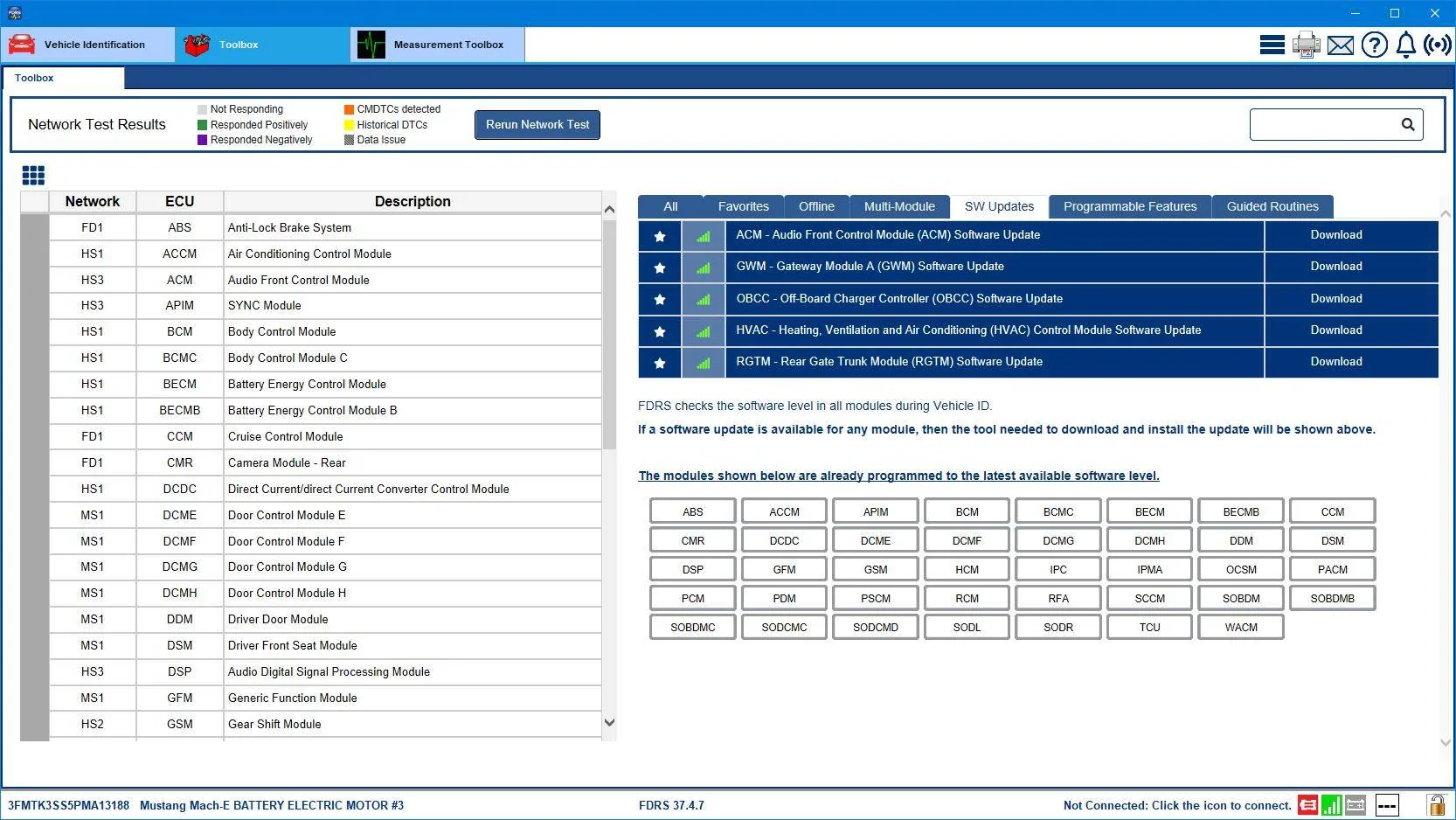
I want to see what updates are pending for my car, because I don't have any "schedule updates" option in my Sync settings, and I can't get PaaK to work with multiple phones.

VIN: 3FMTK3SS5PMA13188
 

Mike G

Well-Known Member
First Name
Mike
Joined
Mar 27, 2022
Threads
25
Messages
6,458
Reaction score
5,298
Location
N. AL, USA
Vehicles
'23(J1) Mach-E GT-PE, '22 F-150 Lightning, '24 Bronco HLE 2Dr
Country flag
Hello @Mike G,

Would you mind pulling my VIN (3FMTK3R73NMA19277)?

Recently went from 5.x to 6.2.0 but car skipped a few 4.x OTAs.

Thank you!
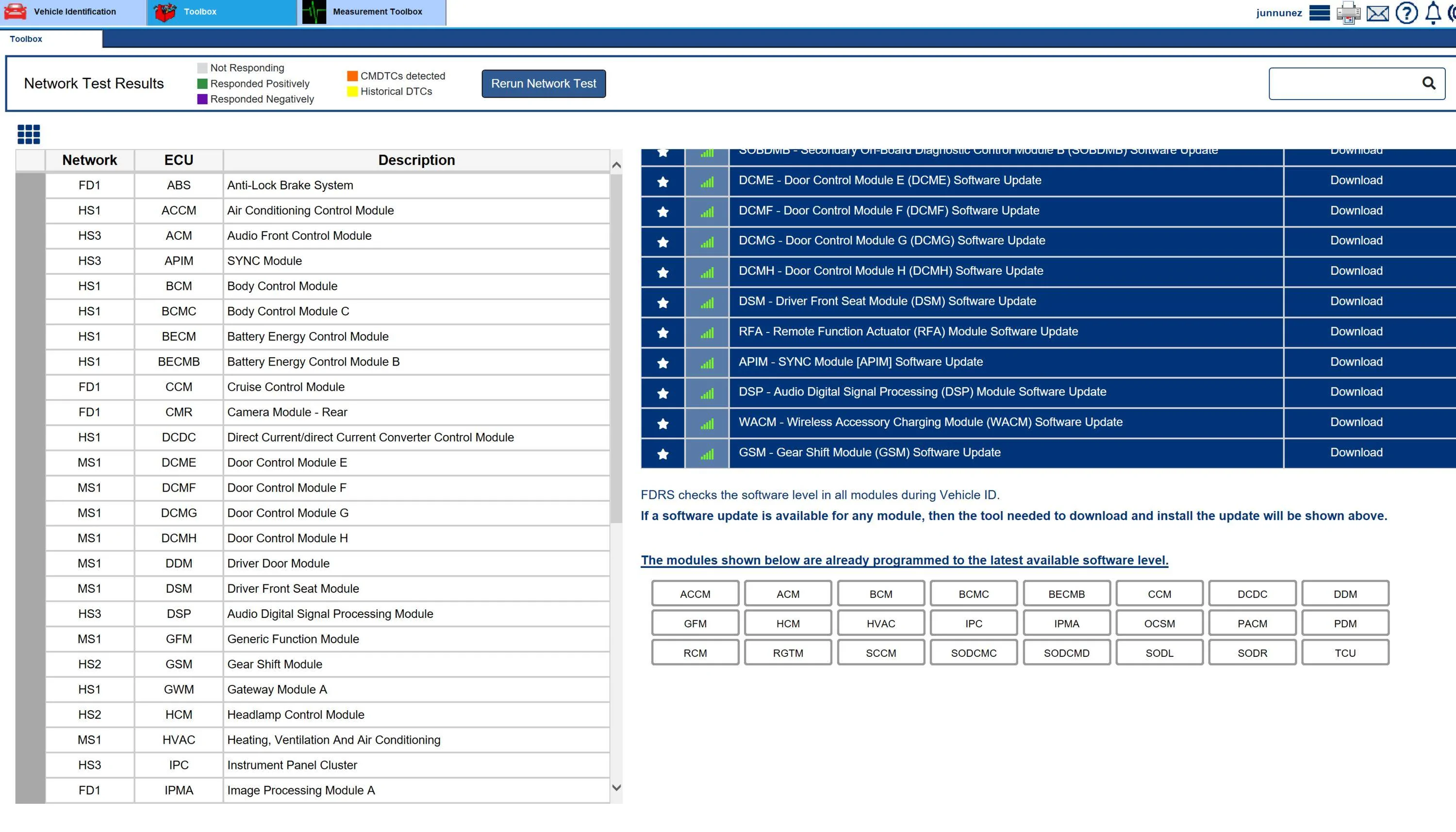
That TCU should be next:
Ford Mustang Mach-E Post here if you have an active FDRS account and are willing to look up info for others 3FMTK3R73NMA19277-15-Oct-23
 

Mike G

Well-Known Member
First Name
Mike
Joined
Mar 27, 2022
Threads
25
Messages
6,458
Reaction score
5,298
Location
N. AL, USA
Vehicles
'23(J1) Mach-E GT-PE, '22 F-150 Lightning, '24 Bronco HLE 2Dr
Country flag
I want to see what updates are pending for my car, because I don't have any "schedule updates" option in my Sync settings, and I can't get PaaK to work with multiple phones.

VIN: 3FMTK3SS5PMA13188
Ford Mustang Mach-E Post here if you have an active FDRS account and are willing to look up info for others 3FMTK3SS5PMA13188-15-Oct-23
 

Mr.GVAK

Well-Known Member
First Name
Ash
Joined
Dec 25, 2022
Threads
2
Messages
71
Reaction score
21
Location
Texas
Vehicles
2022 Mustang Mach-E Select - Star White
Country flag
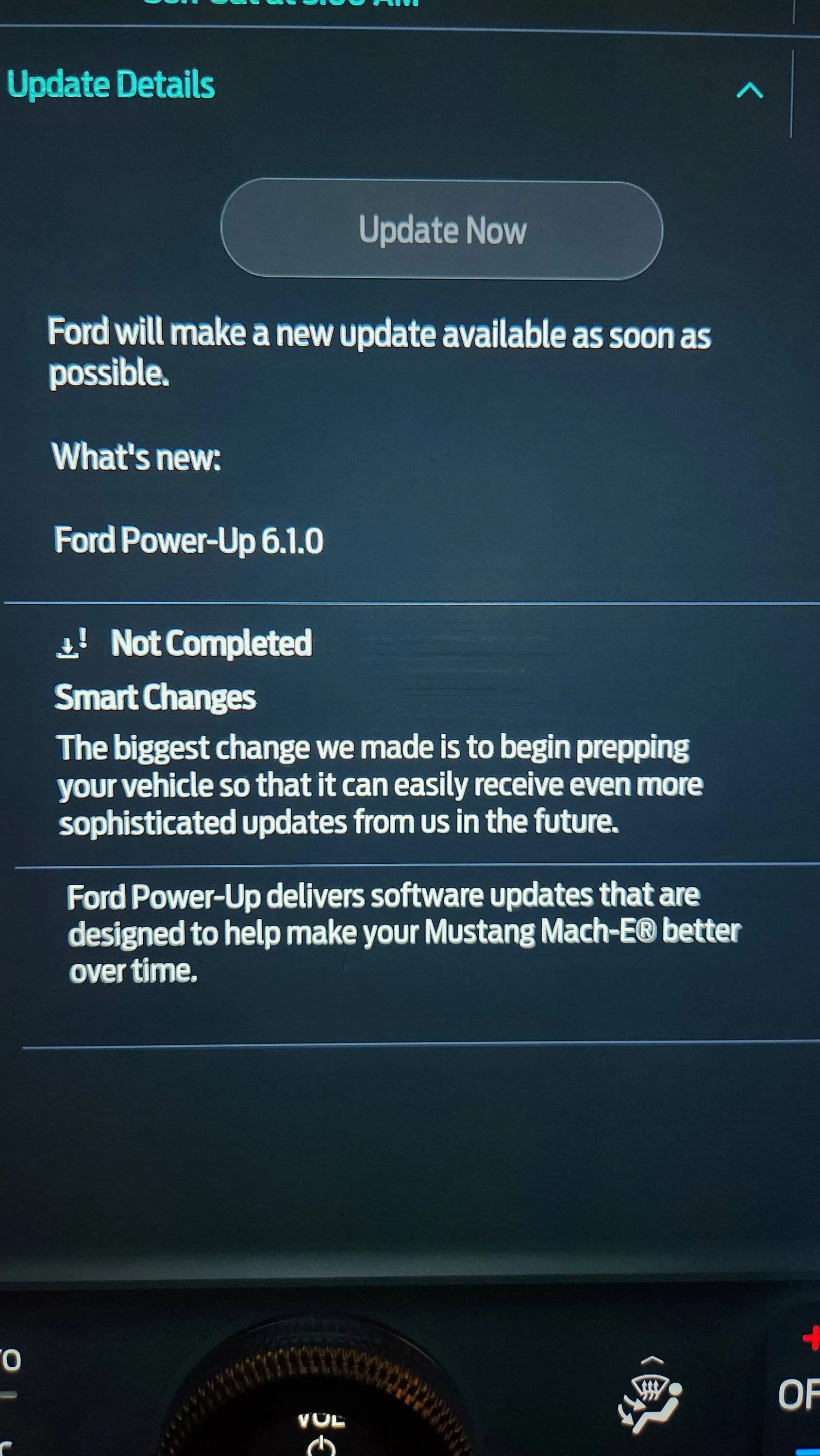
Hi, I am seeing this message for almost a week now. My MME ever had any issues with the ota updates before this. Does this mean there are updates pending but issues with the ota push for my MME?

VIN: 3FMTK1RM7NMA59811

Ford Mustang Mach-E Post here if you have an active FDRS account and are willing to look up info for others 20231013_004027
 

RKinWA

Well-Known Member
Joined
Mar 13, 2023
Threads
54
Messages
719
Reaction score
1,035
Location
Seattle, WA
Vehicles
2022 Mach-E GTPE Space White, 2023 Lincoln Corsair Pristine White Metallic
Occupation
Software Engineer
Country flag
*** I meant to post this here but I accidentally posted it as a new thread ***

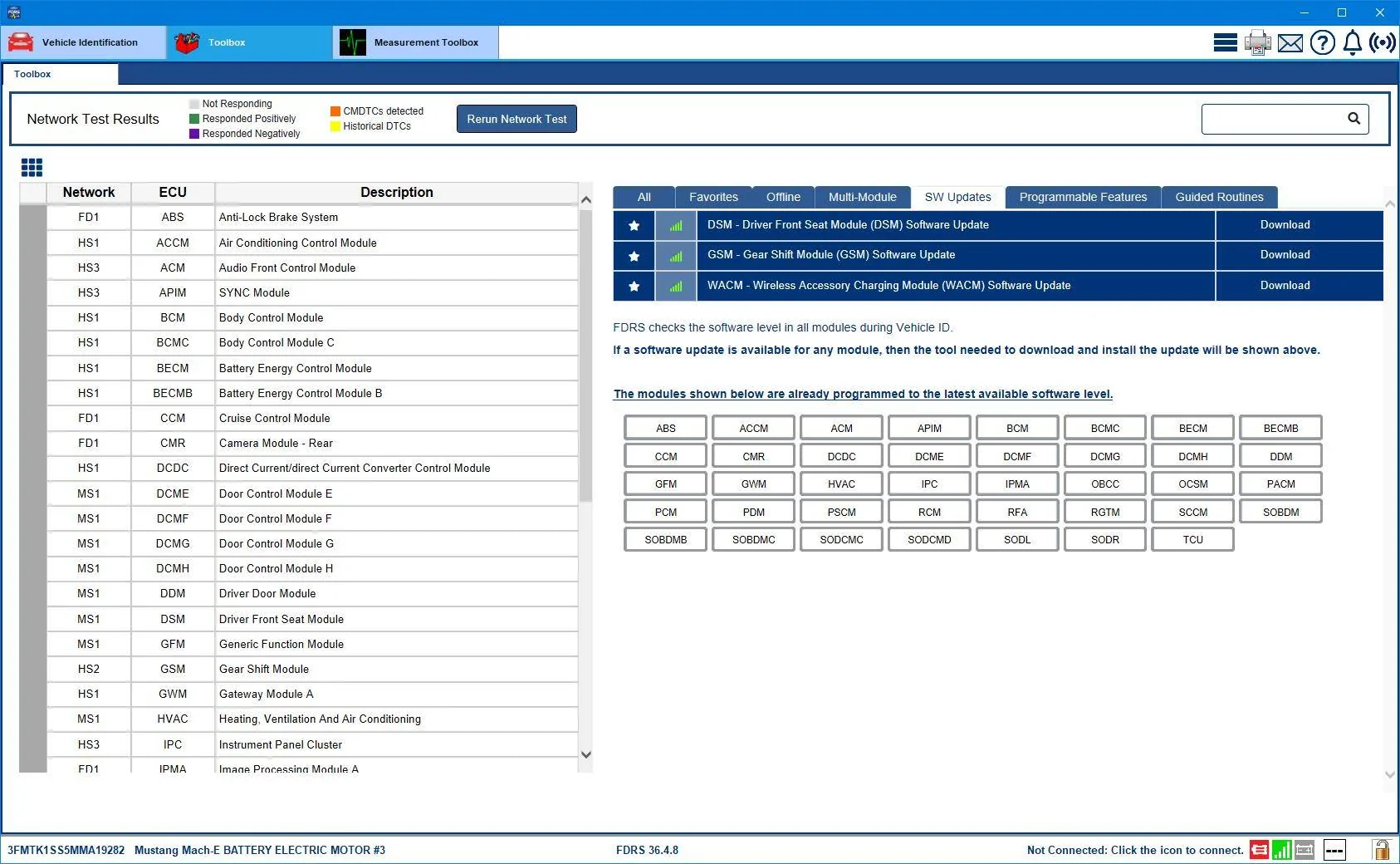
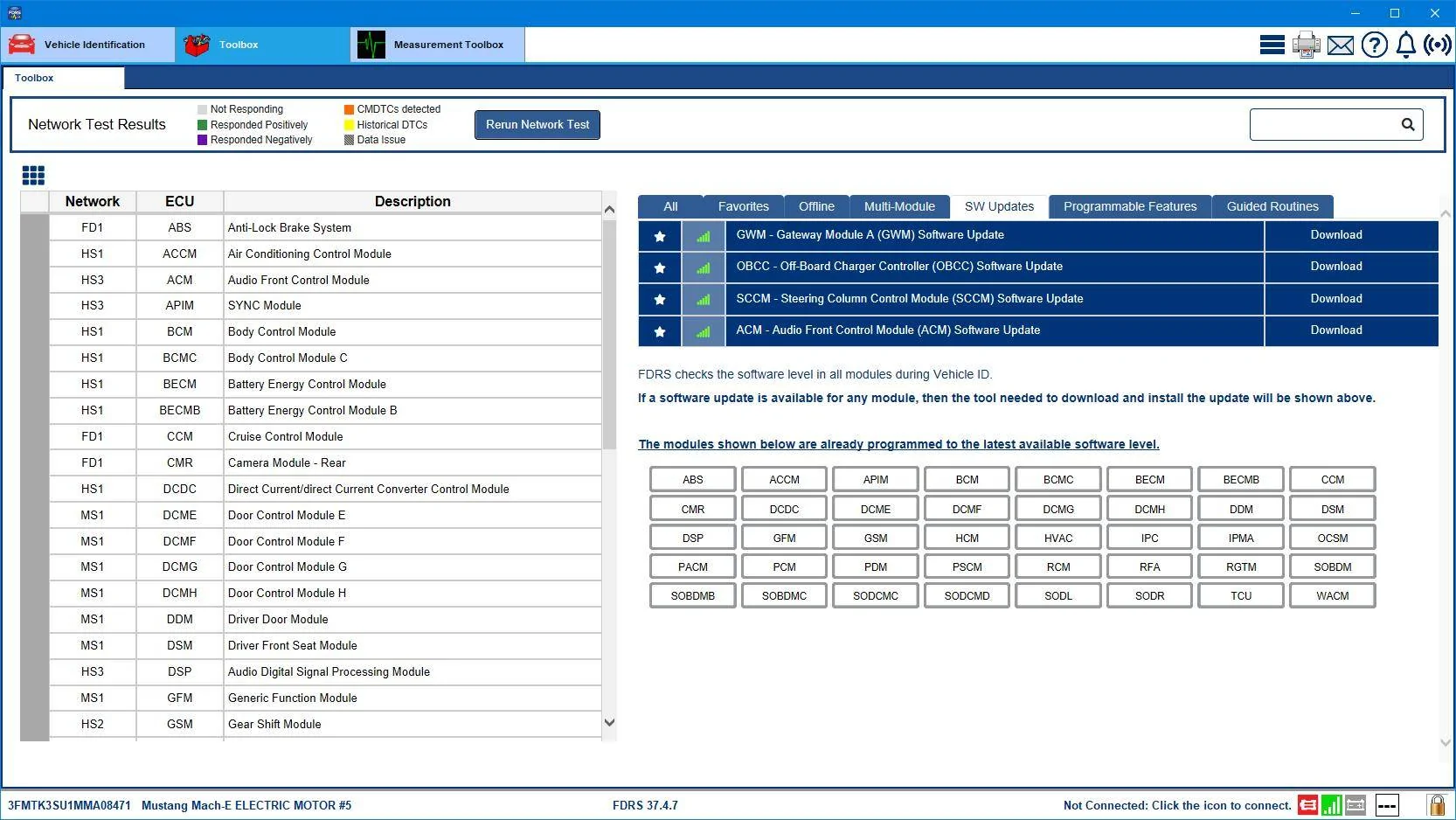
In August, I was able to convince my dealer to update all software modules in my 2021 Job 1 MachE. This took 3 months of escalating my lack of OTA updates since December 2022 with both Ford BEV team and the dealer. The FDRS data provided by Mike G was critical in gaining support from the dealer GM. After the updating service , Mike G graciously ran my VIN and found the car was almost completely updated. Since that service, I have only received OTA 4.3.6 update in early September. I can open the frunk from the door number keys and by the fob. I do not have the frunk button on the Sync screen. I have not received 5.1.1 or any later updates.

Could someone run my VIN (3FMTK3SU1MMA08471) in FDRS and maybe provide any guidance on whether my car can receive the 6.X series of OTA updates? Is 5.1.1 required to receive the 6.X series of updates?

Any help is very appreciated.

Here's the screen shots Mike G provided before and after the updating by my dealer's service department.

FDRS Screen shot before updating...

1697311559090-png.png


FDRS screen shot after updating...

1697311629749-png.png


1697311486605-png.png
I also have a lack of OTA issue, not as long as yours so I will wait to escalate, but good to know it IS possible to get someone to listen. Thanks for the hope!
 

gregpdx

Member
First Name
Greg
Joined
Feb 27, 2022
Threads
0
Messages
24
Reaction score
11
Location
Portland, OR
Vehicles
2021 Mach-EX AWD
Country flag
How long should I expect a GWM module update via USB to take? It’s been more than 45 minutes with the “software updating” and “Update is in progress. Do not remove the USB drive.” message on the screen.

And if one hangs, what’s the right way to handle it?

Update: A message saying the update failed appeared on the screen. I then tried another USB drive, and the updated succeeded after just a few minutes.
 
Last edited:

HuntingPudel

Well-Known Member
First Name
Steve
Joined
Mar 23, 2021
Threads
88
Messages
12,950
Reaction score
17,402
Location
Bay Area, CA
Vehicles
2024 MME GT with Performance Upgrade, 1979 Fire-Am, 1972 K/5 Blazer
Occupation
Engineering
Country flag
How long should I expect a GWM module update via USB to take? It’s been more than 45 minutes with the “software updating” and “Update is in progress. Do not remove the USB drive.” message on the screen.

And if one hangs, what’s the right way to handle it?

Update: A message saying the update failed appeared on the screen. I then tried another USB drive, and the updated succeeded after just a few minutes.
Depends on the speed of your USB drive. I gave up on the little flash drives because they’re super-slow. I went to an M.2 SSD in a USB case. So much faster. Even a SATA SSD will make this so much quicker. It can take hours for a little flash drive where a high- throughput SSD will take less than an hour. ?‍♂?
 

gregpdx

Member
First Name
Greg
Joined
Feb 27, 2022
Threads
0
Messages
24
Reaction score
11
Location
Portland, OR
Vehicles
2021 Mach-EX AWD
Country flag
Well based on the sheer size (6GB) and number of SYNC module/APIM downloads happening right now, I’m guessing a faster drive will be better, for sure.

Depends on the speed of your USB drive. I gave up on the little flash drives because they’re super-slow. I went to an M.2 SSD in a USB case. So much faster. Even a SATA SSD will make this so much quicker. It can take hours for a little flash drive where a high- throughput SSD will take less than an hour. ?‍♂?
Sponsored

 
Last edited:


Top