Post here if you have an active FDRS account and are willing to look up info for others

DeusEx

Well-Known Member
Joined
Apr 17, 2024
Threads
9
Messages
608
Reaction score
745
Location
New York
Vehicles
2023.5 Mach-E Premium ER AWD
Haha I thought you might say that. No, I haven't tried that. I am pretty new to this stuff so I don't know when to do/not do certain things. I didn't want to do something I shouldn't and mess something up!

Would I click yes or no for original module installed?
Click no. It's the same thing you did to address your SOBDM issue but just to a different module.
Sponsored


Mike G

Well-Known Member
First Name
Mike
Joined
Mar 27, 2022
Threads
25
Messages
6,451
Reaction score
5,289
Location
N. AL, USA
Vehicles
'23(J1) Mach-E GT-PE, '22 F-150 Lightning, '24 Bronco HLE 2Dr
Country flag
Haha I thought you might say that. No, I haven't tried that. I am pretty new to this stuff so I don't know when to do/not do certain things. I didn't want to do something I shouldn't and mess something up!

Would I click yes or no for original module installed?
Always click "No". We never click "Yes", the reason being that what we are always attempting to do is completely replace the existing software and strategy that the module has with a fresh copy from the server. So we don't want to have FDRS copy potentially garbage settings from the existing module so that it can then put those same garbage settings back after putting in fresh software. We want fresh software and correct asbuilt settings to be loaded into the module.
 

PianoDan0

Well-Known Member
Joined
Jan 2, 2024
Threads
1
Messages
104
Reaction score
24
Location
Pennsylvania, United States
Vehicles
'21 Mustang Mach-E RWD ER
Country flag
Always click "No". We never click "Yes", the reason being that what we are always attempting to do is completely replace the existing software and strategy that the module has with a fresh copy from the server. So we don't want to have FDRS copy potentially garbage settings from the existing module so that it can then put those same garbage settings back after putting in fresh software. We want fresh software and correct asbuilt settings to be loaded into the module.
Ah, thank you for explaining that!
 

jyagnd

Member
First Name
Chris
Joined
Oct 4, 2024
Threads
3
Messages
20
Reaction score
17
Location
Vermont
Vehicles
22 Mach E
Occupation
parts couterperson
I have had my vehicle to 3 dealerships. 5 times over the past year. Car stopped getting updates at 6.2.0. Back in October 23 First dealer said the time to perform updates was set wrong. Other 2. Nothing avail. Just wait. One reset the battery. And not sure it was done properly charged. When the web site showed 12v status. It was always 60s and 70s. Warranty about to expire due to miles
could you please run my vin. Thanks
3FMTK1SS1NMA16610
 
Last edited:

rugedraw

Well-Known Member
First Name
Javier
Joined
Nov 13, 2023
Threads
0
Messages
2,655
Reaction score
2,419
Location
Miami, FL
Vehicles
2021 Ford F150 Platinum FX4 EB/2023 Bronco Sport Badlands/1991 Mustang 5.0 coupe
Occupation
Auto Sales
Country flag


Mike G

Well-Known Member
First Name
Mike
Joined
Mar 27, 2022
Threads
25
Messages
6,451
Reaction score
5,289
Location
N. AL, USA
Vehicles
'23(J1) Mach-E GT-PE, '22 F-150 Lightning, '24 Bronco HLE 2Dr
Country flag
I have had my vehicle to 3 dealerships. 5 times over the past year. Car stopped getting updates at 6.2.0. Back in October 23 First dealer said the time to perform updates was set wrong. Other 2. Nothing avail. Just wait. One reset the battery. And not sure it was done properly charged. When the web site showed 12v status. It was always 60s and 70s. Warranty about to expire due to miles
could you please run my vin. Thanks
3FMTK1SS1NMA16610
There is no incorrect time to schedule updates. Ford's default time is 0100 (1 AM) but that doesn't mean anything. I set mine to check/update 0900 every day. I don't have a set driving (commute) schedule. Early in the morning is when your 12V battery will be at its lowest state of charge. So I set mine to 0900 in the event that I'm out driving and the check will then happen while the 12V battery is fully charged back up. If I do download an update on that drive, I just tell it to update while I'm in the store shopping or something.

12V batteries in MMEs and Lightnings don't seem to last much beyond the 36 month mark, just so you know.

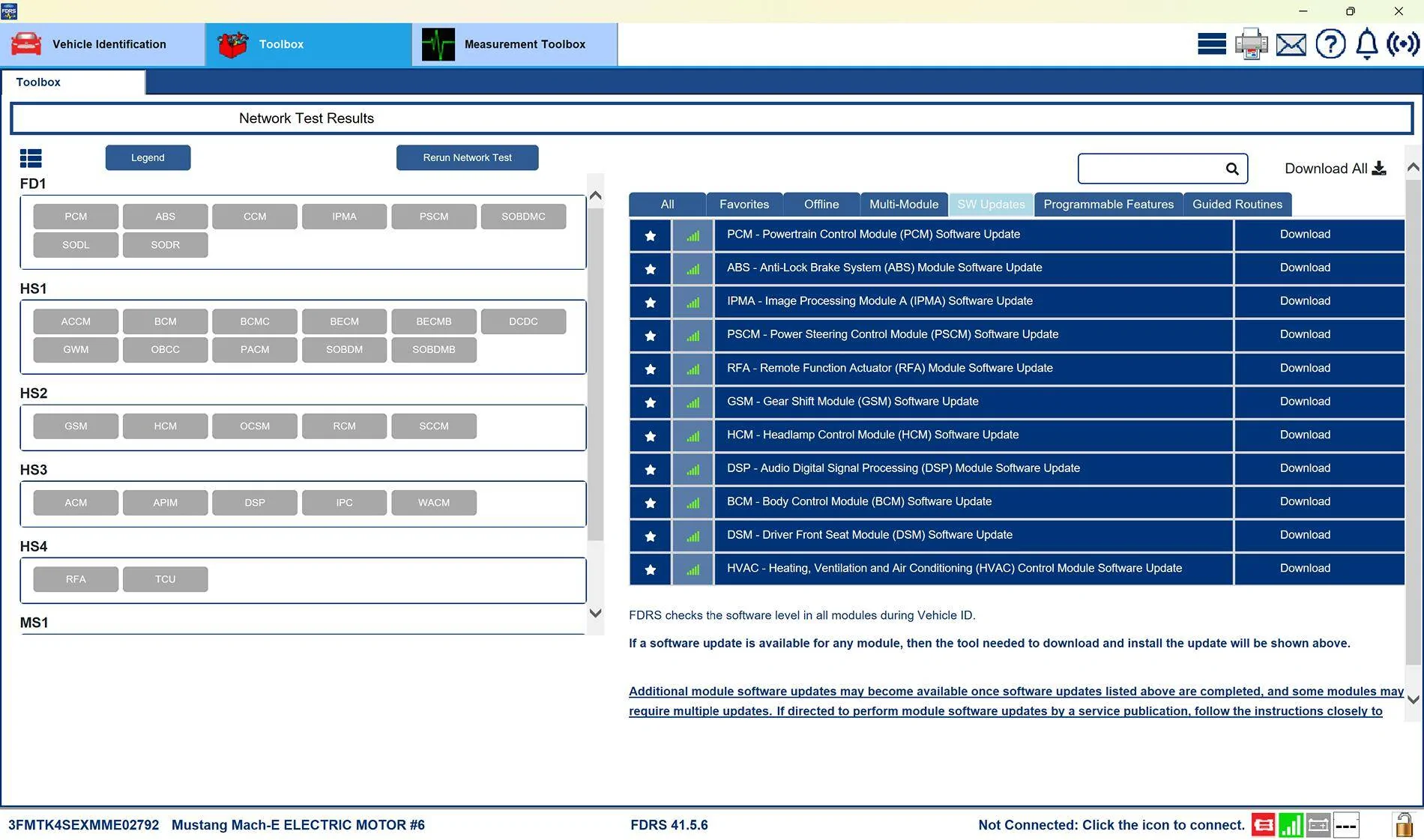
I did check to see if you had any updates and there was a very short list of available updates in FDRS:
Ford Mustang Mach-E Post here if you have an active FDRS account and are willing to look up info for others 3FMTK1SS1NMA16610-5-Oct-24


They did do quite a few updates back on the 1st of Oct, and in the process they also reset your Battery Management System (BMS) learned values so that your 12V battery would get fully charged back up to its potential capacity. Currently, that's showing as 84% SOC (based on the last time your car reported in to the cloud).

I do see a DTC related to the DCME module for a door presenter....are you having issues with the driver's door opening properly? If so, you may need to have that looked at. The only other thing I see is a DTC for the APIM that relates to an issue with XM radio (could be another related issue), but the bottom line is the suggested fix is to do a Master Reset in Sync and then a re-setup of FordPass and PAAK etc, to see if that makes that error go away. I know it's a PITA to do all of that, but that's what the diagnostics say to try.
Ford Mustang Mach-E Post here if you have an active FDRS account and are willing to look up info for others APIM_Private_Messag


Hope this helps.
 
Last edited:

jyagnd

Member
First Name
Chris
Joined
Oct 4, 2024
Threads
3
Messages
20
Reaction score
17
Location
Vermont
Vehicles
22 Mach E
Occupation
parts couterperson
There is no incorrect time to schedule updates. Ford's default time is 0100 (1 AM) but that doesn't mean anything. I set mine to check/update 0900 every day. I don't have a set driving (commute) schedule. Early in the morning is when your 12V battery will be at its lowest state of charge. So I set mine to 0900 in the event that I'm out driving and the check will then happen while the 12V battery is fully charged back up. If I do download an update on that drive, I just tell it to update while I'm in the store shopping or something.

12V batteries in MMEs and Lightnings don't seem to last much beyond the 36 month mark, just so you know.

I did check to see if you had any updates and there was a very short list of available updates in FDRS:
3FMTK1SS1NMA16610-5-Oct-24.jpg


They did do quite a few updates back on the 2nd of Oct, and in the process they also reset your Battery Management System (BMS) learned values so that your 12V battery would get fully charged back up to its potential capacity. Currently, that's showing as 84% SOC (based on the last time your car reported in to the cloud).

I do see a DTC related to the DCME module for a door presenter....are you having issues with the driver's door opening properly? If so, you may need to have that looked at. The only other thing I see is a DTC for the APIM that relates to an issue with XM radio (could be another related issue), but the bottom line is the suggested fix is to do a Master Reset in Sync and then a re-setup of FordPass and PAAK etc, to see if that makes that error go away. I know it's a PITA to do all of that, but that's what the diagnostics say to try.
APIM_Private_Message.jpg


Hope this helps.
 

jyagnd

Member
First Name
Chris
Joined
Oct 4, 2024
Threads
3
Messages
20
Reaction score
17
Location
Vermont
Vehicles
22 Mach E
Occupation
parts couterperson
Yea I did a
There is no incorrect time to schedule updates. Ford's default time is 0100 (1 AM) but that doesn't mean anything. I set mine to check/update 0900 every day. I don't have a set driving (commute) schedule. Early in the morning is when your 12V battery will be at its lowest state of charge. So I set mine to 0900 in the event that I'm out driving and the check will then happen while the 12V battery is fully charged back up. If I do download an update on that drive, I just tell it to update while I'm in the store shopping or something.

12V batteries in MMEs and Lightnings don't seem to last much beyond the 36 month mark, just so you know.

I did check to see if you had any updates and there was a very short list of available updates in FDRS:
3FMTK1SS1NMA16610-5-Oct-24.jpg


They did do quite a few updates back on the 2nd of Oct, and in the process they also reset your Battery Management System (BMS) learned values so that your 12V battery would get fully charged back up to its potential capacity. Currently, that's showing as 84% SOC (based on the last time your car reported in to the cloud).

I do see a DTC related to the DCME module for a door presenter....are you having issues with the driver's door opening properly? If so, you may need to have that looked at. The only other thing I see is a DTC for the APIM that relates to an issue with XM radio (could be another related issue), but the bottom line is the suggested fix is to do a Master Reset in Sync and then a re-setup of FordPass and PAAK etc, to see if that makes that error go away. I know it's a PITA to do all of that, but that's what the diagnostics say to try.
APIM_Private_Message.jpg


Hope this helps.
 

jyagnd

Member
First Name
Chris
Joined
Oct 4, 2024
Threads
3
Messages
20
Reaction score
17
Location
Vermont
Vehicles
22 Mach E
Occupation
parts couterperson
I did a master reset back in feb of 24 with ford support. No change since. The screen shows power up 6.2.0. Not completed. Been showing that since oct 23. I’m just concerned it’s stuck and when the warranty runs out I’m sol.
Car is great. 22 select. Just want to get the update that enables Tesla plug and charge.
Is there anyway to donate your help is greatly appreciated!
 

Mike G

Well-Known Member
First Name
Mike
Joined
Mar 27, 2022
Threads
25
Messages
6,451
Reaction score
5,289
Location
N. AL, USA
Vehicles
'23(J1) Mach-E GT-PE, '22 F-150 Lightning, '24 Bronco HLE 2Dr
Country flag
I did a master reset back in feb of 24 with ford support. No change since. The screen shows power up 6.2.0. Not completed. Been showing that since oct 23. I’m just concerned it’s stuck and when the warranty runs out I’m sol.
Car is great. 22 select. Just want to get the update that enables Tesla plug and charge.
Is there anyway to donate your help is greatly appreciated!
The "Check Updates" screen in Sync will almost always show the last thing that was going on....like forever...or at least until the next OTA thing comes along. If a tech wipes out your available updates list using FDRS and gives you back the car updated...it means it could be potentially long time until an OTA rolls in to update that screen.
 

Mike G

Well-Known Member
First Name
Mike
Joined
Mar 27, 2022
Threads
25
Messages
6,451
Reaction score
5,289
Location
N. AL, USA
Vehicles
'23(J1) Mach-E GT-PE, '22 F-150 Lightning, '24 Bronco HLE 2Dr
Country flag
@jyagnd
Oh, and the tech did an OBCC module update on the 1st of Oct that would be the same as the OTA that enables Tesla supercharging to work with your car.
 

jyagnd

Member
First Name
Chris
Joined
Oct 4, 2024
Threads
3
Messages
20
Reaction score
17
Location
Vermont
Vehicles
22 Mach E
Occupation
parts couterperson
Thanks so much for the quick reply’s. So my car basically is pretty much up to date. Nothing more except to wait for updates that update screen.
 

catnip

New Member
Joined
Sep 23, 2024
Threads
0
Messages
4
Reaction score
1
Location
Coquitlam, BC
Vehicles
2021 Mach E Premium AWD
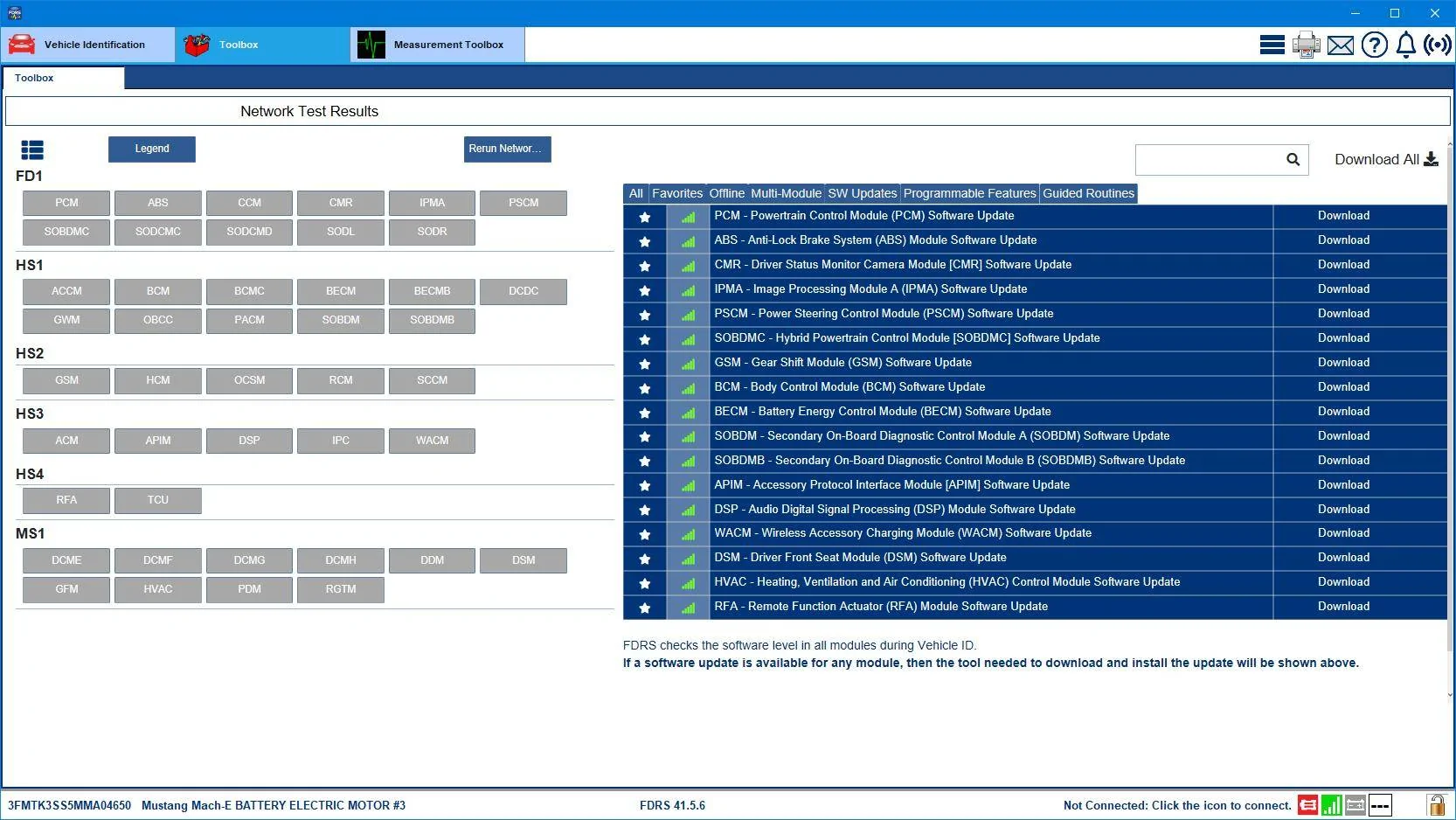
3FMTK3SS5MMA04650-3-Oct-24.jpg


I'm sure you have questions....
Thank you for taking the time to post that, I really appreciate it.

Am I correct to assume that these may eventually be installed OTA on the vehicle? I mean everything seems to be working ok on it from what I can tell, so I will take a wait and see approach for the time being. Still learning all the ins and outs of this new to us technology (electric vehicle and ota updates).


Top