22S41 Recall Software - Server Deployment Issue

Mike G

Well-Known Member
First Name
Mike
Joined
Mar 27, 2022
Threads
25
Messages
6,450
Reaction score
5,289
Location
N. AL, USA
Vehicles
'23(J1) Mach-E GT-PE, '22 F-150 Lightning, '24 Bronco HLE 2Dr
Country flag
In a nutshell my biggest problem with the ME experience. A lot of bla bla bla, but when it comes down to it "No Updates For You!".
They only see MMEs when there's a problem. The 10K service costs between 22-29$ on average depending on location from what I've seen posted.

They aren't making money on oil changes, "tune ups", and for most people they don't even get to work on the brakes that often.

So when they see a MME roll up to the service lane they know they aren't going to make much money.

So it's "Meh, another Mach-E to deal with".

Mike
Sponsored
 

kennethjk

Well-Known Member
First Name
Ken
Joined
Sep 3, 2021
Threads
30
Messages
3,331
Reaction score
2,124
Location
NY
Vehicles
MME Prem. EB 4WD, X3, IX50
Occupation
Retired
Country flag
Dropped my car off at 7 am and was told techs come in at 7:30, made appointment 2 weeks ago, was orferred last week but I wasn’t available.

car still hasn’t moved, neither have the two truck in front of me at service center.
 

Mike G

Well-Known Member
First Name
Mike
Joined
Mar 27, 2022
Threads
25
Messages
6,450
Reaction score
5,289
Location
N. AL, USA
Vehicles
'23(J1) Mach-E GT-PE, '22 F-150 Lightning, '24 Bronco HLE 2Dr
Country flag
You may need to clear your cache, especially since you are manually entering VINs
Like clear out the JSONs in the Program Data folder? Cause there's no button for "clearing the cache" that I can find.

EDIT: I just cleared out all JSON files from the vehicle data folder for VINs I previously ran and started FDRS up again. Starting with an empty VIN list I re-entered that VIN and came up with exactly the same results.

So if somebody else wants to have a go at running that VIN. Let us know what you come up with.

Mike
 
Last edited:

Gimme_my_MME

Well-Known Member
Joined
Oct 12, 2020
Threads
12
Messages
1,945
Reaction score
6,460
Location
Dearborn
Vehicles
Grabber Blue First Edition Mustang Mach-E
Occupation
Engineer
Country flag
Like clear out the JSONs in the Program Data folder? Cause there's no button for "clearing the cache" that I can find.

EDIT: I just cleared out all JSON files from the vehicle data folder for VINs I previously ran and started FDRS up again. Starting with an empty VIN list I re-entered that VIN and came up with exactly the same results.

So if somebody else wants to have a go at running that VIN. Let us know what you come up with.

Mike
Someone else may be able to provide a less drastic solution but uninstall and select remove all data and then reinstall is the sure fire way to do it
 

Mike G

Well-Known Member
First Name
Mike
Joined
Mar 27, 2022
Threads
25
Messages
6,450
Reaction score
5,289
Location
N. AL, USA
Vehicles
'23(J1) Mach-E GT-PE, '22 F-150 Lightning, '24 Bronco HLE 2Dr
Country flag
Someone else may be able to provide a less drastic solution but uninstall and select remove all data and then reinstall is the sure fire way to do it
And I will certainly do that right after somebody else with FDRS checks my results to confirm.

I'd rather not go through all that if I don't have to.

Mike


OP
OP
DevSecOps

DevSecOps

Well-Known Member
First Name
Todd
Joined
Sep 22, 2021
Threads
69
Messages
4,764
Reaction score
11,624
Location
Sacramento, CA
Vehicles
'21 Audi SQ5 / '23 Rivian R1T / '23 M3P
Occupation
CISO
Country flag
Someone else may be able to provide a less drastic solution but uninstall and select remove all data and then reinstall is the sure fire way to do it
We could also suggest he buys a new laptop every week ?
 

Gimme_my_MME

Well-Known Member
Joined
Oct 12, 2020
Threads
12
Messages
1,945
Reaction score
6,460
Location
Dearborn
Vehicles
Grabber Blue First Edition Mustang Mach-E
Occupation
Engineer
Country flag
And I will certainly do that right after somebody else with FDRS checks my results to confirm.

I'd rather not go through all that if I don't have to.

Mike
Understandable. As of this morning the versions you listed are what is showing on that car
 

WyldStallyn

Well-Known Member
First Name
Jody
Joined
Feb 7, 2022
Threads
8
Messages
526
Reaction score
600
Location
New Hampshire
Vehicles
2021 Mach-E GTPE
Country flag
And I will certainly do that right after somebody else with FDRS checks my results to confirm.
I'm showing the same software versions which are the latest. These updates have also cleared the available updates list if they had not on yours.
 

WyldStallyn

Well-Known Member
First Name
Jody
Joined
Feb 7, 2022
Threads
8
Messages
526
Reaction score
600
Location
New Hampshire
Vehicles
2021 Mach-E GTPE
Country flag
Someone else may be able to provide a less drastic solution but uninstall and select remove all data and then reinstall is the sure fire way to do it
For a single VIN you can typically go into support and select "Refresh vehicle files"
 

Mike G

Well-Known Member
First Name
Mike
Joined
Mar 27, 2022
Threads
25
Messages
6,450
Reaction score
5,289
Location
N. AL, USA
Vehicles
'23(J1) Mach-E GT-PE, '22 F-150 Lightning, '24 Bronco HLE 2Dr
Country flag
I'm showing the same software versions which are the latest. These updates have also cleared the available updates list if they had not on yours.
Wait...I'm sorry...are you saying that what I posted was correct?
 

Mike G

Well-Known Member
First Name
Mike
Joined
Mar 27, 2022
Threads
25
Messages
6,450
Reaction score
5,289
Location
N. AL, USA
Vehicles
'23(J1) Mach-E GT-PE, '22 F-150 Lightning, '24 Bronco HLE 2Dr
Country flag
The versions you posted are showing as the installed versions and these are the latest.
Thank you.

...and now...back to VIN checks........
 

Mike G

Well-Known Member
First Name
Mike
Joined
Mar 27, 2022
Threads
25
Messages
6,450
Reaction score
5,289
Location
N. AL, USA
Vehicles
'23(J1) Mach-E GT-PE, '22 F-150 Lightning, '24 Bronco HLE 2Dr
Country flag
So an OTA doesn't update/change what FDRS servers think the car needs in terms of versions?
I see what happened there......

I should have said that a different way.....

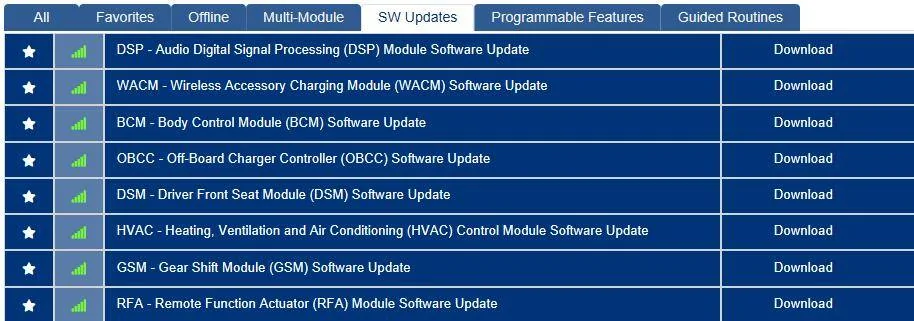
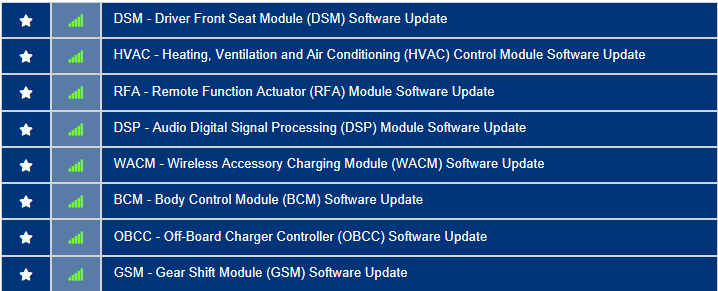
Here's his list from the 9th:
Ford Mustang Mach-E 22S41 Recall Software - Server Deployment Issue 3FMTK3SS6MMA09369-9-July-22


And here's his list from today the 13th:
Ford Mustang Mach-E 22S41 Recall Software - Server Deployment Issue 3FMTK3SS6MMA09369-13-July-22


So what I meant by my statement that it was the same list......is that it's the same list as it was last I checked it......nothing to do with OTA updated version numbers.

The OTA related module updates that *would have appeared between these dates* are not shown because they showed up between those dates, OTA fairy did his/her thing and when I ran the VIN this morning the only trace evidence in FDRS was the version numbers that supposedly got applied.

So that's what I captured and reported per the request.

Sorry for the misunderstanding and possible poor choice of phrasing.

Mike
 

Eugene

Well-Known Member
First Name
Eugene
Joined
Mar 9, 2022
Threads
6
Messages
126
Reaction score
70
Location
48130
Vehicles
Mach E GTPE
Country flag
When I go to the system update menu in the my car it just says in Update Details "Your system is up-to-date". Where can I find a list of all the updates that have actually been downloaded to my vehicle? Shouldn't there be a way to see access this info in my vehicle?
Sponsored


Top