Kmp14
Well-Known Member
- First Name
- Ken
- Joined
- May 30, 2022
- Threads
- 24
- Messages
- 383
- Reaction score
- 334
- Location
- Chicago
- Vehicles
- 2023 Mach-E Premium AWD Extended

- Thread starter
- #1
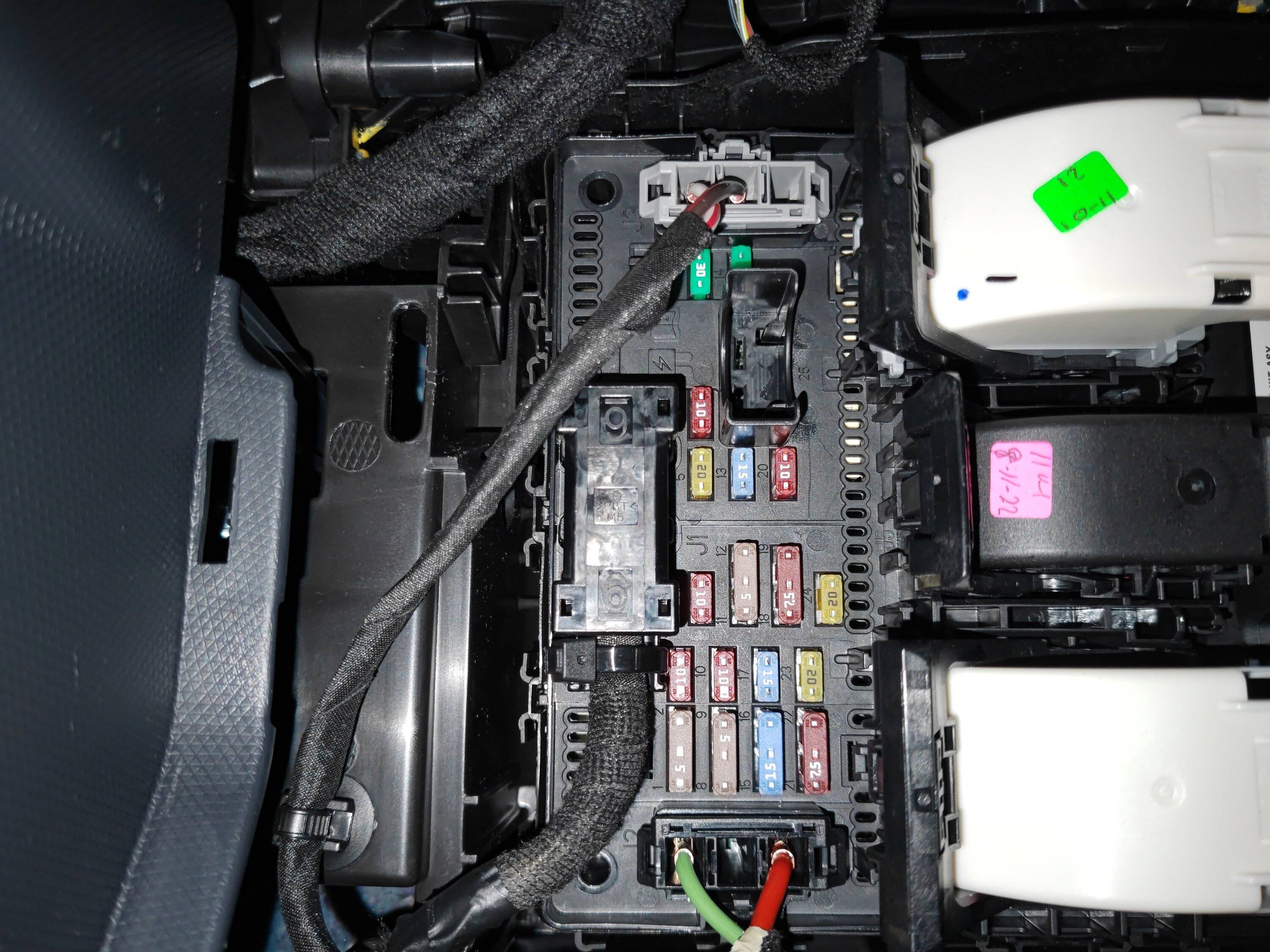
So this is unscientific, but here is what I found. I noticed that I didn't have the little icon at the top of the screen indicating that the vehicle is actively "connected". I don't think that icon had been there for weeks. Remote start and lock in FordPass was working fine despite this. Sure enough, I go into settings-Connectivity, and when I click the "connected vehicle features" setting no options show up beneath it. I pulled fuse 11 for about 10 minutes, and that didn't fix it. Next pulled fuse 11 and 19, and that DID fix it. "connected vehicle features" then had the expected options under it and I could see the icon on screen at the top right.
Next I wondered if changing the departure time settings in FordPass would might work, since it NEVER has (may have worked ONCE), as now it appeared my vehicle was fully connected. I went into FordPass, added a departure time, and saved. Interestingly, at that moment my JuiceBox app notified my that charging had started. This happens whenever the MME pulls even a little bit of juice, so I thought that was promising. I Gave it a few minutes and went out to the car. To my frustration, the departure time did not make it to the car, the connected icon was gone, and the options under "connected vehicle features" were gone too. I pulled 11 and 19 fuses again, and the connected stuff was again back. This was last night. I didn't try to add a departure time in FordPass again.
This morning my connected stuff was still there.
Theory: Sending a departure time to the MME is crashing at least some portion of the connected features. At least in the version I have in my '23 premium, SYNC 4 software version 22280, revision 592. I haven't tried it again since I dont want to keep pulling fuses, but I bet sending a departure time from FordPass would make it happen again. I am sure Ford knows what is going on, but @Ford Motor Company please pass this info on to the devs, if you can!
Next I wondered if changing the departure time settings in FordPass would might work, since it NEVER has (may have worked ONCE), as now it appeared my vehicle was fully connected. I went into FordPass, added a departure time, and saved. Interestingly, at that moment my JuiceBox app notified my that charging had started. This happens whenever the MME pulls even a little bit of juice, so I thought that was promising. I Gave it a few minutes and went out to the car. To my frustration, the departure time did not make it to the car, the connected icon was gone, and the options under "connected vehicle features" were gone too. I pulled 11 and 19 fuses again, and the connected stuff was again back. This was last night. I didn't try to add a departure time in FordPass again.
This morning my connected stuff was still there.
Theory: Sending a departure time to the MME is crashing at least some portion of the connected features. At least in the version I have in my '23 premium, SYNC 4 software version 22280, revision 592. I haven't tried it again since I dont want to keep pulling fuses, but I bet sending a departure time from FordPass would make it happen again. I am sure Ford knows what is going on, but @Ford Motor Company please pass this info on to the devs, if you can!
Sponsored
Last edited: