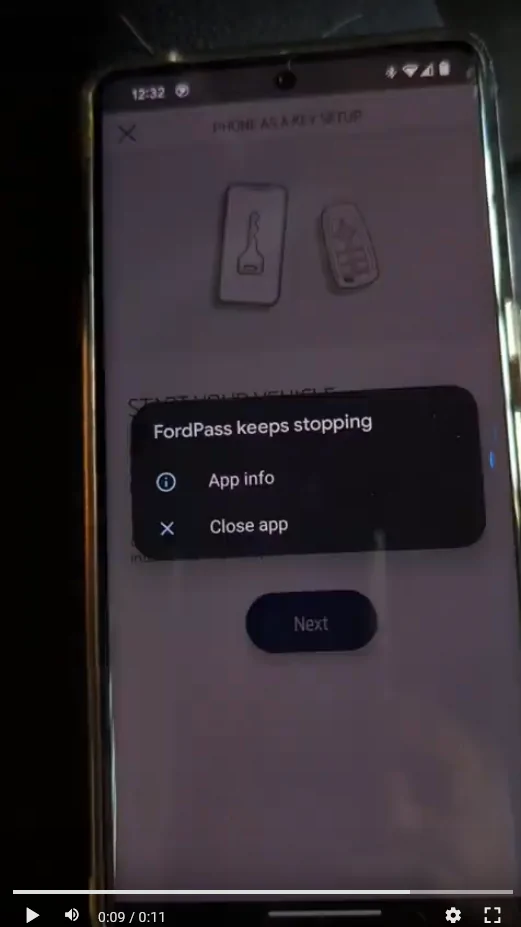
I can't setup PAAK (potentially resolved)

OP
OP
Sneezy

Sneezy

Well-Known Member
First Name
Sneezy
Joined
Mar 18, 2020
Threads
17
Messages
308
Reaction score
337
Location
Central NY
Vehicles
2000 Trans Am Firehawk, 21 Mach E Premium EXT.
Occupation
NRA Rifle Instructor
Country flag

DYohn

Well-Known Member
First Name
David
Joined
Jul 3, 2021
Threads
34
Messages
1,519
Reaction score
2,574
Location
Valley of the Sun
Vehicles
2021 Mach E Premium Ex
Country flag
Another reason I am a happy iPhone customer.

Seriosly, have you tried calling Ford Connected Services or the Ford Pass service center? Start at (800) 392-3673
 
OP
OP
Sneezy

Sneezy

Well-Known Member
First Name
Sneezy
Joined
Mar 18, 2020
Threads
17
Messages
308
Reaction score
337
Location
Central NY
Vehicles
2000 Trans Am Firehawk, 21 Mach E Premium EXT.
Occupation
NRA Rifle Instructor
Country flag
Another reason I am a happy iPhone customer.

Seriosly, have you tried calling Ford Connected Services or the Ford Pass service center? Start at (800) 392-3673
I'm a happy Android (Pixel) customer.

The PAAK product team has reached out to me to work on the problem.


MyTH

Member
Joined
May 30, 2021
Threads
2
Messages
20
Reaction score
48
Location
Boston Area
Vehicles
MME, Bolt EUV, Model Y, Lightning
Country flag
I'm interested to see how this turns out, since I'm having exactly the same problem with two different Pixel 7's and a '21 Mach-E, using FordPass 4.32.1. One of them was working, but I followed the instructions and tried "Phone As A Key Reset". Now neither phone works, and trying to use "Set Up Phone as a Key" produces only the white screen flash.
 
OP
OP
Sneezy

Sneezy

Well-Known Member
First Name
Sneezy
Joined
Mar 18, 2020
Threads
17
Messages
308
Reaction score
337
Location
Central NY
Vehicles
2000 Trans Am Firehawk, 21 Mach E Premium EXT.
Occupation
NRA Rifle Instructor
Country flag
I'm interested to see how this turns out, since I'm having exactly the same problem with two different Pixel 7's and a '21 Mach-E, using FordPass 4.32.1. One of them was working, but I followed the instructions and tried "Phone As A Key Reset". Now neither phone works, and trying to use "Set Up Phone as a Key" produces only the white screen flash.
I will update when it's sorted out or when I know more. I also have an open case with Ford and the BEV team.
 

Space_Pony

Well-Known Member
Joined
Jun 7, 2023
Threads
4
Messages
1,701
Reaction score
1,437
Location
Indiana
Vehicles
2023 Premium Mach-E awdX
Country flag
You could try uninstalling the app and reinstalling then go into the settings for the app. Give permissions to every thing before trying anything. Make sure locations are allowed all the time. After permissions are granted open fordpass and try it again.
 
OP
OP
Sneezy

Sneezy

Well-Known Member
First Name
Sneezy
Joined
Mar 18, 2020
Threads
17
Messages
308
Reaction score
337
Location
Central NY
Vehicles
2000 Trans Am Firehawk, 21 Mach E Premium EXT.
Occupation
NRA Rifle Instructor
Country flag
I have to say I am very impressed with the Ford PAAK Team! They really rocked.
I sent them my log reports while we were on the call so we could talk about what went on.


I'm interested to see how this turns out, since I'm having exactly the same problem with two different Pixel 7's and a '21 Mach-E, using FordPass 4.32.1. One of them was working, but I followed the instructions and tried "Phone As A Key Reset". Now neither phone works, and trying to use "Set Up Phone as a Key" produces only the white screen flash.
First, clear the app data and cache, I only did the cache so it did not clear an old key out. This will log you out of the Ford Pass App. I did NOT clear my phone from the vehicle.
Log back into the app. Start the car (key fob MUST be in the car for the entire process)

Go through the entire PAAK setup process. If you get an Android prompt to pair and connect, IGNORE that and let the app do it's thing. This is sort of where things went wrong. I kept hitting the pair and connect and it didn't work the first 3 times. The 4th time was the charm. Just let the app do it's thing.
Now setup the backup pass code. You should be able to test it now, just put the key far enough away from the car.
The app will prompt you to set the optimization of the location services. Make sure you set it to all the time and that your regular location services are set to high.
You should be all set from here!

You could try uninstalling the app and reinstalling then go into the settings for the app. Give permissions to every thing before trying anything. Make sure locations are allowed all the time. After permissions are granted open fordpass and try it again.
Yes, that may have helped but the PAAK Team didn't want me to do that. They said I shouldn't have to clear the old key or uninstall the app.
I have my location set to high and the app to use it all the time. They did reiterate that to me.
They also said to make sure the phone is in your front pocket for proper connectivity.
 

jasn

Well-Known Member
First Name
Jim
Joined
Jan 15, 2022
Threads
8
Messages
78
Reaction score
52
Location
Outer-Cape, MA
Vehicles
2021 MME AWD Premium ER - Space White
Occupation
Retired
Country flag
PAAK on my Samsung Galaxy 20 has been working very well for me these past few months, except when it's raining. Then it makes me boot the app to unlock the door. :mad: I think some other apps compete with PAAK over connection priorities.
 

Mach E PaaK

Member
Joined
Mar 11, 2022
Threads
0
Messages
6
Reaction score
6
Location
MI
Vehicles
Mach E GT
Country flag
The interim fix to the Android crash during Phone as a Key setup is to clear app data (not the cache).

We're working on a long-term fix in the next app release to prevent the Android app from entering this error state.
 

MyTH

Member
Joined
May 30, 2021
Threads
2
Messages
20
Reaction score
48
Location
Boston Area
Vehicles
MME, Bolt EUV, Model Y, Lightning
Country flag
Thanks for the workaround! I was able to get PaaK working on both Pixel 7 phones by selecting the "Clear storage" option on Android's "App info -> Storage & cache" page.
 

dah

Well-Known Member
First Name
David
Joined
Nov 29, 2022
Threads
1
Messages
53
Reaction score
26
Location
Ann Arbor, MI
Vehicles
Mustang Mach-E 2022 SR AWD
Country flag
PAAK on my Samsung Galaxy 20 has been working very well for me these past few months, except when it's raining. Then it makes me boot the app to unlock the door. :mad: I think some other apps compete with PAAK over connection priorities.
Rain can definitely screw with the Bluetooth connection and make it unlikely to connect since, which then makes it less likely to wake the app to do the PaaK routine; this also happens if you keep your phone in the back pocket since the BLE connection won’t work through your body.
Sponsored


Top