SnBGC

Well-Known Member
First Name
Greg
Joined
Apr 20, 2020
Threads
46
Messages
5,962
Reaction score
9,778
Location
Phoenix
Vehicles
2021 Mach-E FE, 2021 Wrangler 4xe High Altitude
Occupation
Manager
Country flag
do you have access to Lock/Unlock/Remote Start your car via the ForddPass app? if so, you are good to go
If you are using Fordpass, that means you've activated it. This is just the initial FP setup they are wanting to make sure you have done. If you haven't, BlueCruise can't fully activate.

Okay thanks.
Yes. I remote start from the mobile app on a regular basis. Cool.

I looked in the FordPass website and found Connected Services. Right now it shows the Blue Oval Charging Network and Built In Navigation. Both with expiration dates Feb 2023
Sponsored

 

Mike G

Well-Known Member
First Name
Mike
Joined
Mar 27, 2022
Threads
25
Messages
6,450
Reaction score
5,289
Location
N. AL, USA
Vehicles
'23(J1) Mach-E GT-PE, '22 F-150 Lightning, '24 Bronco HLE 2Dr
Country flag
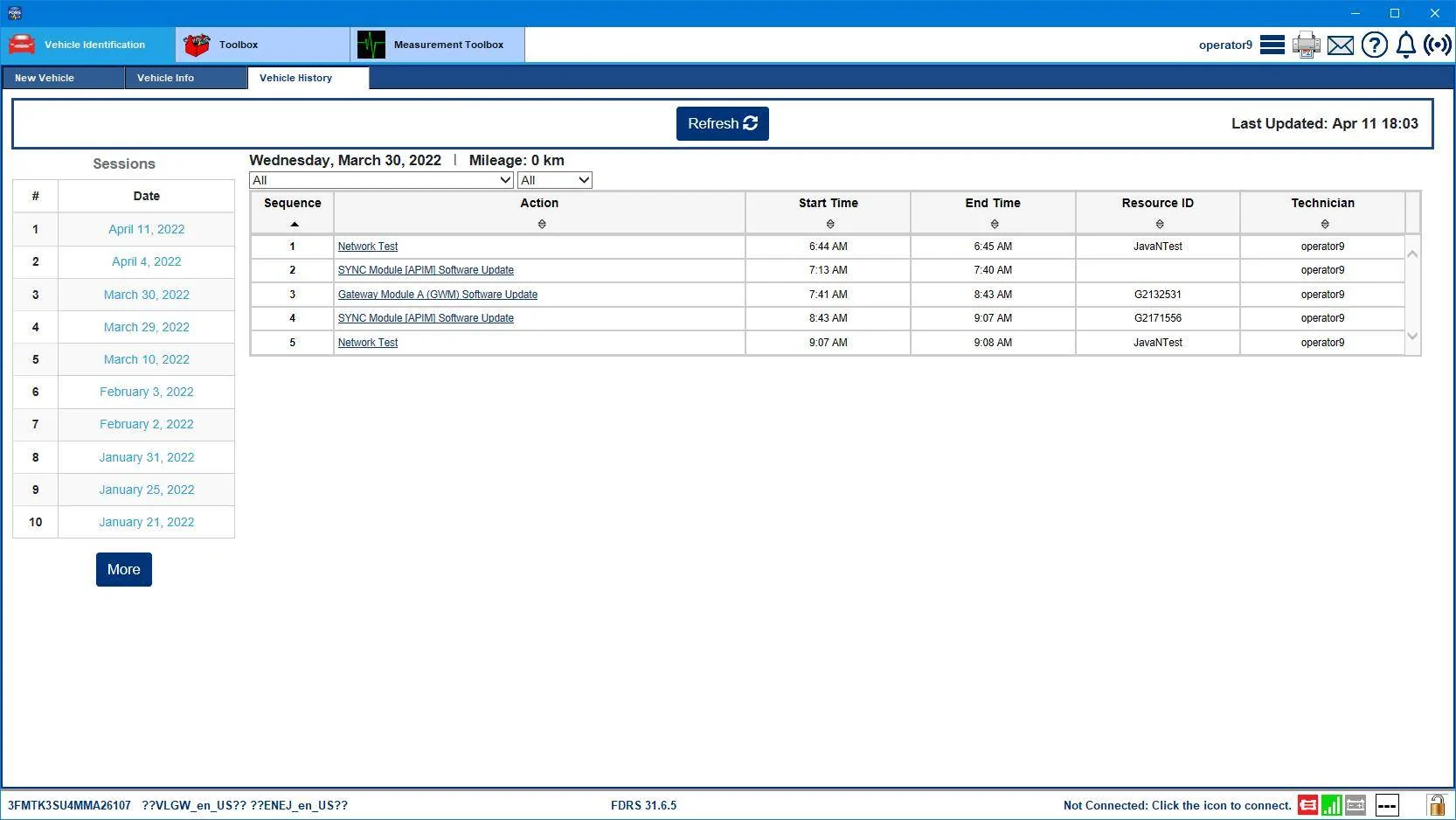
Recently another forum member asked me for my VIN so my FDRS logs (or OASIS history) could be checked to see how I successfully arrived at the BC finish line when dealer techs are having issues. I provided the requested info. And then after going back and re-reading the instructions for both 21G01 and the preceding 21P22 program that is referenced in 21G01 (step 19.) it kinda clicked as to what happened.

I didn't follow the instructions because I didn't know about them.

All I did know what that I was supposed to do any GWM or TCU updates before I did anything else. There weren't any GWM or TCU updates pending when I connected to my Mach-E (there were on my F-150 that I did the day before).

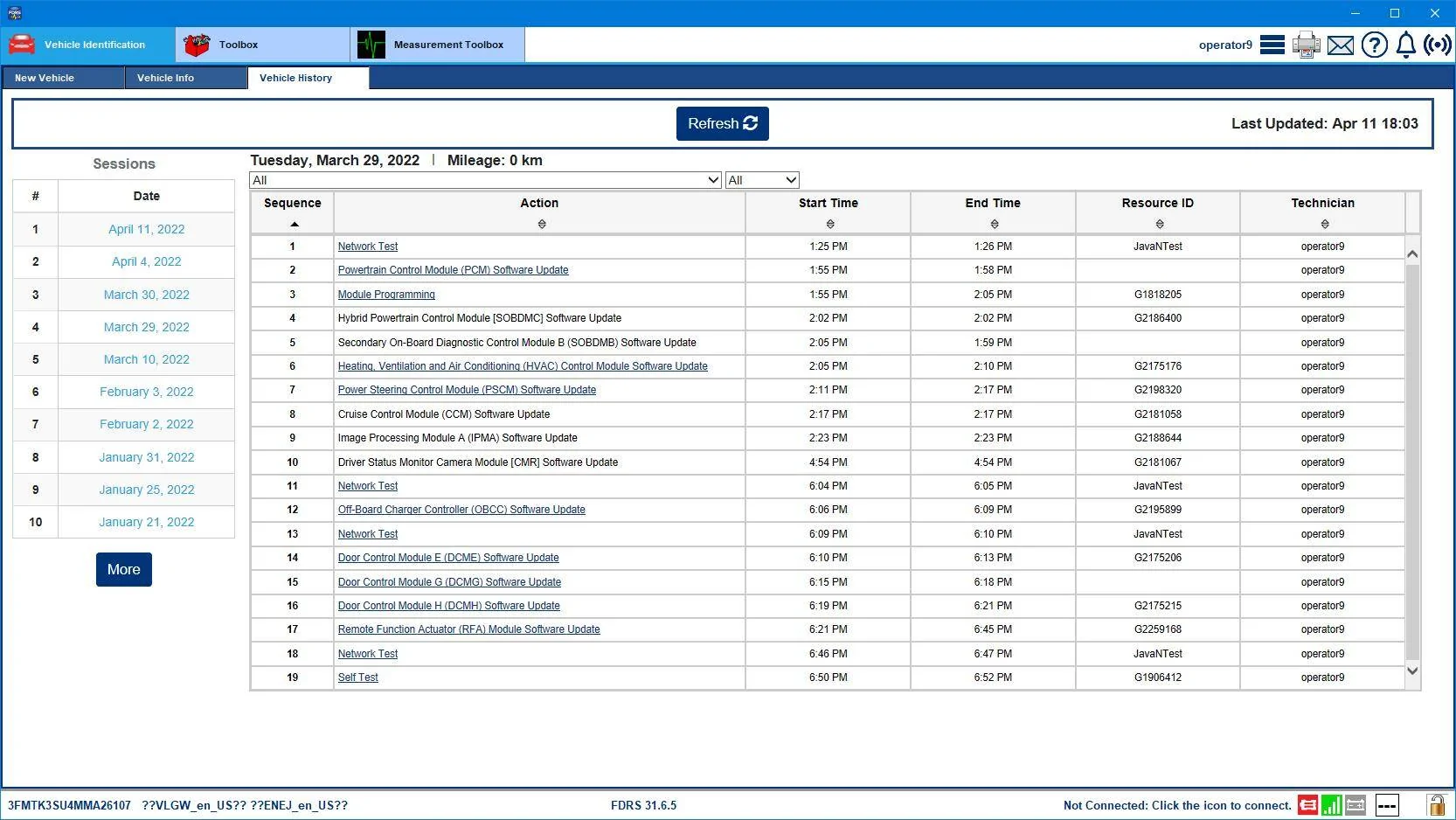
So in looking over my history logs I started with the PCM first. And in essence without knowing it I completed the biggest part of 21P22 before getting into the Power Steering module update which chained the other BC related modules into the first phase of the BC update process. So if anybody else is doing this from scratch they can reference both the actual instructions and take a look at my logs to see what I did to get there. I did this over two days....not because I had to due to any programming issues, but because on day one I had had enough by 7 in the evening, and went to eat dinner, and started the last of it the next morning.

Remember for the USB drive based updates to *reformat* the USB stick *everytime* before loading the files onto it for that module, and be sure to "safely eject" the drive from your computer before inserting it into the car's USB slot. You don't want to stick a corrupted USB drive in.....

Mike

Ford Mustang Mach-E Optional Product Improvement Program 21G01 - BlueCruise Programming Mach_E Day1 Programming


Ford Mustang Mach-E Optional Product Improvement Program 21G01 - BlueCruise Programming Mach-E_Day2_programming
 

Gimme_my_MME

Well-Known Member
Joined
Oct 12, 2020
Threads
12
Messages
1,946
Reaction score
6,464
Location
Dearborn
Vehicles
Grabber Blue First Edition Mustang Mach-E
Occupation
Engineer
Country flag
Recently another forum member asked me for my VIN so my FDRS logs (or OASIS history) could be checked to see how I successfully arrived at the BC finish line when dealer techs are having issues. I provided the requested info. And then after going back and re-reading the instructions for both 21G01 and the preceding 21P22 program that is referenced in 21G01 (step 19.) it kinda clicked as to what happened.

I didn't follow the instructions because I didn't know about them.

All I did know what that I was supposed to do any GWM or TCU updates before I did anything else. There weren't any GWM or TCU updates pending when I connected to my Mach-E (there were on my F-150 that I did the day before).

So in looking over my history logs I started with the PCM first. And in essence without knowing it I completed the biggest part of 21P22 before getting into the Power Steering module update which chained the other BC related modules into the first phase of the BC update process. So if anybody else is doing this from scratch they can reference both the actual instructions and take a look at my logs to see what I did to get there. I did this over two days....not because I had to due to any programming issues, but because on day one I had had enough by 7 in the evening, and went to eat dinner, and started the last of it the next morning.

Remember for the USB drive based updates to *reformat* the USB stick *everytime* before loading the files onto it for that module, and be sure to "safely eject" the drive from your computer before inserting it into the car's USB slot. You don't want to stick a corrupted USB drive in.....

Mike

Mach_E Day1 Programming.png


Mach-E_Day2_programming.png
Also NEEDS to be >32gb USB drive even if the file is tiny!
 

Blake Sacha

Active Member
First Name
Blake
Joined
Jul 29, 2021
Threads
8
Messages
26
Reaction score
22
Location
Gilbert, AZ
Vehicles
Mach E Premium Carbonized Gray
Country flag
Santan Ford seems to have figured this out. After my failed experience over the weekend, they were able to explain what failed and how they would fix it and test it next time. I will be taking my car back in next week.
 

louibluey

Well-Known Member
First Name
Joe
Joined
Dec 21, 2020
Threads
60
Messages
888
Reaction score
1,127
Location
NY
Vehicles
FE "Louibluey" GB
Occupation
retired
Country flag
It was in the SW Updates list first thing this morning. no PMI required
Was your SW Update list clear before that?

So this is a key question, if our SW Update list is clear, Is there anything we can do to get the GWM update line to show in SW Update. Or, is it a matter of waiting for our VIN to be entered on some internal Ford server list somewhere?


Somnus

Well-Known Member
First Name
Cody
Joined
Jan 19, 2022
Threads
0
Messages
45
Reaction score
63
Location
Salt Lake City, UT
Vehicles
'21 Mach E Select AWD (Comfort/Tech Package)
Occupation
Assistant Parts Manager
Country flag
Was your SW Update list clear just before that?

So this is a key question, if our SW Update list is clear, Is there anything we can do to get the GWM update line to show in SW Update. Or, is it just a matter of waiting for our VIN to be entered on some internal Ford list somewhere?
My list was clear for a few days prior to the update appearing. I'm under the assumption that the car and Ford's server finally sat down for tea and caught up.
 

Gullwingdmc

Well-Known Member
First Name
Chip
Joined
May 15, 2021
Threads
85
Messages
2,943
Reaction score
4,110
Location
Boston, MA
Vehicles
2022 Mustang Mach E GT AWD ER - Grabber Blue
Country flag
Santan Ford seems to have figured this out. After my failed experience over the weekend, they were able to explain what failed and how they would fix it and test it next time. I will be taking my car back in next week.
I keep saying, we need a road trip and Job 1 meet up in Arizona!
 

GrumblesTheDog

Well-Known Member
Joined
Aug 21, 2020
Threads
9
Messages
421
Reaction score
644
Location
Ohio
Vehicles
2021 Mustang Mach-E GB FE
Country flag
My list was clear for a few days prior to the update appearing. I'm under the assumption that the car and Ford's server finally sat down for tea and caught up.
Well that gives me some hope... Maybe I can pester someone to look up my VIN in a few days.
 

Nikos

Well-Known Member
Joined
Dec 29, 2019
Threads
2
Messages
594
Reaction score
547
Location
Taylors SC
Vehicles
17 Must GT, 21MME AWD, 22 F-150 Lightning
Occupation
Aircraft Mechanic
Country flag
Yesterday I had 2.5.2 successfully updated.
Don't know if this the final BC download before it becomes operational or it is more to come. I need to check with my account to see if I got a message from Ford.
What I noticed though that 2.5.1 took 220 minutes to download and update with the vehicle. 2.5.2 was quick.
What is next.?????
 

Chuck

Well-Known Member
First Name
Chuck
Joined
May 13, 2021
Threads
96
Messages
1,258
Reaction score
1,775
Location
SoCal
Vehicles
Mustang Mach E 2021
Country flag
I took my Mach-E into the dealer for the BC upgrade. At the end of the day the rep texts me with this:

" The update has been installed. We will not have time to go road test it and see if it is working, are good to pick up and do that ? "

I told him to keep it and run the test this morning. I didn't think it was done because BC didn't show up in my Ford account.

This morning at around 9:15 he texts me with:

" Update, so it did not take the software, it did not show up on your vehicle. This is the first one we have done, we followed all the steps so not sure why it won't take it. We have reached out to Ford technical hotline for some guidence (sic). Let you know as soon as I know what the next step will be. Sorry for the delay. "


Sigh.
 

ChasingCoral

Well-Known Member
First Name
Mark
Joined
Feb 3, 2020
Threads
502
Messages
14,308
Reaction score
28,656
Location
Maryland
Vehicles
2021 GB E4X FE, 2022 F-150 Lightning Lariat ER
Occupation
Retired oceanographer
Country flag
Yesterday I had 2.5.2 successfully updated.
Don't know if this the final BC download before it becomes operational or it is more to come. I need to check with my account to see if I got a message from Ford.
What I noticed though that 2.5.1 took 220 minutes to download and update with the vehicle. 2.5.2 was quick.
What is next.?????
Watch for 2.5.3. Please update your status on the poll:
https://www.macheforum.com/site/threads/comprehensive-powerup-ota-poll.15151/
 

Nikos

Well-Known Member
Joined
Dec 29, 2019
Threads
2
Messages
594
Reaction score
547
Location
Taylors SC
Vehicles
17 Must GT, 21MME AWD, 22 F-150 Lightning
Occupation
Aircraft Mechanic
Country flag
Just checked with Connected Services and 2.5.2 update made BC active and operational. Now I need to activate the cruise control on my way home and see what would happen. According to Ford, I am good for a year.
 

RickMachE

Well-Known Member
Joined
Jul 1, 2021
Threads
267
Messages
17,926
Reaction score
27,921
Location
SE MI
Vehicles
2022 Mach-E Premium 4X, 2022 Lightning Lariat ER
Country flag
I took my Mach-E into the dealer for the BC upgrade. At the end of the day the rep texts me with this:

" The update has been installed. We will not have time to go road test it and see if it is working, are good to pick up and do that ? "

I told him to keep it and run the test this morning. I didn't think it was done because BC didn't show up in my Ford account.

This morning at around 9:15 he texts me with:

" Update, so it did not take the software, it did not show up on your vehicle. This is the first one we have done, we followed all the steps so not sure why it won't take it. We have reached out to Ford technical hotline for some guidence (sic). Let you know as soon as I know what the next step will be. Sorry for the delay. "

Sigh.
Good for you for refusing to pick it up until they finish.


Top