

generaltso
Well-Known Member
- Joined
- Jun 24, 2020
- Threads
- 76
- Messages
- 15,389
- Reaction score
- 28,696
- Location
- Vermont
- Vehicles
- 2024 Kia EV9 GT-Line

Phone as a Key.What is a PAAK?
Sponsored
Phone as a Key.What is a PAAK?
Had this EXACT problem a few weeks. Drove to work using PAAK...left fob at home. No problem. Head out to run an errand and "no fob detected" or whatever it says. I try and bring up the password screen so I can enter my password...no screen. Nothing I did could make the screen come up. My wife had to bring a fob to my office otherwise the car was useless.Well, stranded last night by PAAK. So, I walk up to the car, does not recognize me, fine, happens, open the phone, open the app, Ford Pass Says BT connected, I unlock the car, try to Start "Key not Detected". Okay, I will kill the Ford Pass app, restart the phone, nothing works. All BT connections are working, Apple Car play is working, Ford Pass can open/close/start/stop everything, but no dice on getting the Key Detected. I did just take the car in for Service on Monday and they flashed what they needed to get the PU0105 installed so that Blue Cruise worked, however, since then, PAAK has worked. Worked on Thursday morning too, on my drive to work, but failed that evening on the drive home. So, I am now ready to use my Backup Start Passcode, unfortunately, I cannot get it to display. Should be an option in Settings, but I could not find it (I could access quite a few of the setting screens, even the manual(!), but could not get the start passcode to display. One thing I did NOT do, and probably should have, is to go into Bluetooth settings on the phone, and find the BT connection for the Ford Key, and tap Connect to see if it would connect manually like you do a speaker sometimes. And maybe disconnect the others for Apply CarPlay and Ford Pass. (my assumption is there are 3 BT connections, one for Ford Pass, one for CarPlay and one for the PAAK, but seems ODD that Ford Pass and PAAK would use a different connection, so might be wrong and there are only 2).
Did you recently get the software update to fix blue cruise?? Or take it to the dealership to do a software update??Had this EXACT problem a few weeks. Drove to work using PAAK...left fob at home. No problem. Head out to run an errand and "no fob detected" or whatever it says. I try and bring up the password screen so I can enter my password...no screen. Nothing I did could make the screen come up. My wife had to bring a fob to my office otherwise the car was useless.
One poster did tell me to try and tap the brakes until the screen came up. I tried that when the same thing occurred a couple days later and it did not bring up the password screen. Clearly this is a glitch and it makes it an issue to rely on PAAK which is a real bummer. I love not carrying a FOB and Rivian and many other manufacturers have this worked out and some provide a key card for your wallet as your backup. Frustrated with this issue b/c you can simply can't trust it if you are a long way from home.
Thanks. This sounds like one "feature" I will not be using. My daughter has a Mach-E and left her purse at my house because her phone allowed her drive away without her key or drivers license.Phone As A Key, allows you to leave the fobs at home, and your phone locks and unlocks your car. Comes with a handy backup process.

just to clarify a couple of items:Well, stranded last night by PAAK. So, I walk up to the car, does not recognize me, fine, happens, open the phone, open the app, Ford Pass Says BT connected, I unlock the car, try to Start "Key not Detected". Okay, I will kill the Ford Pass app, restart the phone, nothing works. All BT connections are working, Apple Car play is working, Ford Pass can open/close/start/stop everything, but no dice on getting the Key Detected. I did just take the car in for Service on Monday and they flashed what they needed to get the PU0105 installed so that Blue Cruise worked, however, since then, PAAK has worked. Worked on Thursday morning too, on my drive to work, but failed that evening on the drive home. So, I am now ready to use my Backup Start Passcode, unfortunately, I cannot get it to display. Should be an option in Settings, but I could not find it (I could access quite a few of the setting screens, even the manual(!), but could not get the start passcode to display. One thing I did NOT do, and probably should have, is to go into Bluetooth settings on the phone, and find the BT connection for the Ford Key, and tap Connect to see if it would connect manually like you do a speaker sometimes. And maybe disconnect the others for Apply CarPlay and Ford Pass. (my assumption is there are 3 BT connections, one for Ford Pass, one for CarPlay and one for the PAAK, but seems ODD that Ford Pass and PAAK would use a different connection, so might be wrong and there are only 2).
They can also use BT if you’re close enough.the remote start/lock/unlock/locate horn+light functions use the internet connection to the car, not BT
Windows up/down worked, remote start allowed me access to the screens and such in a limited manner. PAAK working today, but grabbed the fob for obvious reasons! When it fails, the BT connections are all the same as when it works. Same list of connected connections. Appears the backup start passcode is no longer present, and when I go into set it up, it does not recognize phone, even though I just seconds ago started the vehicle with the phone! So. I’ll reset at some point, but for now I’m hitting the water!just to clarify a couple of items:
i'm not sure how you were able to get the car to the point where you could see the settings screen without having a key present - it may be a weird failure mode or something with a missing backup start code.
- the remote start/lock/unlock/locate horn+light functions use the internet connection to the car, not BT
- BT controls window up/down, frunk, trunk
- there are two BT connections (implemented in separate hardware modules too):
- normal BT media connection for car infotainment, carplay, android auto
- BLE (bluetooth LE) for PaaK functions
i had a similar PaaK failure during a long road trip a couple weeks ago where PaaK would work enough to get the car started and then fail during the drive and at odd other points. i was always able to use the backup start code i set when needed so that is different from your experience. the number of "Key not detected" events got progressively worse over the next day. i'm glad i hid a fob (with battery hidden separately) in my car so i could use it to smooth the rest of the trip.
once i got home i cleared the PaaK in fordpass and then reset PaaK in the car and re-set it up and it's been solid again since.
something happened to make PaaK go wonky but i have no idea what the trigger was; the issue started after a normal drive when i came back to the car after stretching my legs while DCFCing.
I hope your next step was to hide a fob (sans battery) in the car.Went to go test my setup. With no fob or phone I enter code to get into car. Then hit brake and start button. Screen pop up no key detected. Hit ok. Then screen sat enter your passcode. Only problem no keyboard showed up for me to type in my passcode. So didn't work for me.
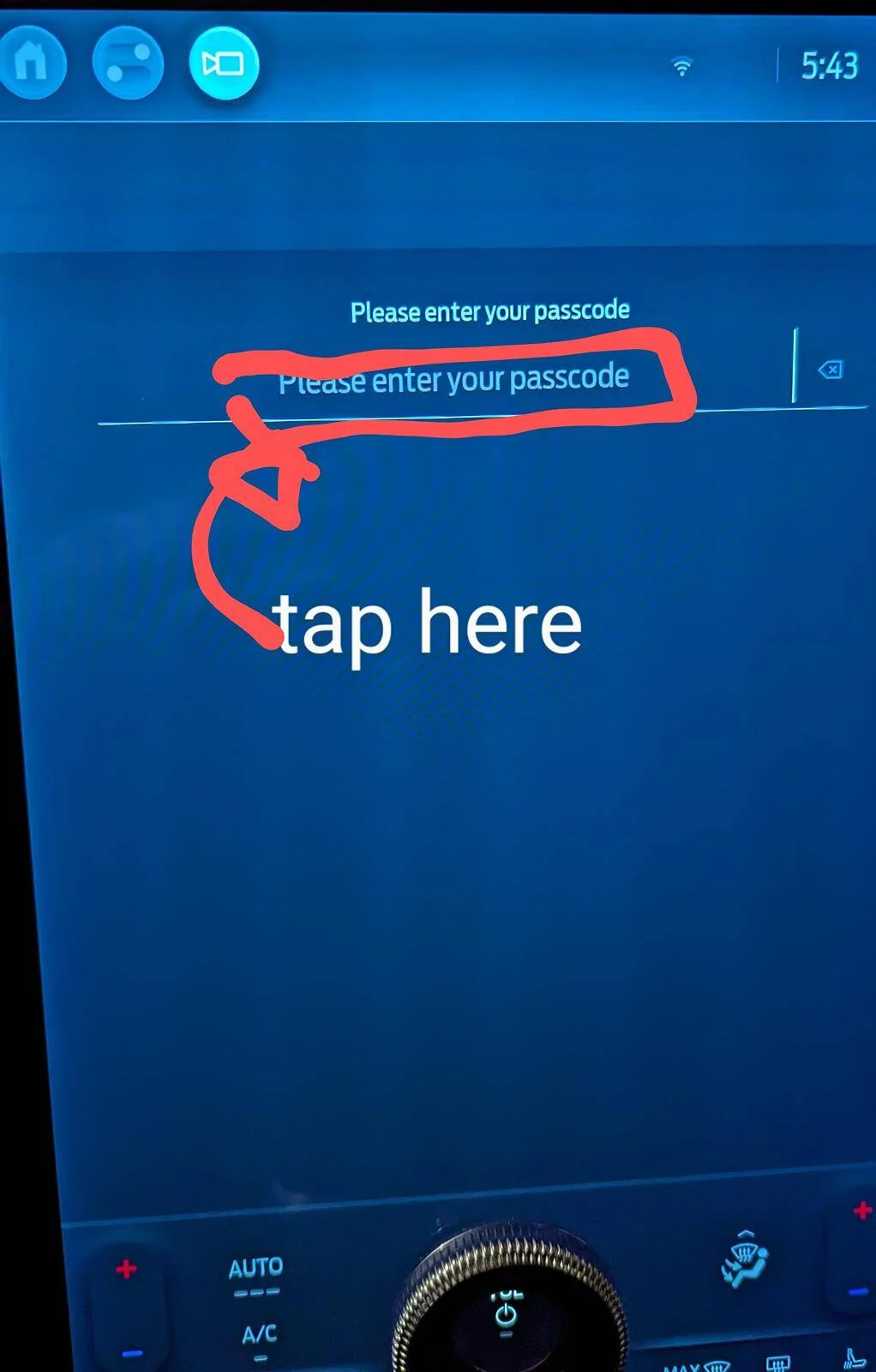
first to confirm: did you touch the input area to trigger the keyboard to come up? it doesn't come up automatically when the screen shows.Went to go test my setup. With no fob or phone I enter code to get into car. Then hit brake and start button. Screen pop up no key detected. Hit ok. Then screen sat enter your passcode. Only problem no keyboard showed up for me to type in my passcode. So didn't work for me.
first to confirm: did you touch the input area to trigger the keyboard to come up? it doesn't come up automatically when the screen shows.
if you did, next steps to try:
[/QUOT
- reboot center console - simultaneously press and hold the seek forward and volume down buttons on the steering wheel for 10 seconds, or
- press the brake repeatedly until the passcode screen comes up
I touch all over the screen to try to bring up the keyboard. Did it a few times (brake and start button) to see if I could get it to bring up the KB.
I was just testing it out because of this thread. Tomorrow I may try rebooting the center console and see if it works.
you need to tap in the input area - two pics to show the sequence:I touch all over the screen to try to bring up the keyboard.
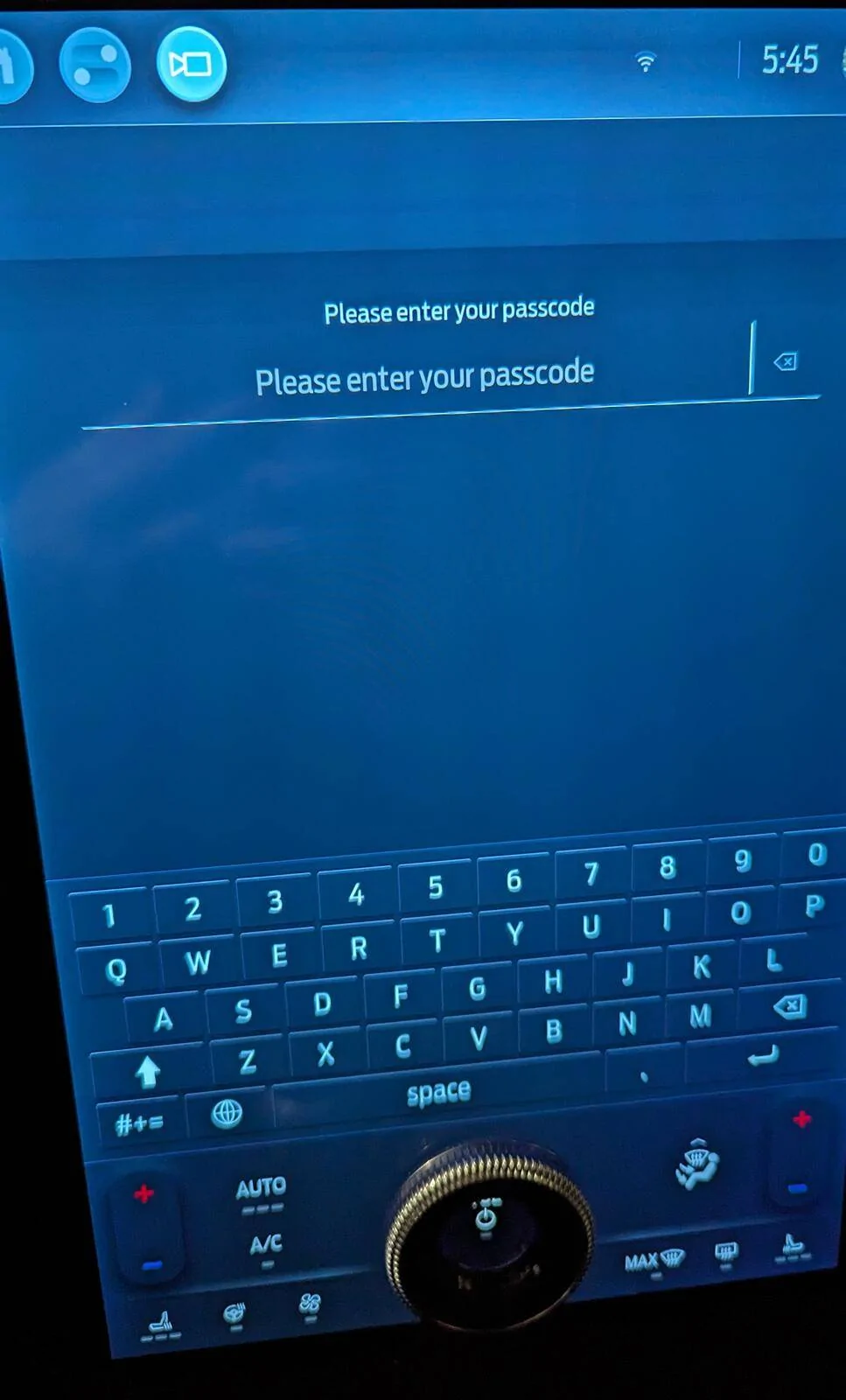
the important part of the repeated brake presses is to ONLY press the brake; do not also push the start button. the repeated brake presses is the trigger.Did it a few times (brake and start button) to see if I could get it to bring up the KB.
definitely a good idea to test it to make sure you know how it works and what to do if there are hiccups.I was just testing it out because of this thread. Tomorrow I may try rebooting the center console and see if it works.


