JR1108

Active Member
First Name
Jason
Joined
Aug 8, 2021
Threads
0
Messages
29
Reaction score
15
Location
Suffolk
Vehicles
Mach-E SR AWD Carbonised Grey
Occupation
Telecommunications
Country flag
It works! I now have the power meter.
What was your build date if you don't mind me asking. I really want this and it currently won't work on my April 21 build.
Sponsored


JR1108

Active Member
First Name
Jason
Joined
Aug 8, 2021
Threads
0
Messages
29
Reaction score
15
Location
Suffolk
Vehicles
Mach-E SR AWD Carbonised Grey
Occupation
Telecommunications
Country flag
January 2021. It will work on yours.
Awesome. Can’t wait. I’m on 6.7.0 but this hasn’t appeared in FDRS for me yet. I hope they aren’t skipping UK cars.
 

CW23

Active Member
Joined
Nov 25, 2023
Threads
2
Messages
43
Reaction score
7
Location
Michigan
Vehicles
2023 Mach E
Country flag
That LVB SOC is a frequent problem. It's pretty common for the LVB SOC to fall below 75% if the car hasn't been ON in the last 24 hours for the DC-DC to kick on and feed the 12v system and charge/maintain the LVB. (Why the car isn't checking that hourly 24x7 and kicking in a DC-DC charge if needed is still a frustrating mystery.)

Being retired, my car will sit in the garage unused for 3-4 days at times. By the 2nd or 3rd day I'm often down around 50% on the LVB. Sometimes I'll go out and turn it ON, disable the 30 minute auto-shutoff, and turn off climate/headlights/radio. Takes like 6 hours to get it back over 90%.
How do you check the LVB percentage?
 

dbsb3233

Well-Known Member
First Name
TimCO
Joined
Dec 30, 2019
Threads
56
Messages
10,100
Reaction score
11,965
Location
Colorado, USA
Vehicles
2021 Mustang Mach-E FE, 2025 Porche Macan Electric
Occupation
Retired
Country flag
How do you check the LVB percentage?
You can see it online. Log into your Ford.com account (webpage), click on the menu bars, MY ACCOUNT, [your name]'s ACCOUNT. The Charge% in the middle box is the LVB, surprisingly. Seems like it should be the HVB but it's not.


Mirak

Banned
Banned
Joined
Oct 8, 2020
Threads
111
Messages
3,754
Reaction score
6,166
Location
Kansas
Vehicles
"Sonic" 2021 MME Grabber Blue First Edition
Country flag
I’m not sure which 6.x included this change, but I noticed after receiving 6.8 that the confusingly redundant CarPlay tile is gone now.

By which I mean, it used to be that if running CarPlay, and then switching to another app (Ford nav, trip stats, tire pressure, whatever), a CarPlay icon would appear in the top ribbon and you’d also get a CarPlay tile in the lower tile ribbon. The buttons also functioned differently - the CarPlay top ribbon icon would take you back to whatever you were using in CarPlay (Spotify, Apple Maps, whatever), whereas tapping the tile would take you back to CarPlay’s default Home Screen.

Now the tile is gone - only the top ribbon icon remains. Which is better because the icon correctly returns you to where you left off in CarPlay, but it’s weird that CarPlay is the only app that operates this way. All other apps become tiles.

It’s just another example of weird, half-assed design by @Ford Motor Company.
 

dbsb3233

Well-Known Member
First Name
TimCO
Joined
Dec 30, 2019
Threads
56
Messages
10,100
Reaction score
11,965
Location
Colorado, USA
Vehicles
2021 Mustang Mach-E FE, 2025 Porche Macan Electric
Occupation
Retired
Country flag
I’m not sure which 6.x included this change, but I noticed after receiving 6.8 that the confusingly redundant CarPlay tile is gone now.

By which I mean, it used to be that if running CarPlay, and then switching to another app (Ford nav, trip stats, tire pressure, whatever), a CarPlay icon would appear in the top ribbon and you’d also get a CarPlay tile in the lower tile ribbon. The buttons also functioned differently - the CarPlay top ribbon icon would take you back to whatever you were using in CarPlay (Spotify, Apple Maps, whatever), whereas tapping the tile would take you back to CarPlay’s default Home Screen.

Now the tile is gone - only the top ribbon icon remains. Which is better because the icon correctly returns you to where you left off in CarPlay, but it’s weird that CarPlay is the only app that operates this way. All other apps become tiles.

It’s just another example of weird, half-assed design by @Ford Motor Company.
It did that with Android Auto too. I hated the way the tile did it. Clicking it would seem to re-launch AA in it's default split screen format that I dislike, and I'd have to hit multiple buttons to full-screen the map. But the top ribbon icon would just switch to the AA screen the way I left it. Way better, and easier to touch in a moving car along to top edge to anchor fingers.
 

Kabay0

Well-Known Member
Joined
Jul 1, 2022
Threads
3
Messages
61
Reaction score
53
Location
SoCal
Vehicles
2021.5 Mach-E Premium Extended EAP
Country flag
I just got 6.8 with the frunk release note but no more Center speedometer for me.

Edit: it also removed the turn by turn direction on IPC.
 
Last edited:

kdonnel

Well-Known Member
Joined
Oct 31, 2021
Threads
35
Messages
1,147
Reaction score
1,665
Location
Metro Atlanta
Vehicles
2022 CA Route 1, 2020 Bolt EV
Country flag
I’m not sure which 6.x included this change, but I noticed after receiving 6.8 that the confusingly redundant CarPlay tile is gone now.

By which I mean, it used to be that if running CarPlay, and then switching to another app (Ford nav, trip stats, tire pressure, whatever), a CarPlay icon would appear in the top ribbon and you’d also get a CarPlay tile in the lower tile ribbon. The buttons also functioned differently - the CarPlay top ribbon icon would take you back to whatever you were using in CarPlay (Spotify, Apple Maps, whatever), whereas tapping the tile would take you back to CarPlay’s default Home Screen.

Now the tile is gone - only the top ribbon icon remains. Which is better because the icon correctly returns you to where you left off in CarPlay, but it’s weird that CarPlay is the only app that operates this way. All other apps become tiles.

It’s just another example of weird, half-assed design by @Ford Motor Company.
You could always get rid of the Phone tile.

It is not a CarPlay/Android Auto tile in the recently used apps ribbon, it is the Phone tile.

If you want it back just launch the phone app and you will see the behavior you previously saw.

There is no change in behavior with the 6.x release.
 

AndyR

Well-Known Member
First Name
Andrew
Joined
Apr 28, 2021
Threads
0
Messages
133
Reaction score
170
Location
Cincinnati, OH
Vehicles
Mach-E X
Country flag
It’s interesting how many people apparently don’t ever use lane assist/centering or adaptive cruise. My speed is always to the right because those are always on in my car. I frankly forgot you could even get the speedo to show up in the center.

I’m used to it always being on the right side, you get used to it.
Same. I use lane centering / adaptive cruise everyday on every road.
 

joford

Active Member
First Name
jo marie
Joined
Jun 16, 2021
Threads
5
Messages
25
Reaction score
41
Location
shawnee, ks
Vehicles
mach E
Occupation
Ford Engineer
Country flag
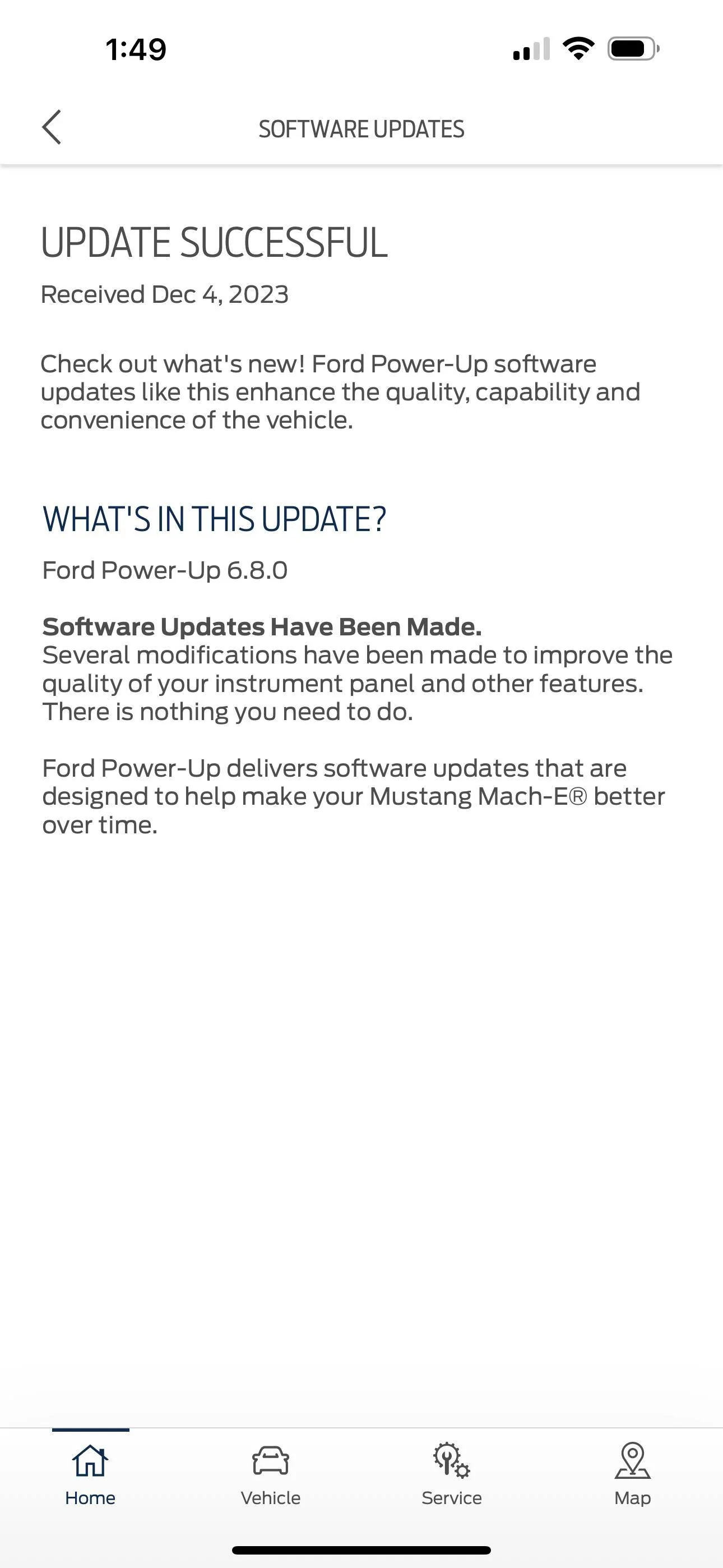
I have a 2023 RWD premium in EAP, car is currently installing PowerUp 6.8.0. I didn’t take screenshot of release notes but it appears to be an IPC update if we are to believe Ford is getting better at accurate release notes. It is an inhibit update, will get screenshot when it’s finished.
IMG_0626.png


After the update my mirrors stopped folding and horn stopped sounding when locked. Had to go back in menu and re-select these items back on.
 

ebeponyan

Well-Known Member
Joined
Mar 11, 2021
Threads
11
Messages
473
Reaction score
1,311
Location
Puget Sound
Vehicles
2021 Infinite Blue Mach-E Premium AWD ER
Country flag
Since this update I've noticed navigation disappear from the IPC a couple times while driving. Not regularly enough for me to pin it down.
 

Neil4Real

Well-Known Member
Joined
Jul 8, 2021
Threads
17
Messages
3,385
Reaction score
3,073
Location
Southern California
Vehicles
Mach-E GT Performance Edition - Shadow Black
Country flag
Since this update I've noticed navigation disappear from the IPC a couple times while driving. Not regularly enough for me to pin it down.
Turn by turn only appears when you’re like a quarter mile from the action now. It doesn’t permanently show the next action anymore.
 

ebeponyan

Well-Known Member
Joined
Mar 11, 2021
Threads
11
Messages
473
Reaction score
1,311
Location
Puget Sound
Vehicles
2021 Infinite Blue Mach-E Premium AWD ER
Country flag
Turn by turn only appears when you’re like a quarter mile from the action now. It doesn’t permanently show the next action anymore.
Interesting choice, but helpful to know it was intentional.
 

CarGuyBill

Well-Known Member
First Name
Bill
Joined
Nov 14, 2021
Threads
12
Messages
178
Reaction score
121
Location
Georgia
Vehicles
2025 Mach e GT Performance Upgrade - 2025 Ford Bronco Badlands Hoss 3.0
Occupation
Photographer
Country flag
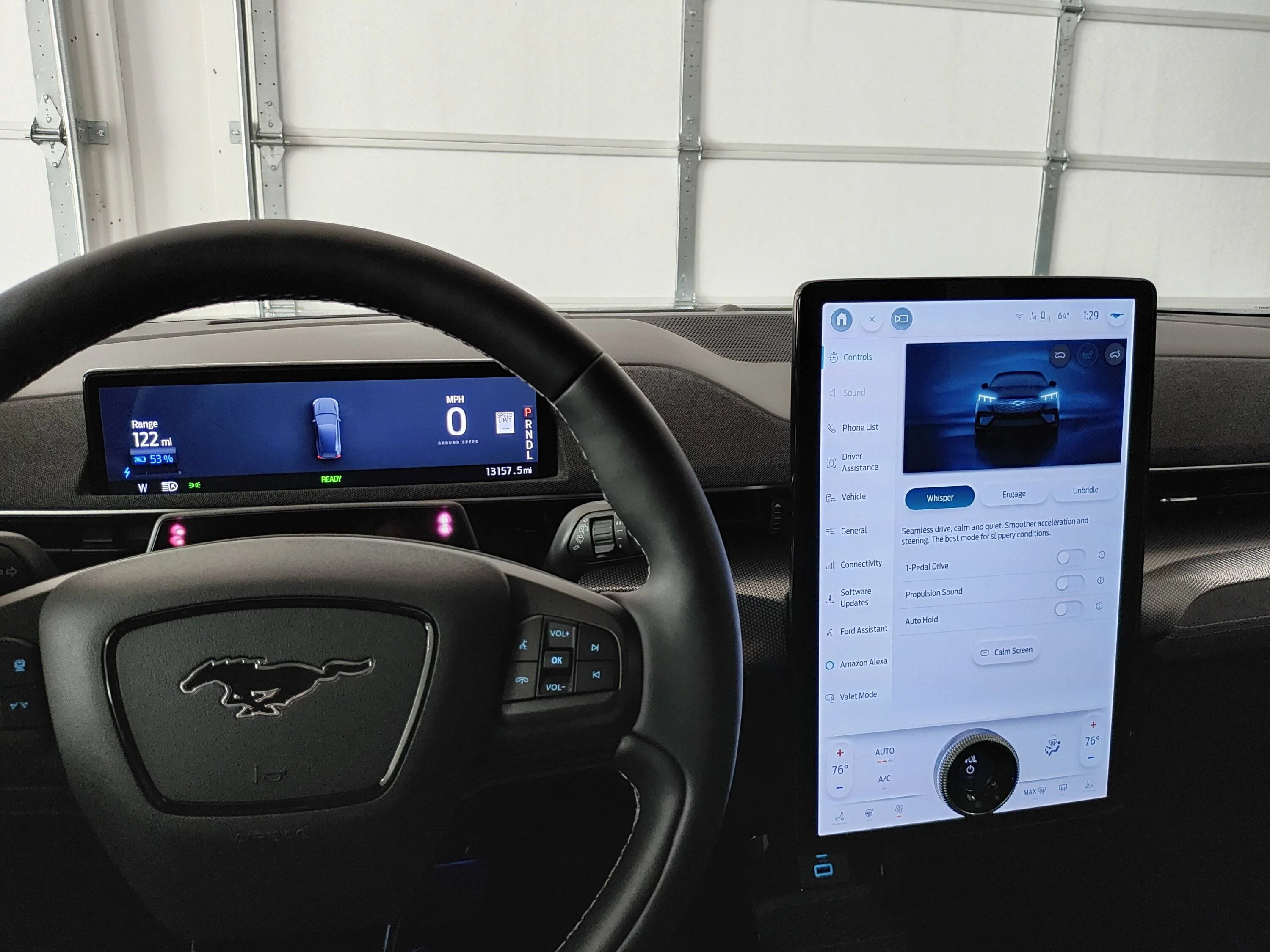
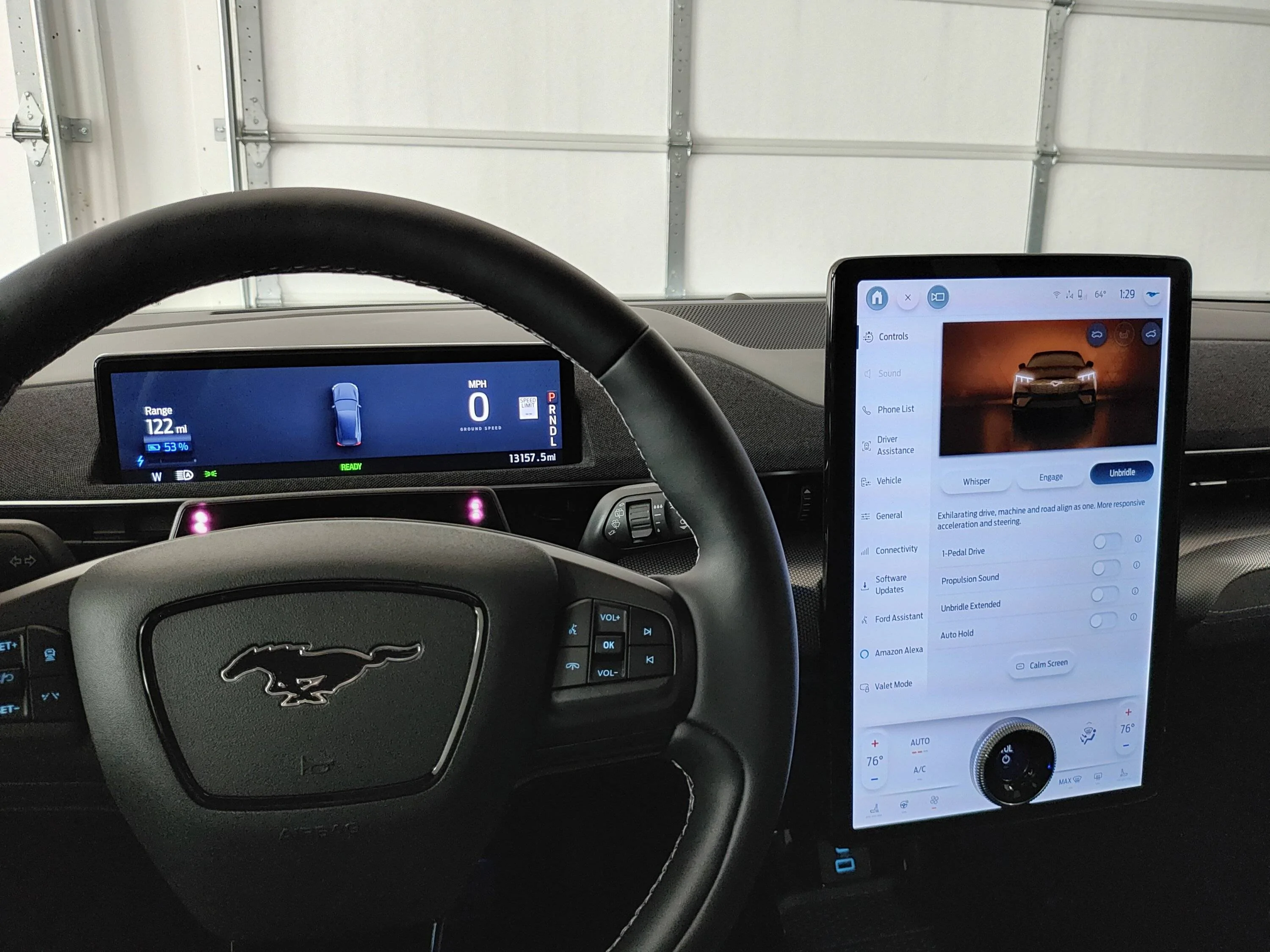
So how do you tell what drive mode the car is in when you start your trip with 6.8.0? The Mach E does not default to Engage so if I have been driving in Unbridled and my wife gets in, and I forgot to change it back it will be bad leaving the garage.

To me there in no change in the display until you get up to speed.

Ford Mustang Mach-E PowerUp 6.8.0 released IMG_20231214_132934568_HDR


Ford Mustang Mach-E PowerUp 6.8.0 released IMG_20231214_132941355_HDR


Ford Mustang Mach-E PowerUp 6.8.0 released IMG_20231214_132948514_HDR
Sponsored


Top