Problems With Brand New Mach-E

MisterSofa

Well-Known Member
First Name
Jerry
Joined
Apr 4, 2022
Threads
26
Messages
391
Reaction score
404
Location
Valley Forge
Vehicles
2021 Toyota Corolla, 2022 Ford MachE Premium AWD
Country flag
When I go to the "Connected Services" section of FordPass, I see BlueCruise (for example) as Activation Pending with "--/--/----" as the expiration date. When I click "Manage" it waits a few seconds and then brings me right back to the same place. When I go to the "Connected Services" section of my account on the Ford website, the same thing happens.

What's interesting is that when I click on "My Mustang Mach-E" on the Ford website, it shows me all of the car's details and doesn't say the car is in "deep sleep" (as it does in the app), even though it shows it hasn't updated since the day I bought the car. When I go to "Connected Services" through there I end up with the same roadblock described above.

Any thoughts? Thanks for your help.
Mine was activating for two weeks. It finally worked itself out.
Sponsored


Nogas4me

Member
First Name
Larry
Joined
Dec 10, 2022
Threads
1
Messages
9
Reaction score
14
Location
Phoenix
Vehicles
2022 Mach-e Select
Occupation
Sr Field Service Engineer
Country flag
Hello Mets0903,

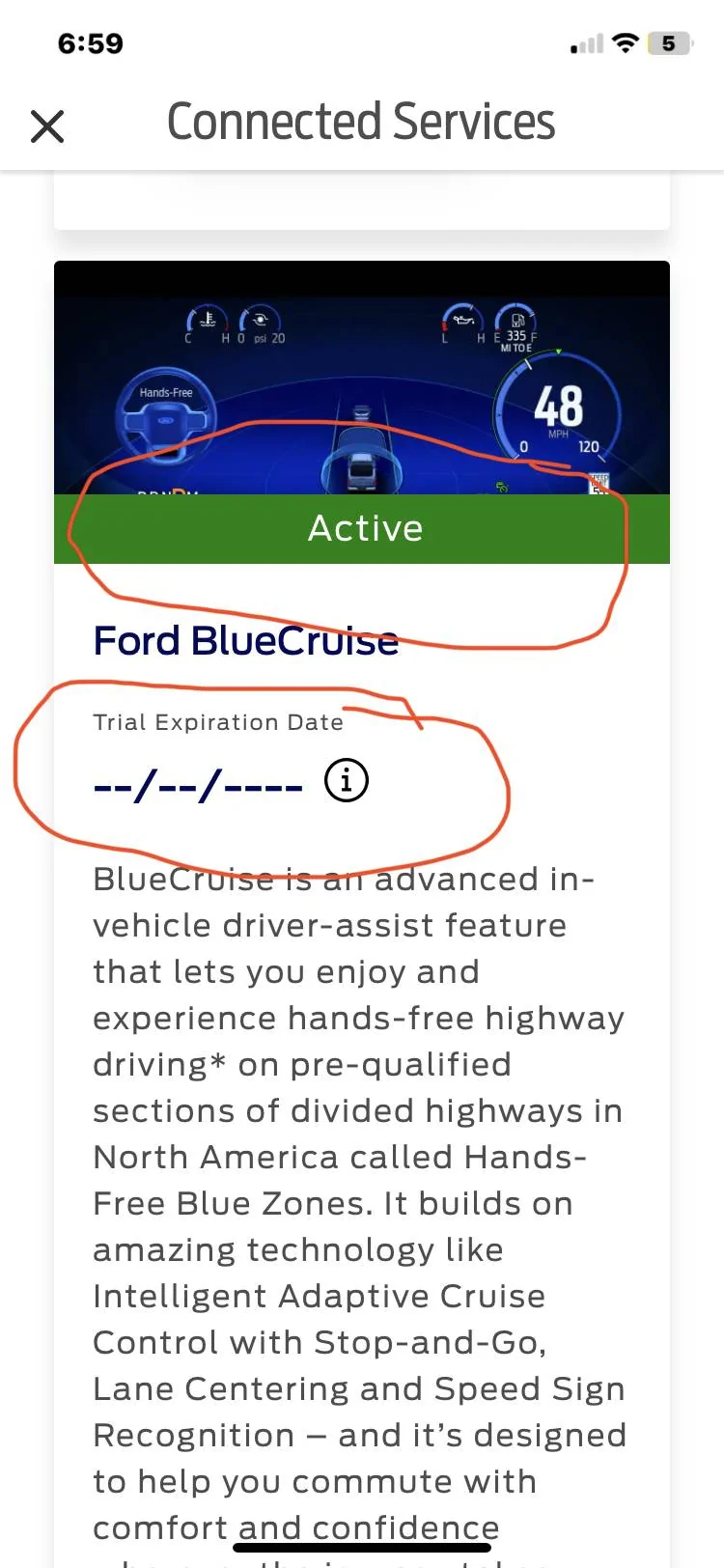
I just bought a new MME 2022 four days ago and have the FordPass app. Note- the Connected Services" WILL NOT show an Expiration date for a few weeks. Your car will need to be registered and your information processed. This will take some time. You should however see an "Active" under the picture in each category. I have attached a picture of my Ford Blue Cruise as an example. For the other connected services you may need to sign up for them. The BlueOval Charge Network for an example. Note- Ford will give you 250 kWh hours of FREE charging so sign up for that. I had my first Fast Charge at a Electrify America charger and it worked perfectly the first time. It greeted me with my name when I plugged in. I grabbed a quick coffee and came back, unplugged the cable.. NOTE- with the fast charger you must push the button next to the charge port to stop the charging before removing the plug!! Once removed my bill came to $0.00. I know this is new car for you. Just because something doesn't work the way you think it should doesn't mean there is a problem. There is a learning curve so please be patient. YouTube is very helpful with many cases. Other's will require some experimental work but I found that most things work after I became more aquatinted with the car. Here's one example. I saw the awesome pony puddles on the ground one night. They were fantastic. Then they were gone, not to be seen again! I couldn't figure out how they were there then the next day gone. The forums were not much help and I assumed my car may have a problem with projecting the pony. Well after trying many things and not giving up or calling Ford, I figured it out myself. In order for the pony puddles to present, the car mirrors must be set to auto fold. I must have been playing around with the settings and stopped the auto fold.... so therefore no pony puddles. My point is although you may not be able to make something work initially please be patient and see if you can figure out what's going on and experiment with different settings. Just wait until you program the Sirius XM favorites in and they magically disappear after you set them! Very frustrating but yep, I figured that one out too. Or.. what's that blue box in front of the car in the main display. Yep, got rid of that ugly box too but had to poke about to figure it out. It's like a game or puzzle. I know when you buy a new car you expect it to work as you think it should and be intuitive. Just think back to the time you set up your new iPhone and all the quirks and odd things that didn't work until you got your 10 year old son to show you :) and magically it all worked. The problem with the Ford employees is that they are new to the game as well so in many cases the owners know more about the car, its nuances and tricks and tips than the Ford staff.
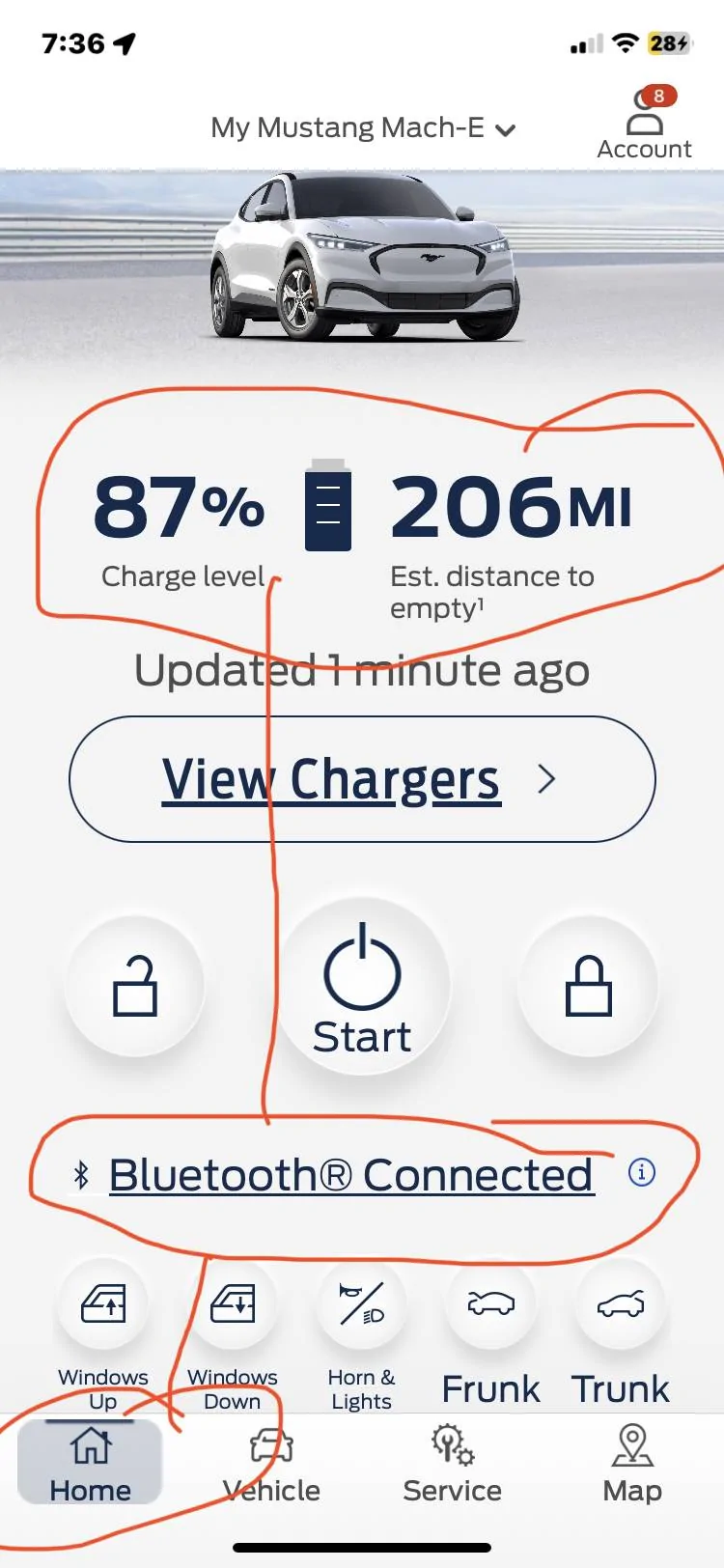
Question for you. In the Ford Pass app does it show you the Charge Level and the Est Distance to Empty (It's on the home screen). Also, does it show "Bluetooth Connected? Please see pic attached as to what I mean. Thanks, Larry

Ford Mustang Mach-E Problems With Brand New Mach-E IMG_0064


Ford Mustang Mach-E Problems With Brand New Mach-E IMG_5E70E352C10B-1
 

Mach-Lee

Well-Known Member
First Name
Lee
Joined
Jul 16, 2021
Threads
262
Messages
11,344
Reaction score
24,964
Location
Wisconsin
Vehicles
2022 Mach-E Premium AWD
Occupation
Sci/Eng
Country flag
I think I ran into you on the FDRS topic, but to reiterate a couple things:
  1. Go drive the car for an hour to recharge the 12V battery.
  2. Make sure vehicle connectivity and share vehicle data is enabled in settings.
  3. Verify your TCU is provisioned in Bezel diagnostics: https://www.macheforum.com/site/threads/ssm-51228-inoperative-fordpass-remote-features.23858/
  4. Your vehicle hasn't reported connected data since Nov 19th (day after you bought it), so there is an issue with the TCU or GWM. Likely #3 above. Pulling fuses #11 (TCU) and #19 (GWM) mentioned in the above may help reboot it. You could also lift the 12V battery negative cable in the frunk to reboot everything in the car.
  5. If your TCU is showing provisioned, try removing and re-adding the vehicle from your FordPass Account. Tap account upper right of app, tap on your Mach-E, and hit the remove vehicle button. Quit the app and reboot your phone. Then add it again.
  6. If you still have trouble, contact a FordPass guide in the app (account>help).
  7. You have a gateway module OTA update pending (3.5.2), as soon as the connectivity issues are fixed that should install. I think this is the update the Ford CS agents were seeing and wanted your dealer to install, but I think they've been leading you down the wrong path. This just seems like a provisioning issue to me, I think the agents got target fixation on that pending update.
  8. I would not let your dealer replace the gateway module (GWM) yet, I think they just don't know how to update it properly based what Mike G and I see (not waiting long enough for the files to copy from the USB). I can tell they don't know what they're doing. Letting them replace the module may do more harm than good. They should only replace the module it if the Hotline engineers are instructing them to do so. The GWM was working fine before you bought the car so I don't think it's bad. This is a software/config issue with the Connected Vehicle activation.
Other relevant help articles:
How do I activate my Ford vehicle to use FordPass®?
Why is my activation pending in FordPass®?
 
Last edited:

ohmslaw

Well-Known Member
First Name
Joseph
Joined
Sep 18, 2021
Threads
18
Messages
227
Reaction score
344
Location
Connecticut
Vehicles
Toyota Highlander, Toyota Rav-4, Mach-e (on order)
Occupation
Engineer
Country flag
Had a similar issue with our car after owning for about 2 months. Totally stopped any updating and stopped talking to fords servers.

Dealer tried a software update 3 times; claiming it was fixed each time. It wasn’t.

Until I made a big stink when the service advisor told me “The car still drives; what’s the issue?” Did they finally replace the telematics module; you probably have the same issue.

Just tell them to replace the damn telematics module. It’s in the trunk; it’s easy.
 

shark

Well-Known Member
First Name
David
Joined
Jul 18, 2021
Threads
22
Messages
326
Reaction score
515
Location
Texas
Vehicles
Mach E GT
Country flag
I went back to the dealer at 7:30am on December 2. Ford's advice to the technician did not work and, apparently, Ford then suggested another fix (TSB 22-2404, which is prescribed for 2021 models, even though my car is a 2022) involving an "adapter" that the dealer did not have (and that they did not know when they would receive).
It sounds like they are wanting to run module updates, not install any hardware. When they said they need "an adapter", I wonder if they even have a working J2534 Interface in order to run FDRS to install updates?


OP
OP

Mets0903

Active Member
First Name
Eric
Joined
Dec 2, 2022
Threads
2
Messages
29
Reaction score
12
Location
New Jersey
Vehicles
2022 Mach-E Premium AWD
Country flag
Hi all,

An update:

My understaning is that the new Gateway Module is now at the dealer and the dealer, the customer experience team, the BEV team, the field service engineer, and another executive customer service person are all in agreement that replacement is the next step toward a resolution.

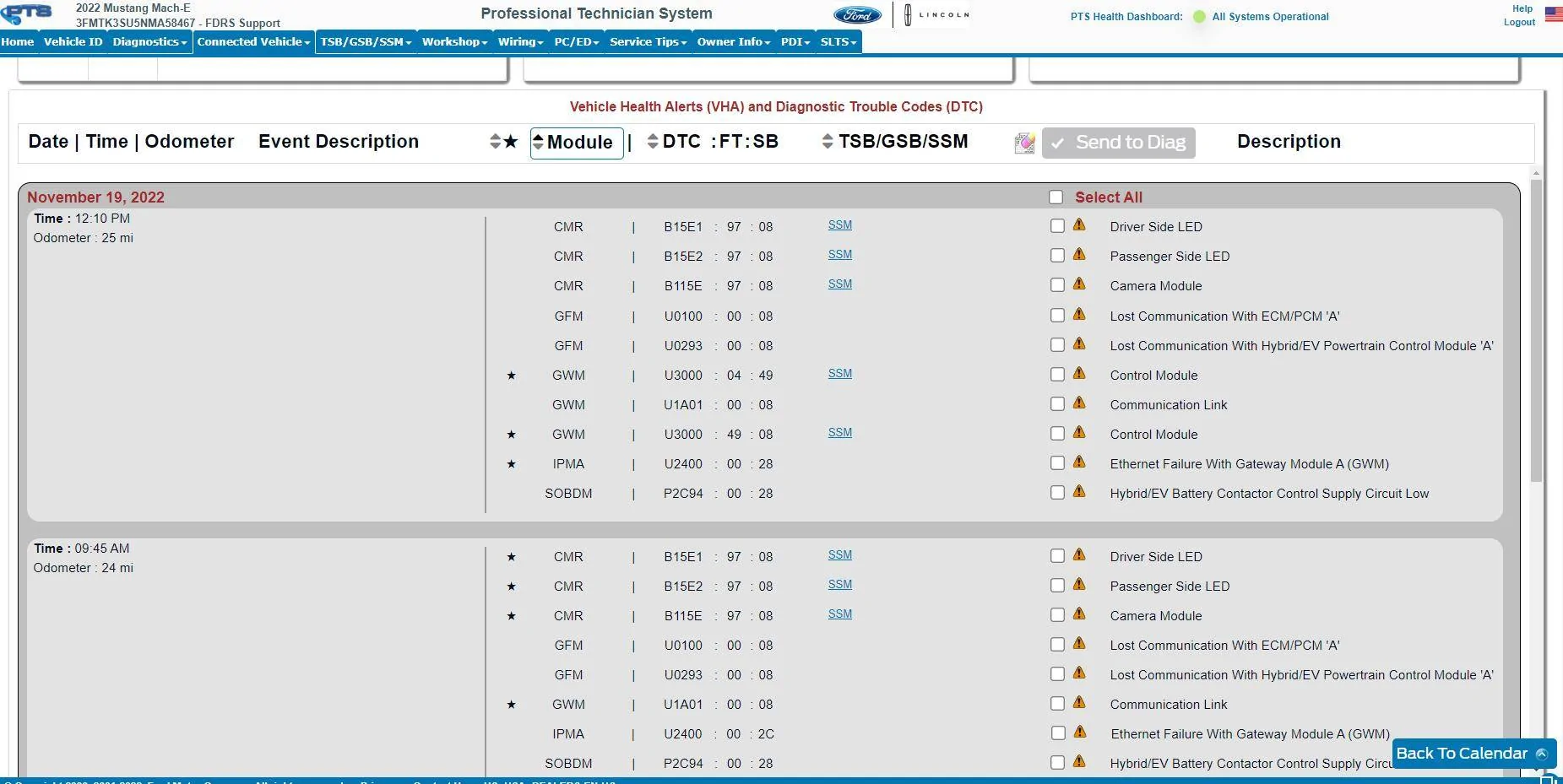
Meanwhile, last night I spoke with another FordPass guide who was by far the most helpful and empathetic Ford employee I have spoken to during this ordeal. She walked me through the Master Reset process, including ensuring that all authorizations were removed from app, the app uninstalled and reinstalled, etc. Ultimately, while the Master Reset worked on the car side of things (all settings were reset), she could not see anything happening on her side, and the car would not activate in the FordPass app. After looking into it a bit more, she found the attached/below diagnostic codes from the day I bought the vehicle (and initially lost connectivity), which do seem to show an issue with the Gateway Module (among other things). I don't know whether the dealer or anyone else has seen these diagnostic codes.

So, while some on this forum (and I) were skeptical that this was actually a hardware issue, there seems to be something to it, right? If so, I'm not sure whether the dealer technician knew what he was doing, or whether it's all a coincidence.

Given all this, it seems prudent to just move forward with Ford's suggestion to replace the module, right? (Not that I really seem to have a choice at this point.)

Thanks again for all your help and advice.


Ford Mustang Mach-E Problems With Brand New Mach-E image001
 

Mike G

Well-Known Member
First Name
Mike
Joined
Mar 27, 2022
Threads
25
Messages
6,449
Reaction score
5,289
Location
N. AL, USA
Vehicles
'23(J1) Mach-E GT-PE, '22 F-150 Lightning, '24 Bronco HLE 2Dr
Country flag
Hi all,

An update:

My understaning is that the new Gateway Module is now at the dealer and the dealer, the customer experience team, the BEV team, the field service engineer, and another executive customer service person are all in agreement that replacement is the next step toward a resolution.

Meanwhile, last night I spoke with another FordPass guide who was by far the most helpful and empathetic Ford employee I have spoken to during this ordeal. She walked me through the Master Reset process, including ensuring that all authorizations were removed from app, the app uninstalled and reinstalled, etc. Ultimately, while the Master Reset worked on the car side of things (all settings were reset), she could not see anything happening on her side, and the car would not activate in the FordPass app. After looking into it a bit more, she found the attached/below diagnostic codes from the day I bought the vehicle (and initially lost connectivity), which do seem to show an issue with the Gateway Module (among other things). I don't know whether the dealer or anyone else has seen these diagnostic codes.

So, while some on this forum (and I) were skeptical that this was actually a hardware issue, there seems to be something to it, right? If so, I'm not sure whether the dealer technician knew what he was doing, or whether it's all a coincidence.

Given all this, it seems prudent to just move forward with Ford's suggestion to replace the module, right? (Not that I really seem to have a choice at this point.)

Thanks again for all your help and advice.


image001.png
It's OBE at this point.

Follow the path the service advisor/Ford have provided. If the GWM fixes the problem fine...if not they will move on to the next thing until it's corrected. It's encouraging an engineer is involved.
 

Andeh

Well-Known Member
First Name
Andrew
Joined
Apr 12, 2021
Threads
0
Messages
243
Reaction score
527
Location
Cumbria
Vehicles
1926 Chrysler 60, 1929 Austin 7, 1965 Ford Anglia
Country flag
Any resolution to this? My 2021 Job 1 car was recently updated to 3.5.3 by my dealer, three days later I have the same issue. Car has not shown on FordPass for 24hrs and the Connectivity menu never opens in settings.
 
OP
OP

Mets0903

Active Member
First Name
Eric
Joined
Dec 2, 2022
Threads
2
Messages
29
Reaction score
12
Location
New Jersey
Vehicles
2022 Mach-E Premium AWD
Country flag
Any resolution to this? My 2021 Job 1 car was recently updated to 3.5.3 by my dealer, three days later I have the same issue. Car has not shown on FordPass for 24hrs and the Connectivity menu never opens in settings.
To my shock and amazement, the replacement of the Gateway Module (along with an overnight stay at the dealer to re-program everything) seems to have fixed the problems. When I took the car home in late December, FordPass worked and the connectivity menu appeared, though I still didn't have updated BlueCruise maps. A few weeks later (I was away over the holidays and so the car wasn't driven much), the updated maps came through and I've been updated OTA from 4.1.1, to 4.1.2, to 4.1.3 since.
 

azerik

Well-Known Member
First Name
Erik
Joined
Jan 8, 2023
Threads
79
Messages
4,545
Reaction score
4,556
Location
Chandler/Flagstaff, AZ
Vehicles
'21 Spacey Prem4x, '21 RX450H, 13 Focus EV
Occupation
DevSecNetOps, General PITA
Country flag
Wow! you have windows up and down buttons in the app! I thought I'd have that but nope.
Sponsored


Top