UK Customers

SteveUk

Well-Known Member
Joined
Nov 10, 2020
Threads
0
Messages
2,112
Reaction score
1,575
Location
Warrington
Vehicles
Mustang Mache with crap keys
Country flag
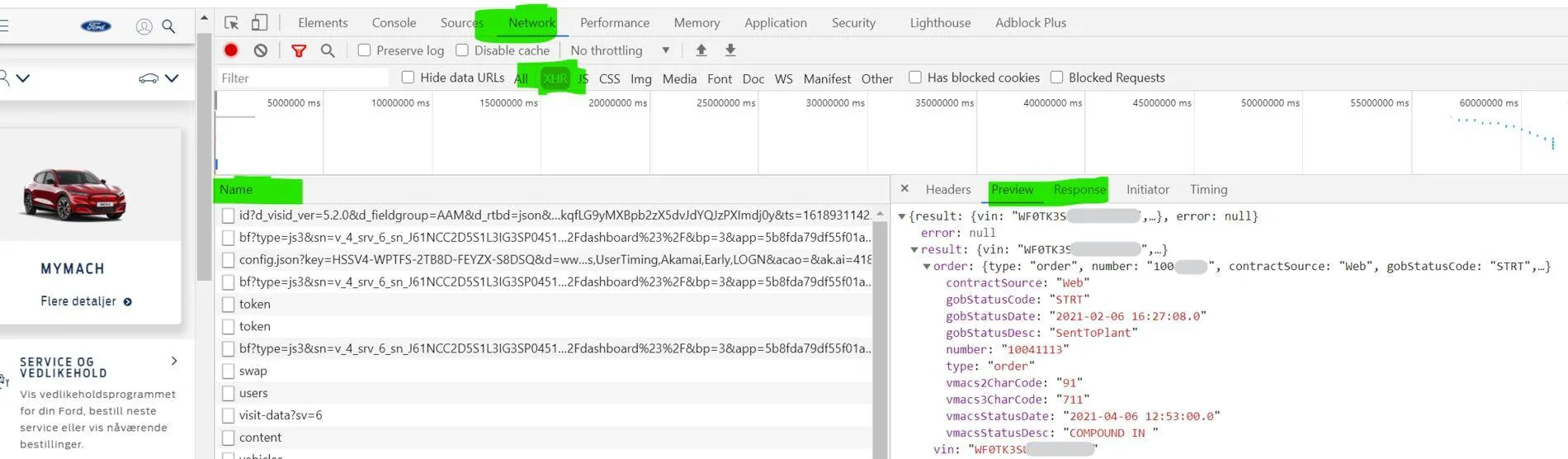
The info they are getting is from f12 on the screen before you select your mache.

Ie manage orders

I get nothing in the recalls line and that error 404 in the line for the status where they get all their info.
Sponsored

 

EssexChris

Well-Known Member
First Name
Chris
Joined
Feb 1, 2021
Threads
0
Messages
155
Reaction score
157
Location
Essex, UK
Vehicles
Mach E RWD ER
Country flag
I still can't get the info that you are saying is available when I go into my ford account. Not sure whether it is because I preordered last Feb and got an order number because that is all that shows up. My VIN doesn't appear at all. When I go to network/XHR I just get the info that is on my order screen. I have tried Edge and Chrome but I get the same on both.
I also don't get any of this info. I have given up on that now, although the VIN shows and that it is ordered. Just get null and error on response.
I go through chrome
 

portlandg

Well-Known Member
First Name
grahame
Joined
Mar 17, 2020
Threads
7
Messages
2,931
Reaction score
3,668
Location
Dorset UK
Vehicles
Black RWD ER and loving it
Occupation
Cabinet maker
Country flag
I have managed to do it via Chrome.

What I do is open a new window then hit F12 to bring up the extra info.

Next go to the Ford site and login to my account then scroll down and select Manage Orders then from that screen I can see the info

InkedFord2_LI.jpg
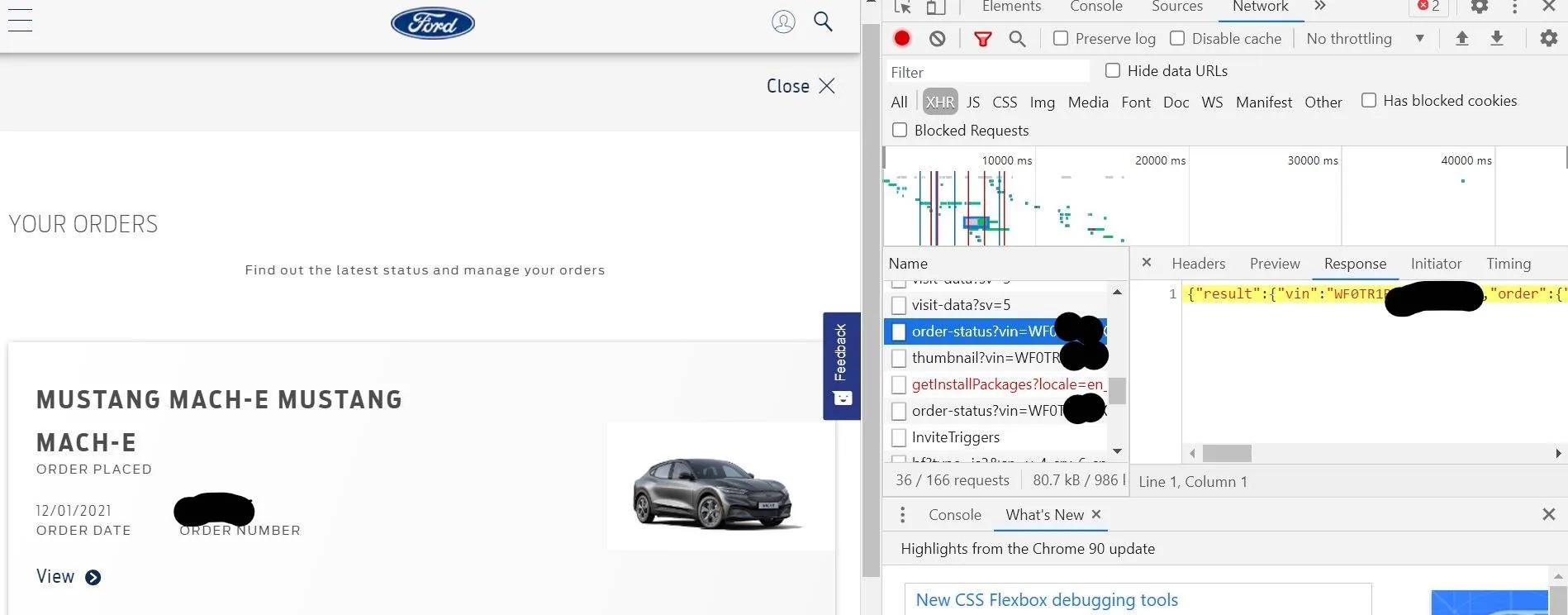
On your order screen it has order date and order number. Is your number your vin or an 8 digit number. Mine is my original preorder number and my vin doesnt come up in the name field as shown above. Either I am doing something wrong or I just can't access what others seem to be able to see
 

Hotspur28

Well-Known Member
First Name
Rick
Joined
Feb 4, 2021
Threads
0
Messages
178
Reaction score
159
Location
UK
Vehicles
Ford Mustang Mach E
Country flag
On your order screen it has order date and order number. Is your number your vin or an 8 digit number. Mine is my original preorder number and my vin doesnt come up in the name field as shown above. Either I am doing something wrong or I just can't access what others seem to be able to see
It works for me on safari but you go on the main page when you log into your account don't push manage orders. I use developers tools and page response and network, xhr and refresh page. Info then comes up. I am at work without my laptop so cannot take screenshots at moment.
 

SteveUk

Well-Known Member
Joined
Nov 10, 2020
Threads
0
Messages
2,112
Reaction score
1,575
Location
Warrington
Vehicles
Mustang Mache with crap keys
Country flag
I suspect batches in the early December build dont show this info. Grahame an I are in that build date.


BazzaFFC

Well-Known Member
First Name
Barry
Joined
Feb 11, 2021
Threads
0
Messages
79
Reaction score
47
Location
UK
Vehicles
Ford Mach-E RWD LR
Country flag
On your order screen it has order date and order number. Is your number your vin or an 8 digit number. Mine is my original preorder number and my vin doesnt come up in the name field as shown above. Either I am doing something wrong or I just can't access what others seem to be able to see
On that screen the order number is shown as an 8 digit number.

Do you manage to get any of the info shown in the right hand window?
 

jongodfrey

Well-Known Member
First Name
Jon
Joined
Dec 22, 2020
Threads
0
Messages
350
Reaction score
396
Location
UK
Vehicles
Push Bike
Occupation
IT bloke
Country flag
I still can't get the info that you are saying is available when I go into my ford account. Not sure whether it is because I preordered last Feb and got an order number because that is all that shows up. My VIN doesn't appear at all. When I go to network/XHR I just get the info that is on my order screen. I have tried Edge and Chrome but I get the same on both.
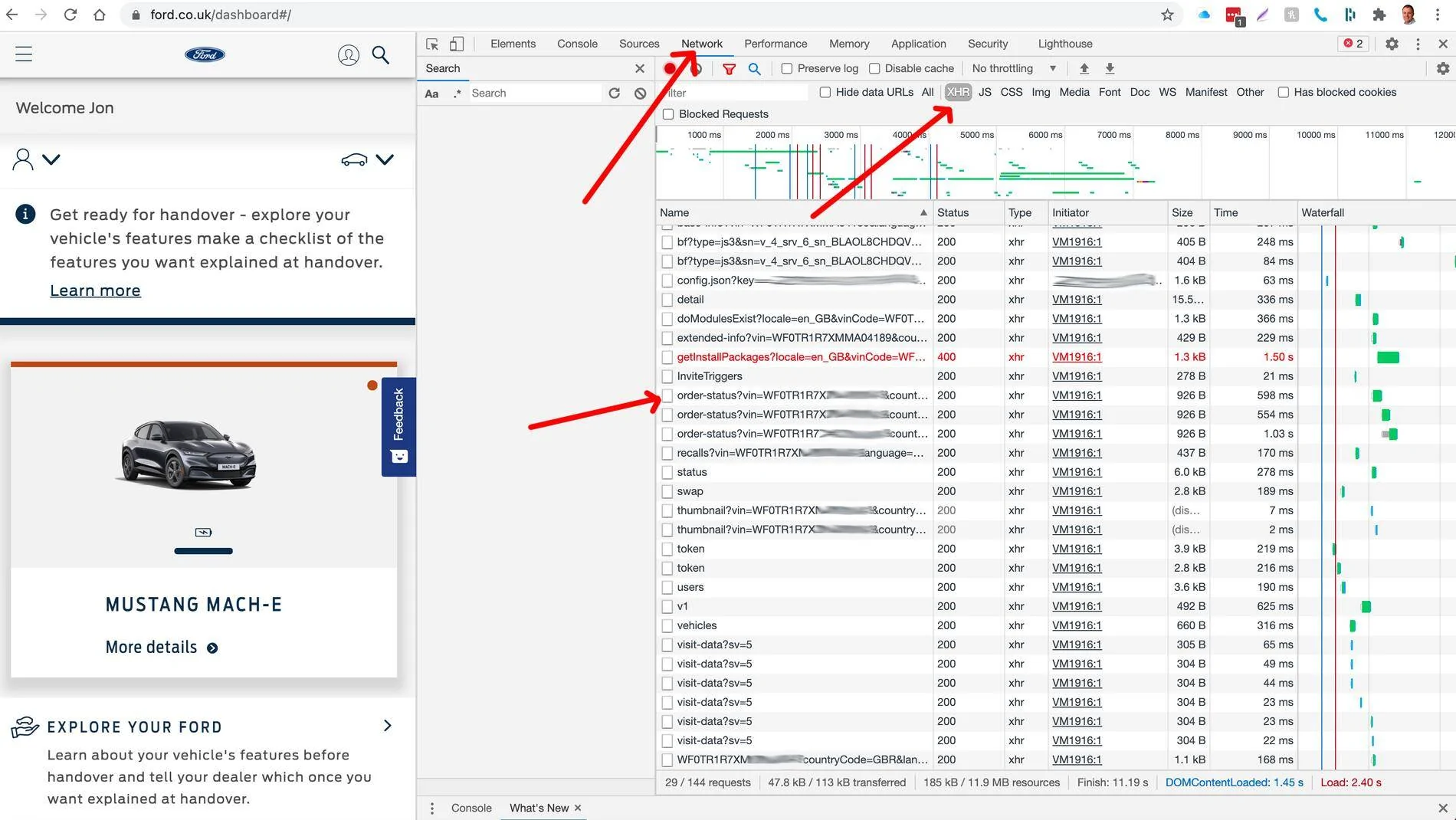
Sorry if you're doing all this together but here are my process stages for Chrome on a Mac:

  1. go to https://www.ford.co.uk/
  2. Log in - you should now be on https://www.ford.co.uk/dashboard#/
  3. Go in to View, Developer Tools.
  4. Refresh the page - F3 or F5 is it on a PC. You should see a screen similar to the attached.
    Ford Mustang Mach-E UK Customers Screenshot 2021-04-21 at 09.08.05
  5. Click on the order.status?vin....
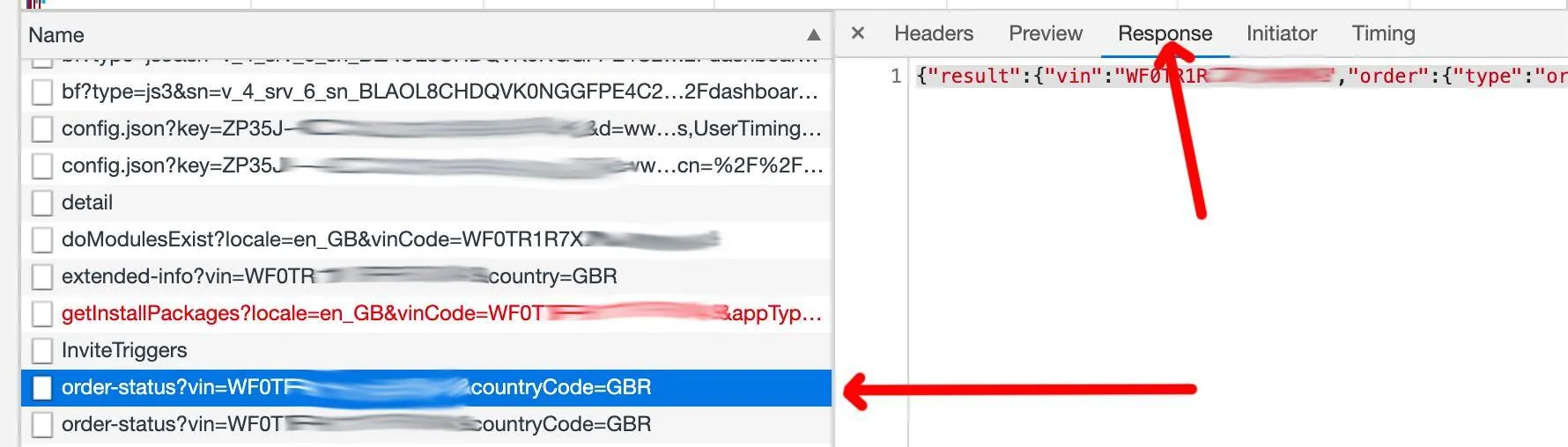
  6. You should now see something like this under Response. You might need to refresh again.
    Ford Mustang Mach-E UK Customers Screenshot 2021-04-21 at 09.14.45
  7. Triple Click on the result which selects the whole string. Then Copy and paste to Notepad
  8. Each field ends with a Comma, so I find the comma and then add a carriage return to put it on a new line.
  9. You can get this info from other pages too such as Manage Orders

    If you are doing that the issue must be at Ford. Sorry all these messages crossed :)
 

Mercury8

Well-Known Member
First Name
Calum
Joined
Jul 13, 2020
Threads
0
Messages
369
Reaction score
505
Location
UK
Vehicles
Mach-E SR AWD
Country flag
To add to confusion, I'm an early December build, but can see the info via the F12 process!
Yeah. My car had a build date of 11 December and the F12 process works for me. ?
The most recent tip from @stesir shows:
lifeCycleMode: “TRANSPORT”
oemCorrelationId: 45
vehicleDateTime: “2021-04-20T07:59:12Z”
tappsDateTime: “2021-04-20T08:20:05.252Z”

Looks like something happened yesterday...
 

jongodfrey

Well-Known Member
First Name
Jon
Joined
Dec 22, 2020
Threads
0
Messages
350
Reaction score
396
Location
UK
Vehicles
Push Bike
Occupation
IT bloke
Country flag
I'm looking at the Remote SetUp data...

To me it looks like a vehicle "mode" and probably not relating to Logistics. IE is @stesir in "Transport" mode, possibly a sleep mode. I keep waking mine up twice a day to see if anything has changed. What is does tell us is how lagging the online data is. See the vehicle date. I know my vehicle date and I know it's also in the wrong time zone from the App.

Mine says;

{"tappsResponseTemplate":{"vin":"WF0TR1R7XMxxxxx”x,
"status":200,"lifeCycleModeStatus":{"lifeCycleMode":"NORMAL",
"oemCorrelationId":338,"
vehicleDateTime":"2021-04-09T17:19:01Z",
"tappsDateTime":"2021-04-21T02:23:41.315Z"}},
"vehicle":{"vin":"WF0TR1R7XMxxxxxx”x,
"radioFlag":"Y","otaFlag":"N",
"wifiFlag":"N",
"driveModeFlag":"Y",
"model":null}}
 

stesir

Well-Known Member
First Name
Steinar
Joined
Jan 8, 2021
Threads
2
Messages
623
Reaction score
663
Location
Norway
Vehicles
RR Mach-E4X, W Mondeo ST AWD
Occupation
Senior Enginer Telecom/development
Country flag
I still can't get the info that you are saying is available when I go into my ford account. Not sure whether it is because I preordered last Feb and got an order number because that is all that shows up. My VIN doesn't appear at all. When I go to network/XHR I just get the info that is on my order screen. I have tried Edge and Chrome but I get the same on both.
Login at Your account, Add Car, with VIN - then it is in there... Remeber Refrech atter pres F12, with Ctrl+R
All account sides

maybe:​
https://www.ford.co.uk/owners/vehicle-dashboard (UK?!)​
https://remotesetup.ford.com/#/welcome (Setup - Hit the Send to Vihicle button at vehicle-dashboard)​
In /under Field "Name" - klick on them, show Response or Preview at the right panel i your browser ...
There you fin a lot of inntrengning info, at sometimes they ar updated... (Rember Refresh after hit F12)
Ford Mustang Mach-E UK Customers 1618992799235
 
Last edited:

jongodfrey

Well-Known Member
First Name
Jon
Joined
Dec 22, 2020
Threads
0
Messages
350
Reaction score
396
Location
UK
Vehicles
Push Bike
Occupation
IT bloke
Country flag
I'm looking at the Remote SetUp data...

To me it looks like a vehicle "mode" and probably not relating to Logistics. IE is @stesir in "Transport" mode, possibly a sleep mode. I keep waking mine up twice a day to see if anything has changed. What is does tell us is how lagging the online data is. See the vehicle date. I know my vehicle date and I know it's also in the wrong time zone from the App.

Mine says;

{"tappsResponseTemplate":{"vin":"WF0TR1R7XMxxxxx”x,
"status":200,"lifeCycleModeStatus":{"lifeCycleMode":"NORMAL",
"oemCorrelationId":338,"
vehicleDateTime":"2021-04-09T17:19:01Z",
"tappsDateTime":"2021-04-21T02:23:41.315Z"}},
"vehicle":{"vin":"WF0TR1R7XMxxxxxx”x,
"radioFlag":"Y","otaFlag":"N",
"wifiFlag":"N",
"driveModeFlag":"Y",
"model":null}}
I just notice otaFlag N os Over The Air Updates disabled which is interesting. I guess they don't want that on whilst in transit.
 

jongodfrey

Well-Known Member
First Name
Jon
Joined
Dec 22, 2020
Threads
0
Messages
350
Reaction score
396
Location
UK
Vehicles
Push Bike
Occupation
IT bloke
Country flag
Yeah. My car had a build date of 11 December and the F12 process works for me. ?
The most recent tip from @stesir shows:
lifeCycleMode: “TRANSPORT”
oemCorrelationId: 45
vehicleDateTime: “2021-04-20T07:59:12Z”
tappsDateTime: “2021-04-20T08:20:05.252Z”

Looks like something happened yesterday...
your date and time is MUCH more up to date than mine... interesting...
 

stesir

Well-Known Member
First Name
Steinar
Joined
Jan 8, 2021
Threads
2
Messages
623
Reaction score
663
Location
Norway
Vehicles
RR Mach-E4X, W Mondeo ST AWD
Occupation
Senior Enginer Telecom/development
Country flag
Last edited:


Top