Post here if you have an active FDRS account and are willing to look up info for others

Mike G

Well-Known Member
First Name
Mike
Joined
Mar 27, 2022
Threads
25
Messages
6,458
Reaction score
5,298
Location
N. AL, USA
Vehicles
'23(J1) Mach-E GT-PE, '22 F-150 Lightning, '24 Bronco HLE 2Dr
Country flag

stellman

Well-Known Member
Joined
Apr 2, 2023
Threads
4
Messages
80
Reaction score
90
Location
Austin, TX
Vehicles
2021 Mustang Mach-E GT
Country flag
Just picked up a new-to-me '21 Job2 Mach-E GT this past weekend. I've got automatic updates on, and setup the schedule (every night at 2am, lol). It's been pending the 3.6.1 update since Saturday. I'm currently on 3.5.3. Can someone see what's going on there before I make an appointment for an update at the dealer? Much appreciated!

3FMTK4SE6MME00263
 

Mike G

Well-Known Member
First Name
Mike
Joined
Mar 27, 2022
Threads
25
Messages
6,458
Reaction score
5,298
Location
N. AL, USA
Vehicles
'23(J1) Mach-E GT-PE, '22 F-150 Lightning, '24 Bronco HLE 2Dr
Country flag
Just picked up a new-to-me '21 Job2 Mach-E GT this past weekend. I've got automatic updates on, and setup the schedule (every night at 2am, lol). It's been pending the 3.6.1 update since Saturday. I'm currently on 3.5.3. Can someone see what's going on there before I make an appointment for an update at the dealer? Much appreciated!

3FMTK4SE6MME00263
Congrats...
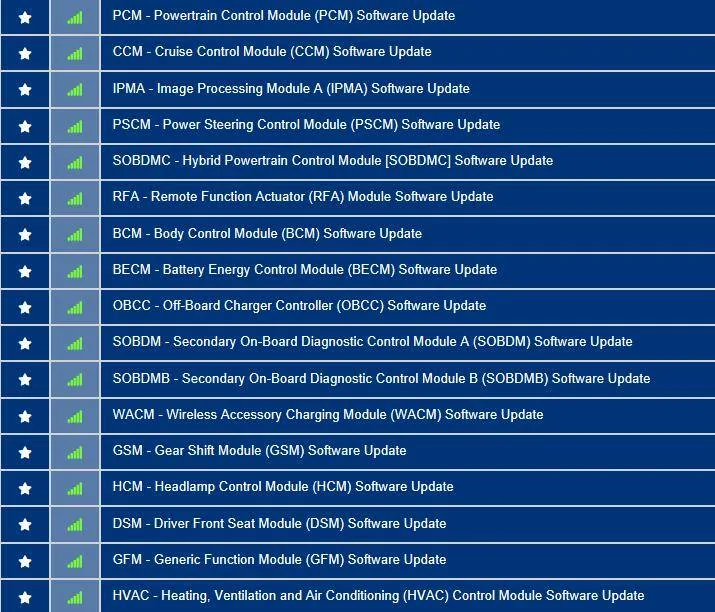
Ford Mustang Mach-E Post here if you have an active FDRS account and are willing to look up info for others 3FMTK4SE6MME00263-4-Apr-23


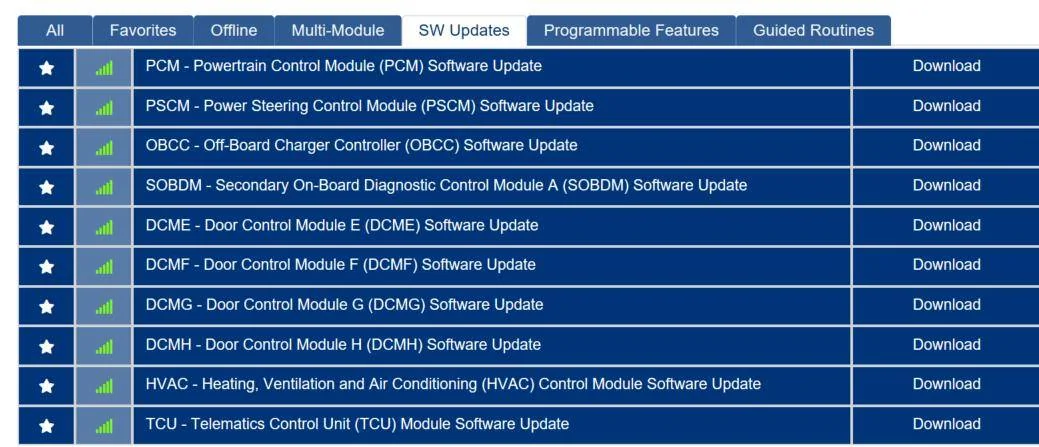
It looks like you're on Sync 539 (maybe?) and you have no GWM, APIM, or TCU updates in your list, and the rest of this list won't get updated by OTA anytime soon.

If you'd like to see some progress you should see if the service tech will at least update your PCM (powertrain items) to hopefully break you out of the possible dependency issue that most of us had at the beginning of the year with the PCM update. Once that was done for a lot of us the updates to the gateway and Sync started to flow.

I find it's better to schedule automatic updates for a time that's approximately 15 minutes into a morning commute so that the 12V battery is back above 80% state of charge and I'm driving in a 3-bar AT&T coverage area. Updates don't seem to happen at night while your car is sleeping.
 

stellman

Well-Known Member
Joined
Apr 2, 2023
Threads
4
Messages
80
Reaction score
90
Location
Austin, TX
Vehicles
2021 Mustang Mach-E GT
Country flag
Congrats...

It looks like you're on Sync 539 (maybe?) and you have no GWM, APIM, or TCU updates in your list, and the rest of this list won't get updated by OTA anytime soon.

If you'd like to see some progress you should see if the service tech will at least update your PCM (powertrain items) to hopefully break you out of the possible dependency issue that most of us had at the beginning of the year with the PCM update. Once that was done for a lot of us the updates to the gateway and Sync started to flow.

I find it's better to schedule automatic updates for a time that's approximately 15 minutes into a morning commute so that the 12V battery is back above 80% state of charge and I'm driving in a 3-bar AT&T coverage area. Updates don't seem to happen at night while your car is sleeping.
Thanks for the info! Yes, I'm on Sync 539. I'll make an appointment with the local dealer to see if they can get me up to date. While the Mach-E is on Wi-Fi at home, we don't have great AT&T cell coverage here at the house, so dunno if it prioritizes one over the other.

Again, appreciate the info and really enjoying the car so far!
 

raphael

Active Member
Joined
Jan 16, 2022
Threads
0
Messages
30
Reaction score
23
Location
Austria
Vehicles
2021 Mustang Mach-E RWD LR
Occupation
IT Security specialist
Country flag
So much of what you and others are saying reads like Phoenician hieroglyphs, fascinating, but unintelligible for us who have not learned your technical language. Can you point me in a direction so that i can learn the language you all are speaking and thereby, fix my similar problem for myself, also? I appreciate your dedication and desire to share your wealth of knowledge with the rest of us.

Respectfully,

Gio
sorry for the hieroglyphs ?
It will be a long post but I will try to keep the necessary steps as simple as possible.
But please read through all the steps before you try them and make sure you understand them.
And never ever select the Disk which contains the C: volume and clean it. This will brick your PC and you would have to install windows again.

I've put the explanation into this spoiler box to keep the post short.
1. plug in your USB stick into your computer
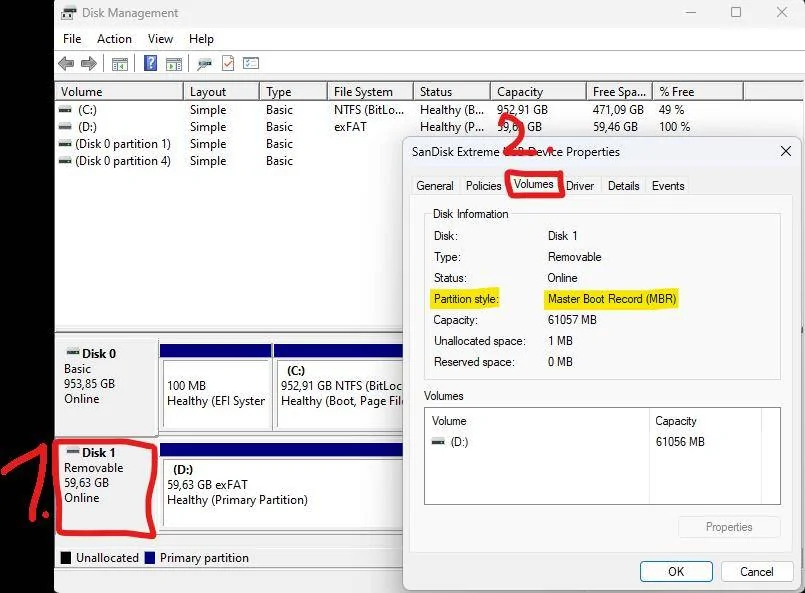
2. open disk management tool (open your start menu and enter disk management and hit enter to open it)
3. right click on the Disk which represents you USB drive and select Properties. You will know whats the right disk, because of the size of the disk. In my case, I use a 64 GB USB stick, so it can only be disk 1.
4. open the Volumes tab and check the partition style:
-if it says Master Boot Record (MBR) you should be good to go to use your USB stick for FDRS updates and you can stop here.

Ford Mustang Mach-E Post here if you have an active FDRS account and are willing to look up info for others 1680612326693


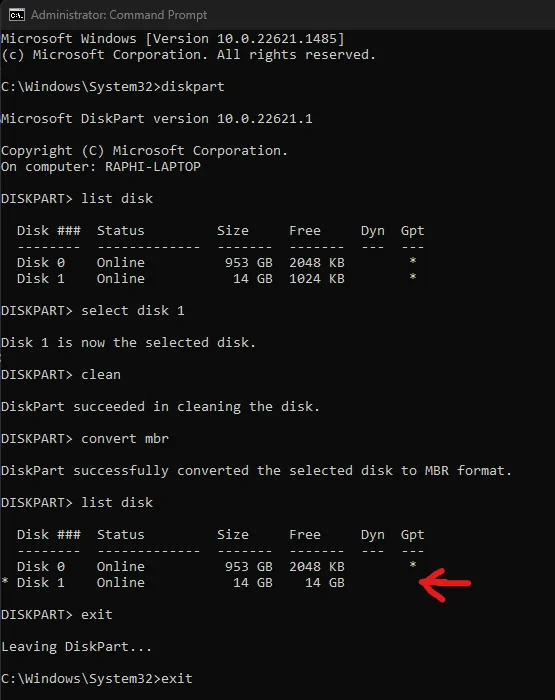
-if it says GUID Partition Table (GPT) you have to convert your USB stick to MBR with the following commands:
1. open your start menu and enter cmd. then right click on it and select "run as administrator"
2. a commandline window should open. then enter "diskpart" (only enter the words between the " into the commandline window like in the screenshot below)
3. enter "list disk" to show all your available disks. In my case, disk 0 is the disk of my laptop and disk 1 is my USB stick (it now has only 14 GB because I used a different USB stick with 16 GB). In your case it could be different. Choose the right disk by comparing the size of the disks with your USB drive.
4. enter "select disk 1" (enter your number here instead of 1)
5. enter "clean" (caution! this removes all volumes and all the data on the selected disk. make sure you select your USB stick and don't have any files on it that you still want to use.)
6. enter "convert mbr"
7. enter "list disk" again and check if the asterisk is gone in the row of your disk
8. enter "exit" to close the diskpart tool and "exit" again to close the commandline window

Ford Mustang Mach-E Post here if you have an active FDRS account and are willing to look up info for others 1680612886698


Now you will have to create a volume again on your usb drive:
1. open disk management again
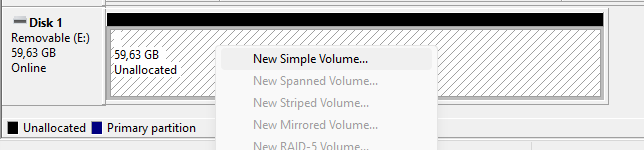
2. right click on the box where it says "Unallocated" in the row of your disk and select "New Simple Volume"
Ford Mustang Mach-E Post here if you have an active FDRS account and are willing to look up info for others 1680614849213

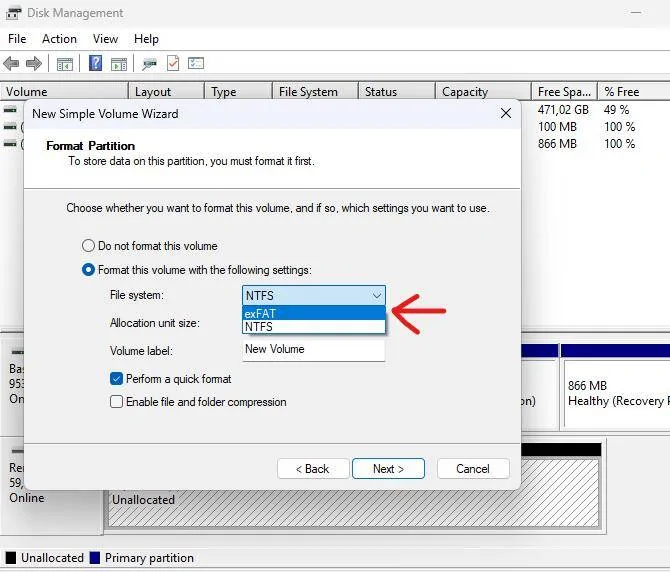
3. Click Next 3 times until you get to the window, where you can select the used file system of your volume. Make sure you select exFAT as your file system. If you don't have the option to select exFAT your USB stick is probably too small. I think Ford recommends at least 32 GB USB sticks for these FDRS updates.
Ford Mustang Mach-E Post here if you have an active FDRS account and are willing to look up info for others 1680614238783

4. Click next again and then Finish. Give it a few seconds until the volume is formated and the File Explorer opens with your newly created empty volume. Now your USB stick should be working for FDRS updates, which need an USB stick.

I hope these steps can help you and others with this FDRS update problem.


raphael

Active Member
Joined
Jan 16, 2022
Threads
0
Messages
30
Reaction score
23
Location
Austria
Vehicles
2021 Mustang Mach-E RWD LR
Occupation
IT Security specialist
Country flag
And yet another month has passed without an OTA update for my APIM. Can somebody please check my VIN (WF0TK1E79MMA32172), if the update is finally available in FDRS
 

Mike G

Well-Known Member
First Name
Mike
Joined
Mar 27, 2022
Threads
25
Messages
6,458
Reaction score
5,298
Location
N. AL, USA
Vehicles
'23(J1) Mach-E GT-PE, '22 F-150 Lightning, '24 Bronco HLE 2Dr
Country flag
And yet another month has passed without an OTA update for my APIM. Can somebody please check my VIN (WF0TK1E79MMA32172), if the update is finally available in FDRS
It is not. But you do have an HVAC for window fogging.
 

Mike G

Well-Known Member
First Name
Mike
Joined
Mar 27, 2022
Threads
25
Messages
6,458
Reaction score
5,298
Location
N. AL, USA
Vehicles
'23(J1) Mach-E GT-PE, '22 F-150 Lightning, '24 Bronco HLE 2Dr
Country flag
Thanks for the info! Yes, I'm on Sync 539. I'll make an appointment with the local dealer to see if they can get me up to date. While the Mach-E is on Wi-Fi at home, we don't have great AT&T cell coverage here at the house, so dunno if it prioritizes one over the other.

Again, appreciate the info and really enjoying the car so far!
TCU is the priority...so checking while you're out and about will get better results.
 

terry_mach_e

Well-Known Member
Joined
Jul 22, 2021
Threads
8
Messages
63
Reaction score
30
Location
MI
Vehicles
2021 Mustang Mach-E4X | Rapid Red
Country flag
Hello,

Can someone help me with a lookup for VIN 3FMTK3SU5MMA28013?

Thanks!
 

terry_mach_e

Well-Known Member
Joined
Jul 22, 2021
Threads
8
Messages
63
Reaction score
30
Location
MI
Vehicles
2021 Mustang Mach-E4X | Rapid Red
Country flag
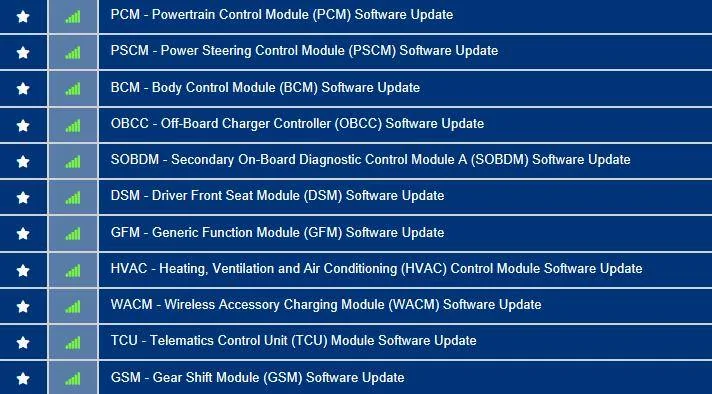
27 May '21 build date, Job 1 car.

Here's the list of available updates:
3FMTK3SU5MMA28013-5-Apr-23.webp

Thanks Mike! I don't know if this question makes sense, but are there any of these that are good-to-have (I have a dealership visit next week, so wanted to confirm)?
Sponsored


Top