Post here if you have an active FDRS account and are willing to look up info for others

sly

Member
Joined
May 23, 2022
Threads
1
Messages
7
Reaction score
25
Location
Redmond
Vehicles
GT
Country flag
Thanks all for offering this service. This is awesome!

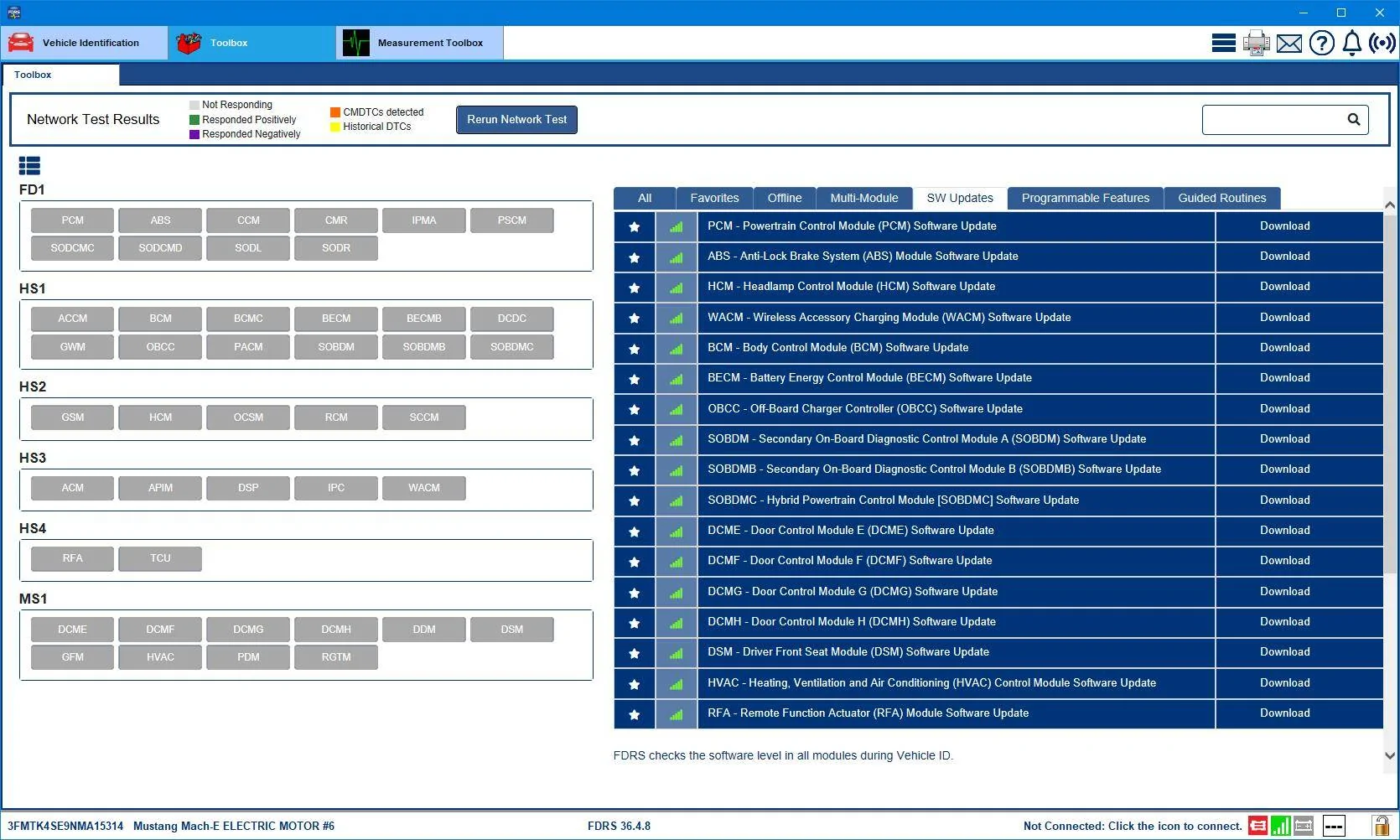
Could someone run by my VIN: 3FMTK4SE9NMA15314

I have had issues installing the latest OTA update and was wondering if I could learn something here.

Thanks!
Sponsored

 

Mike G

Well-Known Member
First Name
Mike
Joined
Mar 27, 2022
Threads
25
Messages
6,458
Reaction score
5,298
Location
N. AL, USA
Vehicles
'23(J1) Mach-E GT-PE, '22 F-150 Lightning, '24 Bronco HLE 2Dr
Country flag
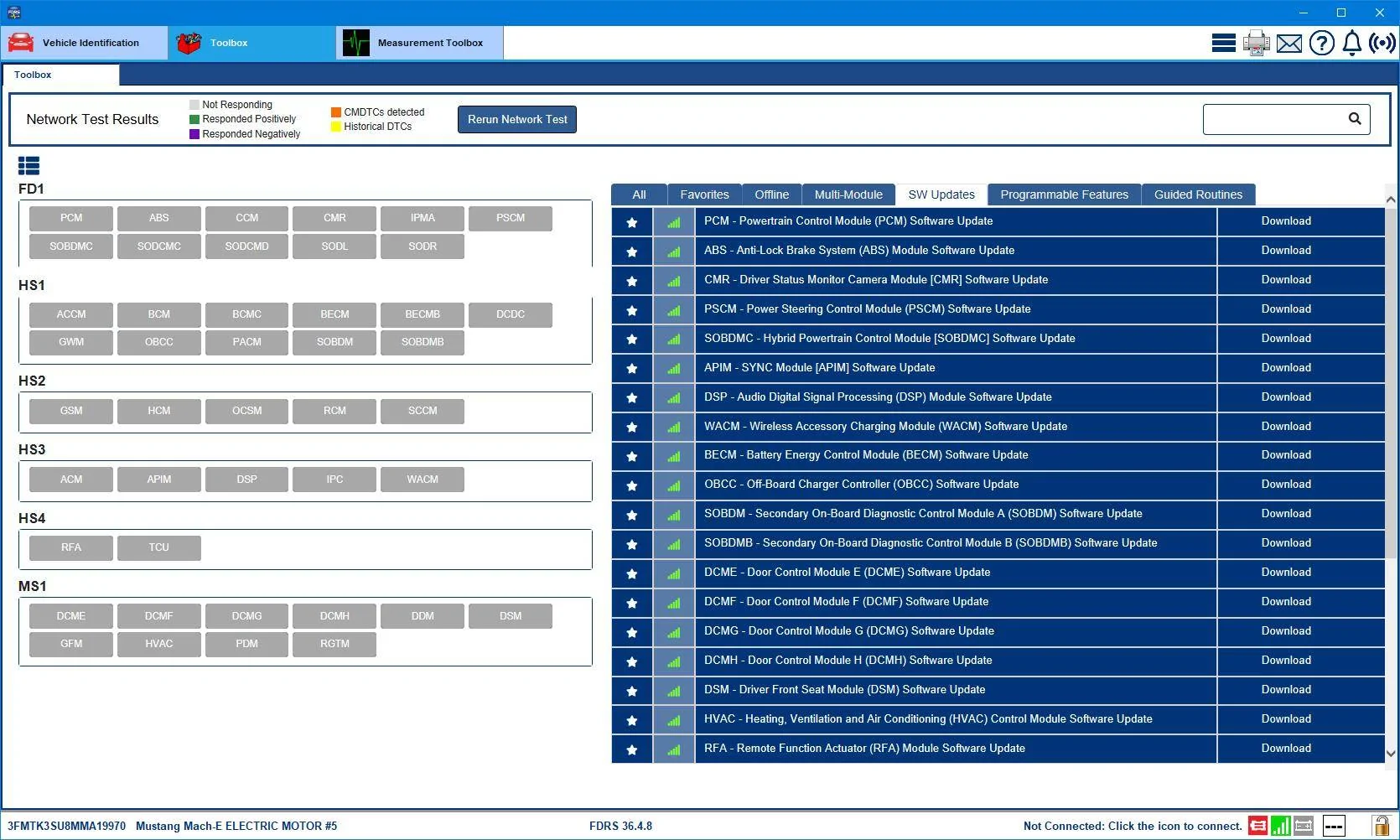
I'm picking up a 2021 in about two weeks. Would anyone mind checking if there are any pending updates I should ask their service department to fix? VIN is 3FMTK3SU8MMA19970

Thank you!
21 Jan '21 build date, Job 1 car.

Yeah I think this one has a few issues with getting OTAs.

Ford Mustang Mach-E Post here if you have an active FDRS account and are willing to look up info for others 3FMTK3SU8MMA19970-31-Jul-23


First of all the version of the APIM (Sync) tht this car is currently showing is pre-UI refresh. In fact it is the same version delivered by OTA 3.5.4 (or 3.2.1) which was the update that enabled connection to two cell phones simultaneously. So that was a while ago.

A lot of these other available updates in this list have already arrived and been processed by many other forum members cars at this point. So if I was intending to buy this car I'd show that service advisor and possibly the salesman this FDRS screenshot and ask them to investigate why this car isn't getting OTAs as a condition of the sale. And to do it before the sale takes place, not after.
 
Last edited:

Mike G

Well-Known Member
First Name
Mike
Joined
Mar 27, 2022
Threads
25
Messages
6,458
Reaction score
5,298
Location
N. AL, USA
Vehicles
'23(J1) Mach-E GT-PE, '22 F-150 Lightning, '24 Bronco HLE 2Dr
Country flag
Thanks all for offering this service. This is awesome!

Could someone run by my VIN: 3FMTK4SE9NMA15314

I have had issues installing the latest OTA update and was wondering if I could learn something here.

Thanks!
17 Mar '22 build date.

Not sure which OTA(s) you're having difficulty with but I'd say there a re few that you've missed based on the list of available software:
Ford Mustang Mach-E Post here if you have an active FDRS account and are willing to look up info for others 3FMTK4SE9NMA15314-31-Jul-23


I would check the Sync "Check Update" schedule settings to confirm that it is checking daily and during a normal commute time (like 15 minutes into your morning or afternoon commute) to ensure that your 12V battery is back up to above 80% state-of-charge and that you're driving in an area with at least three bars of AT&T coverage for your car's TCU to download the update software. It's been said often but bears repeating that updates do not download over your house Wi-Fi, and because of the small 35Ah 12V battery the car has, it is quite often below 80% SOC at the Ford-default scheduled update check time of 0100. So you'll have better luck getting an update while the car is out and about.
 

sly

Member
Joined
May 23, 2022
Threads
1
Messages
7
Reaction score
25
Location
Redmond
Vehicles
GT
Country flag
17 Mar '22 build date.

Not sure which OTA(s) you're having difficulty with but I'd say there a re few that you've missed based on the list of available software:
3FMTK4SE9NMA15314-31-Jul-23.png


I would check the Sync "Check Update" schedule settings to confirm that it is checking daily and during a normal commute time (like 15 minutes into your morning or afternoon commute) to ensure that your 12V battery is back up to above 80% state-of-charge and that you're driving in an area with at least three bars of AT&T coverage for your car's TCU to download the update software. It's been said often but bears repeating that updates do not download over your house Wi-Fi, and because of the small 35Ah 12V battery the car has, it is quite often below 80% SOC at the Ford-default scheduled update check time of 0100. So you'll have better luck getting an update while the car is out and about.
Thanks for the information. It seems that I am able to download the software ok but it fails to install. I do think that the issue is with the 12V battery. I checked the level when the car is off and it is quite low. It does go higher when the car is on. Is there a way to increase the SOC of the 12V battery? Do I need to drive the car or can I just leave the car on to boost the 12V battery?
 

Mike G

Well-Known Member
First Name
Mike
Joined
Mar 27, 2022
Threads
25
Messages
6,458
Reaction score
5,298
Location
N. AL, USA
Vehicles
'23(J1) Mach-E GT-PE, '22 F-150 Lightning, '24 Bronco HLE 2Dr
Country flag
Thanks for the information. It seems that I am able to download the software ok but it fails to install. I do think that the issue is with the 12V battery. I checked the level when the car is off and it is quite low. It does go higher when the car is on. Is there a way to increase the SOC of the 12V battery? Do I need to drive the car or can I just leave the car on to boost the 12V battery?
Well I will suggest that you try a reset of the Battery Management Learned Values routine that Ford tells all the techs to do anytime they think a low 12V battery is causing updates to fail.

There are two ways to do it. The first way that the techs would do it is using the FDRS program, but there's an alternative way that anybody can do.

It's probably best to do this before you plan on driving the car the next time. Takes seconds.

Get in the car and without pressing the brake, hit the start button to put the car in accessory mode.

Flash the high beams with the stalk 5 times.

Press the brake 3 times.

You should then see the battery icon flash on the instrument panel about 3 times.

When that stops, hit the start button to shut the car off. Pause.

Then start the car and drive as normal. You're 12V battery should then charge back up fully, if it wasn't doing so before.


James III

Well-Known Member
First Name
James
Joined
Jun 10, 2022
Threads
1
Messages
81
Reaction score
34
Location
United Kingdom
Vehicles
2021 (build1) Mach-e AWD EXT (iconic silver)
Occupation
Developer
Country flag
Hello again Mike,
You kindly helped me our with an FDRS update list Nov last year. It was very helpful and when I took mine into the Dealer for HVJB recall.

I’ve had a few updates since including BCM which allowed me to open the frunk from keypad code+ 7-8 bingo!

There’s finally been some OTA’s here in the UK since 2.7.O now to 3,5.4.3 last month.
According to tech on Ford team it took 6 separate updates and they changed the way OTA’s deployed here to only come when switched ON, and load when switched off, but can take lots of driving sessions to load because it’s coming through Cellular Edge connectivity.

All this Alexa which only tells me, “I’m having trouble with connecting, Please check your network connection and try again”

Anyway I am having my MME towed into the dealer tomorrow to get my HVBJB replaced and am hoping to get them to pull a few updates for me while there for the week.

Here’s my VIN again;

WFOTR3SU1MMA16209.

Could you please post an the FDRS again?

One last question I was hoping you might be able to find more information on. In the UK blue cruise was approved and activated only for MY 23 here.
They’re saying, because it has more module updates that the other years don’t have from factory, and was approved as complete car as new.
FORD UK saying there aren’t any module updates to bring the earlier models up to the same spec.
One day maybe, even though it was promised when approved when I bought my mine.

Does that make any sense to you?

I know in the US you’ve just had OTA BC releases, especially going back to job1 cars for BC 1.3

As with most improvements, here in the UK/EU on new models aren’t retrospective. Which I believe is because they want to sell new models.

Lastly, do you know of anything that can be done to add the FRUNK button to the display?

I’ve heard some saying it could be done through Forscan if modules are up to date.

I appreciate any input.

Thanks very much !

Jsmes
 

Mike G

Well-Known Member
First Name
Mike
Joined
Mar 27, 2022
Threads
25
Messages
6,458
Reaction score
5,298
Location
N. AL, USA
Vehicles
'23(J1) Mach-E GT-PE, '22 F-150 Lightning, '24 Bronco HLE 2Dr
Country flag
Hello again Mike,
You kindly helped me our with an FDRS update list Nov last year. It was very helpful and when I took mine into the Dealer for HVJB recall.

I’ve had a few updates since including BCM which allowed me to open the frunk from keypad code+ 7-8 bingo!

There’s finally been some OTA’s here in the UK since 2.7.O now to 3,5.4.3 last month.
According to tech on Ford team it took 6 separate updates and they changed the way OTA’s deployed here to only come when switched ON, and load when switched off, but can take lots of driving sessions to load because it’s coming through Cellular Edge connectivity.

All this Alexa which only tells me, “I’m having trouble with connecting, Please check your network connection and try again”

Anyway I am having my MME towed into the dealer tomorrow to get my HVBJB replaced and am hoping to get them to pull a few updates for me while there for the week.

Here’s my VIN again;

WFOTR3SU1MMA16209.

Could you please post an the FDRS again?

One last question I was hoping you might be able to find more information on. In the UK blue cruise was approved and activated only for MY 23 here.
They’re saying, because it has more module updates that the other years don’t have from factory, and was approved as complete car as new.
FORD UK saying there aren’t any module updates to bring the earlier models up to the same spec.
One day maybe, even though it was promised when approved when I bought my mine.

Does that make any sense to you?

I know in the US you’ve just had OTA BC releases, especially going back to job1 cars for BC 1.3

As with most improvements, here in the UK/EU on new models aren’t retrospective. Which I believe is because they want to sell new models.

Lastly, do you know of anything that can be done to add the FRUNK button to the display?

I’ve heard some saying it could be done through Forscan if modules are up to date.

I appreciate any input.

Thanks very much !

Jsmes
Sorry about the HVJB thing but as many people know it's pretty inevitable. It's not really a matter of "if" but "when" it's going to need to be replaced. But the good news is that the newer replacements seem to be holding up well.

As for BlueCruise. I understand from previous postings that BC had been approved but wondered what Ford were going to do about the pre-'23 models. If I had to guess, I would suspect the intention is to delay doing any BC programming on the older cars until such time as the 1.3 software package is out of the oven and ready for OTA delivery. Meaning, Ford won't be paying techs to do all the cruise control related updates you have in your list now (CCM, CMR, PSCM) only to have to do them all over again later when the BC 1.3 campaign starts which will involve not only the modules above but also the IPMA, IPC, and the 'usual suspects' (GWM, APIM, TCU).

You do have a TCU update showing as available and hopefully your tech is read-in on always doing any GWM, APIM, or TCU update before starting in on anything else (it's a dependency thing).

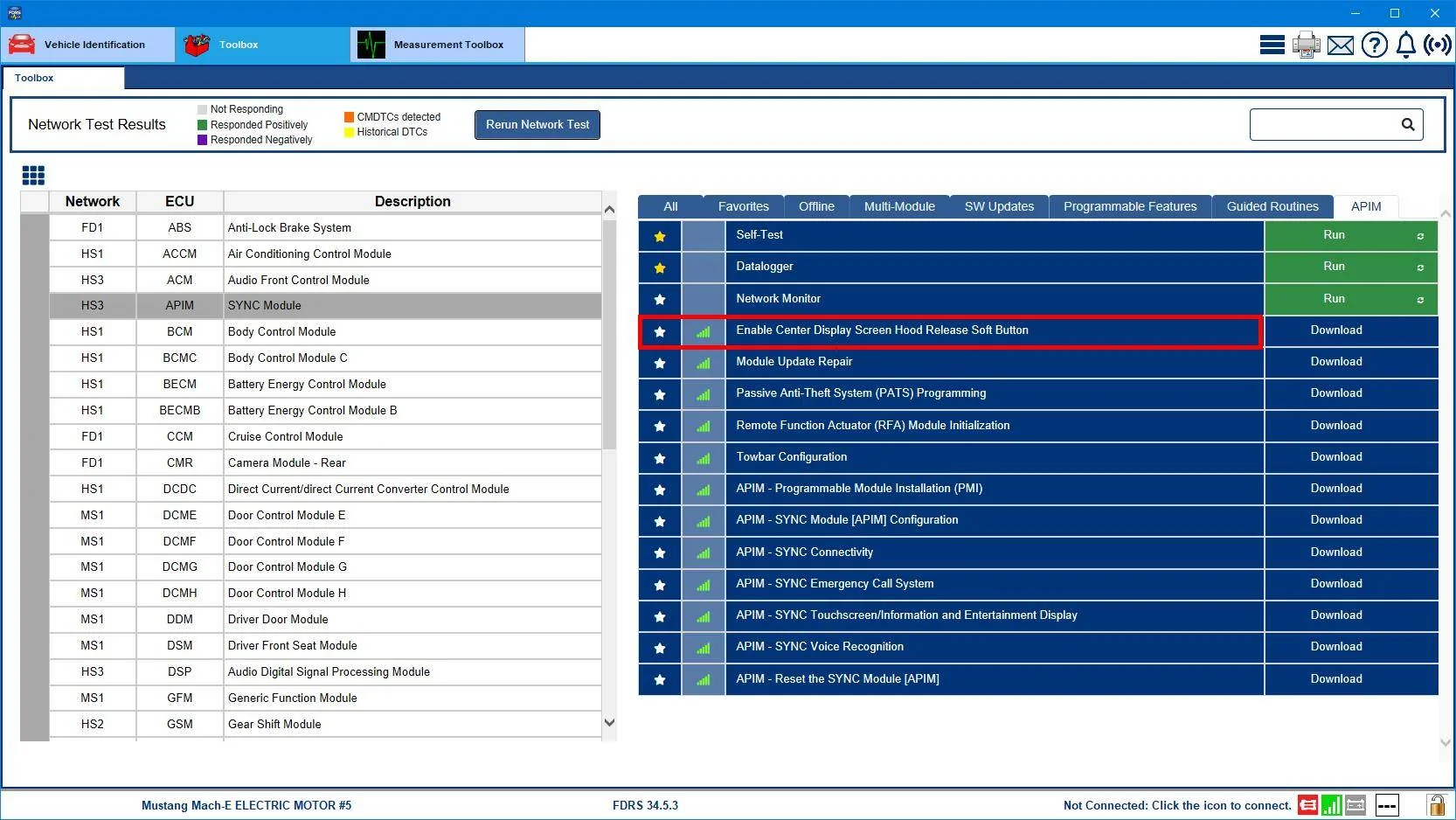
The Frunk button is added to the Sync screen after the BCM and GFM have been updated by a tech simply running this little routine in FDRS:
Ford Mustang Mach-E Post here if you have an active FDRS account and are willing to look up info for others Frunk_Button_Enabl

You'll likely have to point this out to them, most of them don't know it's there, especially if they don't deal with MMEs often.

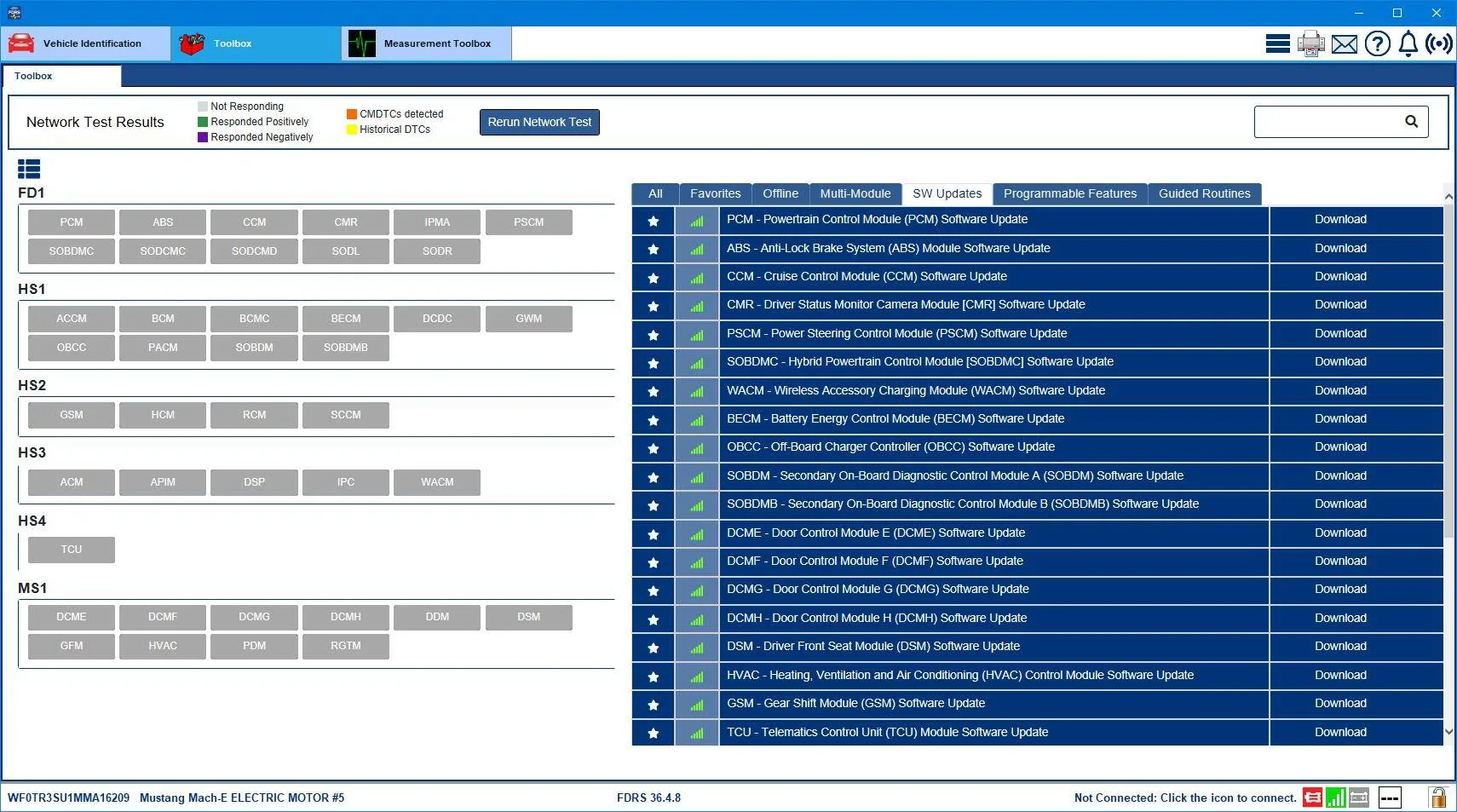
Here's the list of available software updates you have at the minute:
Ford Mustang Mach-E Post here if you have an active FDRS account and are willing to look up info for others WF0TR3SU1MMA16209-1-Aug-23


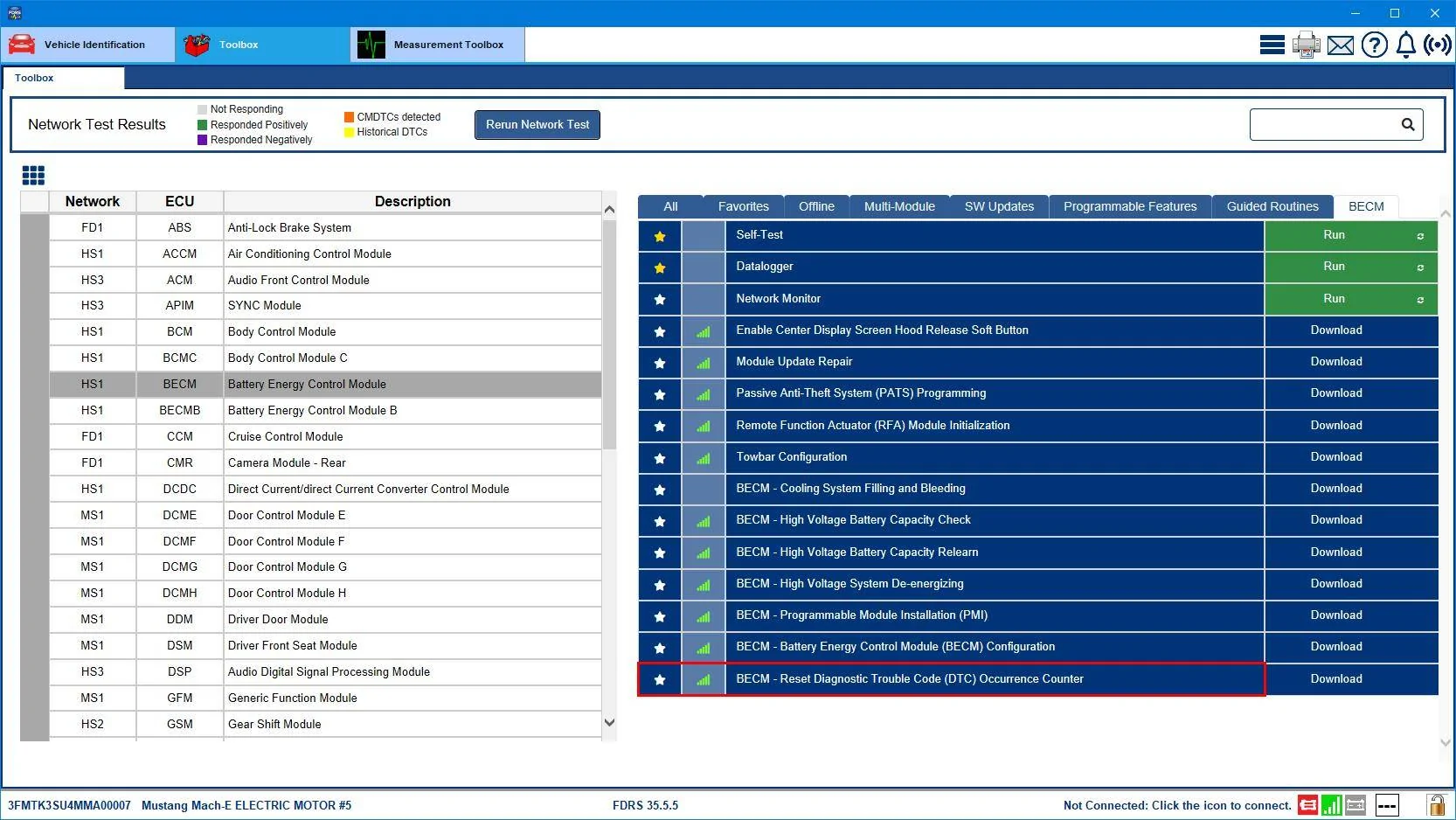
Your tech should be updating (at the very least) all the powertrain related modules during the HVJB replacement (PCM, SOBDM, SOBDMB, SOBDMC, BECM, ABS). As well as running the BECM count reset tool after the HVJB is replaced:
Ford Mustang Mach-E Post here if you have an active FDRS account and are willing to look up info for others MME_Reset_BECM_DTC_Count


That GSM update is applied if the tech sees GSM errors (DTCs) in FDRS, or if you've gotten an error indication on the instrument panel. But it's no harm to update it in any event, doesn't hurt to do it even if it's not indicated.

The door updates all relate to issues with door security or having to press the door buttons repeatedly to get the door to open. And there is an OTA for that but I guess you haven't gotten it yet.

The OBCC update is for compatibility with some DC fast chargers and again, there's an OTA for that as well that you obviously haven't gotten (maybe due to that TCU update you still haven't gotten?).

Let me know how you get on.
 

sly

Member
Joined
May 23, 2022
Threads
1
Messages
7
Reaction score
25
Location
Redmond
Vehicles
GT
Country flag
Well I will suggest that you try a reset of the Battery Management Learned Values routine that Ford tells all the techs to do anytime they think a low 12V battery is causing updates to fail.

There are two ways to do it. The first way that the techs would do it is using the FDRS program, but there's an alternative way that anybody can do.

It's probably best to do this before you plan on driving the car the next time. Takes seconds.

Get in the car and without pressing the brake, hit the start button to put the car in accessory mode.

Flash the high beams with the stalk 5 times.

Press the brake 3 times.

You should then see the battery icon flash on the instrument panel about 3 times.

When that stops, hit the start button to shut the car off. Pause.

Then start the car and drive as normal. You're 12V battery should then charge back up fully, if it wasn't doing so before.
Hi Mike,

I tried this reset as you suggested and it worked! Last night the update completed at the scheduled time (1 am). I didn't even have to take the car for a drive.

Hopefully that will solve the issue going forward for future OTA updates.

Thanks again!
Sly
 

SONEWBE

Well-Known Member
First Name
Dennis
Joined
Jun 30, 2020
Threads
17
Messages
169
Reaction score
125
Location
Oregon
Vehicles
2021 Job 1 MachE 4X, 2014 BMW X3
Occupation
Retired
Could someone run my VIN: 3FMTK3SU1MMA08471 for me. I had 22 available updates last week and I was finally able to convince my dealer to update all of them to fix an OTA issue. I wanted to see if all of them got updated.

Thanks in advance.
 

Mike G

Well-Known Member
First Name
Mike
Joined
Mar 27, 2022
Threads
25
Messages
6,458
Reaction score
5,298
Location
N. AL, USA
Vehicles
'23(J1) Mach-E GT-PE, '22 F-150 Lightning, '24 Bronco HLE 2Dr
Country flag
Could someone run my VIN: 3FMTK3SU1MMA08471 for me. I had 22 available updates last week and I was finally able to convince my dealer to update all of them to fix an OTA issue. I wanted to see if all of them got updated.

Thanks in advance.
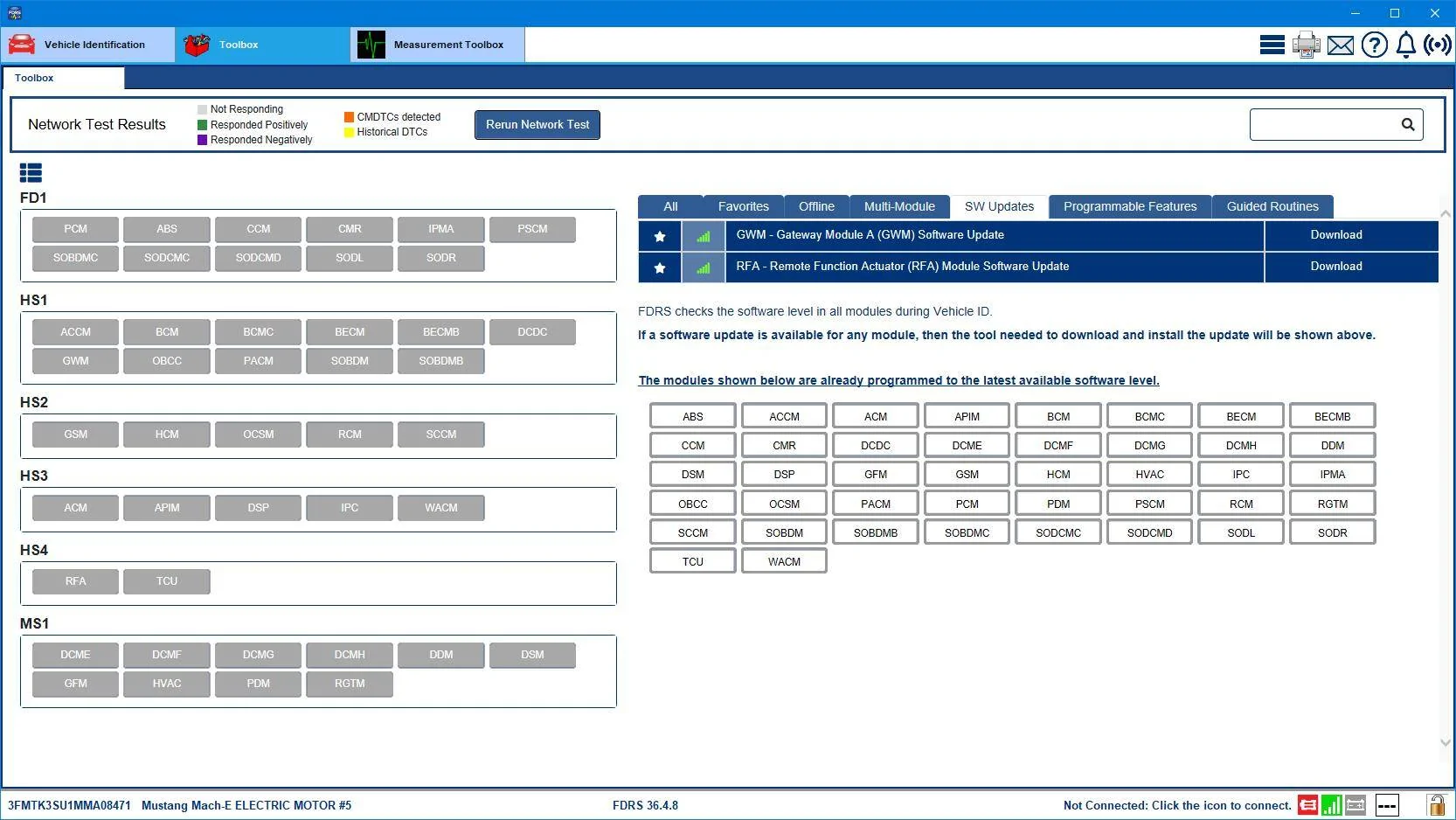
Ford Mustang Mach-E Post here if you have an active FDRS account and are willing to look up info for others 3FMTK3SU1MMA08471-1-Aug-23


They repeatedly tried updating the RFA but it didn't drop from the list. Meaning, it did update, it just didn't drop off yet as far as the cloud is concerned.

They also did do a successful (according to FDRS) update of your gateway, so this one in the list may be a newer follow-on update that's appeared. Your current software revision on the GWM is "-LKA" and I think "-LKB" is the most current for '21 models. CORRECTION: "-LKC" is the most current. So you've got a couple of OTAs to come yet.
 

SONEWBE

Well-Known Member
First Name
Dennis
Joined
Jun 30, 2020
Threads
17
Messages
169
Reaction score
125
Location
Oregon
Vehicles
2021 Job 1 MachE 4X, 2014 BMW X3
Occupation
Retired
3FMTK3SU1MMA08471-1-Aug-23.png


They repeatedly tried updating the RFA but it didn't drop from the list. Meaning, it did update, it just didn't drop off yet as far as the cloud is concerned.

They also did do a successful (according to FDRS) update of your gateway, so this one in the list may be a newer follow-on update that's appeared. Your current software revision on the GWM is "-LKA" and I think "-LKB" is the most current for '21 models. CORRECTION: "-LKC" is the most current. So you've got a couple of OTAs to come yet.
Thanks! Looking forward my first OTA update in 8 months….maybe BC 1.3??
 

James III

Well-Known Member
First Name
James
Joined
Jun 10, 2022
Threads
1
Messages
81
Reaction score
34
Location
United Kingdom
Vehicles
2021 (build1) Mach-e AWD EXT (iconic silver)
Occupation
Developer
Country flag
Sorry about the HVJB thing but as many people know it's pretty inevitable. It's not really a matter of "if" but "when" it's going to need to be replaced. But the good news is that the newer replacements seem to be holding up well.

As for BlueCruise. I understand from previous postings that BC had been approved but wondered what Ford were going to do about the pre-'23 models. If I had to guess, I would suspect the intention is to delay doing any BC programming on the older cars until such time as the 1.3 software package is out of the oven and ready for OTA delivery. Meaning, Ford won't be paying techs to do all the cruise control related updates you have in your list now (CCM, CMR, PSCM) only to have to do them all over again later when the BC 1.3 campaign starts which will involve not only the modules above but also the IPMA, IPC, and the 'usual suspects' (GWM, APIM, TCU).

You do have a TCU update showing as available and hopefully your tech is read-in on always doing any GWM, APIM, or TCU update before starting in on anything else (it's a dependency thing).

The Frunk button is added to the Sync screen after the BCM and GFM have been updated by a tech simply running this little routine in FDRS:
Frunk_Button_Enable.png

You'll likely have to point this out to them, most of them don't know it's there, especially if they don't deal with MMEs often.

Here's the list of available software updates you have at the minute:
WF0TR3SU1MMA16209-1-Aug-23.png


Your tech should be updating (at the very least) all the powertrain related modules during the HVJB replacement (PCM, SOBDM, SOBDMB, SOBDMC, BECM, ABS). As well as running the BECM count reset tool after the HVJB is replaced:
MME_Reset_BECM_DTC_Count.webp


That GSM update is applied if the tech sees GSM errors (DTCs) in FDRS, or if you've gotten an error indication on the instrument panel. But it's no harm to update it in any event, doesn't hurt to do it even if it's not indicated.

The door updates all relate to issues with door security or having to press the door buttons repeatedly to get the door to open. And there is an OTA for that but I guess you haven't gotten it yet.

The OBCC update is for compatibility with some DC fast chargers and again, there's an OTA for that as well that you obviously haven't gotten (maybe due to that TCU update you still haven't gotten?).

Let me know how you get on.
Mike this is an amazing reply, and so very helpful.
I’ll do my best to get this information to the tech at the dealer doing the HVJB replacement.
I’ll let you know how I get.
I’m so grateful! ??

‘Respect’
James ?
 

GERChris

Well-Known Member
First Name
Chris
Joined
Aug 3, 2023
Threads
4
Messages
67
Reaction score
35
Location
Lancaster, PA
Vehicles
2021 Mach E
Country flag
Fellow Mach-E Friends and frustrated over-the-air Updaters,

I follow the Forum for a while as I looked into the Mach-E's as a good alternative for my daily commute to work and back. (around 43 miles total). I got myself a 2021 Select with all the Bells and Whistle's (besides the Premium Sound System and maybe a few other features...)

The only thing I noticed .... after driving it home from the Dealership - is that I'm still stuck in the 3.XXX Software.... not having the latest BlueCruise and Interface Update for the Touchscreen. Can someone check if I have to get it updated at the dealer to update to 4.XXX? I only have it for 4 Days maybe it will solve itself while driving / overnight WIFI and schedule?

VIN: 3FMTK1SSXMMA54643

CarFax
https://www.carfax.com/VehicleHistory/p/Report.cfx?partner=FRD_2&vin=3FMTK1SSXMMA54643

WindowSticker
https://www.carfax.com/phoenix/stic...QO7iMpb7n3TE04Kcbv1UjxiE2PNCwECf1TLe3R023.cfx
 

Mike G

Well-Known Member
First Name
Mike
Joined
Mar 27, 2022
Threads
25
Messages
6,458
Reaction score
5,298
Location
N. AL, USA
Vehicles
'23(J1) Mach-E GT-PE, '22 F-150 Lightning, '24 Bronco HLE 2Dr
Country flag
Fellow Mach-E Friends and frustrated over-the-air Updaters,

I follow the Forum for a while as I looked into the Mach-E's as a good alternative for my daily commute to work and back. (around 43 miles total). I got myself a 2021 Select with all the Bells and Whistle's (besides the Premium Sound System and maybe a few other features...)

The only thing I noticed .... after driving it home from the Dealership - is that I'm still stuck in the 3.XXX Software.... not having the latest BlueCruise and Interface Update for the Touchscreen. Can someone check if I have to get it updated at the dealer to update to 4.XXX? I only have it for 4 Days maybe it will solve itself while driving / overnight WIFI and schedule?

VIN: 3FMTK1SSXMMA54643

CarFax
https://www.carfax.com/VehicleHistory/p/Report.cfx?partner=FRD_2&vin=3FMTK1SSXMMA54643

WindowSticker
https://www.carfax.com/phoenix/stic...QO7iMpb7n3TE04Kcbv1UjxiE2PNCwECf1TLe3R023.cfx
12 Sep '21, Job 2 car.

And if it's a Job 2 Select with comfort and tech it should have come with working BlueCruise from the plant. Could it be that you haven't added this car to your Ford account and enabled Connected Services yet? That would be a possible reason that BC isn't working yet. Based on the build date your BlueCruise 1.0 should expire three years after it was first activated (in-service date in your case).

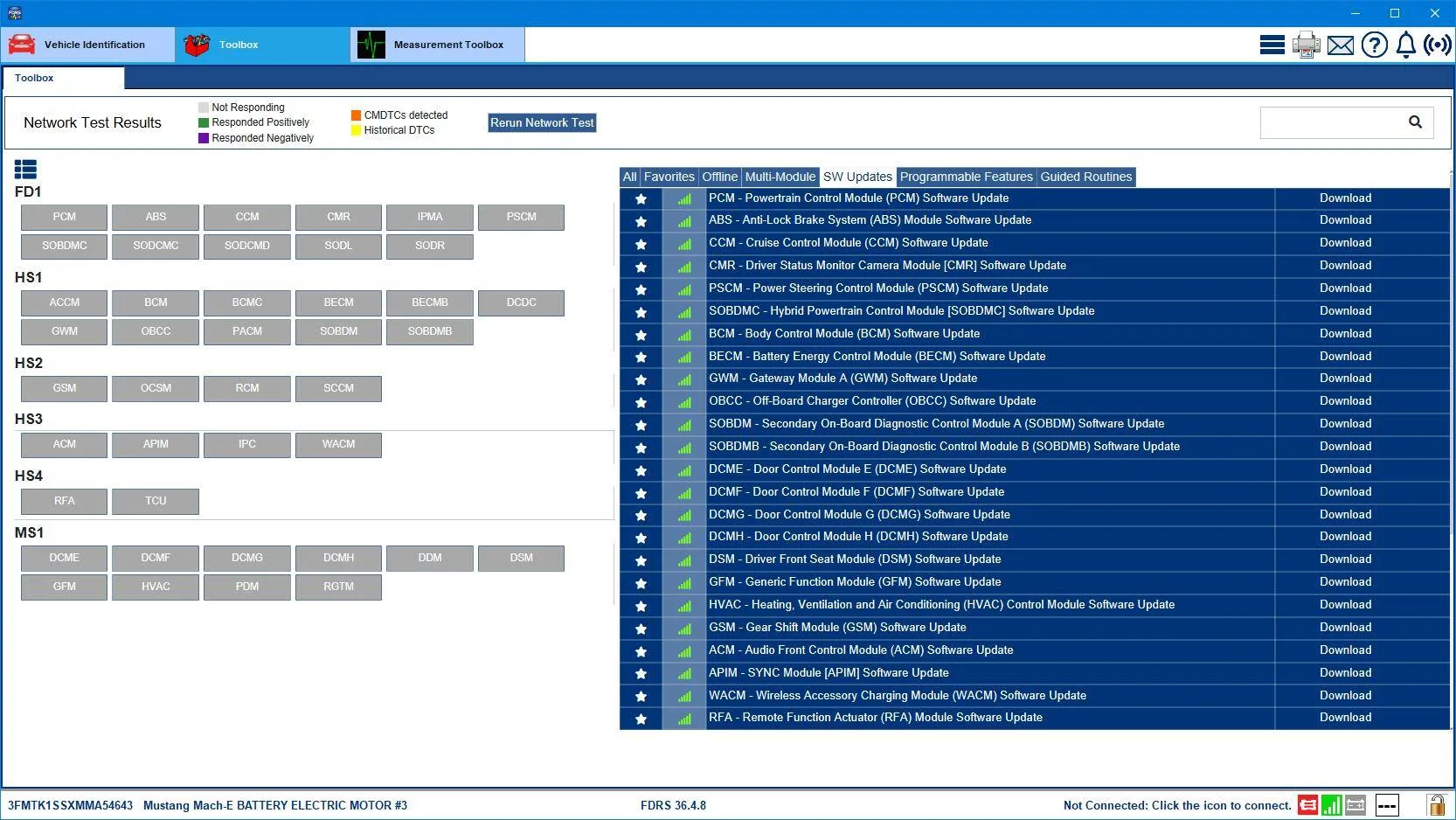
You have a lot of updates in your list but the ones you want to pay attention to are the GWM (gateway) and the APIM (Sync) because in all of the things that are in that list the gateway and then the APIM are the first two that need to be updated before anything else is attempted for software dependency reasons.

If you car has been sitting on a dealers lot for a while I guarantee that your 12V battery needs the "Learned Values" reset on the battery management system. It's a quick procedure.

Forget putting your car on your home Wi-Fi for updates. It doesn't work. Set your check updates schedule to a daily time that's roughly 15-20 minutes into your commute (either to or from work) so that your 12V battery is back up above 80% SOC and your in a good cell coverage area. You'll have better luck getting updates that way.

Here's your list of available updates:
Ford Mustang Mach-E Post here if you have an active FDRS account and are willing to look up info for others 3FMTK1SSXMMA54643-3-Aug-23


Again, very important...that GWM needs to be updated before anything else, and then the APIM.
 

reoquinn

Member
First Name
Robert
Joined
Aug 8, 2022
Threads
0
Messages
18
Reaction score
6
Location
Canada
Vehicles
Mach e
Occupation
commercial pilot
Country flag
Hi Mike,

Can you run mine again?

VIN: 3FMTK1SS5NMA25200

Thanks,

Rob
Sponsored


Top