GrisGris

Well-Known Member
Joined
Dec 29, 2020
Threads
2
Messages
198
Reaction score
148
Location
Tampa
Vehicles
'21 Premium RR ER AWD
Country flag
You might try deleting the script files (not Scriptable ) and reinstalling. https://tonesto7.github.io/fordpass-scriptable/
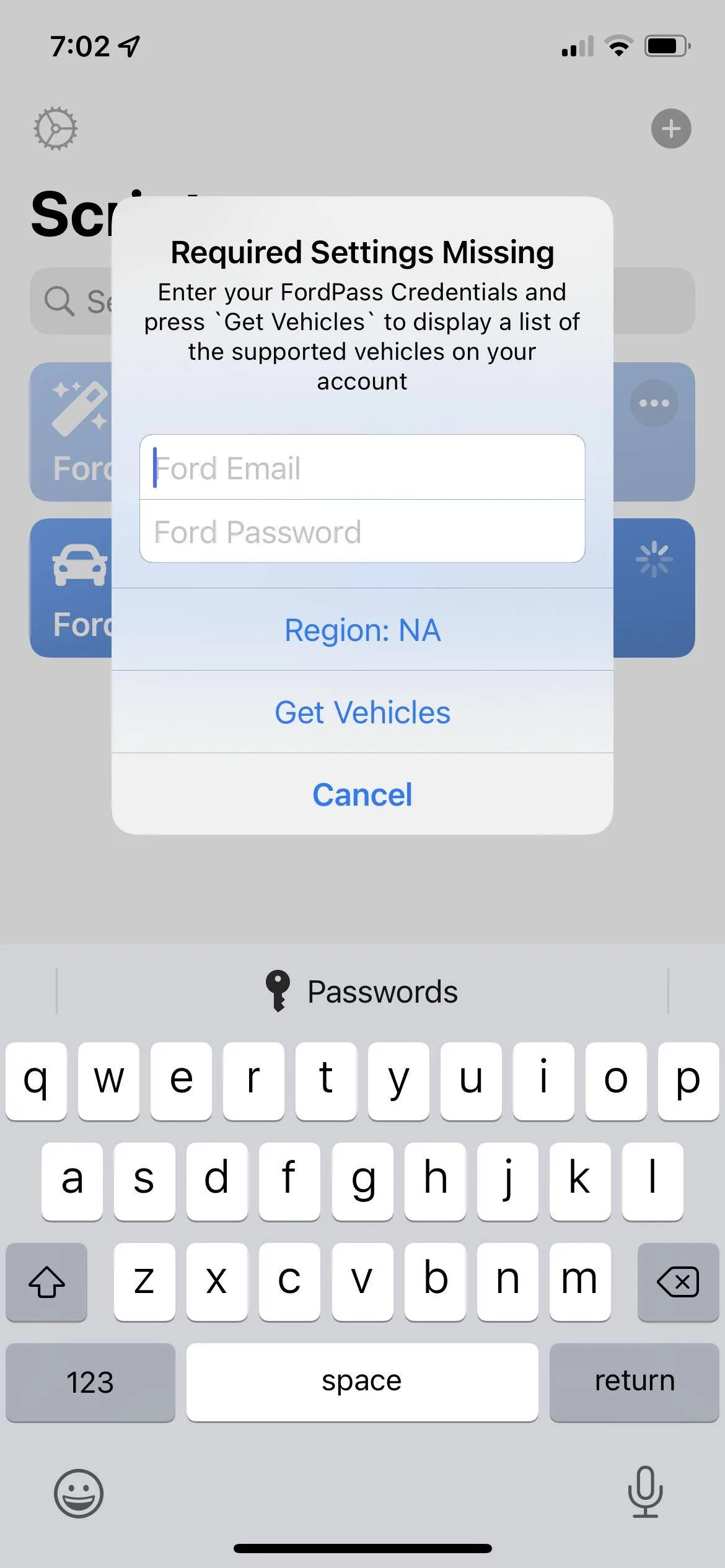
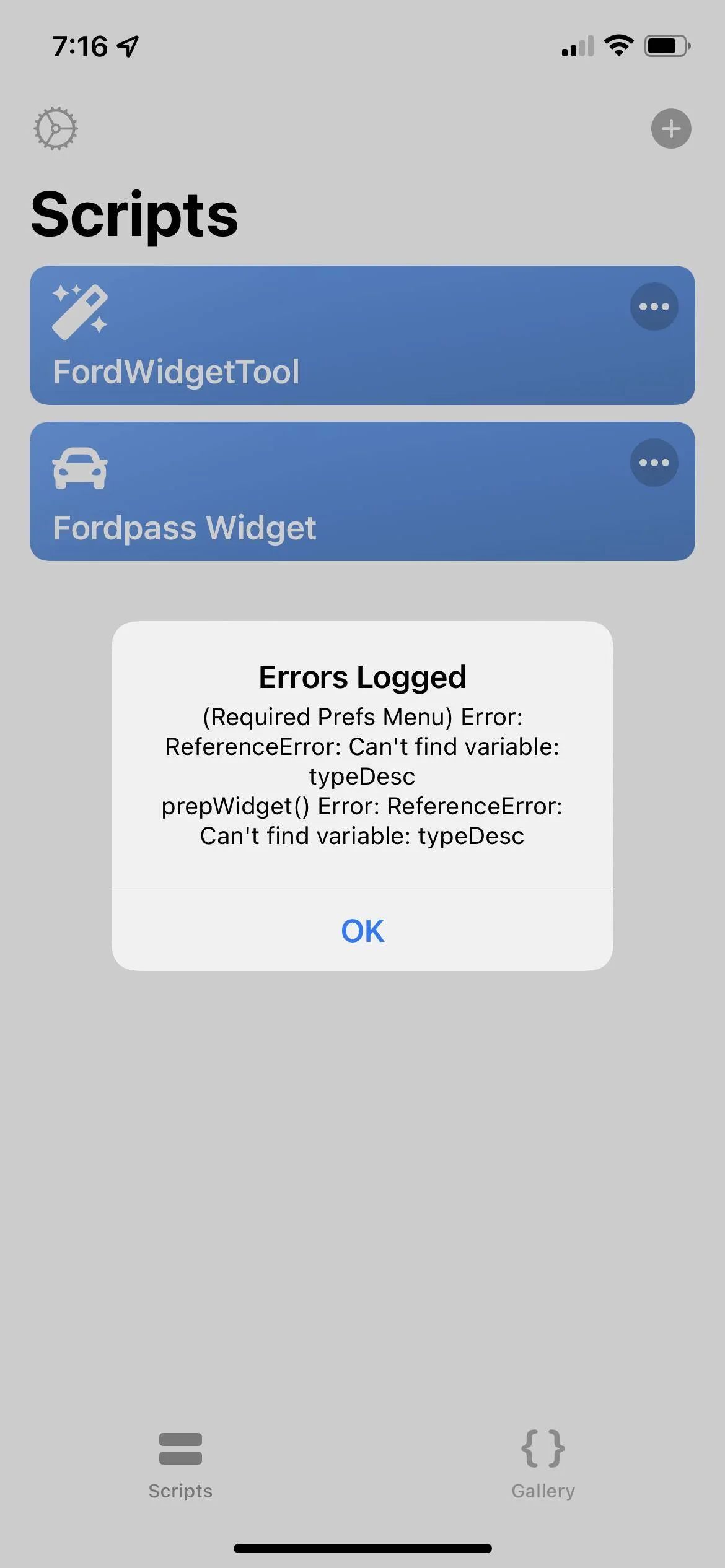
Yes, I thought that might do the trick. Bizarre thing is that now I can't even get it to properly install. The script and widget are there again but I get a "Required Settings Missing" error (the widget style, map provider, etc.) when I try to open the widget.

Still got the darn Ford lockout email though, haha! It doesn't seem to actually lock my account since I'm still logged in on Ford. com.

Dunno...
Sponsored
 

Texas-E

Well-Known Member
Joined
May 16, 2021
Threads
8
Messages
284
Reaction score
499
Location
Texas
Vehicles
2021 Mach-E
Country flag
Yes, I thought that might do the trick. Bizarre thing is that now I can't even get it to properly install. The script and widget are there again but I get a "Required Settings Missing" error (the widget style, map provider, etc.) when I try to open the widget.
Hmmm... not sure what to suggest. I deleted everything thing in the iCloud drive Scriptable folder, including the FPWModules folder. Did you also delete the FPWModules folder?
 

GrisGris

Well-Known Member
Joined
Dec 29, 2020
Threads
2
Messages
198
Reaction score
148
Location
Tampa
Vehicles
'21 Premium RR ER AWD
Country flag
Hmmm... not sure what to suggest. I deleted everything thing in the iCloud drive Scriptable folder, including the FPWModules folder. Did you also delete the FPWModules folder?

I hadn't but this time I tried that as well and it made no difference. So it has to be a completely new installation at this point.

Thanks for trying to help though!
 
OP
OP
tonesto7

tonesto7

Well-Known Member
First Name
Anthony
Joined
Sep 20, 2021
Threads
2
Messages
243
Reaction score
610
Location
Ann Arbor, Michigan
Vehicles
2021 F150
Occupation
Software Developer/System Admin
Country flag
Yes, I thought that might do the trick. Bizarre thing is that now I can't even get it to properly install. The script and widget are there again but I get a "Required Settings Missing" error (the widget style, map provider, etc.) when I try to open the widget.

Still got the darn Ford lockout email though, haha! It doesn't seem to actually lock my account since I'm still logged in on Ford. com.

Dunno...
Open up the widget tool and go into settings and clear all the data for that instance.
 

GrisGris

Well-Known Member
Joined
Dec 29, 2020
Threads
2
Messages
198
Reaction score
148
Location
Tampa
Vehicles
'21 Premium RR ER AWD
Country flag
Open up the widget tool and go into settings and clear all the data for that instance.
Hmm...settings in the widget tool just has the release mode. Am I in the wrong settings?


OP
OP
tonesto7

tonesto7

Well-Known Member
First Name
Anthony
Joined
Sep 20, 2021
Threads
2
Messages
243
Reaction score
610
Location
Ann Arbor, Michigan
Vehicles
2021 F150
Occupation
Software Developer/System Admin
Country flag
Hmm...settings in the widget tool just has the release mode. Am I in the wrong settings?
Sorry it's FordWidgetTool > Reset Instances > Select the instance. It will clear all files and saved configs and settings.
 

GrisGris

Well-Known Member
Joined
Dec 29, 2020
Threads
2
Messages
198
Reaction score
148
Location
Tampa
Vehicles
'21 Premium RR ER AWD
Country flag
Sorry it's FordWidgetTool > Reset Instances > Select the instance. It will clear all files and saved configs and settings.
Okay, thanks, but same result and same Ford "Account Locked" (though it doesn't really seem to be) email every time. I've completely started from scratch, so I'm stumped.

Happy to provide any diagnostic information possible.
 

Ravensfan1996

Well-Known Member
First Name
Rick
Joined
Nov 16, 2020
Threads
10
Messages
622
Reaction score
456
Location
Maryland/Pennsylvania New Freedom, Pa
Vehicles
2021 Mustang Mach E
Country flag
Mine is working again, thanks. Any rhyme or reason why the large widget works like 20% of the time? I can get the small and medium size to work, but the large has only worked a few times then goes the blank widget background.
 

mikeinet

Well-Known Member
First Name
Mike
Joined
Oct 5, 2021
Threads
43
Messages
554
Reaction score
438
Location
New York
Vehicles
Standard AWD Tech/Comfort
Occupation
Cyber Security, First Responder
Country flag
Ugh…. Bad credentials issue again
 

CommittotheIndian

Well-Known Member
First Name
Travis
Joined
Jun 28, 2022
Threads
7
Messages
110
Reaction score
28
Location
Indiana
Vehicles
2022 Ford Mach-E Select eAWD Star White
Occupation
Indiana Supreme Court - IT
Country flag
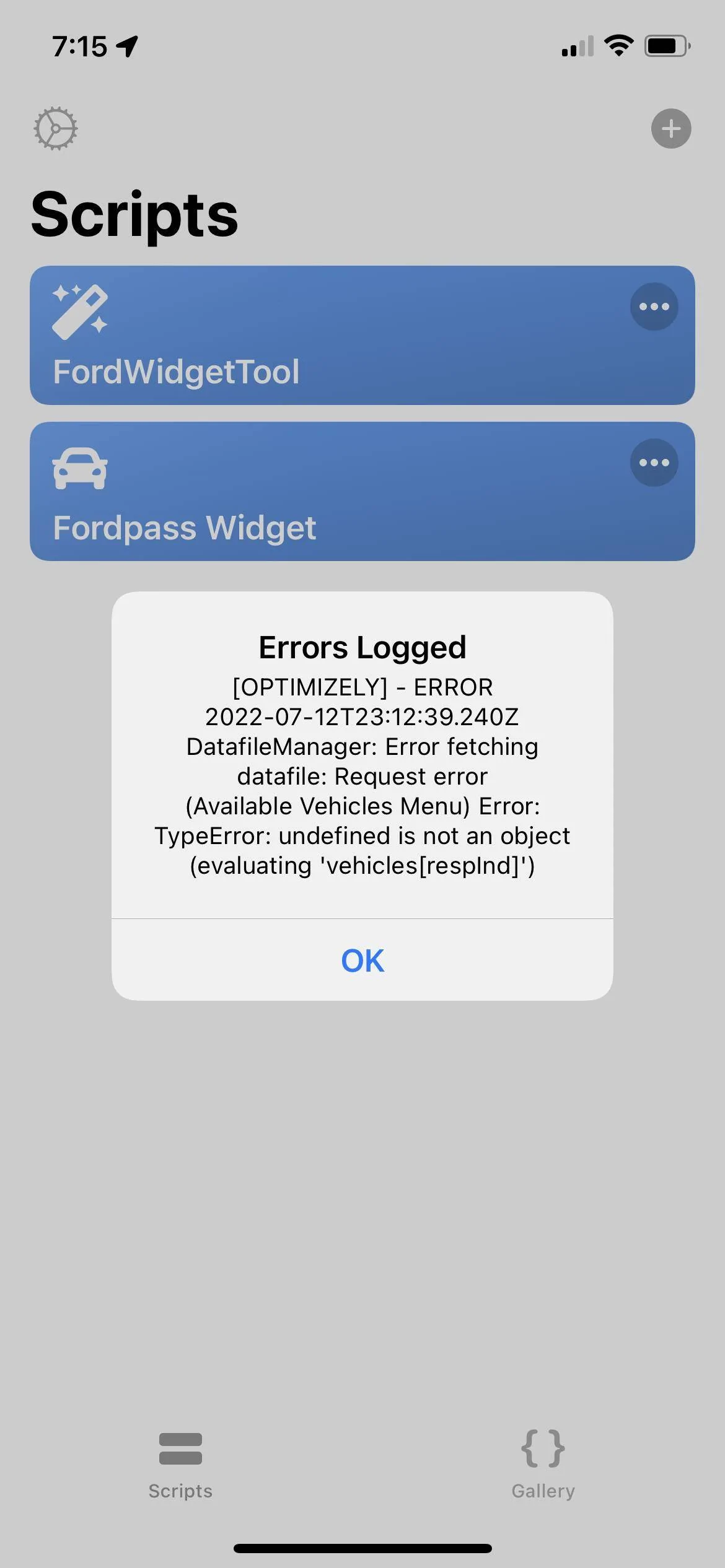
I have been trying to get the widget to work all day and run into any number of different errors.

I followed the instructions but my inputs look different. The video shows the username, password, vin, and settings all on one pop up window. I have 3 different screens for this (username & password, another for just vin, then another just savings).
Ford Mustang Mach-E FordPass - Scriptable Widget V2022.XX (iOS, iPad, MacOS) 205A8369-7FC0-4230-A29C-A26622414972


When I run the widget script nothing happens. Only twice out of countless attempts have I actually gotten an error and following attempts no errors.
Here errors:
Ford Mustang Mach-E FordPass - Scriptable Widget V2022.XX (iOS, iPad, MacOS) D5FEE1D3-2C75-4911-8F85-F5D881269F0B

Ford Mustang Mach-E FordPass - Scriptable Widget V2022.XX (iOS, iPad, MacOS) 9CC1302B-C013-43DA-A5D2-CD2EEB92FFC8


I don’t know how to ask for help because I can’t even pin point a single error/issue.

I ran the log and get two different results in those attempts:
Code:
2022-07-12 18:31:21: All (9) Required Modules Found!
2022-07-12 18:31:21: ---------------------------
2022-07-12 18:31:21: Widget RUN()
2022-07-12 18:31:21: Required Prefs Missing: fpToken,fpCountry,fpLanguage,fpTz,fpPressureUnits,fpDistanceUnits
2022-07-12 18:31:21: Script Version: 2022.07.04.0
2022-07-12 18:31:21: Update Available: false
2022-07-12 18:31:21: Latest Version: 2022.07.04.0
2022-07-12 18:31:26: (Required Prefs Menu) Done was pressed
2022-07-12 18:31:26: Token, RefreshToken, or Expiration State is Missing... Fetching NEW Token...
2022-07-12 18:31:26: Clearing Session Cookies()
2022-07-12 18:31:28: clearCookies: true
2022-07-12 18:31:29: UserPrefs Requested or Missing - Refreshing from Ford API
2022-07-12 18:31:29: Token, RefreshToken, or Expiration State is Missing... Fetching NEW Token...
2022-07-12 18:31:29: Clearing Session Cookies()
2022-07-12 18:31:29: pricing - failed to load spc loader undefined
2022-07-12 18:31:29: pricing - getPricingData call failed for cfg:
2022-07-12 18:31:29: Error in fetch URL : https://cdn.cookielaw.org/scripttemplates/6.10.0/assets/v2/otPcTab.json Exception :TypeError: Load failed
2022-07-12 18:31:29: clearCookies: true
2022-07-12 18:31:30: ****RVV Data****
2022-07-12 18:31:30: FPS set target cookie::success ==>[object Object],[object Object],[object Object],[object Object],[object Object],[object Object]
2022-07-12 18:31:30: (prepWidget) Fetching Vehicle Data | Local: (false)
2022-07-12 18:31:30: Fetching Vehicle Data from Ford Servers...
2022-07-12 18:31:30: Token, RefreshToken, or Expiration State is Missing... Fetching NEW Token...
2022-07-12 18:31:31: Clearing Session Cookies()
2022-07-12 18:31:31: clearCookies: true
2022-07-12 18:31:33: user.lib: auth state
2022-07-12 18:31:33: ****RVV Data****
2022-07-12 18:31:33: FPS set target cookie::success ==>[object Object],[object Object],[object Object],[object Object],[object Object],[object Object]
2022-07-12 18:31:38: makeFordRequest Error: JSON Parse error: Unexpected identifier "Error"
2022-07-12 18:31:38: makeFordRequest(getVehicleStatus) Error: SyntaxError: JSON Parse error: Unexpected identifier "Error"
OR


Code:
2022-07-12 19:04:37: All (9) Required Modules Found!
2022-07-12 19:04:37: ---------------------------
2022-07-12 19:04:37: Widget RUN()
2022-07-12 19:04:37: Required Prefs Missing: fpToken,fpCountry,fpLanguage,fpTz,fpPressureUnits,fpDistanceUnits
2022-07-12 19:04:37: Script Version: 2022.07.04.0
2022-07-12 19:04:37: Update Available: false
2022-07-12 19:04:37: Latest Version: 2022.07.04.0
2022-07-12 19:04:38: (Required Prefs Menu) Done was pressed
2022-07-12 19:04:39: Token, RefreshToken, or Expiration State is Missing... Fetching NEW Token...
2022-07-12 19:04:39: Clearing Session Cookies()
2022-07-12 19:04:41: clearCookies: true
2022-07-12 19:04:42: UserPrefs Requested or Missing - Refreshing from Ford API
2022-07-12 19:04:42: Token, RefreshToken, or Expiration State is Missing... Fetching NEW Token...
2022-07-12 19:04:42: Clearing Session Cookies()
2022-07-12 19:04:43: user.lib: auth state
2022-07-12 19:04:43: clearCookies: true
2022-07-12 19:04:43: RVV - FPS RVV call failed.
2022-07-12 19:04:43: [{},"error",""]
2022-07-12 19:04:43: user.lib: failed to load get FPS values
2022-07-12 19:04:44: ****RVV Data****
2022-07-12 19:04:44: FPS set target cookie::success ==>[object Object],[object Object],[object Object],[object Object],[object Object],[object Object]
2022-07-12 19:04:45: (prepWidget) Fetching Vehicle Data | Local: (false)
2022-07-12 19:04:45: Fetching Vehicle Data from Ford Servers...
2022-07-12 19:04:45: Token, RefreshToken, or Expiration State is Missing... Fetching NEW Token...
2022-07-12 19:04:45: Clearing Session Cookies()
2022-07-12 19:04:47: clearCookies: true
2022-07-12 19:04:48: ****RVV Data****
2022-07-12 19:04:48: FPS set target cookie::success ==>[object Object],[object Object],[object Object],[object Object],[object Object],[object Object]
2022-07-12 19:04:54: makeFordRequest Error: JSON Parse error: Unexpected identifier "Error"
2022-07-12 19:04:54: makeFordRequest(getVehicleStatus) Error: SyntaxError: JSON Parse error: Unexpected identifier "Error"
Can anyone help me? Please?
 

CommittotheIndian

Well-Known Member
First Name
Travis
Joined
Jun 28, 2022
Threads
7
Messages
110
Reaction score
28
Location
Indiana
Vehicles
2022 Ford Mach-E Select eAWD Star White
Occupation
Indiana Supreme Court - IT
Country flag
@mrguyana
Have you seen my error? I saw you quoted my post but didn’t see a reply.
 

mrguyana

Active Member
First Name
Mark
Joined
Nov 28, 2021
Threads
0
Messages
27
Reaction score
22
Location
New Jersey
Vehicles
MachE
Country flag
Try performing a fresh install, remove the scriptable, reboot your device and reinstall. Also I was getting that error but that was before @tonesto7 release the latest fix, been working flawless since latest update.
 

connoisseurr

Well-Known Member
First Name
Connor
Joined
Sep 29, 2021
Threads
35
Messages
1,394
Reaction score
1,624
Location
Northern VA
Vehicles
22 Rivian R1T, 23 Tesla MYP
Occupation
IT Engineering
Country flag
I have been trying to get the widget to work all day and run into any number of different errors.

I followed the instructions but my inputs look different. The video shows the username, password, vin, and settings all on one pop up window. I have 3 different screens for this (username & password, another for just vin, then another just savings).
205A8369-7FC0-4230-A29C-A26622414972.png


When I run the widget script nothing happens. Only twice out of countless attempts have I actually gotten an error and following attempts no errors.
Here errors:
D5FEE1D3-2C75-4911-8F85-F5D881269F0B.png

9CC1302B-C013-43DA-A5D2-CD2EEB92FFC8.png


I don’t know how to ask for help because I can’t even pin point a single error/issue.

I ran the log and get two different results in those attempts:
Code:
2022-07-12 18:31:21: All (9) Required Modules Found!
2022-07-12 18:31:21: ---------------------------
2022-07-12 18:31:21: Widget RUN()
2022-07-12 18:31:21: Required Prefs Missing: fpToken,fpCountry,fpLanguage,fpTz,fpPressureUnits,fpDistanceUnits
2022-07-12 18:31:21: Script Version: 2022.07.04.0
2022-07-12 18:31:21: Update Available: false
2022-07-12 18:31:21: Latest Version: 2022.07.04.0
2022-07-12 18:31:26: (Required Prefs Menu) Done was pressed
2022-07-12 18:31:26: Token, RefreshToken, or Expiration State is Missing... Fetching NEW Token...
2022-07-12 18:31:26: Clearing Session Cookies()
2022-07-12 18:31:28: clearCookies: true
2022-07-12 18:31:29: UserPrefs Requested or Missing - Refreshing from Ford API
2022-07-12 18:31:29: Token, RefreshToken, or Expiration State is Missing... Fetching NEW Token...
2022-07-12 18:31:29: Clearing Session Cookies()
2022-07-12 18:31:29: pricing - failed to load spc loader undefined
2022-07-12 18:31:29: pricing - getPricingData call failed for cfg:
2022-07-12 18:31:29: Error in fetch URL : https://cdn.cookielaw.org/scripttemplates/6.10.0/assets/v2/otPcTab.json Exception :TypeError: Load failed
2022-07-12 18:31:29: clearCookies: true
2022-07-12 18:31:30: ****RVV Data****
2022-07-12 18:31:30: FPS set target cookie::success ==>[object Object],[object Object],[object Object],[object Object],[object Object],[object Object]
2022-07-12 18:31:30: (prepWidget) Fetching Vehicle Data | Local: (false)
2022-07-12 18:31:30: Fetching Vehicle Data from Ford Servers...
2022-07-12 18:31:30: Token, RefreshToken, or Expiration State is Missing... Fetching NEW Token...
2022-07-12 18:31:31: Clearing Session Cookies()
2022-07-12 18:31:31: clearCookies: true
2022-07-12 18:31:33: user.lib: auth state
2022-07-12 18:31:33: ****RVV Data****
2022-07-12 18:31:33: FPS set target cookie::success ==>[object Object],[object Object],[object Object],[object Object],[object Object],[object Object]
2022-07-12 18:31:38: makeFordRequest Error: JSON Parse error: Unexpected identifier "Error"
2022-07-12 18:31:38: makeFordRequest(getVehicleStatus) Error: SyntaxError: JSON Parse error: Unexpected identifier "Error"
OR


Code:
2022-07-12 19:04:37: All (9) Required Modules Found!
2022-07-12 19:04:37: ---------------------------
2022-07-12 19:04:37: Widget RUN()
2022-07-12 19:04:37: Required Prefs Missing: fpToken,fpCountry,fpLanguage,fpTz,fpPressureUnits,fpDistanceUnits
2022-07-12 19:04:37: Script Version: 2022.07.04.0
2022-07-12 19:04:37: Update Available: false
2022-07-12 19:04:37: Latest Version: 2022.07.04.0
2022-07-12 19:04:38: (Required Prefs Menu) Done was pressed
2022-07-12 19:04:39: Token, RefreshToken, or Expiration State is Missing... Fetching NEW Token...
2022-07-12 19:04:39: Clearing Session Cookies()
2022-07-12 19:04:41: clearCookies: true
2022-07-12 19:04:42: UserPrefs Requested or Missing - Refreshing from Ford API
2022-07-12 19:04:42: Token, RefreshToken, or Expiration State is Missing... Fetching NEW Token...
2022-07-12 19:04:42: Clearing Session Cookies()
2022-07-12 19:04:43: user.lib: auth state
2022-07-12 19:04:43: clearCookies: true
2022-07-12 19:04:43: RVV - FPS RVV call failed.
2022-07-12 19:04:43: [{},"error",""]
2022-07-12 19:04:43: user.lib: failed to load get FPS values
2022-07-12 19:04:44: ****RVV Data****
2022-07-12 19:04:44: FPS set target cookie::success ==>[object Object],[object Object],[object Object],[object Object],[object Object],[object Object]
2022-07-12 19:04:45: (prepWidget) Fetching Vehicle Data | Local: (false)
2022-07-12 19:04:45: Fetching Vehicle Data from Ford Servers...
2022-07-12 19:04:45: Token, RefreshToken, or Expiration State is Missing... Fetching NEW Token...
2022-07-12 19:04:45: Clearing Session Cookies()
2022-07-12 19:04:47: clearCookies: true
2022-07-12 19:04:48: ****RVV Data****
2022-07-12 19:04:48: FPS set target cookie::success ==>[object Object],[object Object],[object Object],[object Object],[object Object],[object Object]
2022-07-12 19:04:54: makeFordRequest Error: JSON Parse error: Unexpected identifier "Error"
2022-07-12 19:04:54: makeFordRequest(getVehicleStatus) Error: SyntaxError: JSON Parse error: Unexpected identifier "Error"
Can anyone help me? Please?
To test the procedure, I just deleted my entire widget and re-added successfully. I did have to manually enter my VIN after clicking get vehicles though. That was the only change.
 

CommittotheIndian

Well-Known Member
First Name
Travis
Joined
Jun 28, 2022
Threads
7
Messages
110
Reaction score
28
Location
Indiana
Vehicles
2022 Ford Mach-E Select eAWD Star White
Occupation
Indiana Supreme Court - IT
Country flag
Try performing a fresh install, remove the scriptable, reboot your device and reinstall. Also I was getting that error but that was before @tonesto7 release the latest fix, been working flawless since latest update.
I have deleted everything related to the widget, even the files within iCloud Drive, scriptable (even deleted from iCloud), logged out & in of Ford pass (tried other Ford accounts), turned my phone off and on.
 
Last edited:
OP
OP
tonesto7

tonesto7

Well-Known Member
First Name
Anthony
Joined
Sep 20, 2021
Threads
2
Messages
243
Reaction score
610
Location
Ann Arbor, Michigan
Vehicles
2021 F150
Occupation
Software Developer/System Admin
Country flag
Use the FordWidgetTool > Reset > select instance to wipe all saved logins and configs
Sponsored


Top