RMoore

Well-Known Member
First Name
Rob
Joined
Jul 25, 2021
Threads
75
Messages
1,139
Reaction score
801
Location
New Jersey
Vehicles
Audi Q5, Toyota Sienna, 2022 Mach e
Country flag
Sorry for this random question, but I couldn't find anything using the search function. What does ITG in red letters under Doors mean? I refreshed and it changed to Closed.
Sponsored
 

smartino

Well-Known Member
First Name
Steve
Joined
Feb 11, 2021
Threads
3
Messages
229
Reaction score
283
Location
Indiana
Vehicles
2021 RR Mach E First Edition, 2017 Honda Ridgeline
Occupation
Retired
Country flag
Sorry for this random question, but I couldn't find anything using the search function. What does ITG in red letters under Doors mean? I refreshed and it changed to Closed.
Integrated Tail Gate is my best guess.
 

2021-MMEx-RT1

Well-Known Member
Joined
Aug 18, 2021
Threads
7
Messages
626
Reaction score
702
Location
CA
Vehicles
2021 MMEx CA Route 1
Occupation
Yes
Country flag
after deleting the widget for a few months while I kept getting the
Electrical system drain - Service required error.
(thank you OptiWatt) I reinstalled the widget this AM.

Had to remove all instances and start fresh.

I have it on my 'Today View' screen, however, It only shows the default scriptable |> Play button and not the actual script.

I've tried the options;

Script;
Fordpass Widget

When interacting;

Open App, Run Script, Open Script, Open Url


And none of those give me the 'script graphics' on the Today View.

In the Large screen.

Once in the Medium screen, it actually gave me the desired information screen instead of the default colorful 'Play' button interface.

What do I need to set to have it open the info screen when I swipe right from the home screen to the Today View screen?


Thanks!
 

Mauser

Well-Known Member
Joined
Jul 15, 2022
Threads
18
Messages
230
Reaction score
195
Location
Canada
Vehicles
'22 Mach-e GT-PE Space White
Country flag
I'm not sure if this is the cause of the issue, but I'm not seeing anything related to scriptables in my icloud drive. Like it's not pushing anything. Should I see something there? I was originally getting an error message when running the script as I didn't have icloud drive enabled in my settings. I've since changed that, but I'm not seeing anything showing up.

I'm getting the IBM Account lockout message as well.
 

ziptbm

Well-Known Member
Joined
Jan 12, 2022
Threads
12
Messages
143
Reaction score
63
Location
Michigan
Vehicles
'22 MME GT & '22 F150 Lightning Lariat ER
Country flag
I believe every time (since I started watching the log) I get the same ending lines/errors:


Code:
2022-07-13 07:35:00: makeFordRequest Error: JSON Parse error: Unexpected identifier "Error"
2022-07-13 07:35:00: makeFordRequest(getVehicleStatus) Error: SyntaxError: JSON Parse error: Unexpected identifier "Error"
Did you ever get this to work?

I've tried with multiple devices and multiple Mach-Es on my FordPass account, but I continue to get this same error you have. I've fully reset and deleted the instances within the scripting tool, but it continues to give me this error as well.


CommittotheIndian

Well-Known Member
First Name
Travis
Joined
Jun 28, 2022
Threads
7
Messages
110
Reaction score
28
Location
Indiana
Vehicles
2022 Ford Mach-E Select eAWD Star White
Occupation
Indiana Supreme Court - IT
Country flag
Did you ever get this to work?

I've tried with multiple devices and multiple Mach-Es on my FordPass account, but I continue to get this same error you have. I've fully reset and deleted the instances within the scripting tool, but it continues to give me this error as well.
No I’ve never gotten it to work. I posted the issue on GitHub (you saw that). I just keep watching this thread hoping for a fix.
 
OP
OP
tonesto7

tonesto7

Well-Known Member
First Name
Anthony
Joined
Sep 20, 2021
Threads
2
Messages
243
Reaction score
610
Location
Ann Arbor, Michigan
Vehicles
2021 F150
Occupation
Software Developer/System Admin
Country flag
Sorry for not checking this more. I've been on vacation with my family.
I will see if I can find a fix for this.
 
OP
OP
tonesto7

tonesto7

Well-Known Member
First Name
Anthony
Joined
Sep 20, 2021
Threads
2
Messages
243
Reaction score
610
Location
Ann Arbor, Michigan
Vehicles
2021 F150
Occupation
Software Developer/System Admin
Country flag
No I’ve never gotten it to work. I posted the issue on GitHub (you saw that). I just keep watching this thread hoping for a fix.
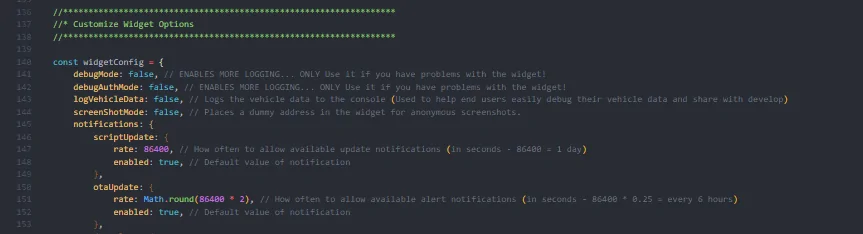
Can you guys try enabling debug mode?
Ford Mustang Mach-E FordPass - Scriptable Widget V2022.XX (iOS, iPad, MacOS) 1661172470774


Edit the debugMode: false, and change it to true near the top of the script.

This will display a lot more details in the logging window.
 

CommittotheIndian

Well-Known Member
First Name
Travis
Joined
Jun 28, 2022
Threads
7
Messages
110
Reaction score
28
Location
Indiana
Vehicles
2022 Ford Mach-E Select eAWD Star White
Occupation
Indiana Supreme Court - IT
Country flag
Can you guys try enabling debug mode?
1661172470774.png


Edit the debugMode: false, and change it to true near the top of the script.

This will display a lot more details in the logging window.
Done.

Where will it save the debug/how to share it with you?
Will it pull any sensitive information I should clear out first?
 

CommittotheIndian

Well-Known Member
First Name
Travis
Joined
Jun 28, 2022
Threads
7
Messages
110
Reaction score
28
Location
Indiana
Vehicles
2022 Ford Mach-E Select eAWD Star White
Occupation
Indiana Supreme Court - IT
Country flag
Can you guys try enabling debug mode?
1661172470774.png


Edit the debugMode: false, and change it to true near the top of the script.

This will display a lot more details in the logging window.
Hopefully this is what you want. With the debugger on, it keeps crashing Scriptable.

Code:
2022-08-22 08:50:09: Module Hash Missmatch... Downloading FPW_AsBuilt.js
2022-08-22 08:50:10: Removing Old Module: FPW_AsBuilt.js
2022-08-22 08:50:10: All (9) Required Modules Found!
2022-08-22 08:50:10: ---------------------------
2022-08-22 08:50:10: Widget RUN()
2022-08-22 08:50:10: Required Prefs Missing: fpToken,fpCountry,fpLanguage,fpTz,fpPressureUnits,fpDistanceUnits
2022-08-22 08:50:10: Script Version: 2022.07.25.0
2022-08-22 08:50:10: Update Available: false
2022-08-22 08:50:10: Latest Version: 2022.07.25.0
2022-08-22 08:50:13: (Required Prefs Menu) Done was pressed
2022-08-22 08:50:13: chechAuth(prepWidget)
2022-08-22 08:50:13: checkAuth | Token: null
2022-08-22 08:50:13: checkAuth | ExpiresAt: null
2022-08-22 08:50:13: checkAuth | Expired: false
2022-08-22 08:50:13: Token, RefreshToken, or Expiration State is Missing... Fetching NEW Token...
2022-08-22 08:50:13: Clearing Session Cookies()
2022-08-22 08:50:18: clearCookies: true
2022-08-22 08:50:19: UserPrefs Expired - Refreshing from Ford API
2022-08-22 08:50:19: chechAuth(makeFordRequest(queryFordPassPrefs))
2022-08-22 08:50:19: checkAuth | Token: null
2022-08-22 08:50:19: checkAuth | ExpiresAt: null
2022-08-22 08:50:19: checkAuth | Expired: false
2022-08-22 08:50:19: Token, RefreshToken, or Expiration State is Missing... Fetching NEW Token...
2022-08-22 08:50:20: Clearing Session Cookies()
2022-08-22 08:50:22: clearCookies: true
2022-08-22 08:50:23: makeFordRequest(queryFordPassPrefs) | Status: 401) | Resp: {"httpStatus":401,"status":401,"requestStatus":"CURRENT","error":{"statusContext":"FS Identity","statusCode":"","message":"Invalid or Expired Authentication Token"},"lastRequested":"2022-08-22T12:50:23.367Z","version":"1.0.0"}
2022-08-22 08:50:23: (prepWidget) Fetching Vehicle Data | Local: (false)
2022-08-22 08:50:23: Fetching Vehicle Data from Ford Servers...
2022-08-22 08:50:23: chechAuth(makeFordRequest(getVehicleStatus))
2022-08-22 08:50:23: checkAuth | Token: null
2022-08-22 08:50:23: checkAuth | ExpiresAt: null
2022-08-22 08:50:23: checkAuth | Expired: false
2022-08-22 08:50:23: Token, RefreshToken, or Expiration State is Missing... Fetching NEW Token...
2022-08-22 08:50:23: Clearing Session Cookies()
2022-08-22 08:50:24: /dealer/Dealers.json failed
2022-08-22 08:50:24: clearCookies: true
2022-08-22 08:50:24: RVV - FPS RVV call failed.
2022-08-22 08:50:24: [{"resource":{"timing":{},"initiator":"xhr"}},"error",""]
2022-08-22 08:50:24: user.lib: failed to load get FPS values
2022-08-22 08:50:32: makeFordRequest(getVehicleStatus) | Status: 500) | Resp: Error Returned From FIG While Processing Request
2022-08-22 08:50:32: makeFordRequest Error: JSON Parse error: Unexpected identifier "Error"
2022-08-22 08:50:32: makeFordRequest(getVehicleStatus) Error: SyntaxError: JSON Parse error: Unexpected identifier "Error"
 

Kangio

Well-Known Member
First Name
Kurt
Joined
Mar 10, 2021
Threads
16
Messages
98
Reaction score
42
Location
Philadelphia
Vehicles
2021 Mach E Premium ER
Country flag
Just checked the widget, and sort of working for first time in weeks. Providing limited status except no "OTA" information, just states "No OTA Deployments Scheduled..." and under RAW DATA is states "Personal Data Removed". At least it shows current sync version and the car status (charge, door locks, etc...).
 

Mauser

Well-Known Member
Joined
Jul 15, 2022
Threads
18
Messages
230
Reaction score
195
Location
Canada
Vehicles
'22 Mach-e GT-PE Space White
Country flag
I'd really like to get this working - I've cleared the data from icloud, deleted all data when removing the scriptable app from the phone, but it appears it's still somehow keeping my account information when I try from scratch. It no longer asks for email/password/VIN. Where do I go to clear that data?
 

CommittotheIndian

Well-Known Member
First Name
Travis
Joined
Jun 28, 2022
Threads
7
Messages
110
Reaction score
28
Location
Indiana
Vehicles
2022 Ford Mach-E Select eAWD Star White
Occupation
Indiana Supreme Court - IT
Country flag
I'd really like to get this working - I've cleared the data from icloud, deleted all data when removing the scriptable app from the phone, but it appears it's still somehow keeping my account information when I try from scratch. It no longer asks for email/password/VIN. Where do I go to clear that data?
If you select Widget Tool then select "Reset Instance", should clear everything.
 

Mauser

Well-Known Member
Joined
Jul 15, 2022
Threads
18
Messages
230
Reaction score
195
Location
Canada
Vehicles
'22 Mach-e GT-PE Space White
Country flag
If you select Widget Tool then select "Reset Instance", should clear everything.
I'm not even getting that far - This is still when setting up the script. When I run the initial "FordWidgetTool" it creates the FordPass Widget, prompting for size, color, layout, etc... no account prompt. Shortly after, I get the "account locked" email...
 

CommittotheIndian

Well-Known Member
First Name
Travis
Joined
Jun 28, 2022
Threads
7
Messages
110
Reaction score
28
Location
Indiana
Vehicles
2022 Ford Mach-E Select eAWD Star White
Occupation
Indiana Supreme Court - IT
Country flag
I'm not even getting that far - This is still when setting up the script. When I run the initial "FordWidgetTool" it creates the FordPass Widget, prompting for size, color, layout, etc... no account prompt. Shortly after, I get the "account locked" email...
Sorry, let me clarify. The FordWidgetTool is where you clear the instances (the script that builds the Ford Pass Widget).
Sponsored


Top