Mr.Meme

Active Member
First Name
Mr. Meme
Joined
Apr 17, 2023
Threads
7
Messages
41
Reaction score
12
Location
Cali
Vehicles
Mach-E Premium STD RWD 22
Country flag
This used to be a thing a year or so ago and then it went away. It has always been available with Android Auto.

Does anyone use Google Maps with Carplay? its annoying that you cant pinch to zoom or drag your finger to move around the map, you have to use the annoying arrows.
Sponsored

 

Dysan911

Well-Known Member
First Name
Brian
Joined
Mar 11, 2024
Threads
13
Messages
318
Reaction score
235
Location
USA
Vehicles
2023 Mustang Mach E GT
Occupation
Technical Software Analyst
Country flag
This used to be a thing a year or so ago and then it went away. It has always been available with Android Auto.

Does anyone use Google Maps with Carplay? its annoying that you cant pinch to zoom or drag your finger to move around the map, you have to use the annoying arrows.
That is one thing I got spoiled with when I had a Tesla.
 

music_cities

Well-Known Member
Joined
Nov 7, 2023
Threads
53
Messages
671
Reaction score
679
Location
Calgary, Canada
Vehicles
Mach E 2022 GT
Country flag
Google Maps integration into the instrument cluster would be great. Apple Maps is still really bad, it doesn't even tell you if there's traffic on your route when you begin navigating. At least Google shows you a green, yellow, or red number to tell you how bad the trip will be.
Although I agree that in most places Google Maps is better than Apple Maps, recently around here I've actually found Apple Maps to be better than Google Maps.
 

Kamuelaflyer

Well-Known Member
First Name
Bill
Joined
Feb 18, 2020
Threads
11
Messages
11,304
Reaction score
22,847
Location
Hawaii
Vehicles
2021 Premium Infinite Blue. ER AWD. 2020 Raptor, 2021 Ranger.
Country flag

StromSpeed

Active Member
First Name
Marcus
Joined
May 19, 2024
Threads
2
Messages
41
Reaction score
51
Location
Phoenix
Website
www.stromspeed.com
Vehicles
2023 Mach-E Premium ER
Occupation
Autonomous Vehicles
Country flag
Would be nice to get all these map functions integrated more.
I run the Ford Nav so that I get miles remaining to destination on the driver display, Waze for traffic/cop alerts in the background as notifications, and Google Maps for the satellite “global” view (which stays on screen as primary).
Also noticed if I enter Ford Nav destination first, then enter Google Maps or Waze destination, it clears the Ford Nav destination; always have to enter that in last.


Stang68

Well-Known Member
Joined
Dec 21, 2020
Threads
13
Messages
1,291
Reaction score
2,606
Location
USA
Vehicles
Eruption Green Mustang Mach-E GT
Country flag
Since mid 2020, Apple Maps has shown traffic conditions in real time to display the current traffic status on roads, including congestion, hazards, road closures, accidents, and construction. The traffic information is indicated by color-coded lines and symbols, with green indicating clear traffic, yellow for moderate congestion, and red for heavy traffic. Additionally, Apple Maps provides estimated travel times based on current traffic conditions, and will suggest alternate routes to avoid traffic if available. Depending on my route, Maps will give me a pop up box next to heavy traffic (red lines) stating how much longer my route will take because of the traffic. Also alerts me if there are speed checks ahead and intersections that have red light cameras.

All of these can be turned off in settings (alerts, traffic, etc.) so maybe the vehicle you were in they were unless it was before 4 years ago.
Sorry, but seeing a strip of red on the map as I approach it is not helpful. Then I'm already stuck in the traffic jam.
With Google Maps, you tap "navigate" and instantly are told whether leaving at this time will suck or if traffic is clear. The color tells you that. Apple Maps tells you no such thing, at least in CarPlay.

I use that feature all the time when I'm trying to figure out if I should leave at a certain time or wait a bit for traffic to die down.

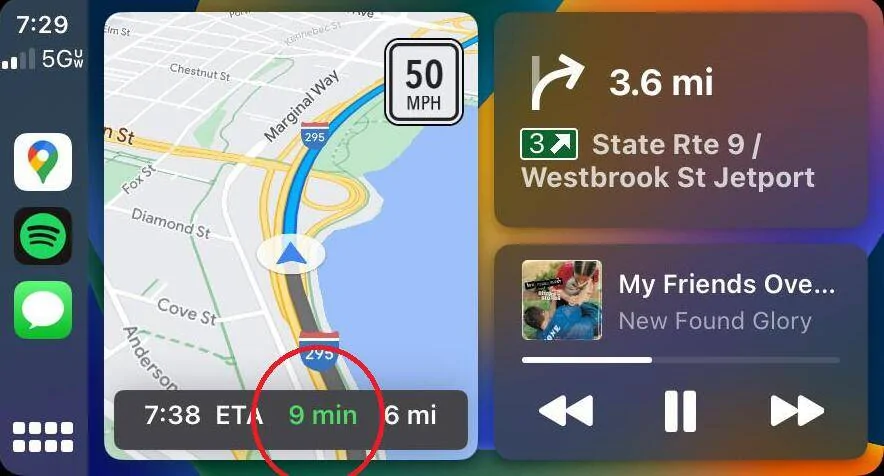
Here is an example of Google Maps telling you you shouldn't hit any traffic on this 9 minute drive because it's green:
Ford Mustang Mach-E More Apple Maps integration with Carplay in iOS 18 maps


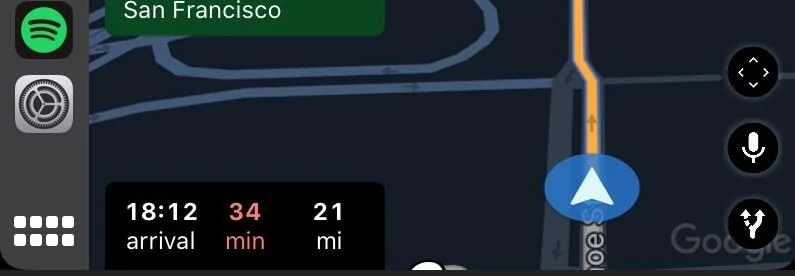
And then of course here's one telling you you're fucked (and not because you're driving through San Francisco lol):
Ford Mustang Mach-E More Apple Maps integration with Carplay in iOS 18 1726674158073-wm
 

SonicBlue

Well-Known Member
First Name
Karim
Joined
Jun 30, 2024
Threads
30
Messages
1,139
Reaction score
2,057
Location
Chicago
Vehicles
2021 Mach E
Country flag
Although I agree that in most places Google Maps is better than Apple Maps, recently around here I've actually found Apple Maps to be better than Google Maps.
I agree. For purposes of CarPlay, Apple Maps seems to have the better interface and integration. I guess that shouldn’t come as a surprise.
 

Stang68

Well-Known Member
Joined
Dec 21, 2020
Threads
13
Messages
1,291
Reaction score
2,606
Location
USA
Vehicles
Eruption Green Mustang Mach-E GT
Country flag
Google has had the ability to do that for some time now. Both Apple and Google have had the ability to integrate preconditioning for a charge stop as well. Both have declined to do so as of yet.
I don't think that's right, only Apple Maps and Ford Navi appear in the instrument cluster.

Edit: I'm on an iPhone, so maybe only using Android Auto bring Google Maps to the instrument cluster!
 

njb

Well-Known Member
First Name
Nancy
Joined
Aug 31, 2022
Threads
1
Messages
309
Reaction score
255
Location
Illinois
Vehicles
Rapid Red 2023 GT
Country flag
I’ve had that using Apple Maps through CarPlay since I got the car back in March and my phone was on some version of iOS 17.
I have also, but now it's stuck on the driver screen. I am not navigating anywhere and it still says 1mi to destination all the time.
 

Kamuelaflyer

Well-Known Member
First Name
Bill
Joined
Feb 18, 2020
Threads
11
Messages
11,304
Reaction score
22,847
Location
Hawaii
Vehicles
2021 Premium Infinite Blue. ER AWD. 2020 Raptor, 2021 Ranger.
Country flag
I don't think that's right, only Apple Maps and Ford Navi appear in the instrument cluster.
Both Google and Apple have had the ability to use the ipc for map turn information. The decision of whether to use that ability lies with those companies. Both were given the ability by Ford quite some time ago. Apple chose to act on it fairly quickly. Google, not so much,

As for preconditioning, neither company has moved forward with that as far as I know.
 

Kamuelaflyer

Well-Known Member
First Name
Bill
Joined
Feb 18, 2020
Threads
11
Messages
11,304
Reaction score
22,847
Location
Hawaii
Vehicles
2021 Premium Infinite Blue. ER AWD. 2020 Raptor, 2021 Ranger.
Country flag
I have also, but now it's stuck on the driver screen. I am not navigating anywhere and it still says 1mi to destination all the time.
Enter a destination (any). Press navigate then cancel it out. It should go away.
 

markboris

Well-Known Member
First Name
Mark
Joined
Nov 13, 2019
Threads
43
Messages
5,731
Reaction score
16,371
Location
Sonora, CA
Vehicles
Currently: '20 Shelby GT500 FPB '24 Mach-E GTP GGM
Occupation
Retired
Country flag
Sorry, but seeing a strip of red on the map as I approach it is not helpful. Then I'm already stuck in the traffic jam.
With Google Maps, you tap "navigate" and instantly are told whether leaving at this time will suck or if traffic is clear. The color tells you that. Apple Maps tells you no such thing, at least in CarPlay.

I use that feature all the time when I'm trying to figure out if I should leave at a certain time or wait a bit for traffic to die down.

Here is an example of Google Maps telling you you shouldn't hit any traffic on this 9 minute drive because it's green:
maps.webp


And then of course here's one telling you you're fucked (and not because you're driving through San Francisco lol):
1726674158073-wm.webp
Ok, now I understand what you mean. Glad you sent the photos. I see Google shows you the destination time in red, yellow or green so you know if there is traffic that will slow you down.

Apple doesn't do this. They just show traffic in yellow or red on the route which informs you that your destination time is going to be greater than if it was solid blue.

Since we are sharing photos, thought I'd take some:

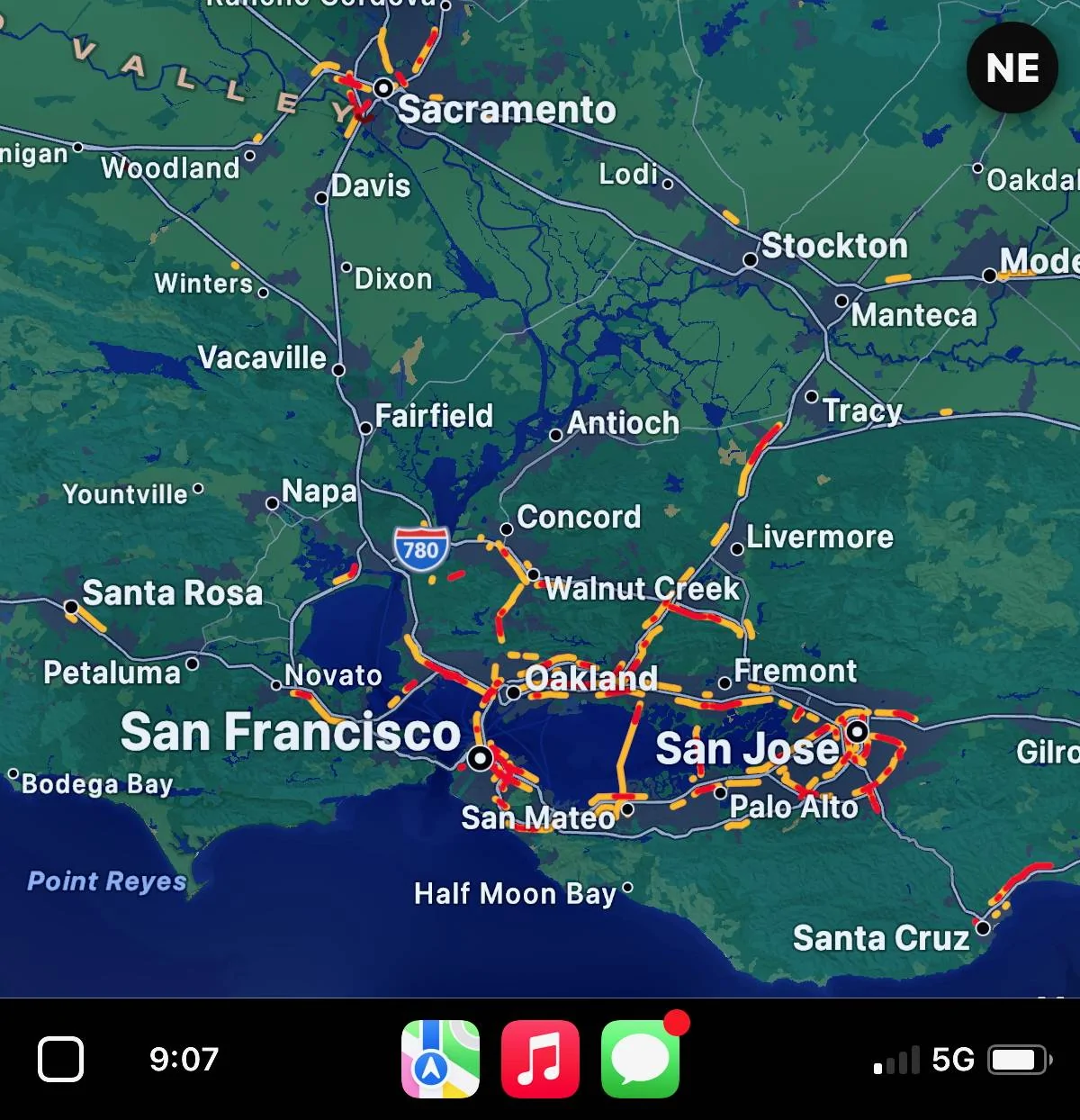
Traffic in the Bay Area this morning:

Ford Mustang Mach-E More Apple Maps integration with Carplay in iOS 18 IMG_2342


Directions to my sister's in Palo Alto:

Ford Mustang Mach-E More Apple Maps integration with Carplay in iOS 18 IMG_2354


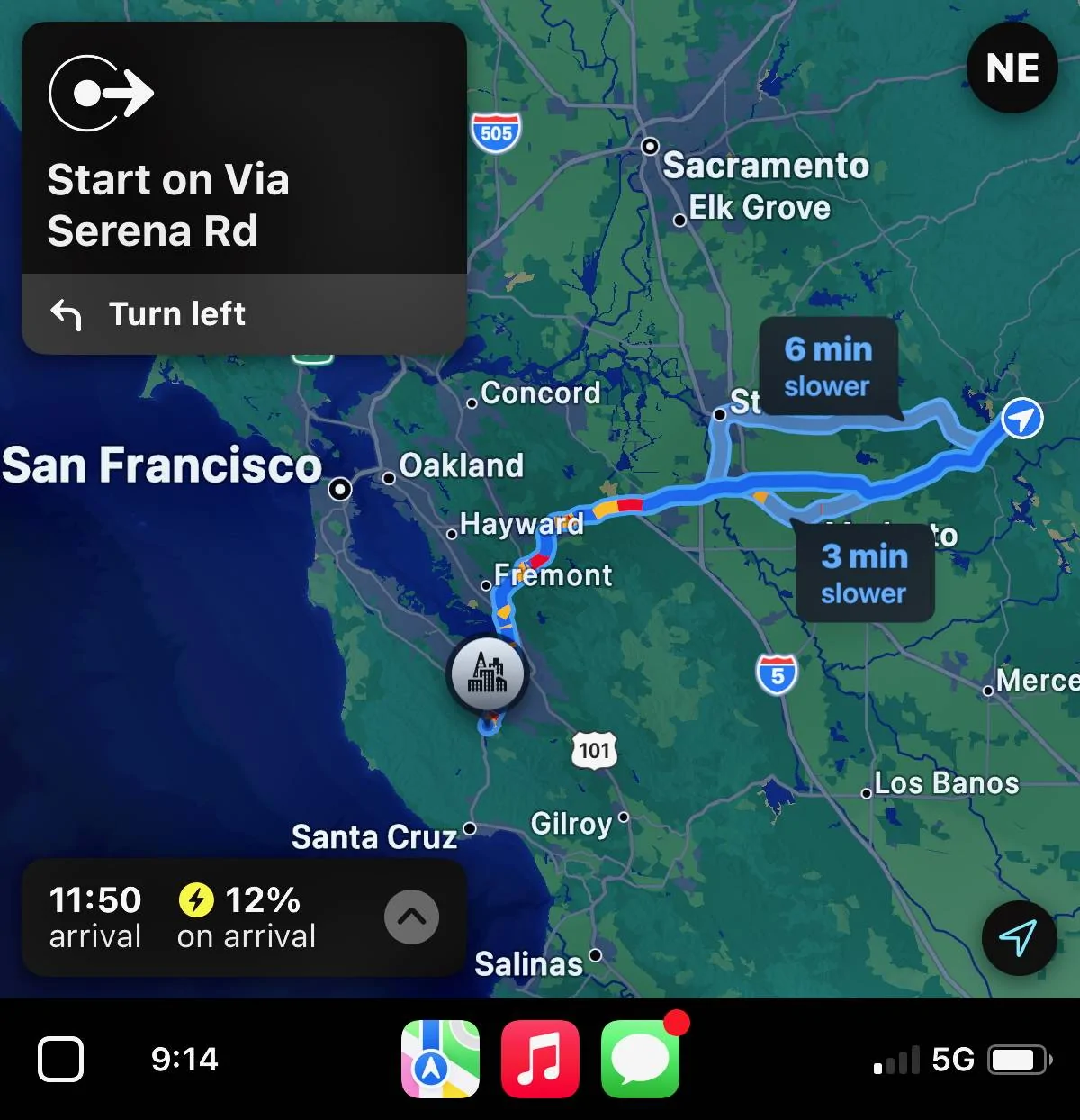
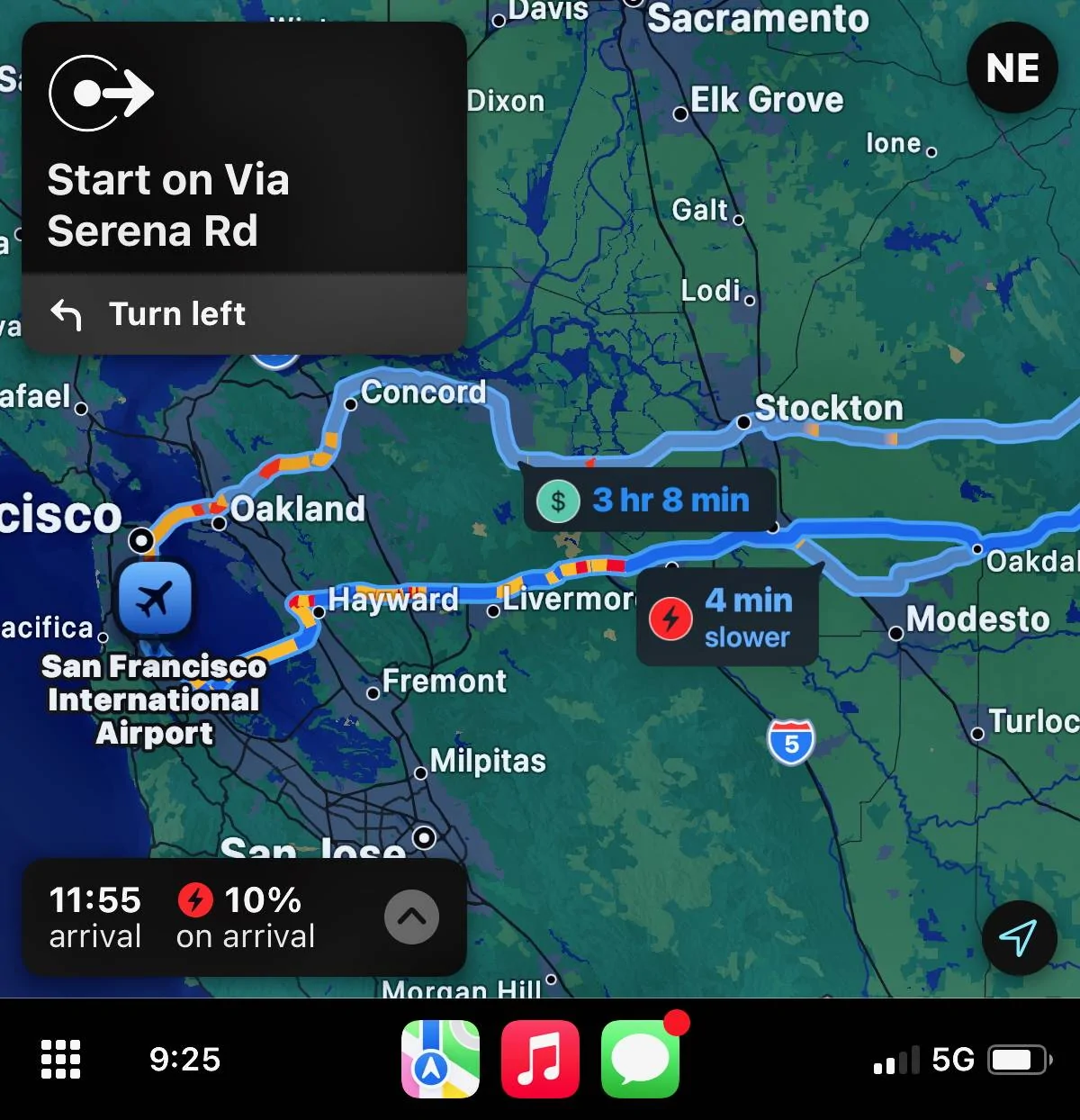
Directions to SF airport zoomed in a bit more. The Stockton route shows a $ because you would have to charge if you went that way. The Modesto route shows a charge symbol letting you know you will have less SOC when you arrive than it currently displays.

Ford Mustang Mach-E More Apple Maps integration with Carplay in iOS 18 IMG_2360


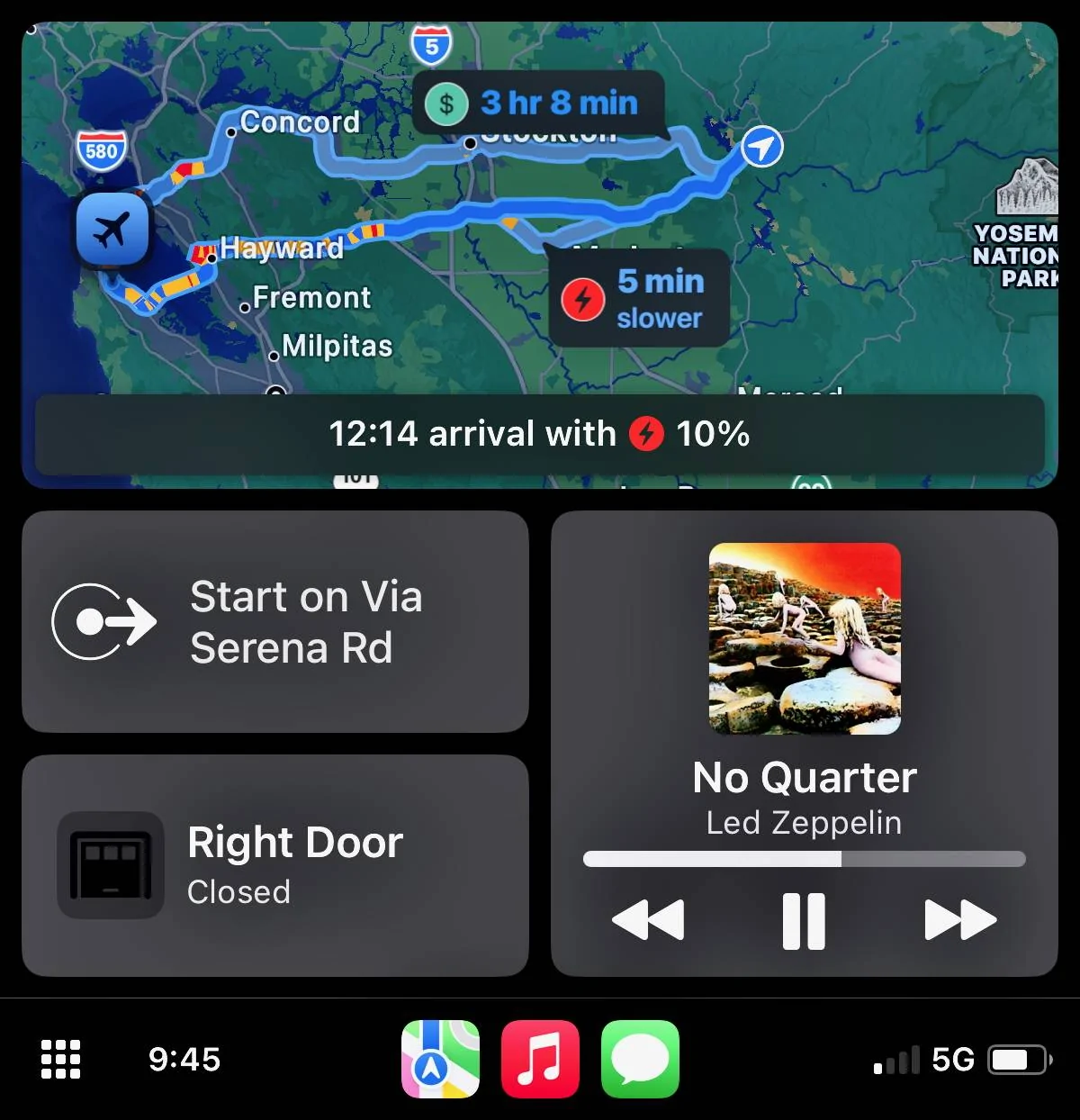
Here is the combo screen (like the ones you posted) of SF airport destination. I took this 20 minutes after the above photo and you can see there is less traffic in that short amount of time.

Ford Mustang Mach-E More Apple Maps integration with Carplay in iOS 18 IMG_2368
 

Vulnox

Well-Known Member
Joined
Nov 12, 2021
Threads
9
Messages
1,087
Reaction score
1,802
Location
Livonia, MI
Vehicles
2024 F-150 Lightning Platinum, 2025 Mach-E Premium AWD ER
Country flag
I have mostly switched to using Apple Maps as well. The routes seem as good as GMaps 95% of the time and I like the look and feel better. I only really open GMaps, both on phone and on PC, to check local store and restaurant reviews. Google I feel still has quite the edge here as I haven't been as happy with Apple Maps Yelp reviews.

I haven't had an issue with the traffic stuff discussed above, I honestly didn't even know GMaps showed the time in different colors. I always just look at the route options either provide when I put in my destination and look at the likely slowdown points (as shown in the response above me).

Apple Maps also offers me alternative routes if it finds a better route along the way, either because traffic increased on my current route or eased on a better one. I know Google Maps does this as well, but it's a reason I wouldn't be that concerned about the color coding of the time remaining because so far if something does come up Apple Maps has offered me an alternate route if one is available.

I agree with others though that the lack of flexibility with charging stops is annoying. When I was driving back from Indy recently it absolutely wanted me to stop at a GMC dealership to use a 75 kW Chargepoint they had, but ABRP was saying based on my current SoC I could instead stop at an EA station about 20 miles later. Apple Maps refused to let me skip the CP station and lost its mind when I passed the station. Really the only problem I have had with it so far. I know I can turn off charge networks, but when driving that's not something I want to be messing with, just give me the options.
Sponsored


Top