21st Century Pony

Well-Known Member
First Name
Martin
Joined
May 21, 2022
Threads
36
Messages
1,976
Reaction score
2,243
Location
Arlington, Virginia
Vehicles
formerly Ford Mustang Mach E 2022 Premium AWD ER, now a li'l bit of Lightning ER
Country flag
Well at least my FDRS login procedure seems to have cleared up from its recent bugs.
 

Mike G

Well-Known Member
First Name
Mike
Joined
Mar 27, 2022
Threads
25
Messages
6,449
Reaction score
5,289
Location
N. AL, USA
Vehicles
'23(J1) Mach-E GT-PE, '22 F-150 Lightning, '24 Bronco HLE 2Dr
Country flag
I feel like we are living the intro to Bob's Burgers.

Will this be the re-re-release of 6.2.0?
Nope this is beyond that one.
 

Eric_C_Boston

Well-Known Member
First Name
Eric
Joined
Apr 16, 2021
Threads
63
Messages
615
Reaction score
811
Location
North Shore, MA, USA
Vehicles
2021 Ford Mustang Mach-E RWD ER
Occupation
Retired Software Engineer
Country flag
I think it's interesting that everytime this spreadsheet gets updated...another APIM update drops within a day or two to make it out of date. ?

I've started to think of it as an early warning indicator for Sync updates.
Interestingly my 2021 Job one is at PU5T-14G682-EL, but due to a FDRS session on November 23 instead of waiting for the OTA. No updates today.


KnightRider2022

New Member
First Name
Tim
Joined
Jun 21, 2022
Threads
0
Messages
3
Reaction score
0
Location
Canada
Vehicles
2021 Mach-E Premium AWD ER (Job 2)
Country flag
Hi, I started the most recent TCU Module Software update mentioned here through FDRS this weekend and after I plugged the USB thumb drive into my 2021 Job 2 Mach-E as I have done many times before, when the procedure finished, it said it was unsuccessful on my car's screen.

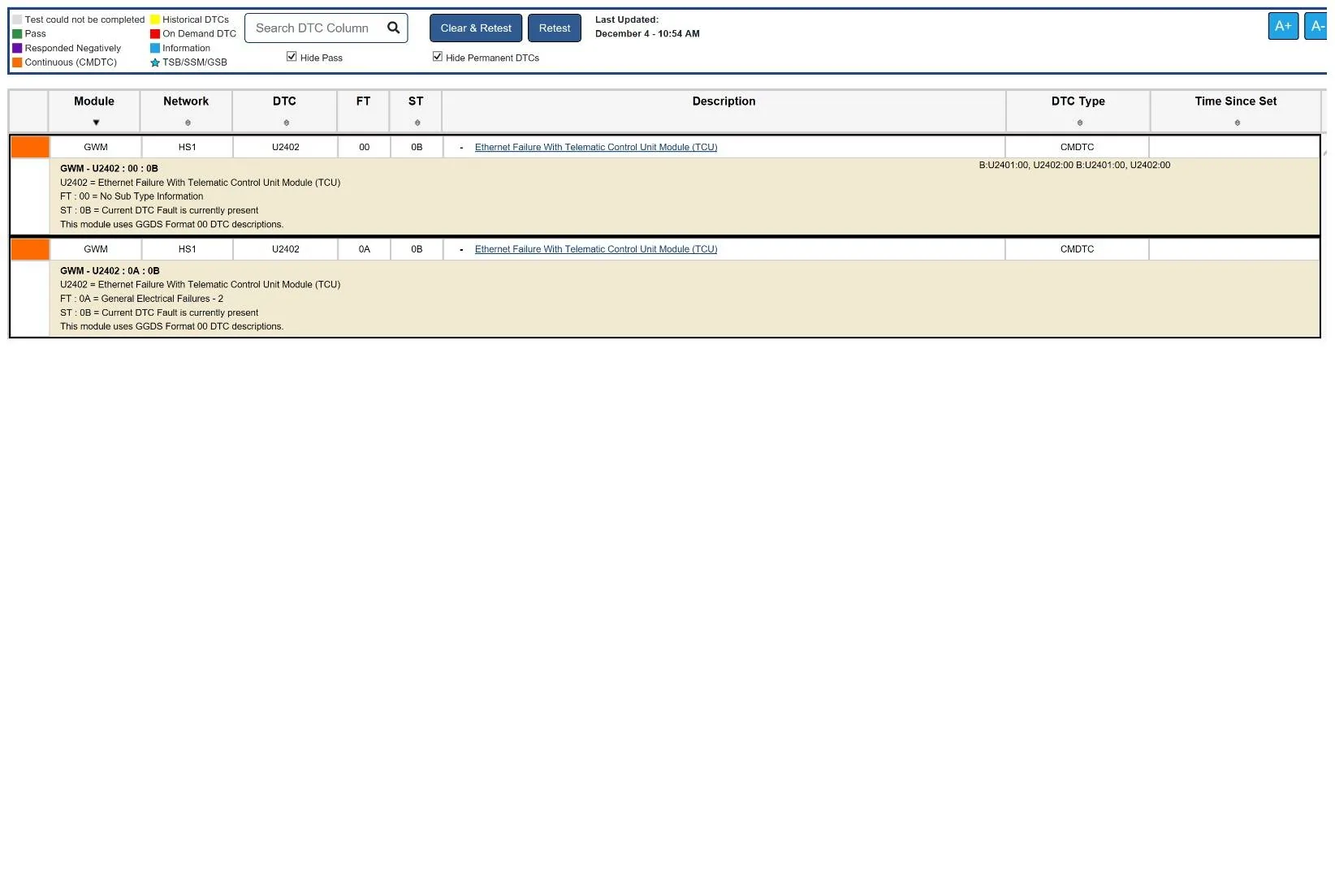
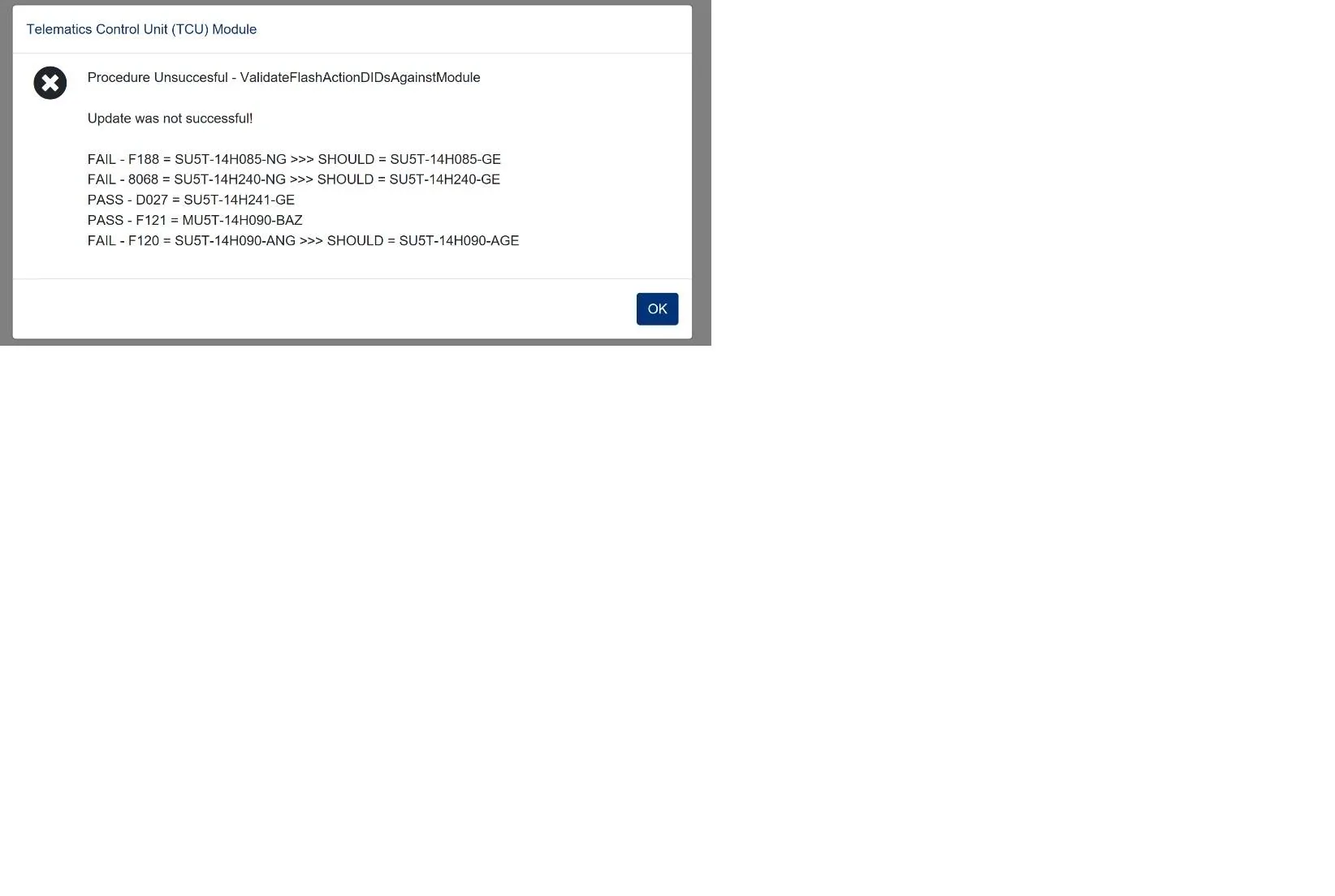
I marked it as so in FDRS and tried again and now it won't even start the update after inserting the USB thumb drive (even after hours), and it shows PASS on some validations and FAIL on the rest (screenshot attached). My car has lost all connectivity (no FordPass, can't use WiFi, no Hotspot, etc), and FDRS is reporting a Ethernet Failure With Telematic Control Unit Module (TCU) (screenshot attached).

I have tried module reconfiguration, module reprogramming, module repair (I have the right cables and adapters ready and trim panel removed, with USB cable exposed but never get past reading module configuration and now I am concerned about APIM lockout), programming over Can (fails on block erase), using FORScan to revert to as built modules and configuration (they don't have any SBL info for TCU even with the paid Extended License so can't do TCU Module firmware update), done several clear DTCs and retests, resetting SYNC and nothing seems to help.

I turned off, locked car and left over night and while there are less DTCs there's still no change connectivity wise. Thankfully driving, charging, and BlueCruise are all fine.

I have done plenty of FDRS updates using my Mongoose Plus Ford2, Win 10 laptop, and 12 V power supply without issues and can usually fix anything that does go wrong myself using my OBDLink+ and FORScan but I'm starting to get a little frustrated and feeling stuck now.

Does anyone have any other ideas I can try or can someone have a look on their side? I can DM my VIN. Thank you very much! This community is fantastic.

Edit 1 - Tried pulling TCU fuse for 10 mins. No difference.

Edit 2 - Called and made appointment at local dealership for Thursday.

Edit 3 - Just got this from FORScan support: "Unfortunately, at this moment FORScan cannot program new TCU, GWM and APIM module as they implement another flash method that is not supported by FORScan yet. We plan to add support for it in the future, but we have no ETA yet, sorry."

Edit 4 - Tried Mike G's suggestion of doing PMI again on the TCU and this time saying "No" when FDRS asks if the original module is still installed and made sure to clear all DTCs before starting any work as he said one of the requirements for programming a module is that there are no DTCs present before doing the update. Unfortunately, no luck. I should also note that I was having problems with my Wifi Hotspot in the car prior to all this (Bell engineers said issue with car, but then it resolved itself) which I believe uses the same module so perhaps the TCU module was on it's way out and it finally just died.

Edit 5 - At this stage Mike G thinks the dealership is the best bet as he thinks a module will need replacement and I agree, so that's what I will do. Thanks all!

Edit 6 - Dealership ended up ordering parts and will call me when they arrive. Apparently will probably take a month as backordered, but thankfully all covered under warranty. Going to be extra careful from now on.

Tim

Ford Mustang Mach-E The Complete DIY Guide to Updating Your Mach-E with FDRS FDRS-GWM-TCU


Ford Mustang Mach-E The Complete DIY Guide to Updating Your Mach-E with FDRS FDRS-TCU-UPDATE
 
Last edited:

Mike G

Well-Known Member
First Name
Mike
Joined
Mar 27, 2022
Threads
25
Messages
6,449
Reaction score
5,289
Location
N. AL, USA
Vehicles
'23(J1) Mach-E GT-PE, '22 F-150 Lightning, '24 Bronco HLE 2Dr
Country flag
Hi, I started the most recent TCU Module Software update mentioned here through FDRS this weekend and after I plugged the USB thumb drive into my 2021 Job 2 Mach-E as I have done many times before, when the procedure finished, it said it was unsuccessful on my car's screen.

I marked it as so in FDRS and tried again and now it won't even start the update after inserting the USB thumb drive (even after hours), and it shows PASS on some validations and FAIL on the rest (screenshot attached). My car has lost all connectivity (no FordPass, can't use WiFi, no Hotspot, etc), and FDRS is reporting a Ethernet Failure With Telematic Control Unit Module (TCU) (screenshot attached).

I have tried module reconfiguration, module reprogramming, module repair (I have the right cables and adapters ready and trim panel removed, with USB cable exposed but never get past reading module configuration and now I am concerned about APIM lockout), programming over Can (fails on block erase), using FORScan to revert to as built modules and configuration (they don't have any SBL info for TCU even with the paid Extended License so can't do TCU Module firmware update), done several clear DTCs and retests, resetting SYNC and nothing seems to help.

I turned off, locked car and left over night and while there are less DTCs there's still no change connectivity wise. Thankfully driving, charging, and BlueCruise are all fine.

I have done plenty of FDRS updates using my Mongoose Plus Ford2, Win 10 laptop, and 12 V power supply without issues and can usually fix anything that does go wrong myself using my OBDLink+ and FORScan but I'm starting to get a little frustrated and feeling stuck now.

Does anyone have any other ideas I can try or can someone have a look on their side? I can DM my VIN. Thank you very much! This community is fantastic.

Edit 1 - Tried pulling TCU fuse for 10 mins. No difference.

Edit 2 - Called and made appointment at local dealership.

Edit 3 - Just got this from FORScan support: "Unfortunately, at this moment FORScan cannot program new TCU, GWM and APIM module as they implement another flash method that is not supported by FORScan yet. We plan to add support for it in the future, but we have no ETA yet, sorry."

Tim

FDRS-GWM-TCU.webp


FDRS-TCU-UPDATE.webp
I would try a PMI on the TCU. Say "No" when FDRS asks if the original module is still installed. Also, make sure you clear all DTCs before starting any work. One of the requirements for programming a module is that there are no DTCs present before doing the update.
 

KnightRider2022

New Member
First Name
Tim
Joined
Jun 21, 2022
Threads
0
Messages
3
Reaction score
0
Location
Canada
Vehicles
2021 Mach-E Premium AWD ER (Job 2)
Country flag
I would try a PMI on the TCU. Say "No" when FDRS asks if the original module is still installed. Also, make sure you clear all DTCs before starting any work. One of the requirements for programming a module is that there are no DTCs present before doing the update.
Hi Mike,

I appreciate your speedy reply. I just tried a PMI on the TCU again, this time saying "No" when it asked if the original module is still installed. It went through the same process as before and during of course checks for updates which it sees the update that keeps failing for me, downloads it and copies to USB. After I plug USB into car nothing happens (or at least the SYNC touchscreen popup never appears on car touchscreen and no errors appear) even after several minutes. I even tried a different USB stick. Same thing.

When I click 'YES' on the installation dialog on my PC it just shows the same pass and failures. If I say 'NO' on the installation dialog it says the USB programming has failed and to try with the CAN protocol which I just did and it failed too about half way through the block erase on D027 SU5T-14H241-GE same as before and then comes up with Procedure Unsuccessful - FlashSoftware Failed to flash SU5T-14H241-GE.

I confirmed before programming that were no DTCs on TCU itself. The GWM ones come back the very second I use the clear and retest in FDRS. Is there a way to just do a DTC clear without a retest?

Also, is there a way to just reprogram/downgrade/reset the TCU module to the last working version of the software rather than FDRS using the latest version which breaks? Or alternate way to do module repair that allows me to skip reading module configuration so I can just use ethernet/USB adapter/cable directly to flash? Normally I would just use FORSCan for that, but of course not compatible with flashing new TCU presently.

Should I just assume at this point the TCU is dead/corrupted/bricked/unfixable and needs to be replaced (even though it's green in FDRS and readable in FORScan although does come back with DTCs in both software)?

My dealership appointment isn't until Thursday so I have time to try something else if you have anymore ideas.

Thanks again for your help!

Tim
 
Last edited:

Mike G

Well-Known Member
First Name
Mike
Joined
Mar 27, 2022
Threads
25
Messages
6,449
Reaction score
5,289
Location
N. AL, USA
Vehicles
'23(J1) Mach-E GT-PE, '22 F-150 Lightning, '24 Bronco HLE 2Dr
Country flag
Hi Mike,

I appreciate your speedy reply. I just tried a PMI on the TCU again, this time saying "No" when it asked if the original module is still installed. It went through the same process as before and during of course checks for updates which it sees the update that keeps failing for me, downloads it and copies to USB. After I plug USB into car nothing happens (or at least the SYNC touchscreen popup never appears on car touchscreen and no errors appear) even after several minutes. I even tried a different USB stick. Same thing.

When I click 'YES' on the installation dialog on my PC it just shows the same pass and failures. If I say 'NO' on the installation dialog it says the USB programming has failed and to try with the CAN protocol which I just did and it failed too about half way through the block erase on D027 SU5T-14H241-GE same as before and then comes up with Procedure Unsuccessful - FlashSoftware Failed to flash SU5T-14H241-GE.

I confirmed before programming that were no DTCs on TCU itself. The GWM ones come back the very second I use the clear and retest in FDRS. Is there a way to just do a DTC clear without a retest?

Also, is there a way to just reprogram/downgrade/reset the TCU module to the last working version of the software rather than FDRS using the latest version which breaks? Or alternate way to do module repair that allows me to skip reading module configuration so I can just use ethernet/USB adapter/cable directly to flash? Normally I would just use FORSCan for that, but of course not compatible with flashing new TCU presently.

Should I just assume at this point the TCU is dead/corrupted/bricked/unfixable and needs to be replaced (even though it's green in FDRS and readable in FORScan although does come back with DTCs in both software)?

My dealership appointment isn't until Thursday so I have time to try something else if you have anymore ideas.

Thanks again for your help!

Tim
At this stage the dealership is the best bet since I think a module will need replacement.
 

21st Century Pony

Well-Known Member
First Name
Martin
Joined
May 21, 2022
Threads
36
Messages
1,976
Reaction score
2,243
Location
Arlington, Virginia
Vehicles
formerly Ford Mustang Mach E 2022 Premium AWD ER, now a li'l bit of Lightning ER
Country flag
I just got a new IPC software upgrade this morning. Have PowerUp version 6.2.1 so far.
 

rugedraw

Well-Known Member
First Name
Javier
Joined
Nov 13, 2023
Threads
0
Messages
2,633
Reaction score
2,390
Location
Miami, FL
Vehicles
2021 Ford F150 Platinum FX4 EB/2023 Bronco Sport Badlands/1991 Mustang 5.0 coupe
Occupation
Auto Sales
Country flag
I just got a new IPC software upgrade this morning. Have PowerUp version 6.2.1 so far.
The same was reported by a 2021 ICE truck earlier today. Jesse noticed the files are old files from a 2022 IPC update. Seems like it rolls the IPC software backwards? At least that's the case for our vehicles. Not sure what the files for you guys look like.

https://www.f150gen14.com/forum/threads/ecu-module-programming-guide-using-fdrs.8249/post-402871

Edit: Truck has the 8" screen. This could explain the older files.
 
Last edited:

Neil4Real

Well-Known Member
Joined
Jul 8, 2021
Threads
17
Messages
3,385
Reaction score
3,073
Location
Southern California
Vehicles
Mach-E GT Performance Edition - Shadow Black
Country flag
I just got a new IPC software upgrade this morning. Have PowerUp version 6.2.1 so far.
The IPC popped in FDRS? I'm on 6.7 and had an IPC only remaining, but on Monday it cleared from FDRS with no 6.8 installing (which seems to be the IPC update). I still do not have an IPC showing for me in FDRS. Last IPC install I did was the one a few months ago that botched me getting the 6 series OTA because of a dependency issue.
 

kdonnel

Well-Known Member
Joined
Oct 31, 2021
Threads
35
Messages
1,147
Reaction score
1,665
Location
Metro Atlanta
Vehicles
2022 CA Route 1, 2020 Bolt EV
Country flag
The IPC popped in FDRS? I'm on 6.7 and had an IPC only remaining, but on Monday it cleared from FDRS with no 6.8 installing (which seems to be the IPC update). I still do not have an IPC showing for me in FDRS. Last IPC install I did was the one a few months ago that botched me getting the 6 series OTA because of a dependency issue.
I have been told I have an IPC waiting in FDRS but also saw some threads that mentioned that F-150 owners are seeing an IPC update that appears to be a rollback to an older version.

I have never been in a situation where my car had a dependency issue.

I don't currently have an FDRS license so I can't check to see if my pending IPC is the 6.8.0 update or potentially a mistake that will be pulled.
 

21st Century Pony

Well-Known Member
First Name
Martin
Joined
May 21, 2022
Threads
36
Messages
1,976
Reaction score
2,243
Location
Arlington, Virginia
Vehicles
formerly Ford Mustang Mach E 2022 Premium AWD ER, now a li'l bit of Lightning ER
Country flag
I just got a new IPC software upgrade this morning. Have PowerUp version 6.2.1 so far.
So I installed the new IPC update. Didn't think to look and capture the old IPC version before installing... after the update I am now on the IPC version PJ8T-14C026-BD.

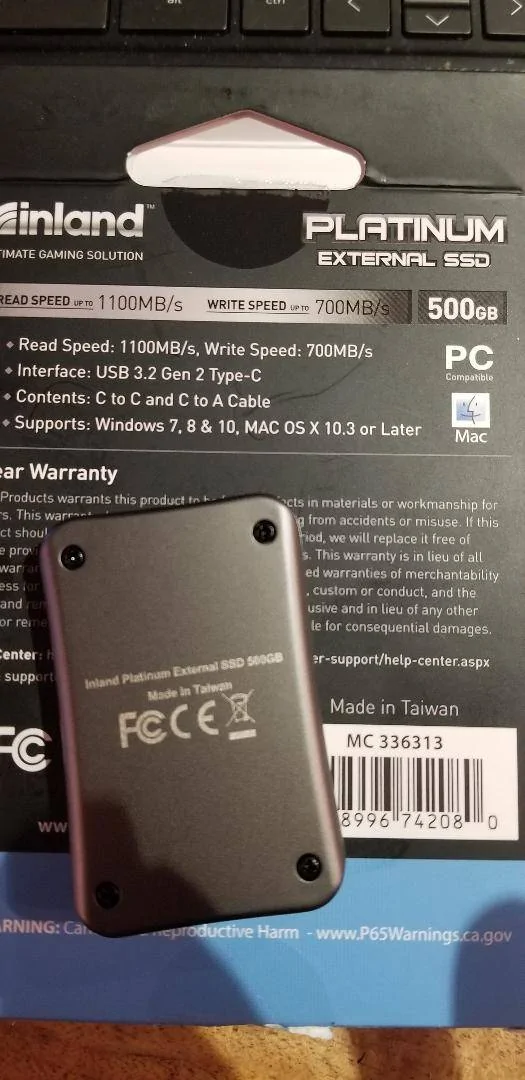
And KUDOS to HuntingPudel. Following his advice, I installed this with my new USB-C external m.2 SSD. Wayyyy faster although (of course) the SSD capacity is overkill for this use. I got it on sale at MicroCenter for $49 + tax. SO worth it for all the FDRS updates which need a USB.

Ford Mustang Mach-E The Complete DIY Guide to Updating Your Mach-E with FDRS US-C External M.2 SSD for FDRS updates
Sponsored

 
Last edited:


Top