
The Complete DIY Guide to Updating Your Mach-E with FDRS

Wonky_Donkey
Well-Known Member
- First Name
- Tony R
- Joined
- Feb 13, 2020
- Threads
- 29
- Messages
- 1,835
- Reaction score
- 3,048
- Location
- Norwich UK
- Vehicles
- 2022 Mach-E RWD ER

I'll let you know when my APIM update appears as we seem to be on a similar timeline.Yeah several times. No luck here.

scoopman
Well-Known Member
- Joined
- Jan 30, 2021
- Threads
- 60
- Messages
- 2,771
- Reaction score
- 5,816
- Location
- Bay Area
- Vehicles
- 2023 KIA EV6 GT, 20214 Hyundai Ioniq 5 Ltd AWD
- Occupation
- former electric pony jockey, flatbed towing expert

If anyone is curious for a benchmark, it took only 10 minutes to copy the 6GB of files for this APIM update to this drive.I use the 64GB version and haven't had one problem. Love that drive.

benk016
Well-Known Member
- First Name
- Ben
- Joined
- Nov 12, 2020
- Threads
- 38
- Messages
- 3,265
- Reaction score
- 5,093
- Location
- Tulsa, Oklahoma
- Vehicles
- 2021 Mustang Mach-E GT
Took just under 3 minutes copying manually with windows explorer.If anyone is curious for a benchmark, it took only 10 minutes to copy the 6GB of files for this APIM update to this drive.
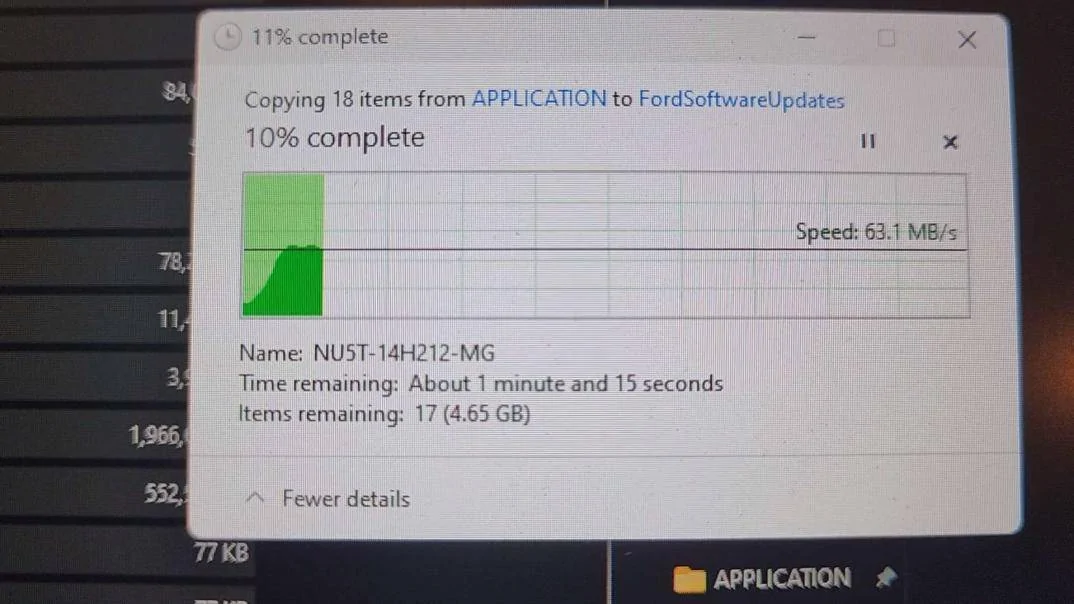
It slowed down some, but still faster than letting FDRS do it.

Mike G
Well-Known Member
- First Name
- Mike
- Joined
- Mar 27, 2022
- Threads
- 25
- Messages
- 6,449
- Reaction score
- 5,289
- Location
- N. AL, USA
- Vehicles
- '23(J1) Mach-E GT-PE, '22 F-150 Lightning, '24 Bronco HLE 2Dr
Its a CA thing....EV Emissions....Is this a new setting in the new UI? What does it mean?

scoopman
Well-Known Member
- Joined
- Jan 30, 2021
- Threads
- 60
- Messages
- 2,771
- Reaction score
- 5,816
- Location
- Bay Area
- Vehicles
- 2023 KIA EV6 GT, 20214 Hyundai Ioniq 5 Ltd AWD
- Occupation
- former electric pony jockey, flatbed towing expert
I didn't want the extra variable of needing to make sure I copied over only the correct files doing it manuallyTook just under 3 minutes copying manually with windows explorer.

It slowed down some, but still faster than letting FDRS do it.
scoopman
Well-Known Member
- Joined
- Jan 30, 2021
- Threads
- 60
- Messages
- 2,771
- Reaction score
- 5,816
- Location
- Bay Area
- Vehicles
- 2023 KIA EV6 GT, 20214 Hyundai Ioniq 5 Ltd AWD
- Occupation
- former electric pony jockey, flatbed towing expert
BTW --- my APIM installed successfully YAY! -- but I then was presented after the APIM with a second GWM update. That's cooking now for 20 minutes with my door open.

737flyer
Well-Known Member
- First Name
- Richard
- Joined
- Jul 12, 2021
- Threads
- 2
- Messages
- 871
- Reaction score
- 371
- Location
- Redington Beach, Fl
- Vehicles
- 2025 Mache Premium, 2024 BMW IX50
- Occupation
- Retired Airline Pilot
Do you download the file to your hard drive then transfer it to the flash card?Took just under 3 minutes copying manually with windows explorer.
It slowed down some, but still faster than letting FDRS do it.
When you do this are you disconnected from the car?
Where is the file stored on your hard drive?

markboris
Well-Known Member
- First Name
- Mark
- Joined
- Nov 13, 2019
- Threads
- 43
- Messages
- 5,731
- Reaction score
- 16,371
- Location
- Sonora, CA
- Vehicles
- Currently: '20 Shelby GT500 FPB '24 Mach-E GTP GGM
- Occupation
- Retired
I got the Sync update today through FDRS. ‘21 Job2 not EA. I used the USB and it took almost 2 hours for the entire thing to update (all modules) but I was in the garage working on other projects so wasn’t in any hurry.
737flyer
Well-Known Member
- First Name
- Richard
- Joined
- Jul 12, 2021
- Threads
- 2
- Messages
- 871
- Reaction score
- 371
- Location
- Redington Beach, Fl
- Vehicles
- 2025 Mache Premium, 2024 BMW IX50
- Occupation
- Retired Airline Pilot
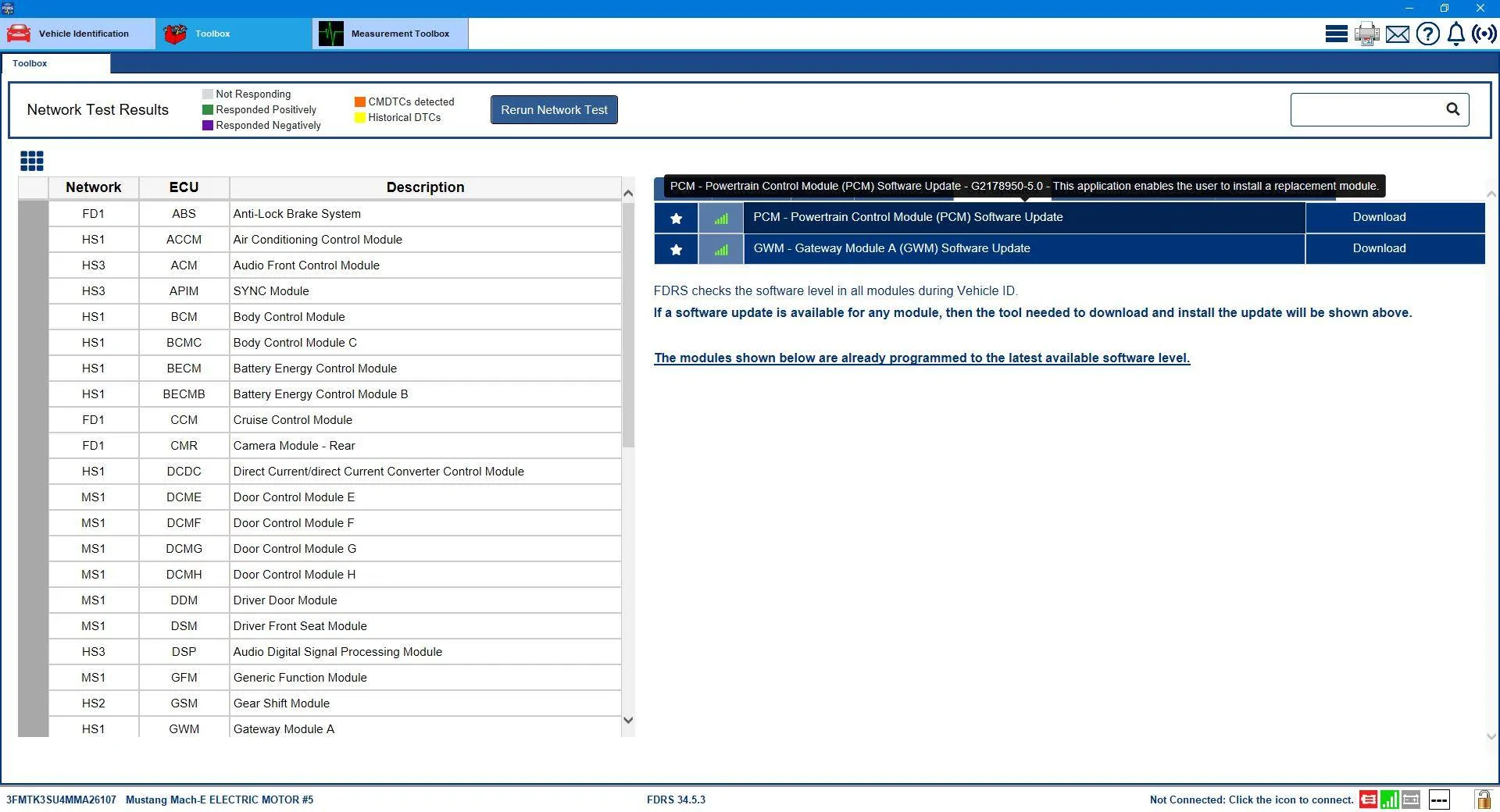
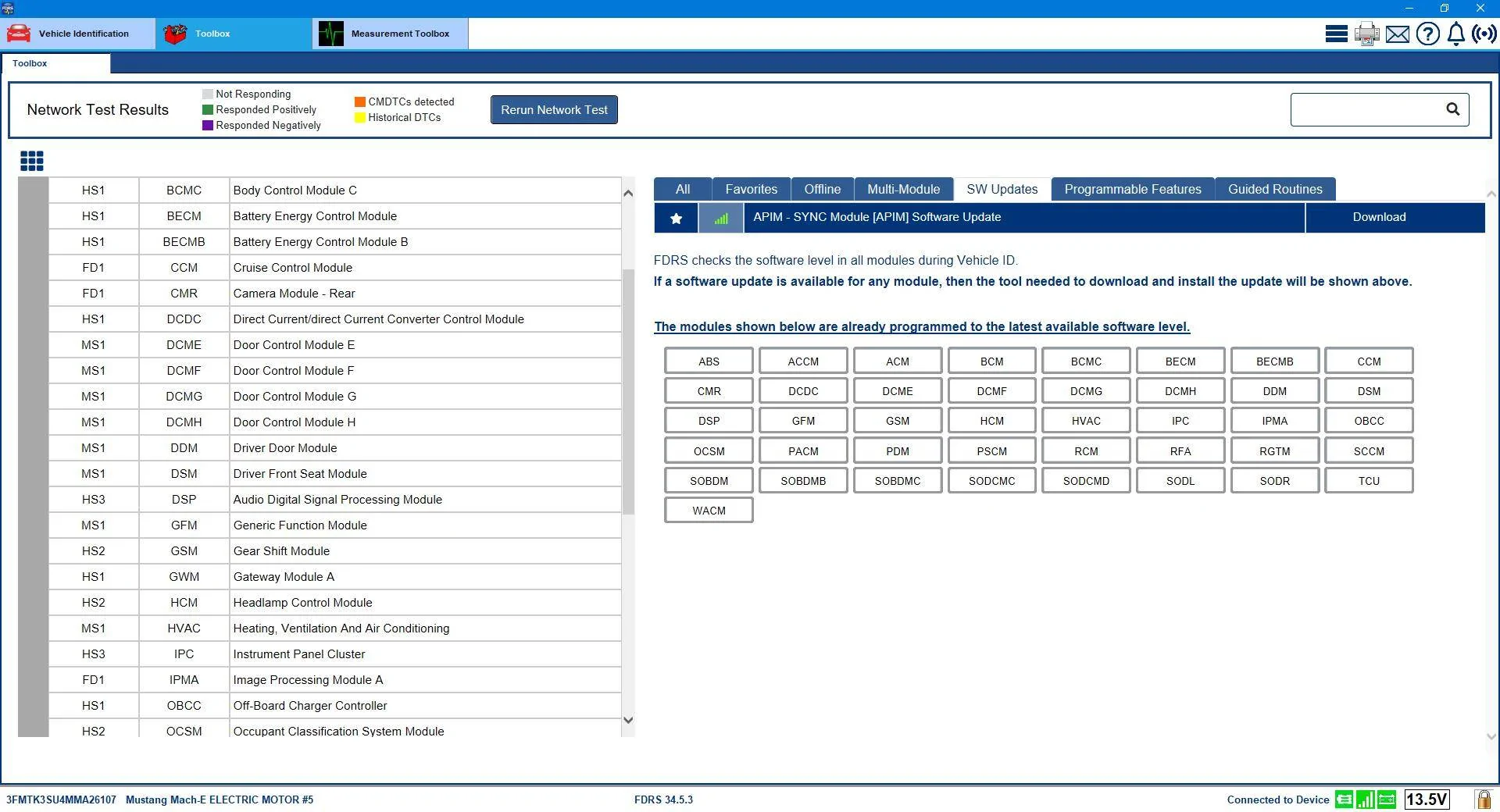
How did you reset the PCM?So now that we're all getting the ball rolling....It was a naughty PCM update that was keeping the GWM from showing up. I'm told that in addition to whatever dependency issue was created by doing the PCM update (at the time I did it there was no GWM in my list) the PCM was not completely 'reporting' as well, which could have compounded the problem.
I asked somebody on another forum to check something out for me and the result was a 'reset' of my PCM reported version to a previous iteration.
Which made the GWM....and the PCM (again) show up as updates in my list.

I was advised to do an offline download of the GWM software (no network scan), and then only plug it in afterward...and to do a PMI (and answer "No" to the question about if the original module is installed).
That worked like a charm and after the completion of the GWM update (GWM "-LAD" revision) and the network scan I was bestowed with the precious Sync 640 APIM update, and the naughty PCM update had disappeared from the list (because it was actually already installed).
Afterward, another GWM showed up and all the packages in that update still showed as "-LAD" except the F188 which flipped over to "-LAE".
All good...another Sync crisis put to rest.
Arjan
Well-Known Member
- First Name
- Arjan
- Joined
- Feb 14, 2020
- Threads
- 6
- Messages
- 360
- Reaction score
- 241
- Location
- NL
- Vehicles
- Ford Mustang Mach-E GT Performance

Looking on the data on my USB stick for the GWM, i noticed that there are 2 files that are matched to my VIN number. I was wondering if these files stay the same in a newer update ?
The manifest and json file are both encrypted so nu luck in figuring it out manually.
The manifest and json file are both encrypted so nu luck in figuring it out manually.

ProximusAl
Well-Known Member
- Joined
- May 27, 2021
- Threads
- 7
- Messages
- 674
- Reaction score
- 707
- Location
- UK
- Vehicles
- Mach-E - SR-AWD - Star White
I’m with you Tony.I'll let you know when my APIM update appears as we seem to be on a similar timeline.
Just completed my GWM with no dramas but not being offered an APIM.
Ford don’t like Europe ?
wappla1911
Well-Known Member
- Joined
- Oct 10, 2022
- Threads
- 2
- Messages
- 51
- Reaction score
- 19
- Location
- Austria
- Vehicles
- Ford Mustang Mach E 2021 Job1

Also GWM here in Austria and 10 Minutes later an APIM Update... but the APIM Update took only a few seconds with a few KByte... no new sync version... sadly
Mike G
Well-Known Member
- First Name
- Mike
- Joined
- Mar 27, 2022
- Threads
- 25
- Messages
- 6,449
- Reaction score
- 5,289
- Location
- N. AL, USA
- Vehicles
- '23(J1) Mach-E GT-PE, '22 F-150 Lightning, '24 Bronco HLE 2Dr
I didn't. I asked a forum member on the F-150 forum to assist and that's what he came up with. He's a certified module whisperer.How did you reset the PCM?
Mike G
Well-Known Member
- First Name
- Mike
- Joined
- Mar 27, 2022
- Threads
- 25
- Messages
- 6,449
- Reaction score
- 5,289
- Location
- N. AL, USA
- Vehicles
- '23(J1) Mach-E GT-PE, '22 F-150 Lightning, '24 Bronco HLE 2Dr
When the USB drive is created by FDRS there is one file that is the .cer file. That is the certificate that the car recognizes and allows the files to be updated. The other file is written to the USB drive when the update is complete. That second file is the reason we used to have to put the USB drive back into the computer so FDRS could read and validate that the update completed sucessfully. Now FDRS just does it using the Mongoose cable instead.Looking on the data on my USB stick for the GWM, i noticed that there are 2 files that are matched to my VIN number. I was wondering if these files stay the same in a newer update ?
The manifest and json file are both encrypted so nu luck in figuring it out manually.
Sponsored
Similar threads
- Replies
- 46
- Views
- 17,098


- Replies
- 29
- Views
- 15,774
