Post here if you have an active FDRS account and are willing to look up info for others

jmatero

Well-Known Member
First Name
John
Joined
Jul 21, 2022
Threads
20
Messages
256
Reaction score
248
Location
San Jose, CA
Vehicles
2022 MME GT-P
Country flag
Anyone else having trouble logging into FDRS. Doing typical non dealer motorcraft and despite resetting password, still fails authentication GRRR
Sponsored

 

likescookies

Well-Known Member
First Name
Bob
Joined
Jan 29, 2020
Threads
2
Messages
47
Reaction score
34
Location
Minneapolis, MN
Vehicles
2021 Mach-E, 2004 Camry
Country flag
@likescookies
8 Jan '21 build date, Job 1 car.

So, interesting history from the session logs. As far back as a year ago a tech tried to update your Sync, months after your gateway (GWM) was replaced, and on two separate occasions the programming update attempts failed and they just quit without doing anything else.

And it looks to me like you've got a version of Sync that is so old you can't even schedule update checks for more than one day a week ("-EG" revision software).

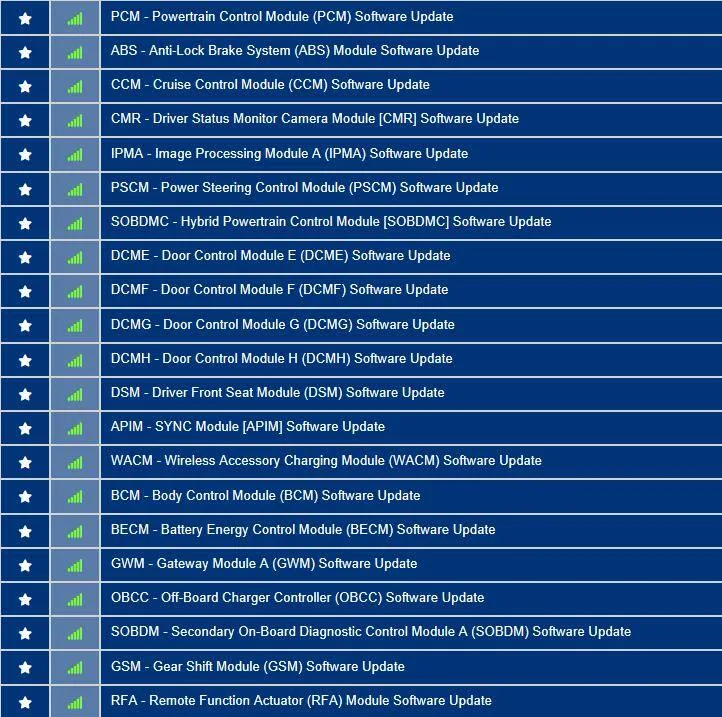
Here's the list of available updates:
3FMTK3RM4MMA09295-23-Apr-23.png


I've highlighted the gateway and the Sync module for a reason. Those two should have already updated via OTA by now. The gateway would have been first followed by the APIM (Sync module). I don't have any idea why they haven't updated by now but you certainly have an issue that your service department should fix under warranty. And If they need to call the engineering hotline to get help, then that's what they should do.

And I just re-read your post...BlueCruise updating by the dealer has not expired. It was renewed and expires at the end of this year...however there was a 'pause' put on doing the updates at the dealer around the holidays due to some technical issues with updating the IPC (instrument panel module), but I would hope that is resolved by now.
Hey, Mike, would you please look me up again? I took it into the dealer to solve the OTA problem, and they were frustratingly vague about what they actually did. Maybe you can tell? Thank you!

3FMTK3RM4MMA09295
 

Mach-Lee

Well-Known Member
First Name
Lee
Joined
Jul 16, 2021
Threads
262
Messages
11,383
Reaction score
25,076
Location
Wisconsin
Vehicles
2022 Mach-E Premium AWD
Occupation
Sci/Eng
Country flag
Anyone else having trouble logging into FDRS. Doing typical non dealer motorcraft and despite resetting password, still fails authentication GRRR
Someone did yesterday, and it turns out it was Windows doing updates. So restart and make sure Windows is up to date before attempting FDRS.
 

Mike G

Well-Known Member
First Name
Mike
Joined
Mar 27, 2022
Threads
25
Messages
6,458
Reaction score
5,298
Location
N. AL, USA
Vehicles
'23(J1) Mach-E GT-PE, '22 F-150 Lightning, '24 Bronco HLE 2Dr
Country flag
Hey, Mike, would you please look me up again? I took it into the dealer to solve the OTA problem, and they were frustratingly vague about what they actually did. Maybe you can tell? Thank you!

3FMTK3RM4MMA09295
They started around 0723 on the 17th by doing a lot of reading up on a wide variety of TSBs until about 0925 and then looked at your OTA dashboard to check the status of that. A network test was run at 0930 after checking the OTA dashboard and then a check for DTCs and then nothing after 0942. No programming was done at all this day.

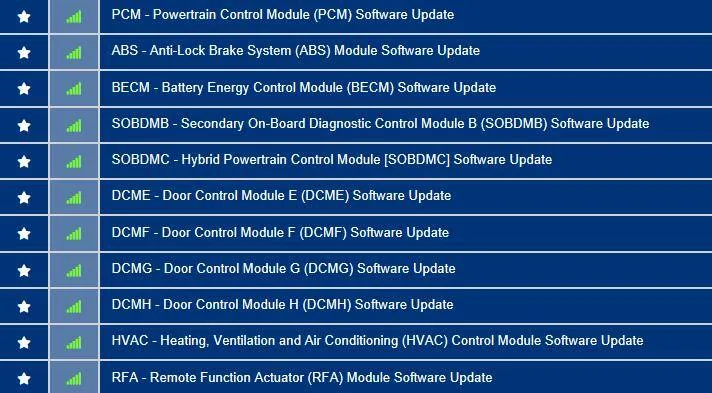
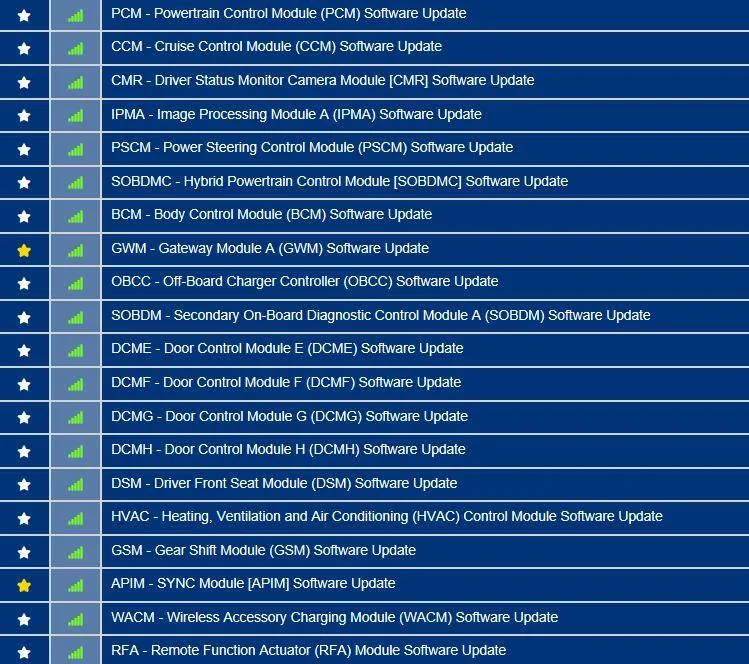
On the 18th they started at 1258 and did the second keyfob (PATS), followed by the HVAC update, followed by a lot of self tests checking for errors and checking the connected vehicle page in PTS and doing more TSB reading. No further programming was done after the HVAC and work ceased at 4:47PM....and that leaves you with this list of available updates, several of which should definitely come as OTAs (GWM, APIM, and then eventually the powertrain updates):
Ford Mustang Mach-E Post here if you have an active FDRS account and are willing to look up info for others 3FMTK3RM4MMA09295-19-May-23


duck2412

Active Member
Joined
Jul 9, 2022
Threads
2
Messages
44
Reaction score
25
Location
Denmark
Vehicles
Mach E
Country flag
Hi,

Saw a post from a new owner in DK who claims his new MME came with the newest APIM version, so i wonder if it has been release for my car as well.

Could someone please check? :)

VIN: WF0TK3SUXNMA05375
 

Jimrpa

Well-Known Member
First Name
Jim
Joined
Sep 10, 2020
Threads
297
Messages
9,581
Reaction score
12,922
Location
Wayne, PA
Vehicles
2021 Infinite Blue Premium Mustang Mach E ER AWD
Occupation
Retied (formerly tried to herd highly technical, independent cats)
Country flag
I hate to trouble people, but before I reach out to my dealer about the weird 4.2.5 issue, could someone please take a look and let me know what’s visible about my car? The Ford helpline claimed they couldn’t see anything unusual and that 4.2.5 was showing as successful. If I go into my dealer with just the “not completed”, message, they’re just going to tell me I need to give it time to clear (it’s been since April 25) and send me away.
3FMTK3SU2MMA09354

Thanks!
 

Sburgoon

Member
First Name
Sean
Joined
May 20, 2023
Threads
1
Messages
7
Reaction score
2
Location
California
Vehicles
Mach E 2021 Premium
Country flag
Hey all,

Can someone take a look at 3FMTK3RM8MMA26469 when they have a minute? I’m stuck on 3.5.4.2 which seems… not great. I have Wi-Fi setup and everything else and it just refuses to update to anything close to new, and I’d love to be able to tell the dealership what’s wrong because I don’t have a lot of faith in their interest in putting effort into finding a solution. Thanks for any help anyone can give!
 

Mach-Lee

Well-Known Member
First Name
Lee
Joined
Jul 16, 2021
Threads
262
Messages
11,383
Reaction score
25,076
Location
Wisconsin
Vehicles
2022 Mach-E Premium AWD
Occupation
Sci/Eng
Country flag
I hate to trouble people, but before I reach out to my dealer about the weird 4.2.5 issue, could someone please take a look and let me know what’s visible about my car? The Ford helpline claimed they couldn’t see anything unusual and that 4.2.5 was showing as successful. If I go into my dealer with just the “not completed”, message, they’re just going to tell me I need to give it time to clear (it’s been since April 25) and send me away.
3FMTK3SU2MMA09354

Thanks!
Yes it completed successfully on the 25th, but didn't post the OTA completed flag to the cloud for some reason. So it might not show status correctly on your end.
 

Mach-Lee

Well-Known Member
First Name
Lee
Joined
Jul 16, 2021
Threads
262
Messages
11,383
Reaction score
25,076
Location
Wisconsin
Vehicles
2022 Mach-E Premium AWD
Occupation
Sci/Eng
Country flag
Hey all,

Can someone take a look at 3FMTK3RM8MMA26469 when they have a minute? I’m stuck on 3.5.4.2 which seems… not great. I have Wi-Fi setup and everything else and it just refuses to update to anything close to new, and I’d love to be able to tell the dealership what’s wrong because I don’t have a lot of faith in their interest in putting effort into finding a solution. Thanks for any help anyone can give!
4.2.1 tried to install and failed several times on April 19th because of low 12V battery, last time failed due to a server error. Says it will retry but hasn't since. Not much I can advise, other than possibly trying a 12V reset.
 

Mike G

Well-Known Member
First Name
Mike
Joined
Mar 27, 2022
Threads
25
Messages
6,458
Reaction score
5,298
Location
N. AL, USA
Vehicles
'23(J1) Mach-E GT-PE, '22 F-150 Lightning, '24 Bronco HLE 2Dr
Country flag
Hi,

Saw a post from a new owner in DK who claims his new MME came with the newest APIM version, so i wonder if it has been release for my car as well.

Could someone please check? :)

VIN: WF0TK3SUXNMA05375
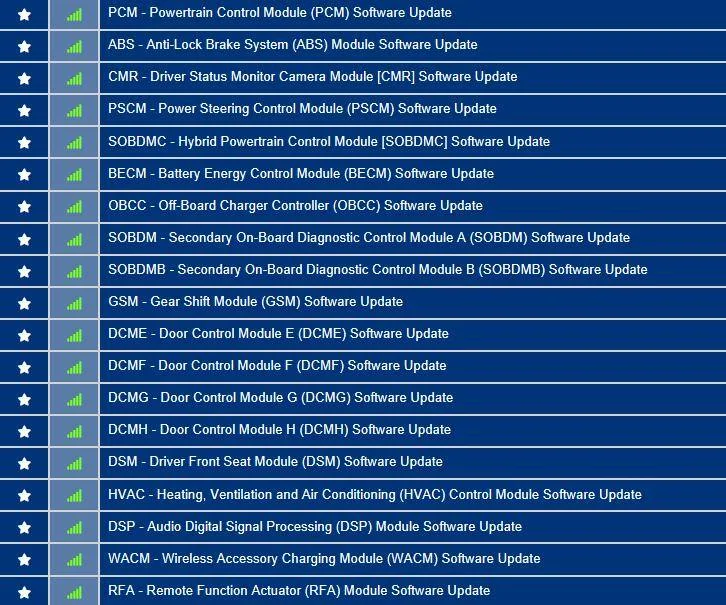
I don't see anything in this list:
Ford Mustang Mach-E Post here if you have an active FDRS account and are willing to look up info for others WF0TK3SUXNMA05375-22-May-23
 

Mike G

Well-Known Member
First Name
Mike
Joined
Mar 27, 2022
Threads
25
Messages
6,458
Reaction score
5,298
Location
N. AL, USA
Vehicles
'23(J1) Mach-E GT-PE, '22 F-150 Lightning, '24 Bronco HLE 2Dr
Country flag
I hate to trouble people, but before I reach out to my dealer about the weird 4.2.5 issue, could someone please take a look and let me know what’s visible about my car? The Ford helpline claimed they couldn’t see anything unusual and that 4.2.5 was showing as successful. If I go into my dealer with just the “not completed”, message, they’re just going to tell me I need to give it time to clear (it’s been since April 25) and send me away.
3FMTK3SU2MMA09354

Thanks!
I see that Lee has checked your OTA status, here's the list of available updates:
Ford Mustang Mach-E Post here if you have an active FDRS account and are willing to look up info for others 3FMTK3SU2MMA09354-22-May-23_Jimrpa
 

Mike G

Well-Known Member
First Name
Mike
Joined
Mar 27, 2022
Threads
25
Messages
6,458
Reaction score
5,298
Location
N. AL, USA
Vehicles
'23(J1) Mach-E GT-PE, '22 F-150 Lightning, '24 Bronco HLE 2Dr
Country flag
Hey all,

Can someone take a look at 3FMTK3RM8MMA26469 when they have a minute? I’m stuck on 3.5.4.2 which seems… not great. I have Wi-Fi setup and everything else and it just refuses to update to anything close to new, and I’d love to be able to tell the dealership what’s wrong because I don’t have a lot of faith in their interest in putting effort into finding a solution. Thanks for any help anyone can give!
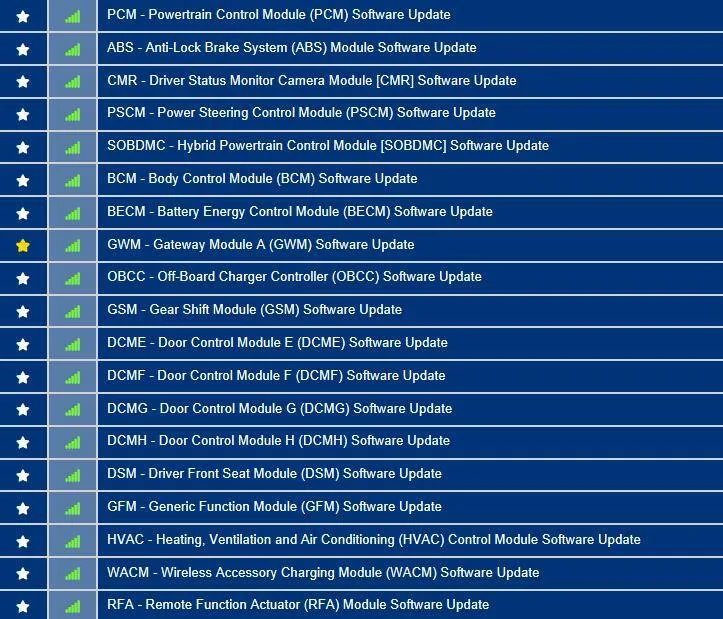
I see that Lee has checked your OTA status for 4.2.1. You do have this update in your available software list (it's the gateway module):
Ford Mustang Mach-E Post here if you have an active FDRS account and are willing to look up info for others 3FMTK3RM8MMA26469-22-May-23


Updates don't come over Wi-Fi 99.9% of the time. They come over the car's TCU modem. As Lee says yours failed due to low 12V battery state of charge. Which means you probably have your schedule set to check in the middle of the night. And every night your battery drains a bit down below 80% (like everybody's does), and when the logic checks to see the battery status before initiating the update it decides the 12V battery is to low to support the process and no update takes place.

I would recommend two things. First, set your schedule to check for updates about 15-20 minutes into your normal commute time either in the morning or after you leave work on the way home. When you start the car it takes the high voltage battery about 15-20 minutes to recharge the 12V battery back up above 80% SOC (just like a regular ICE car with the alternator recharging the 12V battery back up). So this would allow the update to proceed when the system checks and finds your 12V battery is good to go. Also, you'll probably be driving in an area with at least three bars of AT&T coverage, which is also necessary for getting updates downloaded.

The second thing to do is to reset the "Battery Monitoring System Learned Values" before starting off on your next drive to ensure that your battery is getting fully recharged instead of only partially recharged. It's pretty simple to do.

Before leaving for your drive, get in and push the start button without putting your foot on the brake. So while in accessory mode, flash the high beams 5 times, and then tap the brake pedal 3 times and look for the battery symbol on the instrument panel to cycle. Then press the start button again to shut the car off. Then start the car as normal and drive off with your new update schedule set to check everyday during your commute and you should see results soon.
 
Last edited:

Sburgoon

Member
First Name
Sean
Joined
May 20, 2023
Threads
1
Messages
7
Reaction score
2
Location
California
Vehicles
Mach E 2021 Premium
Country flag
Ah, that makes sense. I’ll give that a try. Thank you both!

I see that Lee has checked your OTA status for 4.2.1. You do hve this update in your available software list (it's the gateway module):
3FMTK3RM8MMA26469-22-May-23.png


Updates don't come over Wi-Fi 99.9% of the time. They come over the car's TCU modem. As Lee says yours failed due to low 12V battery state of charge. Which means you probably have your schedule set to check in the middle of the night. And every night your battery drains a bit down below 80% (like everybody's does), and when the logic checks to see the battery status before initiating the update it decides the 12V battery is to low to support the process and no update takes place.

I would recommend two things. First, set your schedule to check for updates about 15-20 minutes into your normal commute time either in the morning or after you leave work on the way home. When you start the car it takes the high voltage battery about 15-20 minutes to recharge the 12V battery back up above 80% SOC (just like a regular ICE car with the alternator recharging the 12V battery back up). So this would allow the update to proceed when the system checks and finds your 12V battery is good to go. Also, you'll probably be driving in an area with at least three bars of AT&T coverage, which is also necessary for getting updates downloaded.

The second thing to do is to reset the "Battery Monitoring System Learned Values" before starting off on your next drive to ensure that your battery is getting fully recharged instead of only partially recharged. It's pretty simple to do.

Before leaving for your drive, get in and push the start button without putting your foot on the brake. So while in accessory mode, flash the high beams 5 times, and then tap the brake pedal 3 times and look for the battery symbol on the instrument panel to cycle. Then press the start button again to shut the car off. Then start the car as normal and drive off with your new update schedule set to check everyday during your commute and you should see results soon.
 

JesperDK

New Member
First Name
Jesper
Joined
Apr 6, 2023
Threads
0
Messages
4
Reaction score
0
Location
Denmark
Vehicles
Mustang Mach E ER AWD
Country flag
May I have a check on my car?

VIN: WF0TK3SU9MMA47034

Appreciate it.
Sponsored


Top