geftsnowball
Well-Known Member
- Joined
- Mar 26, 2022
- Threads
- 8
- Messages
- 184
- Reaction score
- 189
- Location
- Washington
- Vehicles
- '22 Mach-E, Grabber Blue, Premium AWD ER

I have this exact issue. My Android Auto will disconnect at a specific intersection near home (4-way, with lights). Without fail, traversing this intersection results in a disconnect.
I guess rebooting Sync sounds like the quickest way to resolve the problem, at least for now.
From my experience you don't need to do either of these things. There are 2 spots on my drive that Wireless AA always drops (recently that is... 1 has ongoing construction I suspect is the cause and the 2nd no clue but it's absolutely location based and consistent). I'll get the connection failed message and it drops me to this screen (random image from the internet, ignore CarPlay text):sometimes just toggling bluetooth off then on (either on the MME or the phone) causes it to reconnect. really depends what is easiest at the time whether i try rebooting Sync first or not.
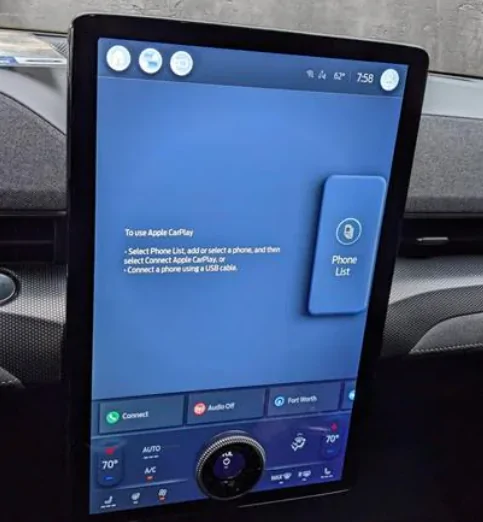
I wait a minute or so because the connection will fail if I try immediately (likely still in range of whatever wireless interference caused the drop) but I click the giant Phone List button and then tap on my phone to expand the dropdown menu. It will show that the phone is still connected but the third icon is the AA icon. I can press that and it will reconnect without force restarting sync or toggling Bluetooth.
My guess is that both of those methods that work for you work because it reestablishes the connection with your phone and auto starts AA again.
Sponsored