PaaK Not Working

raijinmach

Well-Known Member
Joined
May 5, 2025
Threads
23
Messages
110
Reaction score
68
Location
Ottawa
Vehicles
n/a
PaaK was working fine for me up until yesterday. I have all the optimzed settings turned on. I tried restarting my phone, made sure VPNs were turned off and it still isn't detecting my key. It will connect to the infotainment system but doesn't recognize my phone as a key. Interestingly, I can still unlock my door half the time, but the car can't detect my phone for some reason. Any ideas?
Sponsored
 

4sallypat

Well-Known Member
First Name
Pat
Joined
Mar 30, 2022
Threads
103
Messages
2,806
Reaction score
2,463
Location
Southern California
Website
www.kudo-ume-farms.com
Vehicles
'23 MME delivered May '23 + '22 Lightning July '22
Occupation
Network Tech
Country flag
Make sure the app is set to "always on".

If not you will have to "wake it up" by opening the Ford Pass app.
 
OP
OP

raijinmach

Well-Known Member
Joined
May 5, 2025
Threads
23
Messages
110
Reaction score
68
Location
Ottawa
Vehicles
n/a
Make sure the app is set to "always on".

If not you will have to "wake it up" by opening the Ford Pass app.
Like I said, all the optimized settings recommended by the app are turned on unless there is another way
 

Jeffvisor

Well-Known Member
First Name
Jeff
Joined
Feb 24, 2021
Threads
35
Messages
851
Reaction score
807
Location
Harrisburg, PA
Vehicles
Ford Mustang Mach-e
Occupation
Retired
Country flag
I would reboot the phone if it's an iPhone touch volume up then volume down and then hold the off button on the right side continue to hold it until you see the apple logo. Once you see the Apple logo let it restart and I bet that fixes it.
 

4sallypat

Well-Known Member
First Name
Pat
Joined
Mar 30, 2022
Threads
103
Messages
2,806
Reaction score
2,463
Location
Southern California
Website
www.kudo-ume-farms.com
Vehicles
'23 MME delivered May '23 + '22 Lightning July '22
Occupation
Network Tech
Country flag
My 2 iPhones are always running the app in the background even when it locks.

Check location settings to be always on.


4sallypat

Well-Known Member
First Name
Pat
Joined
Mar 30, 2022
Threads
103
Messages
2,806
Reaction score
2,463
Location
Southern California
Website
www.kudo-ume-farms.com
Vehicles
'23 MME delivered May '23 + '22 Lightning July '22
Occupation
Network Tech
Country flag
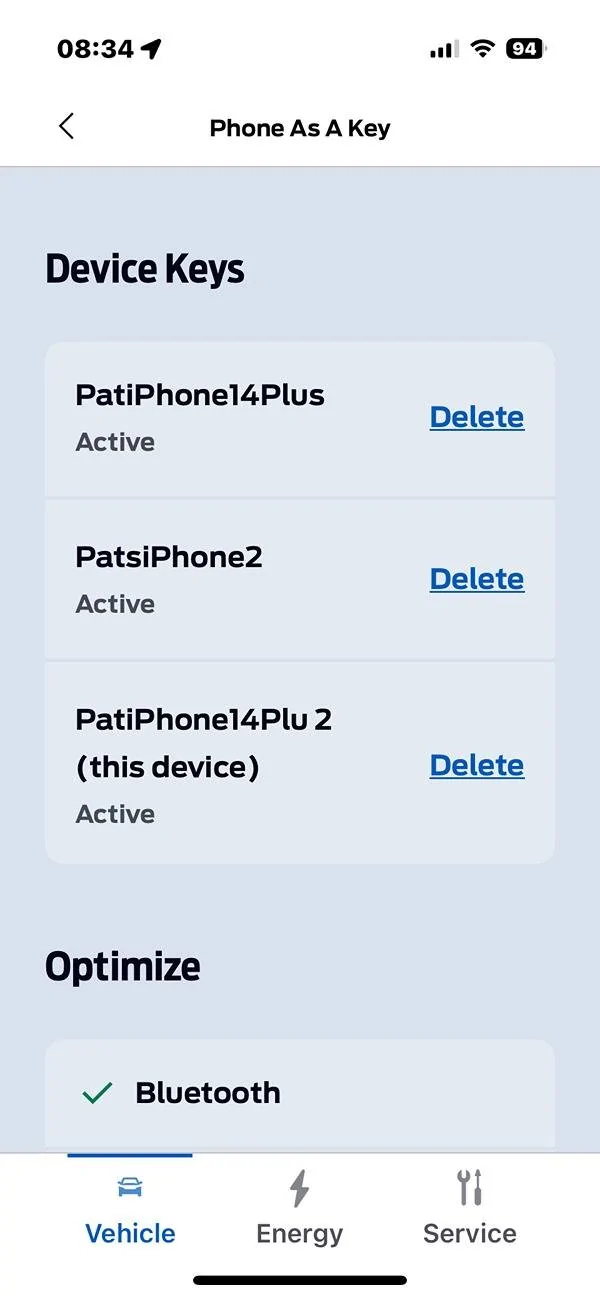
After rebooting the phone (shut down and restart), check for app updates.

Then check the Ford Pass app and check if your phone is listed on the PAAK.

Ford Mustang Mach-E PaaK Not Working Screenshot 2025-07-12 at 08.34.35
 

benk016

Well-Known Member
First Name
Ben
Joined
Nov 12, 2020
Threads
38
Messages
3,265
Reaction score
5,093
Location
Tulsa, Oklahoma
Vehicles
2021 Mustang Mach-E GT
Country flag
Mine stopped working yesterday out of the blue as well. Samsung Galaxy S25 ultra. BT connects and I can unlock and lock with the buttons in the app instantly. But get no key detected message in the car. Rebooted the app and the phone and no change.
 
OP
OP

raijinmach

Well-Known Member
Joined
May 5, 2025
Threads
23
Messages
110
Reaction score
68
Location
Ottawa
Vehicles
n/a
Mine stopped working yesterday out of the blue as well. Samsung Galaxy S25 ultra. BT connects and I can unlock and lock with the buttons in the app instantly. But get no key detected message in the car. Rebooted the app and the phone and no change.
I have Samsung Galaxy S23. I wonder if it's a Samsung thing
 

Mach-Lee

Well-Known Member
First Name
Lee
Joined
Jul 16, 2021
Threads
262
Messages
11,344
Reaction score
24,964
Location
Wisconsin
Vehicles
2022 Mach-E Premium AWD
Occupation
Sci/Eng
Country flag
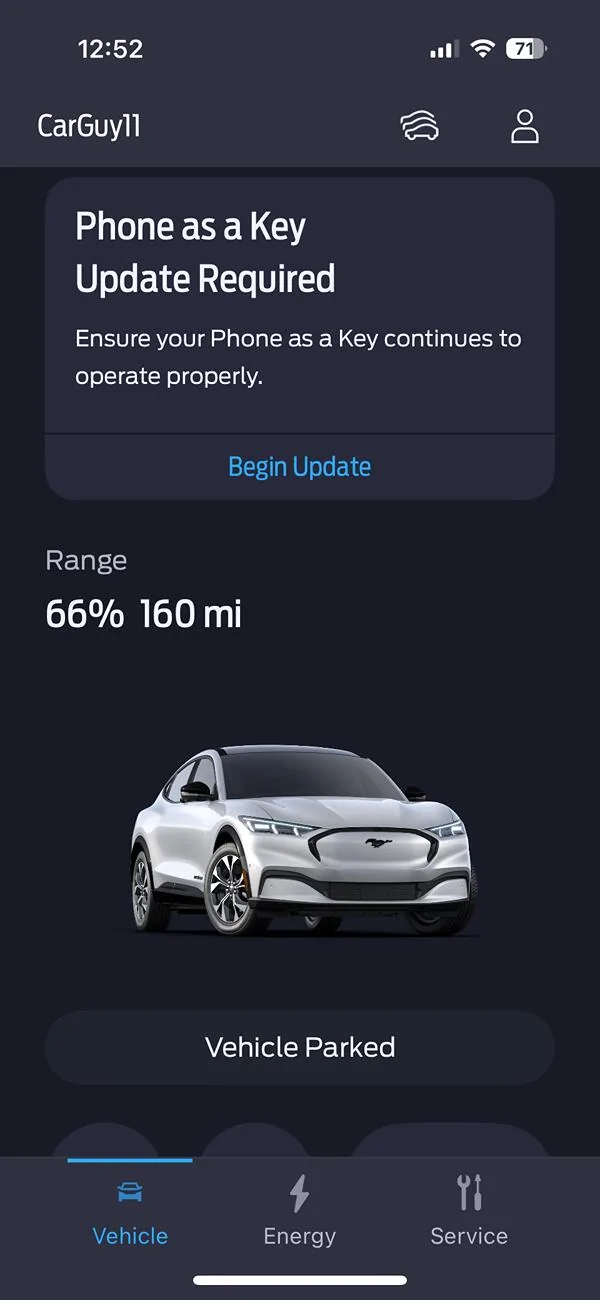
Some users have been getting a warning message about needing to refresh their PAAK keys, perhaps it's related to that (and not everyone got the message). I would make sure you're updated to the latest version of FordPass on your phone, and if it still doesn't work, you may need to re-create your phone keys?

Ford Mustang Mach-E PaaK Not Working img_7584-jpg
 
OP
OP

raijinmach

Well-Known Member
Joined
May 5, 2025
Threads
23
Messages
110
Reaction score
68
Location
Ottawa
Vehicles
n/a
Mine stopped working yesterday out of the blue as well. Samsung Galaxy S25 ultra. BT connects and I can unlock and lock with the buttons in the app instantly. But get no key detected message in the car. Rebooted the app and the phone and no change.
Some users have been getting a warning message about needing to refresh their PAAK keys, perhaps it's related to that (and not everyone got the message). I would make sure you're updated to the latest version of FordPass on your phone, and if it still doesn't work, you may need to re-create your phone keys?

img_7584-jpg.jpg

I reset the phone as a key on both the phone and the car and re-registered the phone again and it has started working
 

Two Trick Ponies

Well-Known Member
First Name
Jack
Joined
Aug 1, 2023
Threads
11
Messages
64
Reaction score
33
Location
Nebraska
Vehicles
1964 1/2 Mustang, 2023 Nite Pony Mach E
Country flag
Mine stopped working about a week and a half ago. Samsung S25. No warning message at all. Was this another security update from Samsung that disabled our PAAK again? This happened about a year or so ago and it took a month or two for Ford to work things out with Samsung. I have rebooted my phone and checked for updates in the play store. and my app seems to up to date. When I try to set up the "Make this phone a key" it seems to start downloading a key, but it just gives me the spinning circle of death or it times out one or the other. Now I'm stuck without my PAAK once again.
 

Two Trick Ponies

Well-Known Member
First Name
Jack
Joined
Aug 1, 2023
Threads
11
Messages
64
Reaction score
33
Location
Nebraska
Vehicles
1964 1/2 Mustang, 2023 Nite Pony Mach E
Country flag
I finally got it working again by getting in the car with the fob and phone, starting the car outdoors, uninstalled the app in my phone, restarted my phone, deleted the phone in the car, reinstalled the app and logged back in to Ford Pass, pressed the Bluetooth Controls button and selected "set up phone as a key". I had to go all the way through this set up because the previous actions also removed the backup start code. Once I completely reprogramed the entire PaaK, it worked again. I think, either an OTA update took it out originally because it was working fine, and then one day it just stopped. Not really sure, but it took pretty extreme measures to get it operational again. Seems to work good again "for now". LOL
 

GreaseMonkey

Well-Known Member
First Name
Steve
Joined
Oct 3, 2021
Threads
21
Messages
3,233
Reaction score
5,173
Location
Chicago, IL
Vehicles
24 Mach-E GT
Country flag
On five separate occasions and two different iPhones, my wife and I had trouble putting the vehicle in gear after a “key not detected” message. Yesterday, my wife and daughter got stranded at a Target while I was out of state on business. They had to cab it back home, get a key fob, and go back to retrieve the car. I could not remember what the backup code was given that I don’t use it that often.

Time to reset everything and start all over. But this experience was very frustrating to us. I bet my wife will never use a PaaK again.

Oh, and the funny thing is: while looking for threads on the topic, I came across this smart ass saying that he was very frustrated that “people are still complaining about PaaK”. He posted his comment in 2022! Three and a half years later, Ford has not fixed this goddamned feature.
Sponsored


Top