tonesto7

Well-Known Member
First Name
Anthony
Joined
Sep 20, 2021
Threads
2
Messages
243
Reaction score
610
Location
Ann Arbor, Michigan
Vehicles
2021 F150
Occupation
Software Developer/System Admin
Country flag
Thanks for the update. After running the script, I get the widget menu, choose show widget and medium. The widget shows in a window but after closing the window the widget does not show on the home screen. I can't figure out what's wrong.
I'm still trying to wrap my head around apple refresh logic of widgets.
Did the widget populate yet?
Sponsored
 

tonesto7

Well-Known Member
First Name
Anthony
Joined
Sep 20, 2021
Threads
2
Messages
243
Reaction score
610
Location
Ann Arbor, Michigan
Vehicles
2021 F150
Occupation
Software Developer/System Admin
Country flag
Release v1.3.1
  • Fixed Oil Life showing no data.
  • Fixes for timestamp offset text at the bottom are offset too much.
  • Shows warning for Low Oil Life and low oil.
  • Fixed issue with advanced control menu going to wrong sections when only certain items were shown due to the vehicle capabilities.
  • Fixed the Alerts not allowed in widget error (this is really shown because the saved VIN is invalid)
  • Fixed repeated login prompt because of the deviceLanguage variable missing from the setUserPrefs call. Removed the requirement as it's not being used right now

Download Link:
https://raw.githubusercontent.com/tonesto7/fordpass-scriptable/main/Fordpass Widget.js

Instructions:
tonesto7/fordpass-scriptable: FordPass Widget for Scriptable (github.com)

What's Next?

  • Slowing down on features and focusing on stability.
  • Working on small widget layout.
Community:
Discord: https://discord.gg/VPw3zw9v
 

bs1055

Well-Known Member
Joined
Jul 15, 2021
Threads
11
Messages
184
Reaction score
181
Location
Miami
Vehicles
2021 Mach-E Premium
Occupation
Eng/M&A
Country flag
I'm still trying to wrap my head around apple refresh logic of widgets.
Did the widget populate yet?
Yes! The new update resolved the issue. Thanks so much for this — it’s awesome.
 

SAM

Well-Known Member
First Name
SAM
Joined
Dec 29, 2020
Threads
3
Messages
335
Reaction score
362
Location
Central NJ
Vehicles
Premium MME4X Iconic Silver
Country flag
I'm still trying to wrap my head around apple refresh logic of widgets.
Did the widget populate yet?
No, unfortunately not. I updated to 1.3.1, runs well but still no widget on home screen. Tried deleting Scriptable app and its data on iCloud and reloading everything fresh. Tried "Clear all saved data" in Widget Settings. Same result each time, shows widget in window but not on home screen.
 

generaltso

Well-Known Member
Joined
Jun 24, 2020
Threads
76
Messages
15,389
Reaction score
28,696
Location
Vermont
Vehicles
2024 Kia EV9 GT-Line
Country flag
No, unfortunately not. I updated to 1.3.1, runs well but still no widget on home screen. Tried deleting Scriptable app and its data on iCloud and reloading everything fresh. Tried "Clear all saved data" in Widget Settings. Same result each time, shows widget in window but not on home screen.
This may be a stupid question, but did you add the widget to your home screen?


generaltso

Well-Known Member
Joined
Jun 24, 2020
Threads
76
Messages
15,389
Reaction score
28,696
Location
Vermont
Vehicles
2024 Kia EV9 GT-Line
Country flag
  • Fixes for timestamp offset text at the bottom are offset too much.
I don't think the data timestamp is working quite right. It tracks perfectly with what FordPass displays for the first hour. But when the data surpasses 1 hour old, the time displayed in the widget resets and starts counting by the minute again.

For example, I unlocked my car 64 minutes ago. FordPass counted the minutes since it was last updated for the first hour and now just says "Updated 1 hour ago", which expected. The widget counted the minutes the same way for the first hour, but now says Updated 4 minutes ago.
 

SAM

Well-Known Member
First Name
SAM
Joined
Dec 29, 2020
Threads
3
Messages
335
Reaction score
362
Location
Central NJ
Vehicles
Premium MME4X Iconic Silver
Country flag
This may be a stupid question, but did you add the widget to your home screen?
Yeah, I looked for this in the customize widgets section, but not listed. But your question made me explore further. Did a long press on home screen and clicked + in upper left and scrolled to Scriptable app and selected it. Got a generic medium sized Scriptable widget to show on home screen. Then had to click on widget to select the Scriptable FordPass script to run.

Worked. Didn't have to go though all that last time.
 

tonesto7

Well-Known Member
First Name
Anthony
Joined
Sep 20, 2021
Threads
2
Messages
243
Reaction score
610
Location
Ann Arbor, Michigan
Vehicles
2021 F150
Occupation
Software Developer/System Admin
Country flag
I don't think the data timestamp is working quite right. It tracks perfectly with what FordPass displays for the first hour. But when the data surpasses 1 hour old, the time displayed in the widget resets and starts counting by the minute again.

For example, I unlocked my car 64 minutes ago. FordPass counted the minutes since it was last updated for the first hour and now just says "Updated 1 hour ago", which expected. The widget counted the minutes the same way for the first hour, but now says Updated 4 minutes ago.
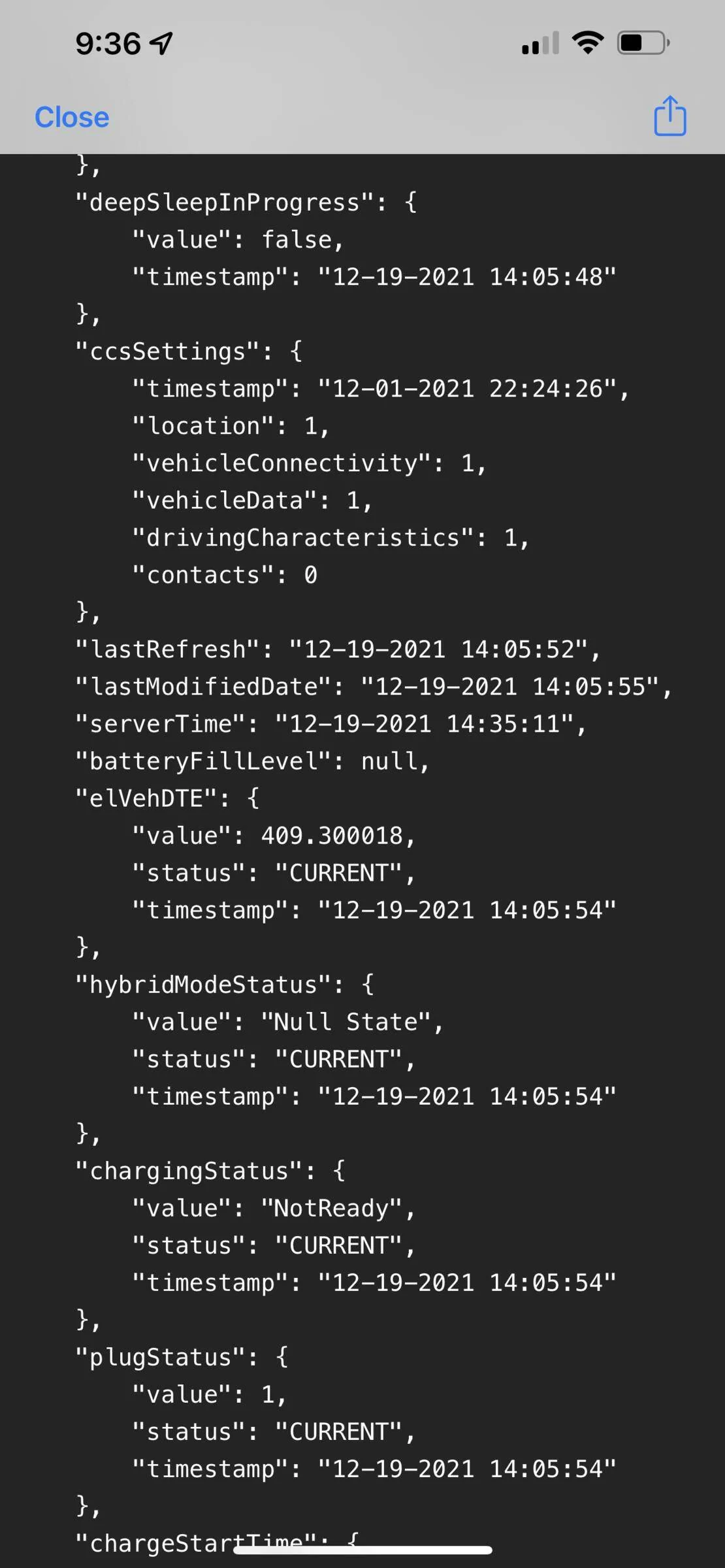
Do me a favor and tap on the widget to bring up the menu > go to widget settings > Debug Menu > View Vehicle Data Output and look for lastRefresh
Ford Mustang Mach-E ? Scriptable FordPass Widget (iOS, iPad, MacOS) 1639924630449

The time and date are in the UTC timezone
 

generaltso

Well-Known Member
Joined
Jun 24, 2020
Threads
76
Messages
15,389
Reaction score
28,696
Location
Vermont
Vehicles
2024 Kia EV9 GT-Line
Country flag
Do me a favor and tap on the widget to bring up the menu > go to widget settings > Debug Menu > View Vehicle Data Output and look for lastRefresh

The time and date are in the UTC timezone
Last Refresh shows "12-19-2021 14:14:14", which is about 30 minutes ago in EST and the widget shows that it was updated 30 minutes ago. But FordPass says that it was updated 2 hours ago.
 

SoriceConsulting

Well-Known Member
First Name
Sal
Joined
Oct 10, 2020
Threads
29
Messages
469
Reaction score
469
Location
NJ, USA
Website
sorice.com
Vehicles
2023 GTPE, Rapid Red
Occupation
IT Consultant
Country flag
Working well for me, except for (as mentioned in an earlier comment) that the widget does not scale up on an iPad screen. Still tiny. Also, I thought there was a mention about showing one decimal place for the battery voltage (like 12.5 instead of just 12). I think that would be important to know.
 

generaltso

Well-Known Member
Joined
Jun 24, 2020
Threads
76
Messages
15,389
Reaction score
28,696
Location
Vermont
Vehicles
2024 Kia EV9 GT-Line
Country flag
Did a long press on home screen and clicked + in upper left and scrolled to Scriptable app and selected it. Got a generic medium sized Scriptable widget to show on home screen. Then had to click on widget to select the Scriptable FordPass script to run.
Well, those steps are included in the instructions :)

Also, for anyone still copying/pasting the script every time there's an update, I recommend you follow @tonesto7 's note about saving the script file to iCloud. Overwriting the file there is easier than copying and pasting since Safari doesn't natively support Select All.
 

tonesto7

Well-Known Member
First Name
Anthony
Joined
Sep 20, 2021
Threads
2
Messages
243
Reaction score
610
Location
Ann Arbor, Michigan
Vehicles
2021 F150
Occupation
Software Developer/System Admin
Country flag
FYI - i've decided to make this a christmas project for myself to migrate this to android (and maybe windows). Hope @tonesto7 is cool with that and I will definitely open source as well once it's ready :)
I would really like to be part of it. I haven’t really had a reason to develop anything for android yet. I have a few android devices. And lots of dev experience in Java and html
 

tonesto7

Well-Known Member
First Name
Anthony
Joined
Sep 20, 2021
Threads
2
Messages
243
Reaction score
610
Location
Ann Arbor, Michigan
Vehicles
2021 F150
Occupation
Software Developer/System Admin
Country flag
Last Refresh shows "12-19-2021 14:14:14", which is about 30 minutes ago in EST and the widget shows that it was updated 30 minutes ago. But FordPass says that it was updated 2 hours ago.
I'm more inclined to think that the FP app is not updating the time elapsed.
the script is working with the data it has available which is the same exact data used by the FP app
It's weird that it's spot on with FP app and suddenly they skew
Sponsored


Top