The Electric Duo

Well-Known Member
First Name
Patrick
Joined
Jul 25, 2020
Threads
135
Messages
1,794
Reaction score
7,632
Location
Oceanside, CA
Website
machevlog.com
Vehicles
Mach-E GT PE - Grabber Blue - Blucifer Twocifer
Country flag
I just ordered a new BLE ODB2 adapter since mine was just Bluetooth. It arrives tomorrow. If the Android app gets updated quickly, I'll be able to make a video demo about it this weekend. Very excited to give it a try.
Sponsored

 

jhalkias

Well-Known Member
First Name
John
Joined
Mar 3, 2020
Threads
123
Messages
2,491
Reaction score
5,039
Location
Ohio
Vehicles
'21 RR ME FE, '22 Corsair GT, '22 Lightning Lariat
Occupation
Benefit Fund Administrator
Country flag
I personally have tried two different OBD Dongles and they work.

VGate iCar Pro:
https://www.amazon.com/dp/B06XGB4873?psc=1&ref=ppx_yo2_dt_b_product_details

VeePeak OBDCheck BLE:
https://www.amazon.com/dp/B073XKQQQW?psc=1&ref=ppx_yo2_dt_b_product_details


Recommended OBD adapter is the OBDLink CX. It does have some actual security to keep others from pairing to it when idle. However, This has been sold out everywhere for weeks with no sign of coming back in stock soon.
Ordered that VeePeak today on Amazon and expect it on Christmas Eve. Road trip on the 27th so I will be curious as to how this will work.
 

dtbaker61

Well-Known Member
First Name
Dan
Joined
May 11, 2020
Threads
126
Messages
4,822
Reaction score
4,525
Location
santa fe,nm
Website
www.envirokarma.org
Vehicles
MME (delivered 2/26/21), DIY eMiata BEV
Occupation
Solar Sales/install
Country flag
Yes you have to login and you have to add the MachE and then after you add it you have to pick the option to "Add my Car" which saves it to your profile. Then you'll get the cogwheel icon where you can go into the settings of that vehicle.

It's probably the worst UX implementation I've seen in a while.
not obvious that you have to create a login that's for sure..... I did create an account, and it does know I have the Mache now... but I still don't see a screen with temps, power, etc as shown in the OP
 
OP
OP
benk016

benk016

Well-Known Member
First Name
Ben
Joined
Nov 12, 2020
Threads
39
Messages
3,274
Reaction score
5,118
Location
Tulsa, Oklahoma
Vehicles
2021 Mustang Mach-E GT
Country flag
not obvious that you have to create a login that's for sure..... I did create an account, and it does know I have the Mache now... but I still don't see a screen with temps, power, etc as shown in the OP
You still need to pair the dongle to the app. The video in the ABRP Twitter announcement on the first post shows the quick process to do it.
 
OP
OP
benk016

benk016

Well-Known Member
First Name
Ben
Joined
Nov 12, 2020
Threads
39
Messages
3,274
Reaction score
5,118
Location
Tulsa, Oklahoma
Vehicles
2021 Mustang Mach-E GT
Country flag
The play store still hasn't released the latest update yet. The team is doing what they can to get it released asap.

I'll update here and the first post when it is available for Android devices.


The Electric Duo

Well-Known Member
First Name
Patrick
Joined
Jul 25, 2020
Threads
135
Messages
1,794
Reaction score
7,632
Location
Oceanside, CA
Website
machevlog.com
Vehicles
Mach-E GT PE - Grabber Blue - Blucifer Twocifer
Country flag
The play store still hasn't released the latest update yet. The team is doing what they can to get it released asap.

I'll update here and the first post when it is available for Android devices.
I'm in the Beta, do you know if that makes a difference?
 
OP
OP
benk016

benk016

Well-Known Member
First Name
Ben
Joined
Nov 12, 2020
Threads
39
Messages
3,274
Reaction score
5,118
Location
Tulsa, Oklahoma
Vehicles
2021 Mustang Mach-E GT
Country flag
I'm in the Beta, do you know if that makes a difference?
I'm honestly not sure if the beta is different from the regular release. I'm in the beta through the playstore also. But, They have a whole separate instance of the app for the testing I've been doing.
 
OP
OP
benk016

benk016

Well-Known Member
First Name
Ben
Joined
Nov 12, 2020
Threads
39
Messages
3,274
Reaction score
5,118
Location
Tulsa, Oklahoma
Vehicles
2021 Mustang Mach-E GT
Country flag
With an OBD2 dongle, can you display live data through CarPlay using ABRP or another app or that would only show up on the phone directly?
Just was talking to the devs about this. And they are not allowed to display the data while driving. Then only thing they can show is the SoC.

They may be able to show some stats while the car is charging though. So that could be a future enhancement.
 

unhandled

Well-Known Member
First Name
Mathieu
Joined
Jul 28, 2021
Threads
13
Messages
176
Reaction score
173
Location
Stoke, Quebec, Canada
Vehicles
Mustang Mach-E Premium AWD ER
Country flag
Just was talking to the devs about this. And they are not allowed to display the data while driving. Then only thing they can show is the SoC.

They may be able to show some stats while the car is charging though. So that could be a future enhancement.
Hmm is that an Apple App Store policy/guideline or a technical limitation of CarPlay? I wonder what the line is for this. I.e. Some apps are able to display stuff in realtime -> maps/directions/audio tracks/etc.
 
OP
OP
benk016

benk016

Well-Known Member
First Name
Ben
Joined
Nov 12, 2020
Threads
39
Messages
3,274
Reaction score
5,118
Location
Tulsa, Oklahoma
Vehicles
2021 Mustang Mach-E GT
Country flag
Hmm is that an Apple App Store policy/guideline or a technical limitation of CarPlay? I wonder what the line is for this. I.e. Some apps are able to display stuff in realtime -> maps/directions/audio tracks/etc.
I believe the extra data is what is not allowed per the guidelines. No technical reason it won't work. It must fall under being too distracting.
 

dtbaker61

Well-Known Member
First Name
Dan
Joined
May 11, 2020
Threads
126
Messages
4,822
Reaction score
4,525
Location
santa fe,nm
Website
www.envirokarma.org
Vehicles
MME (delivered 2/26/21), DIY eMiata BEV
Occupation
Solar Sales/install
Country flag
Just was talking to the devs about this. And they are not allowed to display the data while driving. Then only thing they can show is the SoC.

They may be able to show some stats while the car is charging though. So that could be a future enhancement.

hhhmmmm, this basically shoots down the main reason I would want to display either on phone or AndroidAuto. I really want to see interactive power/regen, and battery temp

If I were just displaying on phone, on the app, and NOT putting it on the big screen, would the power and temps display just on the phone while driving?
 
OP
OP
benk016

benk016

Well-Known Member
First Name
Ben
Joined
Nov 12, 2020
Threads
39
Messages
3,274
Reaction score
5,118
Location
Tulsa, Oklahoma
Vehicles
2021 Mustang Mach-E GT
Country flag
hhhmmmm, this basically shoots down the main reason I would want to display either on phone or AndroidAuto. I really want to see interactive power/regen, and battery temp

If I were just displaying on phone, on the app, and NOT putting it on the big screen, would the power and temps display just on the phone while driving?
It does show the data on the phone, the live power and battery temp. Just doesn't show it on the car screen.
 

dtbaker61

Well-Known Member
First Name
Dan
Joined
May 11, 2020
Threads
126
Messages
4,822
Reaction score
4,525
Location
santa fe,nm
Website
www.envirokarma.org
Vehicles
MME (delivered 2/26/21), DIY eMiata BEV
Occupation
Solar Sales/install
Country flag
It does show the data on the phone, the live power and battery temp. Just doesn't show it on the car screen.

hhhmmmm, well I'll take a look as soon as I see it available on Android Playstore....

for now I guess I'm back to considering a 'custom display' via the CarScanner app. I just haven't read thru how to multiply the battery volts x battery current to show kW interactively.
 
OP
OP
benk016

benk016

Well-Known Member
First Name
Ben
Joined
Nov 12, 2020
Threads
39
Messages
3,274
Reaction score
5,118
Location
Tulsa, Oklahoma
Vehicles
2021 Mustang Mach-E GT
Country flag
hhhmmmm, well I'll take a look as soon as I see it available on Android Playstore....

for now I guess I'm back to considering a 'custom display' via the CarScanner app. I just haven't read thru how to multiply the battery volts x battery current to show kW interactively.
You will need torque for that. I believe car scanner can't take data from multiple sensors and combine them.

There is a post on here with the PIDs you can download that will give you all the data.
 

DaMeatMan

Well-Known Member
First Name
Joe
Joined
Feb 26, 2021
Threads
46
Messages
497
Reaction score
1,191
Location
Toronto, ON, Canada
Vehicles
Mustang Mach-E Premium AWD Extended Range Battery
Country flag
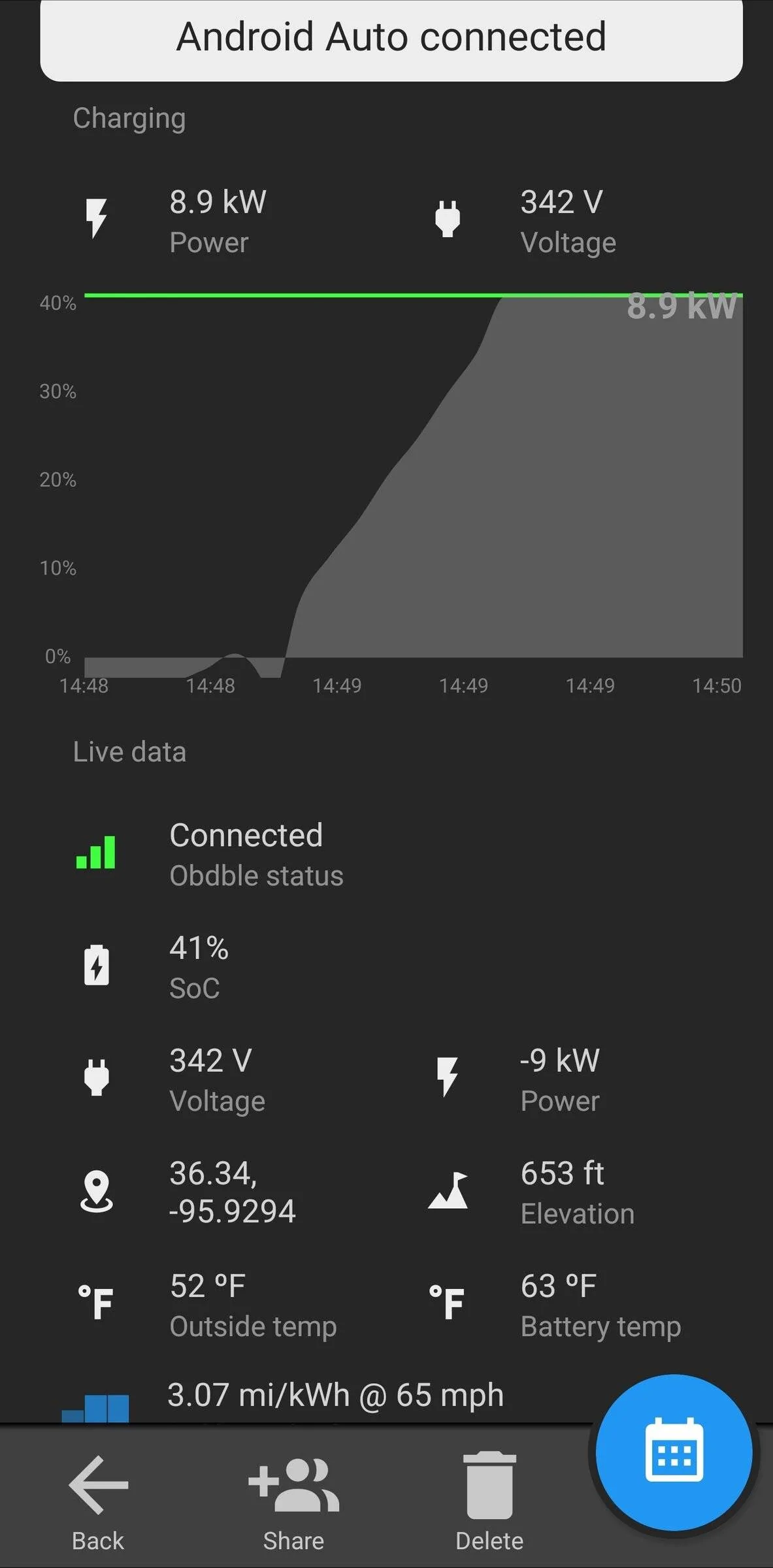
I just wanted to take a moment to share some news of a new ABRP feature that is being launched right now. ABRP now has the ability to use a Bluetooth Low Energy OBD2 dongle to read live data from your car directly to improve route planning. I have been working with the team to get this working with the Mach E on launch and they have pushed the production apps today!

App update is live for iOS devices.

The update is still not available for Android as Google has not approved it yet. I will update this post when it is available.

The app will collect the following data from the Mach E:

  • State Of Charge (Matching the displayed SoC)
  • Current
  • Voltage
  • External Temperature
  • Battery Pack Temperature
  • If the car is charging or not charging
  • State of Health of the HVB

Screenshot_20211220-145031_Plasma Ember.jpg


The ABRP app can – for supported vehicle models – connect via Bluetooth Low Energy (BLE) to a user-installed OBD BLE adapter in the car. This allows the ABRP app to communicate instantly with your car to read out SoC (battery %), and many other parameters which keeps the ABRP app up to date with your car as you drive. This works for both iOS and Android devices and is available for all ABRP users, not only Premium members.

Click Here for more BLE info and what adapters have been tested so far


This is pretty amazing, but the nerd in me sees this as a major security vulnerability particularly if someone is going to leave the OBD device plugged in all the time. Anyone connected to this device would have direct access to the vehicle computer, and it is devices like these which are essentially used by thieves to defeat vehicle security protocols during theft by resetting security tokens and reverting to known defaults after they break in. Essentially you would be potentially be making it that much easier for sophisticated thieves, as they no longer need to even get into the vehicle first, since you were kind enough to install the OBD adapter for them allowing them to do it from a distance, while taking their sweet ass time doing so as well.

I really like the idea of giving ABRP direct access to live vehicle data, but those doing so should be made well aware of the risks involved, particularly if leaving it plugged in all the time.
Sponsored


Top