RMoore

Well-Known Member
First Name
Rob
Joined
Jul 25, 2021
Threads
75
Messages
1,139
Reaction score
801
Location
New Jersey
Vehicles
Audi Q5, Toyota Sienna, 2022 Mach e
Country flag
Yes. Be aware though, that FordPass is sending a message to the vehicle to wake up and report its latest status. This in turn will cause the LVB to drain for a while until the vehicle goes back to sleep.
Interesting and a bit of a Heisenberg Uncertainly situation. But does that message lead to all that much 12V drain? I wouldn't have thought it would but I'm no expert.
Sponsored


macchiaz-o

Well-Known Member
First Name
Jonathan
Joined
Nov 25, 2019
Threads
171
Messages
8,580
Reaction score
15,988
Location
}not/A/gr8'Place.2.store-mEyePassword{
Vehicles
MY21 J1 Premium RWD SR
Country flag
Interesting and a bit of a Heisenberg Uncertainly situation. But does that message lead to all that much 12V drain? I wouldn't have thought it would but I'm no expert.
I've observed something like a 10% drop from loading FordPass. :(
 
OP
OP
Mach-Lee

Mach-Lee

Well-Known Member
First Name
Lee
Joined
Jul 16, 2021
Threads
262
Messages
11,379
Reaction score
25,063
Location
Wisconsin
Vehicles
2022 Mach-E Premium AWD
Occupation
Sci/Eng
Country flag
I've observed something like a 10% drop from loading FordPass. :(
It’s about 2% per refresh for me, but if the car has been sitting some hours since the last refresh you’re also seeing the standby drain added in as well. 10% drop would be indicative of the car waking up 3-5 times since the last refresh.
 

macchiaz-o

Well-Known Member
First Name
Jonathan
Joined
Nov 25, 2019
Threads
171
Messages
8,580
Reaction score
15,988
Location
}not/A/gr8'Place.2.store-mEyePassword{
Vehicles
MY21 J1 Premium RWD SR
Country flag
It’s about 2% per refresh for me, but if the car has been sitting some hours since the last refresh you’re also seeing the standby drain added in as well. 10% drop would be indicative of the car waking up 3-5 times since the last refresh.
That's fair. I wasn't sure what was happening during the proceeding hours since the last wake up.
 

shark

Well-Known Member
First Name
David
Joined
Jul 18, 2021
Threads
22
Messages
326
Reaction score
515
Location
Texas
Vehicles
Mach E GT
Country flag
BMS is reporting your battery capacity is low (only about 60% of new) which is why you're having difficulties. Fully charge the battery 6+ hours and reset the BMS (see instructions in post #1). If you continue to have issues with OTAs after that, you'll need a new 12V battery because yours is failing.
I hooked up my AGM battery charger every night for about 10-12 hours. Sometime during the 4th night 6.6 finally installed! I then did the BMS reset procedure. Hopefully my LVB is somewhat reconditioned now and in a better state than it was.


shadowsjc

Well-Known Member
Joined
Mar 24, 2021
Threads
21
Messages
406
Reaction score
550
Location
NJ
Vehicles
2021 Mach-E Premium AWD + Ext Range
Country flag
I tried to get 6.6 to install for almost a week with failures each time. Now I don't get the pop up prompt to install anymore, and when I go to settings the option to manually update is grayed out. Is there any way I can force it to attempt the update again?
 

TheSteelRider

Well-Known Member
Joined
Dec 31, 2019
Threads
57
Messages
1,296
Reaction score
2,309
Location
United States
Vehicles
'21 Premium RWD
Country flag
I tried to get 6.6 to install for almost a week with failures each time. Now I don't get the pop up prompt to install anymore, and when I go to settings the option to manually update is grayed out. Is there any way I can force it to attempt the update again?
Right now OTAs are on-hold due to some bricked cars during (probably the 6.8.0?) update:

on-hold:
https://www.macheforum.com/site/thr...via-ota-before-nye23.32307/page-5#post-732067

bricked otas:
https://www.macheforum.com/site/threads/ota-bricked-car.32561

so you will have to wait until the hold is released by Ford, whenever that will be.
 

shark

Well-Known Member
First Name
David
Joined
Jul 18, 2021
Threads
22
Messages
326
Reaction score
515
Location
Texas
Vehicles
Mach E GT
Country flag
I tried to get 6.6 to install for almost a week with failures each time. Now I don't get the pop up prompt to install anymore, and when I go to settings the option to manually update is grayed out. Is there any way I can force it to attempt the update again?
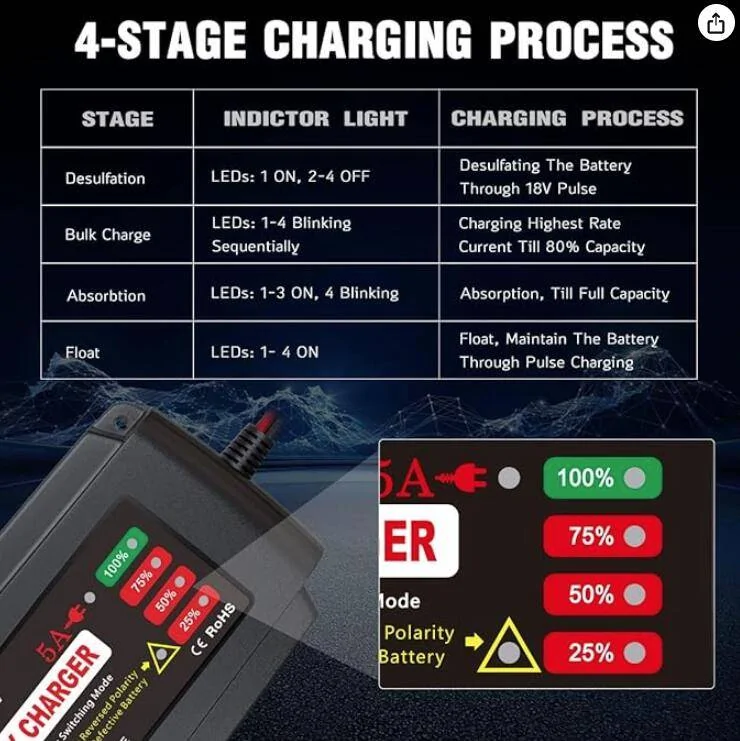
You may be in the same boat I was in, with a failing 12V battery. While waiting for Ford to release the OTA hold, perhaps you should recondition your battery for 48 hours. This is the charger I bought:
BMK 12V 5A Smart Battery Charger Portable Battery Maintainer

Ford Mustang Mach-E How To Get Failed OTAs To Install 1703431789186
 

chuckles

Well-Known Member
Joined
Apr 5, 2022
Threads
5
Messages
164
Reaction score
288
Location
California
Vehicles
2021 Job 1 RWD Mustang Mach E
Country flag
@MachLee how do you get the 12V storage capacity number? I wanted to see if my LVB needed replacing, but nothing on CarScanner seemed to describe LVB amp-hours.

Thanks again for all of your helpful posts. ??
 
OP
OP
Mach-Lee

Mach-Lee

Well-Known Member
First Name
Lee
Joined
Jul 16, 2021
Threads
262
Messages
11,379
Reaction score
25,063
Location
Wisconsin
Vehicles
2022 Mach-E Premium AWD
Occupation
Sci/Eng
Country flag
@MachLee how do you get the 12V storage capacity number? I wanted to see if my LVB needed replacing, but nothing on CarScanner seemed to describe LVB amp-hours.

Thanks again for all of your helpful posts. ??
That’s a special thing, you’d have to send me your VIN to check.
 

MoonRiver

Well-Known Member
Joined
Jan 27, 2022
Threads
41
Messages
521
Reaction score
231
Location
Tampa Bay, FL
Vehicles
22 Mach e select, 07 Infiniti G35
Country flag
Ford's OTA process can be frustrating at times, with some users experiencing multiple failures in a row without success. Following this guide should increase your chances of success.

There are many conditions that must be met before an OTA can install. Some are obvious, such as the car needing to be off and in park. But other conditions, such as the 12V battery status, may not be obvious to you.

You can check your 12V % status here at the Ford Account Dashboard (temporary website error is showing 12V SoC instead of HVB SoC).

View attachment 115756

There are many reasons why an OTA update fails, but a low 12V battery is the most common cause of failed OTA installs, by far. About 80% of the OTA install failures I've seen are caused by a low 12V battery. It can be extremely difficult to get the 12V battery to a high enough state of charge to install updates, especially if the car is driven or charged infrequently. Due to the charging system design and lead acid charging kinetics, it can take an extremely long time (hours) to get the 12V fully charged up. Most OTAs require the 12V battery to be above 75% SoC (state-of-charge), and sometimes up to 90%. The 12V SoC is not visible to the user, and can only be accessed with an OBD scan tool. In lieu of direct monitoring, you can follow these methods to ensure the 12V battery is fully charged before applying OTAs.

Disconnect any idle draw devices such as dashcams, OBD dongles, or radar detectors first. If these items are powered while the car is off, they may impact your ability to get OTAs installed.

Unplug everything from the USB ports when attempting an APIM/SYNC update.

Please follow these methods (including times) exactly for best success. These have worked for people I've helped in the past.

"30 Minute Drive" Method

This is the least successful method, but is the easiest and may be enough in some cases (if you don't drive much). If this method doesn't work, move on to one of the longer methods below.
  1. Drive your car for at least 30 minutes
  2. Leave car ON and park (do not shut off yet)
  3. Set the parking brake
  4. Turn OFF the headlights fully (rotate knob counterclockwise)
  5. Manually start the update on the screen with the "Update Now" button
  6. Turn OFF the vehicle, exit, and close all doors
  7. Wait for the update to complete (up to 30 mins)

"Long Charge" Method
  1. Drive the car until the high voltage battery is down to 50% or less.
  2. Level 2 charge the car up to 100% in one session
  3. As soon as possible after the car finishes charging...
  4. Unplug the car
  5. Turn ON the car and set the parking brake
  6. Turn OFF the headlights fully (rotate knob counterclockwise)
  7. Manually start the update on the screen with the "Update Now" button
  8. Turn OFF the vehicle, exit, and close all doors
  9. Wait for the update to complete (up to 30 mins)
Level 1 (120V) users, charging the battery +10% will be enough time (e.g. 70% to 80%), then start at step 3.

"Slow Charge" Method

Very similar to the above, but if you have a smart EVSE you can set it to a low amperage (8A) to prolong charging time.
  1. Drive the car until the high voltage battery is down to 50% or less.
  2. Set smart EVSE to lowest amperage (e.g. 8 amps)
  3. Let the car charge for at least 6 hours or overnight
  4. Unplug the car
  5. Turn ON the car and set the parking brake
  6. Turn OFF the headlights fully (rotate knob counterclockwise)
  7. Manually start the update on the screen with the "Update Now" button
  8. Turn OFF the vehicle, exit, and close all doors
  9. Wait for the update to complete (up to 30 mins)

"Stay On" Method
  1. Unplug the car
  2. Turn ON the car
  3. Disable "Vehicle Power Down Timer" in vehicle settings
  4. Set the parking brake
  5. Turn OFF the headlights fully (rotate knob counterclockwise)
  6. Exit, taking all key fobs with you, and lock the doors if necessary
  7. Leave the car ON in Park for 6+ hours
  8. Manually start the update on the screen with the "Update Now" button
  9. Turn OFF the vehicle, exit, and close all doors
  10. Wait for the update to complete (up to 30 mins)
Great write-up Mach-Lee. I have a question on "Stay On" Method.
Why to unplug the charger first? Doing so would that the charging source be the HVB? Why not plug in using the wall charger? 120v or 240v. I use 240 to charge HVB.
 
OP
OP
Mach-Lee

Mach-Lee

Well-Known Member
First Name
Lee
Joined
Jul 16, 2021
Threads
262
Messages
11,379
Reaction score
25,063
Location
Wisconsin
Vehicles
2022 Mach-E Premium AWD
Occupation
Sci/Eng
Country flag
Great write-up Mach-Lee. I have a question on "Stay On" Method.
Why to unplug the charger first? Doing so would that the charging source be the HVB? Why not plug in using the wall charger? 120v or 240v. I use 240 to charge HVB.
Having the J1772 plugged in can occasionally interfere with some of the updates installing. The car can idle for days off the main battery. You can charge it back up after the update successfully installs.
 

MoonRiver

Well-Known Member
Joined
Jan 27, 2022
Threads
41
Messages
521
Reaction score
231
Location
Tampa Bay, FL
Vehicles
22 Mach e select, 07 Infiniti G35
Country flag
Having the J1772 plugged in can occasionally interfere with some of the updates installing. The car can idle for days off the main battery. You can charge it back up after the update successfully installs.
If it’s not for OTA installation but just charging the LVB would that be charging the HVB simultaneously? I plugin every night even I don’t drive more than 30 miles in a typical day. But it takes hours to charge up the LVB. It took last night from 11 to 8 in the morning to bring 79% up to 94%. So if I had plugged in wouldn’t the HVB have charged up too?
 
OP
OP
Mach-Lee

Mach-Lee

Well-Known Member
First Name
Lee
Joined
Jul 16, 2021
Threads
262
Messages
11,379
Reaction score
25,063
Location
Wisconsin
Vehicles
2022 Mach-E Premium AWD
Occupation
Sci/Eng
Country flag
If it’s not for OTA installation but just charging the LVB would that be charging the HVB simultaneously? I plugin every night even I don’t drive more than 30 miles in a typical day. But it takes hours to charge up the LVB. It took last night from 11 to 8 in the morning to bring 79% up to 94%. So if I had plugged in wouldn’t the HVB have charged up too?
If you can get the car to charge for long periods, then yes that would keep the 12V battery charged up. 12V only charges while car is on, or when HVB is actively charging.
Sponsored


Top