dtbaker61

Well-Known Member
First Name
Dan
Joined
May 11, 2020
Threads
126
Messages
4,822
Reaction score
4,524
Location
santa fe,nm
Website
www.envirokarma.org
Vehicles
MME (delivered 2/26/21), DIY eMiata BEV
Occupation
Solar Sales/install
Country flag
I too started getting errors and dealer repaired under warranty for a TSB for coax cable.
when was the repair done ? (date)
have you had another error since ?
Sponsored

 

Wonder_MachE

Member
First Name
Dave
Joined
Jul 26, 2023
Threads
0
Messages
6
Reaction score
4
Location
Allen, TX
Vehicles
2023 MachE 4wd 91KW
Country flag
One week ago. So jury out. All good thus far and problem was gaining frequency beforehand. Probably need a few months to be conclusive.
 

bergmi

Member
First Name
Mike
Joined
May 1, 2024
Threads
1
Messages
20
Reaction score
25
Location
Eau Claire, WI
Vehicles
2021 Ford Mach E Premium Extended Range
Country flag
I’ve gotten this error at least 3 times the last week or so, it it’s also accompanied by precollision assist not available and something about lane positioning not working. Seems to clear up in a few seconds. Wondering if all that is due to camera issue or maybe software. I Did have the windshield replaced a few months ago(Oem) but just started seeing this error.
In my situation, I'll see those errors and it will disable for a time but if there's multiple instances (ie. bumpy road) it will disable permanently until the car is turned off/back on! I've had it in the dealer and they did make it better for a time, but now the problem is back... I'll have to take matters into my own hands!
 

Vgkfan

Well-Known Member
First Name
Keith
Joined
Jul 7, 2022
Threads
4
Messages
398
Reaction score
270
Location
Nevada
Vehicles
2022 mme premium ER AWD 2016 Kia, 2003 Honda
Country flag
I ended up taking mine to the dealer and they replaced the cable and did some software updates. It hasn’t happened since, I feel like when the window was replaced they may have crimped the cable, but no way to know for sure.
 

justalfe

Well-Known Member
First Name
alfredo
Joined
Feb 10, 2025
Threads
10
Messages
51
Reaction score
29
Location
las vegas
Vehicles
21 Mach E select
Occupation
Tech
I noticed when the area around the camera /windshield is dirty the errors occur more often


OP
OP
GT-Papa

GT-Papa

Well-Known Member
First Name
Tim
Joined
Nov 15, 2023
Threads
4
Messages
169
Reaction score
230
Location
Denver CO
Vehicles
2021 Mach-e GTPE
Occupation
Retired Quality Engineer
Country flag
Followup 6w later - no more problems. I’ve had zero errors since the cable replacement.

I'm assuming your cable replacement was done under warrant since your car is less than 3 years old? Any idea how much this might have cost if not under warranty, and how much of the cable was replaced?
 

Wonder_MachE

Member
First Name
Dave
Joined
Jul 26, 2023
Threads
0
Messages
6
Reaction score
4
Location
Allen, TX
Vehicles
2023 MachE 4wd 91KW
Country flag
Warranty work indeed. No clue on the cost. The service advisor was able to pull up my error messages and diagnose it as such. I imagine you could go to the dealer and ask them to pull codes and give you an estimate. i can’t think it was more than a few hours plus the cable costs.
 
OP
OP
GT-Papa

GT-Papa

Well-Known Member
First Name
Tim
Joined
Nov 15, 2023
Threads
4
Messages
169
Reaction score
230
Location
Denver CO
Vehicles
2021 Mach-e GTPE
Occupation
Retired Quality Engineer
Country flag
When I first started this thread back in March, I felt certain that I had nailed the problem by firmly mounting my loose front camera. And for 4 full weeks I had zero camera faults. And then I got one while driving into the sun, so I figured it was a 1-off. However once again I am back to an almost daily camera fault. Last week I got the fault when I was just sitting in the garage. So it must be something other than a loose camera. I'm now back to thinking that it really is the cable. And since, when I messed with the cable near the camera in March and the problem went away for a month, I can convince myself that only the part of the cable that goes from the camera to the A-pillar is flakey. This seems like something I could do myself. Anybody know how to disconnect the coax cable from the camera?
 

greenaero

Well-Known Member
First Name
Vic
Joined
Jan 27, 2021
Threads
5
Messages
108
Reaction score
109
Location
Mansfield Texas
Vehicles
Ford MME gray , Mazda Cx5, Honda CBR250R
Occupation
Retired Firefighter
Country flag
When I first started this thread back in March, I felt certain that I had nailed the problem by firmly mounting my loose front camera. And for 4 full weeks I had zero camera faults. And then I got one while driving into the sun, so I figured it was a 1-off. However once again I am back to an almost daily camera fault. Last week I got the fault when I was just sitting in the garage. So it must be something other than a loose camera. I'm now back to thinking that it really is the cable. And since, when I messed with the cable near the camera in March and the problem went away for a month, I can convince myself that only the part of the cable that goes from the camera to the A-pillar is flakey. This seems like something I could do myself. Anybody know how to disconnect the coax cable from the camera?
Thx for the update . I have the same problem and have decided to fix it myself since I am out of warranty and don't feel like paying ~$3k to fix it. I have pulled the cover and checked for camera excessive play but it is fine. I've tried moving the coaxial cable near the connection but also no difference. I probably will have to replace the cable but I can't figure out how to disconnect it from the camera. I'm sure it is simple and I don't want to destroy it or damage the camera. I've searched the forum and internet but haven't found any specific detail on how to disconnect it.
If anyone can share how to properly disconnect the coaxial cable from the front camera I (and many others) would greatly appreciate it.
many thx
 

sukhoi_584th

Well-Known Member
Joined
Sep 29, 2021
Threads
15
Messages
318
Reaction score
302
Location
United States
Vehicles
2022 MME CR1 AWD
Country flag
You could try searching Digikey / Mouser / Newark for coax connectors to see if you can find something similar, and then see how it connects. Unlikely Ford made something custom for no reason.
 
OP
OP
GT-Papa

GT-Papa

Well-Known Member
First Name
Tim
Joined
Nov 15, 2023
Threads
4
Messages
169
Reaction score
230
Location
Denver CO
Vehicles
2021 Mach-e GTPE
Occupation
Retired Quality Engineer
Country flag
@sukhoi_584th
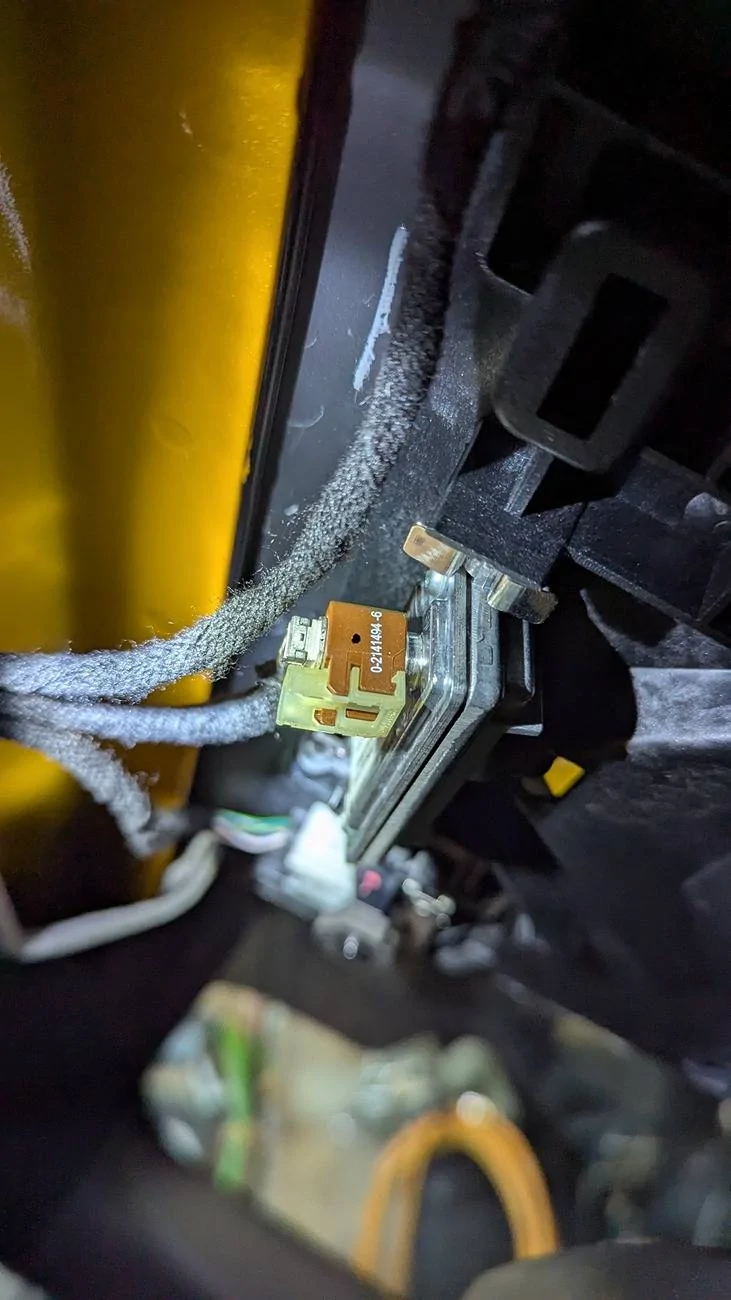
Thanks for the nudge in the right direction. The pn on the connector body is 0-2141494-6. Turns out it's a Tyco connector. Dwgs attached. Still looking for a definitive illustration on how to disconnect without breaking it. Will update...

Ford Mustang Mach-E Front Camera Fault Errors - Issue fixed! DIY How-to PXL_20250601_001005859
 

Attachments

OP
OP
GT-Papa

GT-Papa

Well-Known Member
First Name
Tim
Joined
Nov 15, 2023
Threads
4
Messages
169
Reaction score
230
Location
Denver CO
Vehicles
2021 Mach-e GTPE
Occupation
Retired Quality Engineer
Country flag
AI says:

The number "0-2141494-6" likely refers to a specific type of FAKRA RF connector, a standardized connector used in the automotive industry for radio frequency and data connections.
How to disconnect a FAKRA RF Connector:
Identify the Locking Mechanism: FAKRA connectors usually have a locking tab or clip that needs to be disengaged before you can separate the two halves.
Access the Tab: You may need to use a small flat-head screwdriver or a similar tool to reach and press the locking tab.
Disengage the Lock: Gently press or pry the locking tab to release the connector.
Separate the Connector: Once the locking mechanism is disengaged, you should be able to pull the two halves of the connector apart.
 
OP
OP
GT-Papa

GT-Papa

Well-Known Member
First Name
Tim
Joined
Nov 15, 2023
Threads
4
Messages
169
Reaction score
230
Location
Denver CO
Vehicles
2021 Mach-e GTPE
Occupation
Retired Quality Engineer
Country flag
I finally got back to this today.
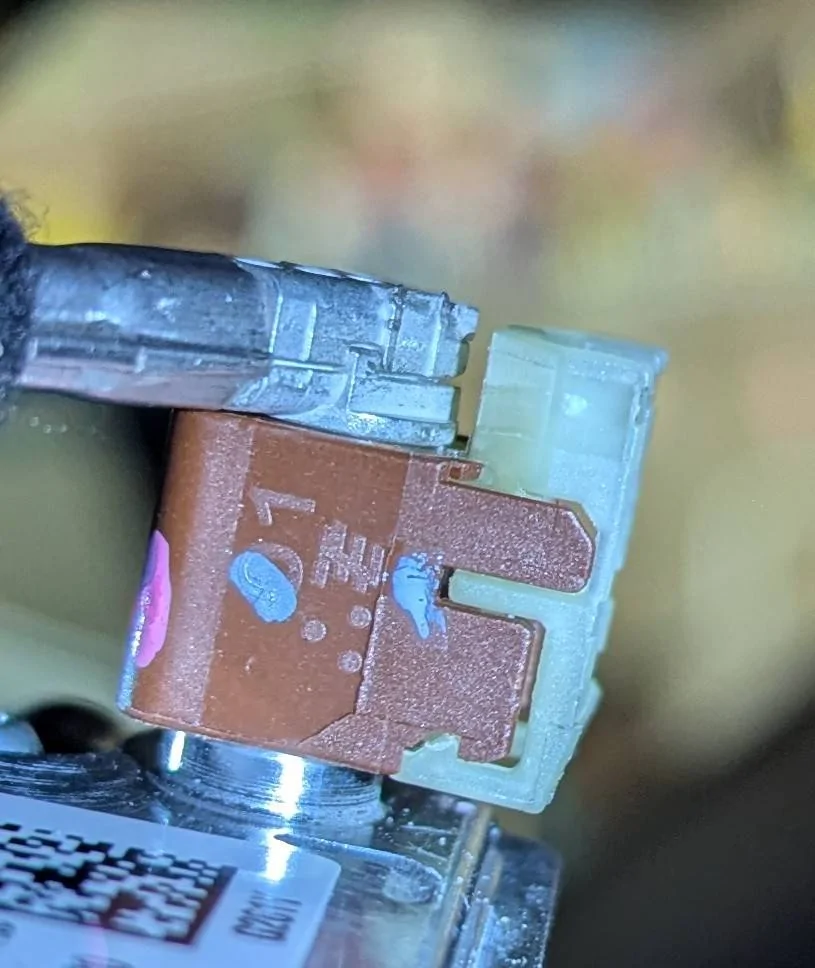
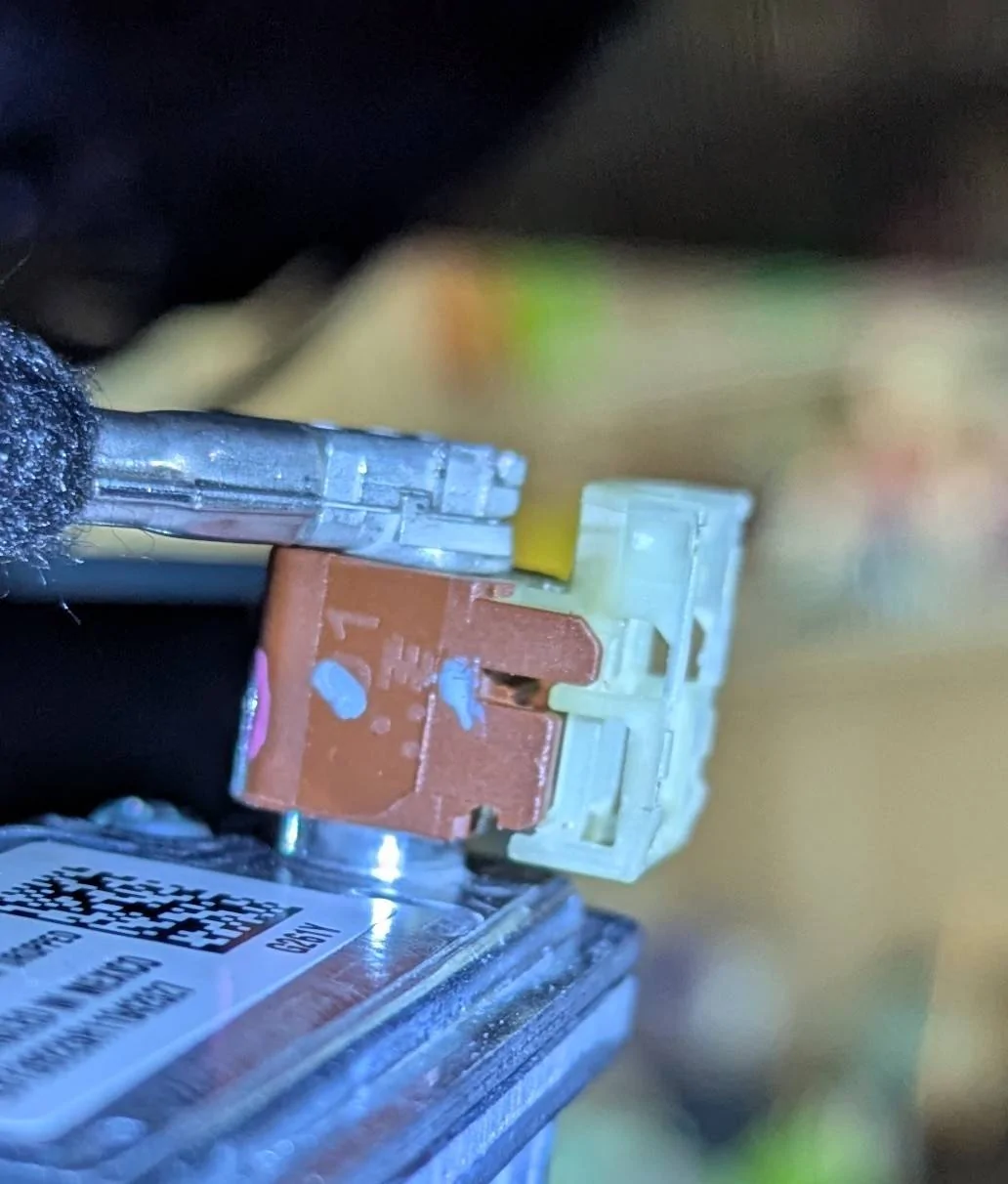
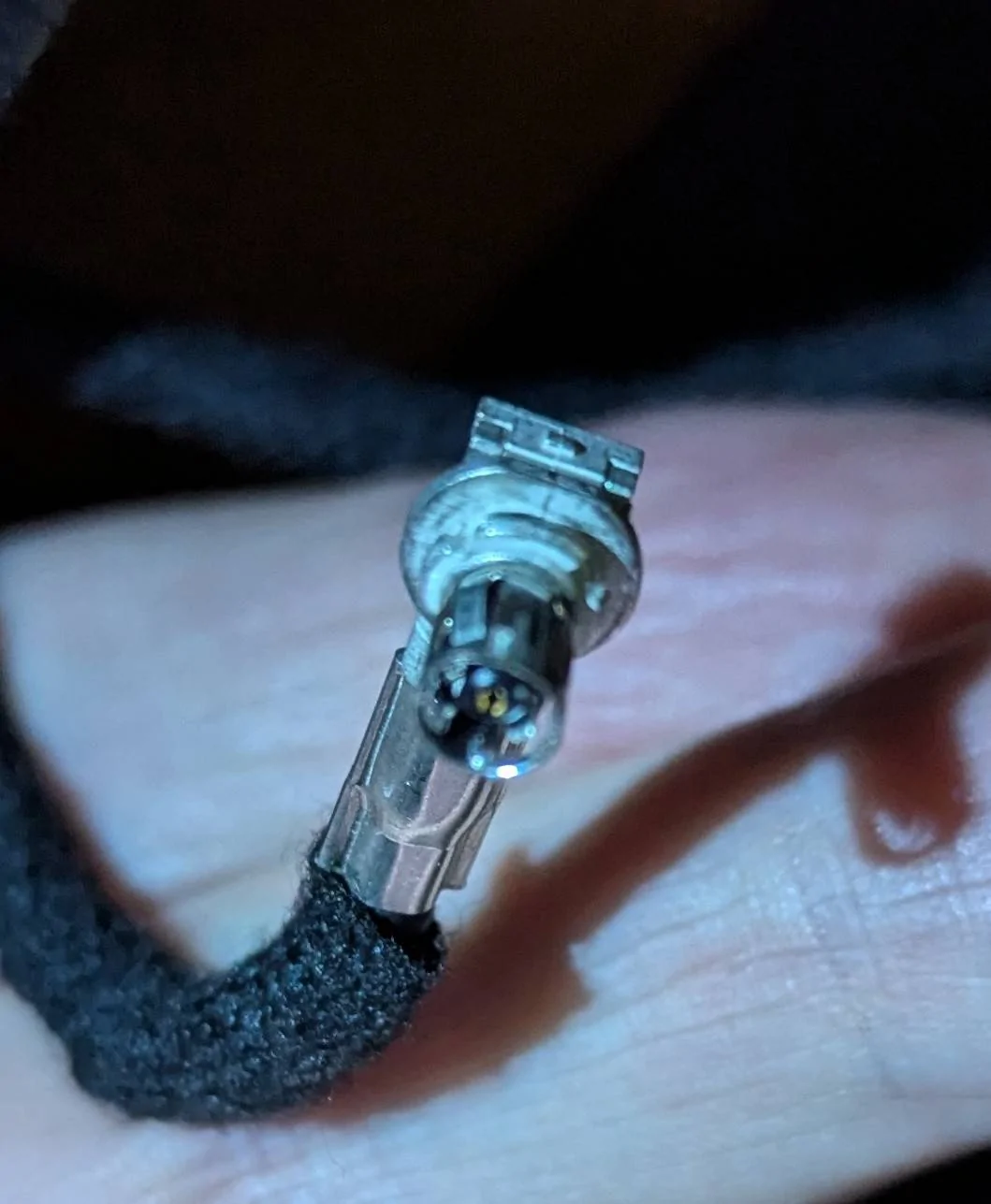
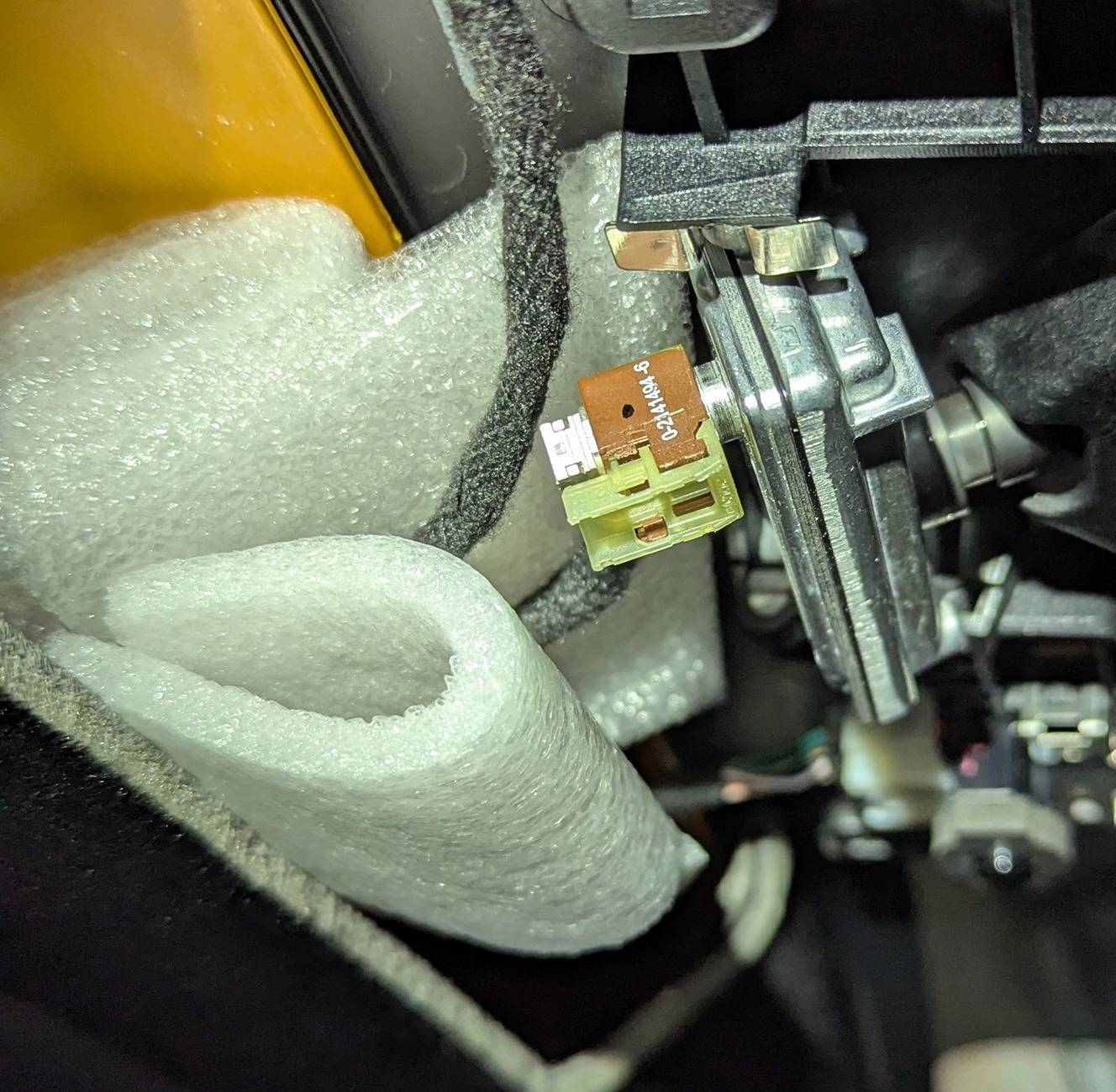
I did figure out how to disconnect the coax cable from the camera. Basically the yellow piece of plastic is what needs to be removed to allow the brown piece which contains the coax connector to unplug. The connector drawings attached previously show a tab to depress to unlock the yellow piece from the brown piece. In my case, either by design or whether it was purposely broken off at the factory, the tab to depress was MIA. So I had to use a very small screwdriver to unlock the yellow piece. There are 2 "barbs", one on either side of the bottom of the yellow piece that must be deflected enough to allow the piece to slide out to the right. Once the yellow piece is removed, the brown piece and the coax connecter can be pulled off the camera. See attached photos.

I will digress slightly at this point. I have no intention of replacing the camera or the cable at this time. Before I get to replacing things, I simply wanted see if I could separate the coax from the camera, and to try a couple of other things that have been suggested on other "front camera fault" threads (there are many of these) to fix this issue.

Every time I have popped off the interior cover and messed with the coax cable. it seems to work fine again for a while, but eventually goes right back to failing. So I figured; what if the coax cable was wiggling around in the camera connector? Since my 21' GTPE is sprung like a log wagon, everything in the car vibrates when going over railroad tracks/potholes. So I decided to tighten up this connection. How? The coax termination is quite small and just presses in (not a screw-in connection) and did feel loose. Not much to do to tighten up the center conductor, but the shield connection is made by 4 little leaf springs around the outside of the connector (female). So I pushed in on these 4 little leaf springs until I sprung them slightly to create a tighter fit. Now the coax connector feels much more solid when it it reattaches to the camera and shouldn't vibrate wildly.

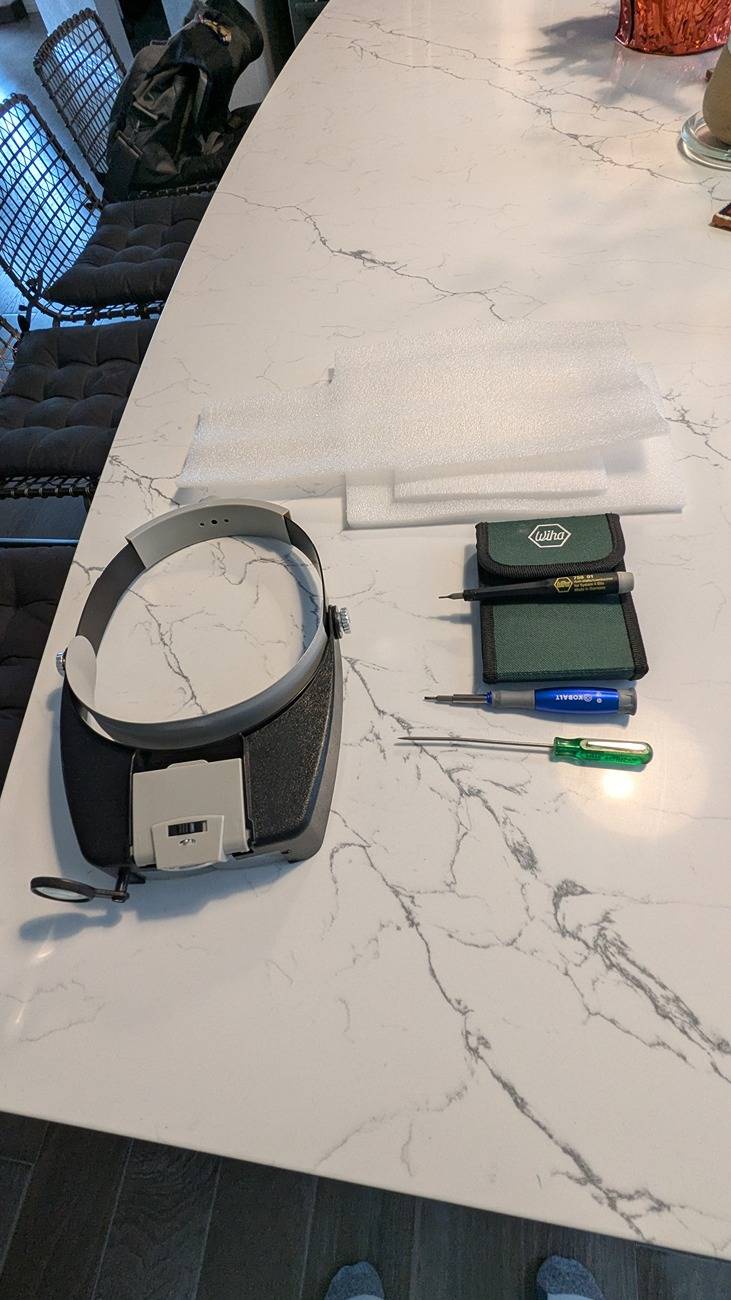
The second thing was something suggested on another thread, and that is a "foam sandwich" around the cable, between the camera body and the point where the cable disappears above the headliner. I put two or three layers of foam above the cable, between the cable and the roof of the car, and two more layers between the bottom of the cable and the trim cover.
Allegedly this will hold everything firmly in place, also preventing movement/vibration.

Interesting factoid: There is no separate connection to the camera providing power to the camera. The only connection to the camera is the coax cable. Which means that the power to the camera comes through the coax and the video signal from the camera travels on the same conductor. Any vibration that causes connection integrity issues here affects both the signal and the power! This connection must me rock solid. So I figure why not make this as robust as possible. Tighten the coax connector, and keep it from vibrating. Belt and suspenders. See more attached photos of all the things and the tools I used. I made the "sandwich" (simple white packaging foam) hang down a bit and then when the interior trim piece is reinstalled, the "sandwich" is compressed slightly, holding everything solid.

After putting everything back together, I took the car out for a drive on my least favorite piece of rough and bumpy interstate and across some nasty RR tracks. So far no faults and BlueCruise was solid.

I'm not going to call this fixed until I can get past 1 or 2 or 6 months without a camera fault. If this doesn't do it, next step is cable replacement. Will advise again in 1 week.

Cheers, Tim

Ford Mustang Mach-E Front Camera Fault Errors - Issue fixed! DIY How-to 1000012326


Ford Mustang Mach-E Front Camera Fault Errors - Issue fixed! DIY How-to 1000012325


Ford Mustang Mach-E Front Camera Fault Errors - Issue fixed! DIY How-to 1000012324


Ford Mustang Mach-E Front Camera Fault Errors - Issue fixed! DIY How-to 1000012328


Ford Mustang Mach-E Front Camera Fault Errors - Issue fixed! DIY How-to 1000012329


Ford Mustang Mach-E Front Camera Fault Errors - Issue fixed! DIY How-to 1000012327


Ford Mustang Mach-E Front Camera Fault Errors - Issue fixed! DIY How-to 1000012321
 

Mach-Lee

Well-Known Member
First Name
Lee
Joined
Jul 16, 2021
Threads
262
Messages
11,344
Reaction score
24,965
Location
Wisconsin
Vehicles
2022 Mach-E Premium AWD
Occupation
Sci/Eng
Country flag
I finally got back to this today.
I did figure out how to disconnect the coax cable from the camera. Basically the yellow piece of plastic is what needs to be removed to allow the brown piece which contains the coax connector to unplug. The connector drawings attached previously show a tab to depress to unlock the yellow piece from the brown piece. In my case, either by design or whether it was purposely broken off at the factory, the tab to depress was MIA. So I had to use a very small screwdriver to unlock the yellow piece. There are 2 "barbs", one on either side of the bottom of the yellow piece that must be deflected enough to allow the piece to slide out to the right. Once the yellow piece is removed, the brown piece and the coax connecter can be pulled off the camera. See attached photos.

I will digress slightly at this point. I have no intention of replacing the camera or the cable at this time. Before I get to replacing things, I simply wanted see if I could separate the coax from the camera, and to try a couple of other things that have been suggested on other "front camera fault" threads (there are many of these) to fix this issue.

Every time I have popped off the interior cover and messed with the coax cable. it seems to work fine again for a while, but eventually goes right back to failing. So I figured; what if the coax cable was wiggling around in the camera connector? Since my 21' GTPE is sprung like a log wagon, everything in the car vibrates when going over railroad tracks/potholes. So I decided to tighten up this connection. How? The coax termination is quite small and just presses in (not a screw-in connection) and did feel loose. Not much to do to tighten up the center conductor, but the shield connection is made by 4 little leaf springs around the outside of the connector (female). So I pushed in on these 4 little leaf springs until I sprung them slightly to create a tighter fit. Now the coax connector feels much more solid when it it reattaches to the camera and shouldn't vibrate wildly.

The second thing was something suggested on another thread, and that is a "foam sandwich" around the cable, between the camera body and the point where the cable disappears above the headliner. I put two or three layers of foam above the cable, between the cable and the roof of the car, and two more layers between the bottom of the cable and the trim cover.
Allegedly this will hold everything firmly in place, also preventing movement/vibration.

Interesting factoid: There is no separate connection to the camera providing power to the camera. The only connection to the camera is the coax cable. Which means that the power to the camera comes through the coax and the video signal from the camera travels on the same conductor. Any vibration that causes connection integrity issues here affects both the signal and the power! This connection must me rock solid. So I figure why not make this as robust as possible. Tighten the coax connector, and keep it from vibrating. Belt and suspenders. See more attached photos of all the things and the tools I used. I made the "sandwich" (simple white packaging foam) hang down a bit and then when the interior trim piece is reinstalled, the "sandwich" is compressed slightly, holding everything solid.

After putting everything back together, I took the car out for a drive on my least favorite piece of rough and bumpy interstate and across some nasty RR tracks. So far no faults and BlueCruise was solid.

I'm not going to call this fixed until I can get past 1 or 2 or 6 months without a camera fault. If this doesn't do it, next step is cable replacement. Will advise again in 1 week.

Cheers, Tim

1000012326.webp


1000012325.webp


1000012324.webp


1000012328.jpg


1000012329.jpg


1000012327.jpg


1000012321.jpg
I can't tell, but if that cable is bent backwards in a hairpin loop, that's your issue. The minimum bend radius should be about 1.5 inches or more. That means a 180º turn needs to be a 3" circle.

Again, I believe a lot of these cables were damaged and misrouted during the glass recalls, the techs just bent and shoved them around without knowledge of the minimum bend radius. You can try to reduce the bends but the cable may be irreparably damaged and need replacement.
Sponsored


Top