Always charging to 100%

RedStallion

Banned
Banned
Joined
Mar 9, 2021
Threads
50
Messages
1,393
Reaction score
1,770
Location
People's Republic of California
Vehicles
Mach-E, et al
Country flag
@Ford Motor Company it's time you give a option for a global charge limit for the car. I think this makes life a lot simpler
They should go a step further and allow setting any charging session to any target and any schedule after connecting the car. That's kind of an obvious thing to do. I'm surprised Ford software is designed so unprofessionally.
When I travel I may be charging at various locations over night, it's ridiculous requiring to save them with a schedule and a target.
Sponsored


 

Tampamike

Well-Known Member
First Name
Mike
Joined
Feb 19, 2021
Threads
24
Messages
2,071
Reaction score
2,806
Location
Tampa, FL
Vehicles
ā€˜24 Mach E Premium RWD
Country flag
Well as I went back and checked the app it has switched on its own again to 100%!! It charged no problem and now it’s back doing it again lol dang it! And it’s been on the charger for 3 hours and kept saying charging at home, 85% now it says charge to 100. What the heck I give up lol
Is it actually charging past your desired percentage or does it just look like it is going to when you look at the charging details in FordPass? Let it finish charging and see where it stops. Seems to me when I look at ā€œcharging detailsā€ on FordPass while it is charging, the display seems to indicate something other than what it is doing. However, it always charges to my set 90%.
 
OP
OP
Elena

Elena

Member
First Name
Elena
Joined
Feb 10, 2023
Threads
1
Messages
24
Reaction score
8
Location
Florida
Vehicles
Mustang Mach e
Country flag
Is it actually charging past your desired percentage or does it just look like it is going to when you look at the charging details in FordPass? Let it finish charging and see where it stops. Seems to me when I look at ā€œcharging detailsā€ on FordPass while it is charging, the display seems to indicate something other than what it is doing. However, it always charges to my set 90%.
Yes, it keeps charging past my settings. It worked for a day with one of these suggestions I followed and then last night it stopped. I checked settings before I went to bed and it said charging at home 85%, couple hours later I looked and it changed it to charging at 100%, then at the bottom is said resume schedule so I clicked that and it went back to 85% (my settings) woke up this morning somehow it got over rode and it charged to 100
 

Howard

Well-Known Member
First Name
Howard
Joined
Jun 1, 2022
Threads
0
Messages
220
Reaction score
189
Location
West TN
Vehicles
'23 Premium RWD ER CG Mach E & '25 Blazer RS EV
Country flag
Elena, sorry that my suggestion didn't work. Hopefully, software folks will get it figured out for everyone at some point.
 

83girl

Well-Known Member
First Name
Stephanie
Joined
Jan 28, 2022
Threads
3
Messages
65
Reaction score
41
Location
USA
Vehicles
MachE Premium
Occupation
Scientist
Country flag
That’s a great idea. I do have home set up in the navigation the issue is that the GPS when charging thinks I’m at my neighbors house. So when I set up ā€œhomeā€ it’s at a different address then what my home really is. Unless I put ā€œhomeā€ as my neighbors address and see if that changes it.
I had the same problem with my 2021 for about a year and a half. My address would not show in the ford app, and it always assumed I was at my neighbors house. Glitch that somehow fixed in an update last December I think it was.


DaMeatMan

Well-Known Member
First Name
Joe
Joined
Feb 26, 2021
Threads
46
Messages
497
Reaction score
1,191
Location
Toronto, ON, Canada
Vehicles
Mustang Mach-E Premium AWD Extended Range Battery
Country flag
Hi!
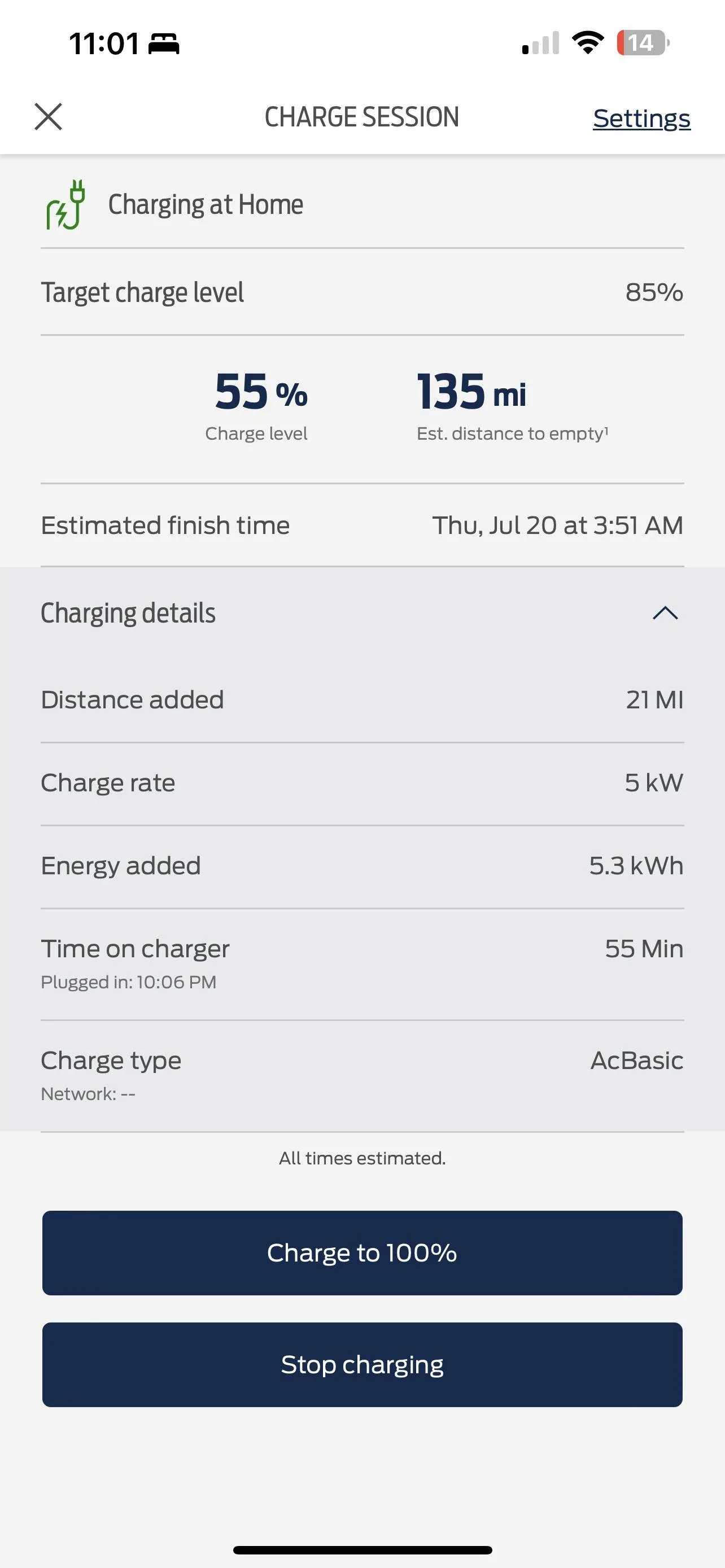
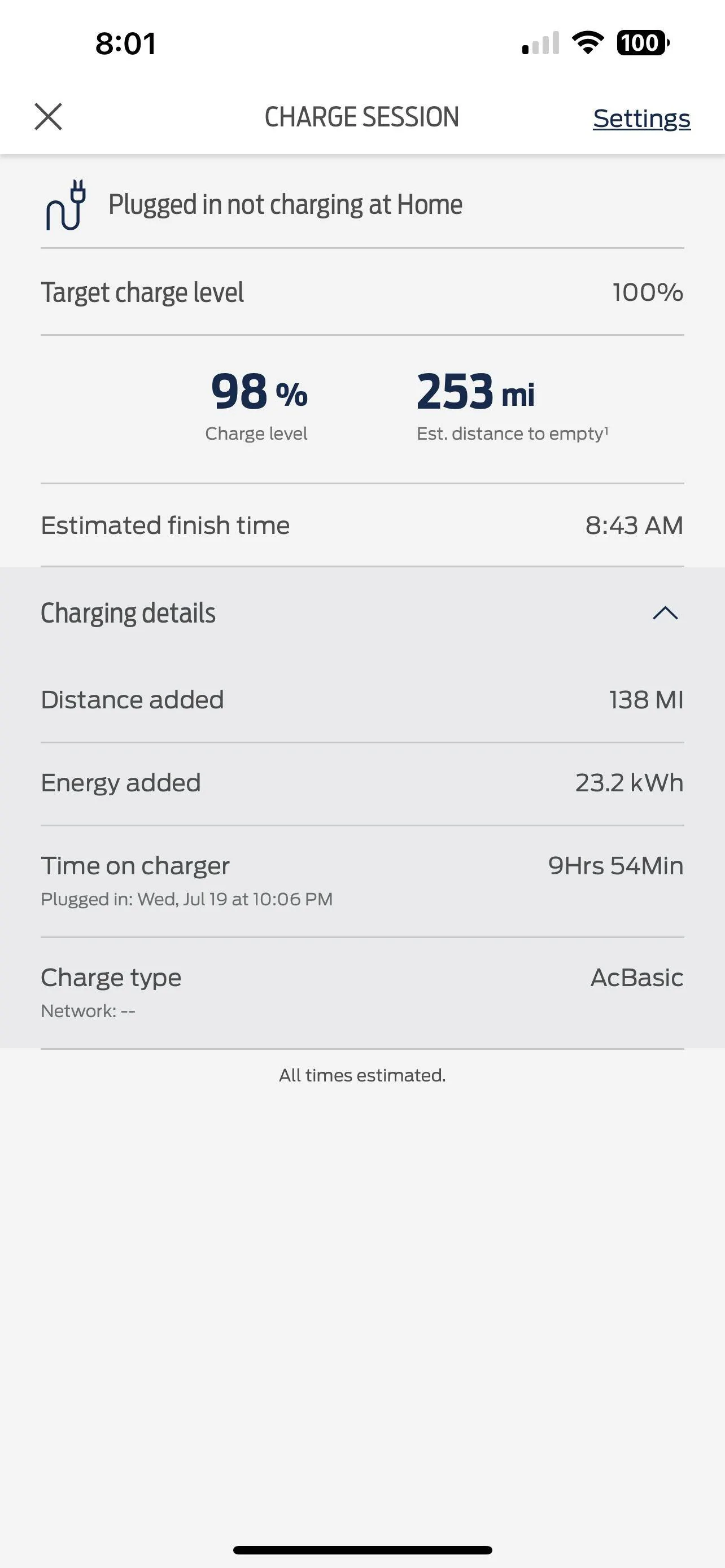
I am needing some advice. I feel like I’ve read and done everything has been suggested and my car is still charging to 100%. First off the gps in the car thinking I’m charging my neighbors house. Previously it has never been my correct address which was fine because it always recognized me at ā€œhomeā€ and did my charging preferences. I have deleted, reset, reentered you name it. It starts by saying I am charging at home (will attach photo below) but then I wake up and it says I’m not charging at home and charges to 100. (Attach second photo) I’m at a loss at what to do.

IMG_1502.png


IMG_1503.png
This is just one of those things where Ford decided to re-invent the wheel with wonky logic, instead of doing what every other EV manufacturer does by allowing you to specify a GLOBAL setting that limits charge rate ANYWHERE you charge.

They still could have implemented location based charging logic that overrides the default global setting (it the customer chosesbto add a location entry).

But clearly some genius at Ford decided it would be a great idea to FORCE the customer to muck around with location settings FOR EVERY LOCATION THEY CHARGE AT, just to prevent the battery from charging to 100%.

Obviously my sarcasm here is an indication that this is a long-standing issue that Ford chooses to IGNORE, despite it being so incredibly simple to fix. So for now your going to do all sorts of wonky things like setting your "home" address as your neighbors address, or the house 2 blocks away.. essentially set it to wherever the GPS thinks you are and that should fix it (for your home location anyway).
 

Maquis

Well-Known Member
First Name
Dave
Joined
Dec 21, 2020
Threads
34
Messages
5,689
Reaction score
8,069
Location
Illinois
Vehicles
2021 Mach E4X, 2023 Lightning Lariat ER
Country flag
Yes, it keeps charging past my settings. It worked for a day with one of these suggestions I followed and then last night it stopped. I checked settings before I went to bed and it said charging at home 85%, couple hours later I looked and it changed it to charging at 100%, then at the bottom is said resume schedule so I clicked that and it went back to 85% (my settings) woke up this morning somehow it got over rode and it charged to 100
That sounds like somehow the car is getting a ā€œCharge to 100%ā€ signal from FordPass just as if you tapped that button.

Since know you didn’t do that, there are three possibilities that I can think of:

1. Your car is connected to FordPass on someone elseā€˜s phone and theyā€˜re messing with you. (Not likely)
2. FordPass on your phone is whacked and sending the signal. You could rule this out by deleting FordPass from your phone and doing a charge session while uninstalled.
3. There is a problem in the SOBDMC module on the car. See post 20. I think this is the most likely scenario.
 

Shayne

Well-Known Member
Joined
Aug 9, 2020
Threads
18
Messages
3,824
Reaction score
2,738
Location
Northern Ontario Canada
Vehicles
2021 MME4x Prem
Occupation
Retired
Country flag
Yes, it keeps charging past my settings. It worked for a day with one of these suggestions I followed and then last night it stopped. I checked settings before I went to bed and it said charging at home 85%, couple hours later I looked and it changed it to charging at 100%, then at the bottom is said resume schedule so I clicked that and it went back to 85% (my settings) woke up this morning somehow it got over rode and it charged to 100
SOBDMC module resetting itself is my guess. Keeps giving you hope but then resets and goes to 100%. Sometimes holds for scheduled time sometimes it does not sometimes it stops at set % but will always reset and charge to 100%. The end result is it does not work. Your best to see if it can be reproduced at the dealer. No one is going to fix it here if you are sure the settings are right. The idea of disconnecting the 12V for 10 minutes is BS let your dealer deal with it. Schedules, charging and departure, are hard for Ford on mine.

As noted my FP and Sync have 2 different addresses neither are at my home where it is. Was not the problem and both are still wrong. Forget what the address says take whatever it gives you when adding the locations. It uses the coordinates and use to display them when adding. I have not added a charging location lately but if you plug the coordinates displayed when adding the location into google map it will most likely be really close to where the car is. Just set it and forget it until that does not work ;)
 
OP
OP
Elena

Elena

Member
First Name
Elena
Joined
Feb 10, 2023
Threads
1
Messages
24
Reaction score
8
Location
Florida
Vehicles
Mustang Mach e
Country flag
SOBDMC module resetting itself is my guess. Keeps giving you hope but then resets and goes to 100%. Sometimes holds for scheduled time sometimes it does not sometimes it stops at set % but will always reset and charge to 100%. The end result is it does not work. Your best to see if it can be reproduced at the dealer. No one is going to fix it here if you are sure the settings are right. The idea of disconnecting the 12V for 10 minutes is BS let your dealer deal with it. Schedules, charging and departure, are hard for Ford on mine.

As noted my FP and Sync have 2 different addresses neither are at my home where it is. Was not the problem and both are still wrong. Forget what the address says take whatever it gives you when adding the locations. It uses the coordinates and use to display them when adding. I have not added a charging location lately but if you plug the coordinates displayed when adding the location into google map it will most likely be really close to where the car is. Just set it and forget it until that does not work ;)
Thank you ? I called and got an appointment with someone but they don’t have anything for another month ??ā€ā™€ I think it maybe something with the app not communicating with my vehicle because every now and again it will say it’s partially responded. I reset my keys and the app won’t connect to my so I can’t even get the pakk key right now. It’s so weird cuz I’ve had it since the beginning of the year with literally no issues but I am known to have technology always break on me so it explains why it’s doing it ?? I appreciate all the suggestions and help!

 

Shayne

Well-Known Member
Joined
Aug 9, 2020
Threads
18
Messages
3,824
Reaction score
2,738
Location
Northern Ontario Canada
Vehicles
2021 MME4x Prem
Occupation
Retired
Country flag
Thank you ? I called and got an appointment with someone but they don’t have anything for another month ??ā€ā™€ I think it maybe something with the app not communicating with my vehicle because every now and again it will say it’s partially responded. I reset my keys and the app won’t connect to my so I can’t even get the pakk key right now. It’s so weird cuz I’ve had it since the beginning of the year with literally no issues but I am known to have technology always break on me so it explains why it’s doing it ?? I appreciate all the suggestions and help!
That is normally the case start playing with things until you have a number of other problems. As long as you know you can not fix broken hardware playing with software you should be good. Make and hold the appointment in case you need it still a month from now.
 

Tampamike

Well-Known Member
First Name
Mike
Joined
Feb 19, 2021
Threads
24
Messages
2,071
Reaction score
2,806
Location
Tampa, FL
Vehicles
ā€˜24 Mach E Premium RWD
Country flag
Yes, it keeps charging past my settings. It worked for a day with one of these suggestions I followed and then last night it stopped. I checked settings before I went to bed and it said charging at home 85%, couple hours later I looked and it changed it to charging at 100%, then at the bottom is said resume schedule so I clicked that and it went back to 85% (my settings) woke up this morning somehow it got over rode and it charged to 100
Right. That’s what I was saying. Just plug it in with your current settings. Go to sleep and forget about until the morning. Don’t look at or change anything. See what happens. When I look at my settings, it doesn’t always look right but it always does what I set it to.
 

laika

Member
First Name
Sean
Joined
Nov 30, 2022
Threads
6
Messages
20
Reaction score
1
Location
Brighton, UK
Vehicles
Mustang Mach E ER RWD
Occupation
MD
Country flag
I have had similar problems for almost a year now.
there was an update about 10 months ago and from that point I never got the schedule charge to work.
I went through every suggestion listed in this thread. Sometimes it would not charge at all and it was a lottery if I woke up with a charged car.
it went back to the dealer 4 times and they just said it was fine. I sent them close on 100 screen shots and videos of me setting the schedule on the app and in the car and then the results next day. All they would say is it works fine for them and it must be my charger. Well the charger just delivers when it’s asked and it worked fine for 5 months.
I now have a Zappi and I schedule my charge through that. Downside is that I can never charge to a set level unless I do the maths. Upside is that it doesn’t randomly charge on more expensive electric.
I was most disappointed with Fords customer service as they just had no sympathy and just told me to keep taking it back to the dealer.
Good luck in resolving as I never managed to.
 
OP
OP
Elena

Elena

Member
First Name
Elena
Joined
Feb 10, 2023
Threads
1
Messages
24
Reaction score
8
Location
Florida
Vehicles
Mustang Mach e
Country flag
I have had similar problems for almost a year now.
there was an update about 10 months ago and from that point I never got the schedule charge to work.
I went through every suggestion listed in this thread. Sometimes it would not charge at all and it was a lottery if I woke up with a charged car.
it went back to the dealer 4 times and they just said it was fine. I sent them close on 100 screen shots and videos of me setting the schedule on the app and in the car and then the results next day. All they would say is it works fine for them and it must be my charger. Well the charger just delivers when it’s asked and it worked fine for 5 months.
I now have a Zappi and I schedule my charge through that. Downside is that I can never charge to a set level unless I do the maths. Upside is that it doesn’t randomly charge on more expensive electric.
I was most disappointed with Fords customer service as they just had no sympathy and just told me to keep taking it back to the dealer.
Good luck in resolving as I never managed to.
Thank you! I’m so sorry. Yeah it seems something somewhere isn’t communicating with my car. I can’t even add the PAKK key anymore, just says it can’t communicate which leads me to believe there is some sort of error in software. It charged the other day to 85% then at some point charged up to 100 again. I’m hoping I can get this resolved. If I do I’ll post it ?
 

RickMachE

Well-Known Member
Joined
Jul 1, 2021
Threads
267
Messages
17,919
Reaction score
27,907
Location
SE MI
Vehicles
2022 Mach-E Premium 4X, 2022 Lightning Lariat ER
Country flag
I'd suggest you go back and read what I wrote in post #15. The issue here is with FordPass, not the car, IMO.
 
OP
OP
Elena

Elena

Member
First Name
Elena
Joined
Feb 10, 2023
Threads
1
Messages
24
Reaction score
8
Location
Florida
Vehicles
Mustang Mach e
Country flag
I'd suggest you go back and read what I wrote in post #15. The issue here is with FordPass, not the car, IMO.
You are assuming I did not do that already. I don’t disagree with you it’s probably the app, but I’ve done all that and it’s not responding.
Sponsored


Top